


How to maintain a single source of truth for your dependencies across multiple Android projects.
As a project grows, or as a company expands its portfolio of Android apps and libraries, dependency management quickly becomes difficult. We’ve all been there: copying and pasting libs.versions.toml files, manually syncing library versions between the “App A” and “App B” repositories, and dealing with that one feature module that somehow still uses a 2-year-old version of Retrofit.
Gradle’s Version Catalog was a massive step forward, but by default, it is local to a single project.
In this article, we’ll explore how to take this to the next level by creating a Shared Version Catalog. We will build a centralized repository to host our dependencies, publish it to Maven, and see how to keep everything updated automatically using the right tooling.
Why Share a Version Catalog?
In a big company, the primary goal of sharing a version catalog is to achieve total consistency across the organization. When your platform team identifies a critical security patch or decides to migrate to a new stable version of Compose, enforcing that change across dozens of repositories is a logistical hurdle if each team is managing their own local TOML file. By centralizing this configuration, you create a single source of truth that drastically reduces boilerplate code in new micro-projects and ensures that every app in your ecosystem is aligned on foundational versions, such as the Kotlin and Compose Compiler versions.
This alignment becomes even more critical when dealing with internal “Core” or “Design System” libraries. In many large organizations, these shared components are often developed in separate repositories. Without a shared catalog, a core library might be compiled against OkHttp 4.9 while the consuming app has already moved to 4.12. This discrepancy is a recipe for disaster, frequently leading to runtime crashes like MethodNotFoundException due to binary incompatibilities, or build issues like duplicate classes on the classpath.
Furthermore, trying to resolve these mismatches often triggers a cascade of forced updates across the entire company just to fix a single bug in a shared component. By adopting a shared Version Catalog, both your internal libraries and your main applications point to the exact same version references. This “Dependency Alignment” creates a predictable environment where a core library developed today is guaranteed to be compatible with the apps consuming it tomorrow, removing the friction from company-wide refactoring efforts.
Creating the Centralized Project
To get started, we need to create a new, dedicated repository. This project is unique because it doesn’t contain any Android code, app modules, or UI logic. Its only purpose is to house and distribute your libs.versions.toml file. This separation ensures that the catalog remains a lightweight, independent utility that can be versioned and released without being tied to the lifecycle of any specific application.
The heart of this project is the build.gradle.kts file. Here, we must apply the version-catalog and maven-publish plugins to transform our static TOML file into a distributable Maven artifact.
You can find the full implementation in my VersionCatalog GitHub repository.
In your central repository, edit the build.gradle.kts file. We configure the catalog block to point to our local TOML file and use the publishing block to define the Maven coordinates.
plugins {
    // Specifically designed to package and publish TOML catalogs
    `version-catalog`
    // Enables publishing to Maven repositories (local or remote)
    `maven-publish`
}

catalog {
    versionCatalog {
        // We tell Gradle to build the catalog using our shared TOML file
        from(files("libs.versions.toml"))
    }
}

publishing {
    publications {
        create<MavenPublication>("maven") {
            // These coordinates define how your apps will find the catalog
            groupId = "com.stefanoq21"
            version = "2026.01.00"
            artifactId = "versioncatalog"

            // This line is crucial: it attaches the catalog component to this publication
            from(components["versionCatalog"])
        }
    }
}
Publishing to Maven
If you are interested in seeing the deep details of how to publish a library, I have written several articles on that topic that you can find on my profile. For the scope of this tutorial, we will focus on the execution.
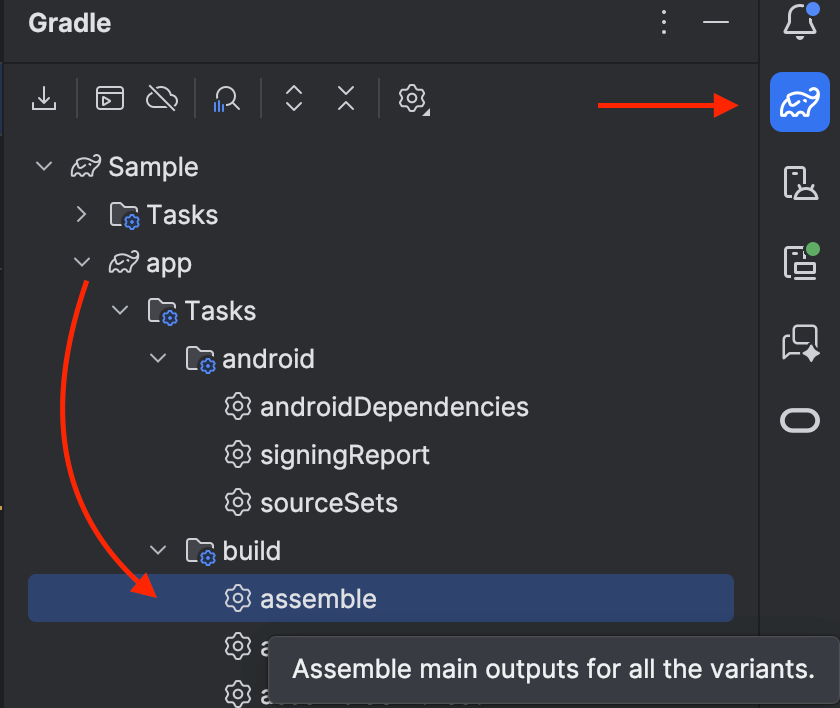
To test and verify the correct configuration of our project, we can run the following command to publish the catalog to our local machine:
./gradlew publishToMavenLocal
Once you’ve confirmed it works locally, in a production environment, you would typically set up a CI/CD pipeline or, more in general, refine the publishing block with your details to publish this to a Maven repository.
Integrating the Catalog in Your Apps
Once the catalog is published, you can consume it in any Android project by declaring it in the settings.gradle.kts file. It is important to note that once you switch to a shared catalog, you should delete the local libs.versions.toml file from your project’s gradle folder. The remote catalog will now serve as your single source of truth.
dependencyResolutionManagement {
    repositories {
        google()
        mavenCentral()
        mavenLocal() // Only for local testing
    }
    versionCatalogs {
        create("libs") {
            from("com.stefanoq21:versioncatalog:2026.01.00")
        }
    }
}
With the local file removed and the remote catalog linked, your app modules can access dependencies exactly as they did before, but with the peace of mind that they are globally managed:
dependencies {
  implementation(libs.androidx.core.ktx)
  ...
}
The “Update” Problem (And How to Fix It)
There is a catch. When you use a local libs.versions.toml, Android Studio provides linting and annotations to tell you when a newer version of a library is available.
However, once the catalog is externalized into a separate project, Android Studio loses this visibility. You won’t see those yellow highlights in your app project anymore.
To solve this, we have a few different options. One of my favorite approaches is using a dedicated Gradle plugin that handles the updates for us.
I highly recommend using the version-catalog-update plugin by littlerobots.
First, add the plugin to your catalog’s build.gradle.kts:
plugins {
    id("nl.littlerobots.version-catalog-update") version "1.0.1"
}
By default, this plugin sorts all entries alphabetically. However, if you are like me and prefer to keep your dependencies manually organized (grouping related libraries together), you might want to disable this behavior. You can add the following configuration to your build.gradle.kts to keep your custom organization intact:
versionCatalogUpdate {
    // to stop sort the dependencies
    sortByKey.set(false)
}
To automatically scan for updates and apply them directly to the libs.versions.toml file, simply run:
./gradlew versionCatalogUpdate
This setup gives you a dedicated, automated maintenance workflow for your dependencies in one single place, ensuring your ecosystem stays modern without the manual overhead.
Conclusion
As we’ve explored, the adoption of a Shared Version Catalog is both highly impactful and surprisingly straightforward to implement. By stripping away the usage of local TOML files and moving to a centralized, published artifact, we gain immediate benefits: total alignment across internal libraries, a single point of truth for security updates, and a massive reduction in maintenance boilerplate for every new project in our organization.
We’ve seen that the setup only requires a lean, dedicated Gradle project and a few lines of configuration in your build.gradle.kts. While externalizing the catalog requires us to be more proactive about monitoring updates, the addition of a clear update strategy ensures that we can keep our entire stack modern, maintaining our custom organization all the while.
The payoff for this small architectural shift is a scalable, professional dependency management system that works for you, rather than against you. To see the full implementation in action, I highly recommend checking out my VersionCatalog project on GitHub.
If you found this deep dive helpful, feel free to follow me for more insightful content on Android development and modern Gradle practices. I regularly publish new articles on these topics. Don’t hesitate to share your comments or reach out to me on Bluesky or LinkedIn for further discussions.
Have a great day, and happy coding!
Scaling dependency management: The Shared Version Catalog was originally published in ProAndroidDev on Medium, where people are continuing the conversation by highlighting and responding to this story.




This Post Has 0 Comments