


If you’ve worked with Room in Android, you’ve probably seen this dreaded error:
Room cannot verify the data integrity. Looks like you've changed schema but forgot to update the version number.
Most developers just increment the version number and move on. But what’s actually happening behind the scenes? Why does Room care so much about schema changes? And what exactly is this “hash” it keeps talking about?
Let’s go deep.
Table of Contents
- What is a Database Schema?
- How Room Tracks Schema: The Identity Hash
- Where the Hash Lives: room_master_table
- Why Room Crashes on Schema Mismatch
- The Migration System Explained
- fallbackToDestructiveMigration: What It Really Does
- When to Use Each Migration Strategy
- Auto-Migrations in Room 2.4+
- Schema Export and Version Control
- Common Pitfalls and Best Practices
1. What is a Database Schema?
A schema is the blueprint of your database. It defines:
- Tables — What tables exist
- Columns — Name, type, nullable, default value
- Primary Keys — Unique identifier for each row
- Foreign Keys — Relationships between tables
- Indices — For faster queries
- Constraints — NOT NULL, UNIQUE, CHECK, etc.
In Room, your schema is defined by your @Entity classes:
@Entity(
    tableName = "users",
    indices = [Index(value = ["email"], unique = true)])
data class UserEntity(
    @PrimaryKey(autoGenerate = true)
    val id: Long = 0,
    @ColumnInfo(name = "email")
    val email: String,
    @ColumnInfo(name = "name")
    val name: String,
    @ColumnInfo(name = "created_at")
    val createdAt: Long = System.currentTimeMillis()
)
Room reads these annotations at compile time and generates:
- SQL CREATE TABLE statements
- DAO implementations
- A schema identity hash
2. How Room Tracks Schema: The Identity Hash
Here’s where it gets interesting.
At compile time, Room generates a hash string that uniquely represents your entire database schema. This hash is calculated from:
- All table names
- All column names, types, and constraints
- All indices
- All foreign keys
- All views
- The order of everything
How the Hash is Generated
Room collects all schema information and creates a deterministic string representation:
// Simplified conceptual example
schemaString = """
    TABLE users (
        id INTEGER PRIMARY KEY AUTOINCREMENT NOT NULL,
        email TEXT NOT NULL,
        name TEXT NOT NULL,
        created_at INTEGER NOT NULL
    )
    INDEX index_users_email ON users(email) UNIQUE
    TABLE posts (
        id INTEGER PRIMARY KEY AUTOINCREMENT NOT NULL,
        user_id INTEGER NOT NULL,
        content TEXT,
        FOREIGN KEY (user_id) REFERENCES users(id)
    )
"""

identityHash = SHA-256(schemaString)  // e.g., "a3f2b8c9d4e5f6a7b8c9d0e1f2a3b4c5"
This hash is then hardcoded into the generated _Impl class:
// Generated by Room: AppDatabase_Impl.java
@Override
protected SupportSQLiteOpenHelper createOpenHelper(DatabaseConfiguration configuration) {
    return new RoomOpenHelper(
        configuration,
        new RoomOpenHelper.Delegate(2) {  // version
            @Override
            public void createAllTables(SupportSQLiteDatabase _db) {
                // CREATE TABLE statements...
            }
            @Override
            protected void validateMigration(SupportSQLiteDatabase _db) {
                // Schema validation...
            }
        },
        "a3f2b8c9d4e5f6a7b8c9d0e1f2a3b4c5",  // ← THE IDENTITY HASH
        "d7e8f9a0b1c2d3e4f5a6b7c8d9e0f1a2"   // ← Legacy hash (pre-Room 2.2)
    );
}
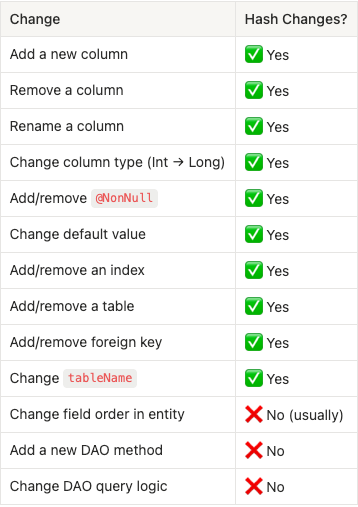
What Changes the Hash?
ANY schema modification changes the hash:
3. Where the Hash Lives: room_master_table
When Room creates your database for the first time, it creates a special internal table:
CREATE TABLE room_master_table (
    id INTEGER PRIMARY KEY,
    identity_hash TEXT
);

INSERT INTO room_master_table (id, identity_hash)
VALUES (42, 'a3f2b8c9d4e5f6a7b8c9d0e1f2a3b4c5');
This table has exactly one row with:
- id = 42 (always 42, it’s hardcoded)
- identity_hash = the schema hash when the database was created/migrated
You can actually see this yourself:
// Debug: Query the room_master_table
@Dao
interface DebugDao {
    @Query("SELECT identity_hash FROM room_master_table WHERE id = 42")
    fun getSchemaHash(): String
}
Or via Android Studio’s Database Inspector:
SELECT * FROM room_master_table;
-- Result: id=42, identity_hash="a3f2b8c9d4e5f6a7b8c9d0e1f2a3b4c5"
4. Why Room Crashes on Schema Mismatch
Now we understand the full picture. Here’s what happens on every app launch:
The Verification Process
┌─────────────────────────────────────────────────────────┐
│                    APP LAUNCHES                         │
└─────────────────────────────────────────────────────────┘
                           │
                           ▼
┌─────────────────────────────────────────────────────────┐
│  Room opens the database file                           │
└─────────────────────────────────────────────────────────┘
                           │
                           ▼
┌─────────────────────────────────────────────────────────┐
│  Query: SELECT identity_hash FROM room_master_table     │
│  Result: "abc123..." (hash stored in database file)     │
└─────────────────────────────────────────────────────────┘
                           │
                           ▼
┌─────────────────────────────────────────────────────────┐
│  Compare with compiled hash in AppDatabase_Impl         │
│  Compiled hash: "xyz789..." (from current code)         │
└─────────────────────────────────────────────────────────┘
                           │
                           ▼
                    ┌──────────────┐
                    │  Match?      │
                    └──────────────┘
                      │          │
                     YES         NO
                      │          │
                      ▼          ▼
               ┌──────────┐  ┌──────────────────────┐
               │ Continue │  │ Check version number │
               │ normally │  └──────────────────────┘
               └──────────┘           │
                                      ▼
                              ┌───────────────┐
                              │ Version same? │
                              └───────────────┘
                                │           │
                               YES          NO
                                │           │
                                ▼           ▼
                         ┌──────────┐  ┌────────────────┐
                         │  CRASH!  │  │ Run migrations │
                         └──────────┘  └────────────────┘
The Crash Scenario
When hashes don’t match AND version is the same:
// Your code (version unchanged)
@Database(entities = [UserEntity::class], version = 1)

// But you added a field to UserEntity:
@Entity
data class UserEntity(
    @PrimaryKey val id: Long,
    val name: String,
    val email: String  // ← NEW FIELD!
)
Room’s logic:
- Database file has hash “abc123” and version 1
- Compiled code has hash “xyz789” and version 1
- Hashes don’t match but versions are same
- Room thinks: “Schema changed but developer didn’t acknowledge it”
- CRASH with IllegalStateException
Why Crash Instead of Auto-Migrate?
Room crashes intentionally because:
- Data Safety — Auto-altering tables could lose data
- Explicit Acknowledgment — Developer must consciously handle changes
- No Guessing — Room can’t know if you want to migrate or reset
- Production Protection — Prevents accidental data loss in production
The error message is actually Room being helpful:
"Hey, your schema changed but the version didn't.
Did you forget to update it? I'm crashing now so you
notice this in development, not in production."
5. The Migration System Explained
When you increment the version, Room looks for a migration path:
@Database(entities = [UserEntity::class], version = 2)  // Was 1
abstract class AppDatabase : RoomDatabase()
Migration Path Resolution
Database file version: 1
Code version: 2

Room searches for: Migration(1, 2)
If found, Room executes it:
val MIGRATION_1_2 = object : Migration(1, 2) {
    override fun migrate(db: SupportSQLiteDatabase) {
        db.execSQL("ALTER TABLE users ADD COLUMN email TEXT")
    }
}
Multi-Step Migrations
For version jumps, Room chains migrations:
Database: version 1
Code: version 4

Room searches for path: 1 → 2 → 3 → 4
Executes: MIGRATION_1_2, MIGRATION_2_3, MIGRATION_3_4
Or you can provide a direct jump:
val MIGRATION_1_4 = object : Migration(1, 4) {
    override fun migrate(db: SupportSQLiteDatabase) {
        // All changes from v1 to v4 in one migration
    }
}
Room prefers the shortest path. If both exist:
- MIGRATION_1_2 + MIGRATION_2_3 + MIGRATION_3_4 (3 steps)
- MIGRATION_1_4 (1 step)
Room uses MIGRATION_1_4.
What Happens Inside migrate()
You have full SQL access:
override fun migrate(db: SupportSQLiteDatabase) {
    // Add column
    db.execSQL("ALTER TABLE users ADD COLUMN age INTEGER NOT NULL DEFAULT 0")

    // Create new table
    db.execSQL("""
        CREATE TABLE IF NOT EXISTS posts (
            id INTEGER PRIMARY KEY AUTOINCREMENT NOT NULL,
            user_id INTEGER NOT NULL,
            content TEXT,
            FOREIGN KEY (user_id) REFERENCES users(id) ON DELETE CASCADE
        )
    """)
    // Create index
    db.execSQL("CREATE INDEX index_posts_user_id ON posts(user_id)")
    // Copy data (for complex migrations)
    db.execSQL("""
        INSERT INTO users_new (id, name, email)
        SELECT id, name, '' FROM users_old
    """)
    // Drop old table
    db.execSQL("DROP TABLE users_old")
    // Rename table
    db.execSQL("ALTER TABLE users_new RENAME TO users")
}
Post-Migration Validation
After migration completes, Room:
- Recalculates schema hash from actual database
- Compares with compiled hash
- If match → Updates room_master_table with new hash
- If no match → CRASH (migration was incomplete/incorrect)
Migration complete
├── Actual DB hash: "xyz789"
├── Expected hash:  "xyz789"
├── Match? ✅
└── Update room_master_table SET identity_hash = "xyz789"
6. fallbackToDestructiveMigration: What It Really Does
This is the “nuclear option”:
Room.databaseBuilder(context, AppDatabase::class.java, "app.db")
    .fallbackToDestructiveMigration()
    .build()
Under the Hood
When enabled and no migration path exists:
// Simplified Room internal logic
fun onUpgrade(db: SQLiteDatabase, oldVersion: Int, newVersion: Int) {
    val migrationPath = findMigrationPath(oldVersion, newVersion)

    if (migrationPath != null) {
        // Execute migrations normally
        migrationPath.forEach { it.migrate(db) }
    } else if (fallbackToDestructiveMigration) {
        // DESTROY EVERYTHING
        dropAllTables(db)
        createAllTables(db)
        // User data is GONE
    } else {
        throw IllegalStateException("Migration path not found")
    }
}
fun dropAllTables(db: SQLiteDatabase) {
    // Get all table names
    val cursor = db.rawQuery(
        "SELECT name FROM sqlite_master WHERE type='table' AND name NOT LIKE 'sqlite_%'",
        null
    )
    // Drop each table
    cursor.use {
        while (it.moveToNext()) {
            val tableName = it.getString(0)
            if (tableName != "room_master_table" && tableName != "android_metadata") {
                db.execSQL("DROP TABLE IF EXISTS $tableName")
            }
        }
    }
}
What Gets Destroyed
Destroyed Preserved All your tables room_master_table (recreated) All your data android_metadata All indices Database file itself All foreign keys
Variants of Destructive Migration
// Destroy on ANY failed migration
.fallbackToDestructiveMigration()

// Destroy only when DOWNGRADING (e.g., version 3 → 2)
.fallbackToDestructiveMigrationOnDowngrade()

// Destroy only from specific versions
.fallbackToDestructiveMigrationFrom(1, 2, 3)
The Destruction Sequence
1. Room detects version change (1 → 2)
2. Room searches for Migration(1, 2)
3. Not found!
4. fallbackToDestructiveMigration is enabled
5. Room executes:
   - DROP TABLE users
   - DROP TABLE posts
   - DROP TABLE comments
   - (all tables dropped)
6. Room executes onCreate():
   - CREATE TABLE users (new schema)
   - CREATE TABLE posts (new schema)
   - etc.
7. Room updates room_master_table with new hash
8. Database is now empty but schema is correct
7. When to Use Each Migration Strategy
Decision Tree
Schema changed?
│
├── YES
│   │
│   ├── Development/Testing?
│   │   │
│   │   ├── YES → fallbackToDestructiveMigration() ✅
│   │   │         Fast iteration, don't care about data
│   │   │
│   │   └── NO (Production)
│   │       │
│   │       ├── Can lose data? (fresh install behavior OK?)
│   │       │   │
│   │       │   ├── YES → fallbackToDestructiveMigration() ⚠️
│   │       │   │         (Consider user experience)
│   │       │   │
│   │       │   └── NO → Write proper Migration() ✅
│   │       │
│   │       └── Complex schema change?
│   │           │
│   │           ├── YES → Consider Auto-Migration (Room 2.4+)
│   │           │
│   │           └── NO → Manual Migration()
│   │
│   └── Increment version number!
│
└── NO → Do nothing
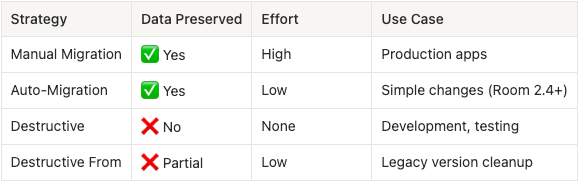
Strategy Comparison
When Destructive is Actually OK in Production
- First launch after install — No existing data
- Cache-only database — Data can be re-fetched
- Non-critical data — User won’t miss it
- Explicit user action — “Reset app data” feature
// Example: Cache database that can be rebuilt
@Database(entities = [CachedArticle::class], version = 2)
abstract class CacheDatabase : RoomDatabase()

// OK to use destructive - data is just a cache
Room.databaseBuilder(context, CacheDatabase::class.java, "cache.db")
    .fallbackToDestructiveMigration()
    .build()
When You MUST Use Proper Migration
- User-generated content — Notes, messages, documents
- Purchase history — Transactions, receipts
- Authentication state — Tokens, sessions
- Preferences — Settings user configured
- Progress data — Game saves, completed tutorials
8. Auto-Migrations in Room 2.4+
Room 2.4 introduced automatic migrations for simple schema changes:
@Database(
    entities = [User::class],
    version = 2,
    autoMigrations = [
        AutoMigration(from = 1, to = 2)
    ])
abstract class AppDatabase : RoomDatabase()
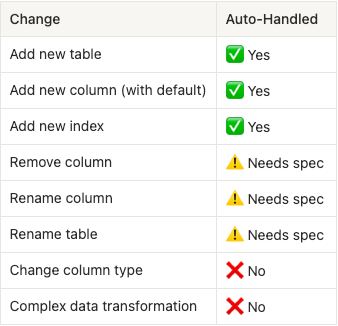
What Auto-Migration Can Handle
Auto-Migration with Spec
For deletions and renames, provide a spec:
@Database(
    entities = [User::class],
    version = 3,
    autoMigrations = [
        AutoMigration(from = 1, to = 2),
        AutoMigration(from = 2, to = 3, spec = Migration2To3::class)
    ])
abstract class AppDatabase : RoomDatabase()

@RenameColumn(tableName = "users", fromColumnName = "name", toColumnName = "full_name")
@DeleteColumn(tableName = "users", columnName = "temp_field")
@RenameTable(fromTableName = "user_data", toTableName = "user_profiles")
class Migration2To3 : AutoMigrationSpec
How Auto-Migration Works Internally
- Room compares schema of version N and N+1 at compile time
- Generates SQL statements automatically
- Creates a Migration class under the hood
// Generated: AppDatabase_AutoMigration_1_2_Impl.java
public class AppDatabase_AutoMigration_1_2_Impl extends Migration {
    public AppDatabase_AutoMigration_1_2_Impl() {
        super(1, 2);
    }

    @Override
    public void migrate(@NonNull SupportSQLiteDatabase database) {
        database.execSQL("ALTER TABLE users ADD COLUMN age INTEGER NOT NULL DEFAULT 0");
        database.execSQL("CREATE TABLE IF NOT EXISTS posts (...)");
    }
}
9. Schema Export and Version Control
Enabling Schema Export
@Database(
    entities = [User::class],
    version = 5,
    exportSchema = true  // Enable this!
)
abstract class AppDatabase : RoomDatabase()
In build.gradle:
android {
    defaultConfig {
        javaCompileOptions {
            annotationProcessorOptions {
                arguments += ["room.schemaLocation": "$projectDir/schemas"]            }
        }
    }
}

// For KSP
ksp {
    arg("room.schemaLocation", "$projectDir/schemas")
}
What Gets Exported
Room creates a JSON file for each version:
app/schemas/
├── com.example.AppDatabase/
│   ├── 1.json
│   ├── 2.json
│   ├── 3.json
│   ├── 4.json
│   └── 5.json
Example 5.json:
{
  "formatVersion": 1,
  "database": {
    "version": 5,
    "identityHash": "a3f2b8c9d4e5f6a7b8c9d0e1f2a3b4c5",
    "entities": [
      {
        "tableName": "users",
        "createSql": "CREATE TABLE IF NOT EXISTS `${TABLE_NAME}` (`id` INTEGER PRIMARY KEY AUTOINCREMENT NOT NULL, `name` TEXT NOT NULL, `email` TEXT NOT NULL)",
        "fields": [
          {
            "fieldPath": "id",
            "columnName": "id",
            "affinity": "INTEGER",
            "notNull": true
          },
          {
            "fieldPath": "name",
            "columnName": "name",
            "affinity": "TEXT",
            "notNull": true
          }
        ],
        "primaryKey": {
          "columnNames": ["id"],
          "autoGenerate": true
        },
        "indices": [],
        "foreignKeys": []      }
    ],
    "setupQueries": [
      "CREATE TABLE IF NOT EXISTS room_master_table (id INTEGER PRIMARY KEY,identity_hash TEXT)",
      "INSERT OR REPLACE INTO room_master_table (id,identity_hash) VALUES(42, 'a3f2b8c9d4e5f6a7b8c9d0e1f2a3b4c5')"
    ]  }
}
Why Export Schemas?
- Version Control — Track schema changes in Git
- Migration Testing — Test migrations against real schemas
- Code Review — Review schema changes in PRs
- Auto-Migration — Required for auto-migrations to work
- Documentation — Clear history of database evolution
Testing Migrations
@RunWith(AndroidJUnit4::class)
class MigrationTest {

      @get:Rule
    val helper = MigrationTestHelper(
        InstrumentationRegistry.getInstrumentation(),
        AppDatabase::class.java,
        listOf(),  // Auto-migrations
        FrameworkSQLiteOpenHelperFactory()
    )
    @Test
    fun migrate1To2() {
        // Create database with version 1
        helper.createDatabase("test-db", 1).apply {
            execSQL("INSERT INTO users (id, name) VALUES (1, 'John')")
            close()
        }
        // Run migration and validate
        helper.runMigrationsAndValidate("test-db", 2, true, MIGRATION_1_2).apply {
            val cursor = query("SELECT * FROM users WHERE id = 1")
            cursor.moveToFirst()
            assertEquals("John", cursor.getString(cursor.getColumnIndex("name")))
            assertEquals("", cursor.getString(cursor.getColumnIndex("email")))  // New column
            close()
        }
    }
}
10. Common Pitfalls and Best Practices
Pitfall 1: Forgetting @ColumnInfo Default Values
// ❌ Bad: Migration will fail
@Entity
data class User(
    @PrimaryKey val id: Long,
    val name: String,
    val age: Int  // New non-null field without default
)

// Migration:
db.execSQL("ALTER TABLE users ADD COLUMN age INTEGER NOT NULL")
// CRASH: NOT NULL constraint requires default value
// ✅ Good: Provide default in SQL
db.execSQL("ALTER TABLE users ADD COLUMN age INTEGER NOT NULL DEFAULT 0")

// Or make it nullable in entity
@Entity
data class User(
    @PrimaryKey val id: Long,
    val name: String,
    val age: Int? = null  // Nullable is OK
)
Pitfall 2: SQLite ALTER TABLE Limitations
SQLite has limited ALTER TABLE support:
// ✅ Supported
ALTER TABLE users ADD COLUMN email TEXT
ALTER TABLE users RENAME TO customers
ALTER TABLE users RENAME COLUMN name TO full_name  // SQLite 3.25+

// ❌ NOT Supported
ALTER TABLE users DROP COLUMN temp_field
ALTER TABLE users MODIFY COLUMN name VARCHAR(100)
ALTER TABLE users ADD PRIMARY KEY (id)
Workaround: Table Recreation
override fun migrate(db: SupportSQLiteDatabase) {
    // 1. Create new table with desired schema
    db.execSQL("""
        CREATE TABLE users_new (
            id INTEGER PRIMARY KEY NOT NULL,
            name TEXT NOT NULL,
            email TEXT NOT NULL
            -- 'temp_field' is gone (dropped)
        )
    """)

    // 2. Copy data
    db.execSQL("""
        INSERT INTO users_new (id, name, email)
        SELECT id, name, email FROM users
    """)
    // 3. Drop old table
    db.execSQL("DROP TABLE users")
    // 4. Rename new table
    db.execSQL("ALTER TABLE users_new RENAME TO users")
    // 5. Recreate indices
    db.execSQL("CREATE INDEX index_users_email ON users(email)")
}
Pitfall 3: Foreign Key Constraints
// If you have foreign keys, disable checks during migration
override fun migrate(db: SupportSQLiteDatabase) {
    db.execSQL("PRAGMA foreign_keys=OFF")

    // ... migration logic ...
    db.execSQL("PRAGMA foreign_keys=ON")
    // Validate foreign key integrity
    val cursor = db.query("PRAGMA foreign_key_check")
    if (cursor.count > 0) {
        throw IllegalStateException("Foreign key violation after migration")
    }
}
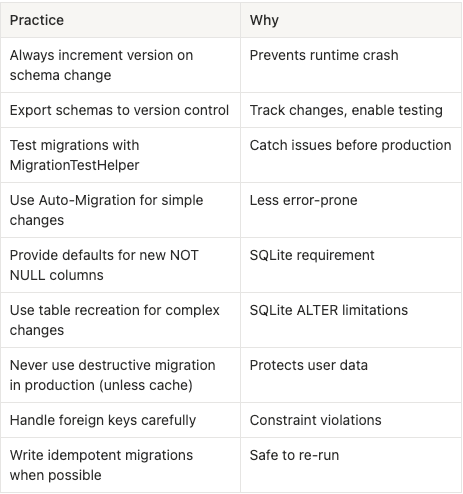
Best Practices Summary
Conclusion
Room’s migration system is designed to protect your users’ data. The schema hash ensures you never accidentally corrupt a database, and the migration system gives you full control over how data evolves.
Key Takeaways:
- Schema = Database blueprint (tables, columns, indices)
- Identity Hash = Unique fingerprint of your schema
- room_master_table = Stores the hash in the database file
- Crash on mismatch = Intentional protection, not a bug
- Migration = Your instructions for evolving the schema
- Destructive fallback = Nuclear option, destroys all data
- Export schemas = Version control for your database
The error message isn’t your enemy — it’s Room protecting your users from data loss. Embrace it, understand it, and your database migrations will be rock solid.
Quick Reference Card
// 1. Always set version
@Database(entities = [...], version = 2, exportSchema = true)

// 2. Write migration
val MIGRATION_1_2 = object : Migration(1, 2) {
    override fun migrate(db: SupportSQLiteDatabase) {
        db.execSQL("ALTER TABLE users ADD COLUMN age INTEGER NOT NULL DEFAULT 0")
    }
}
// 3. Register migration
Room.databaseBuilder(context, AppDatabase::class.java, "app.db")
    .addMigrations(MIGRATION_1_2)
    .build()
// 4. Test migration
@Test
fun testMigration1To2() {
    helper.createDatabase("test", 1)
    helper.runMigrationsAndValidate("test", 2, true, MIGRATION_1_2)
}
That’s it. Now you understand Room migrations from the inside out.
Why Room Crashes When You Change Your Database (And How to Fix It) was originally published in ProAndroidDev on Medium, where people are continuing the conversation by highlighting and responding to this story.




This Post Has 0 Comments