


In my previous article, I introduced the concept of a PlayerPool for managing ExoPlayer instances in a TikTok-style video feed. The PlayerPool handles player lifecycle, memory management, and basic caching. But there’s a critical limitation: videos only start caching when a player is acquired and prepared.
What if users navigate quickly through your feed? What if you want to download videos for offline viewing before they’re even visible? The answer is predownloading — downloading media to cache independently of player creation.
In this article, I’ll show you how to extend the PlayerPool to support background video downloads using Media3’s DownloadManager, enabling you to:
- Download videos before users reach them in the feed
- Prepare content for offline viewing
- Reduce perceived loading times to near-zero
- Track download progress and handle failures gracefully
Let’s dive into the implementation.
The Problem: Player-Dependent Caching
Traditional video caching in ExoPlayer happens automatically when you prepare a player with a cached data source. This works well for the current video and maybe one or two ahead, but it has limitations:
// Traditional approach - caching only happens when player is acquired
val player = playerPool.acquirePlayer(page, url)
// Video starts downloading NOW, user waits
The user experience suffers when:
- Network is slow or unstable
- Videos are large (high resolution)
- Users scroll quickly through content
- You want to enable offline mode.
The Solution: DownloadManager + PlayerPool
Media3 provides a powerful DownloadManager — a specialized component designed for managing media downloads independent of playback. Unlike the implicit caching that happens when ExoPlayer buffers content during playback, DownloadManager is purpose-built for deliberate, background downloads.
In simple terms, DownloadManager is a tool that saves videos to your device so you can watch them later without buffering. Unlike a regular video player that only saves data while you’re actively watching, DownloadManager is proactive. It can download multiple files at once, resume them if your Wi-Fi cuts out, and keep working even if you close the app or restart your phone.
Think of it this way: standard caching is like a chef cooking food only as you eat it. DownloadManager is like pre-ordering your meals for the week so they’re already in the fridge when you’re hungry.
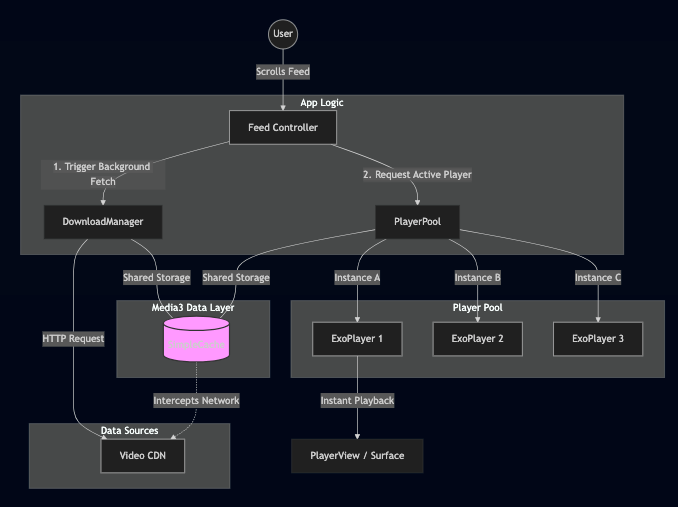
You can extend this idea even further by integrating DownloadManager into your existing player pool architecture. In the following code block, the player pool is enhanced to leverage DownloadManager so that media is proactively downloaded and stored ahead of time, while players focus purely on efficient playback. This separation allows your app to reuse players for smooth viewing while relying on DownloadManager to handle reliable, resumable, and background-safe downloads.
@UnstableApi
class PlayerPool(...) {
    private val databaseProvider = StandaloneDatabaseProvider(context)

    private val cache: SimpleCache by lazy {
        File(context.cacheDir, "media_cache").apply { mkdirs() }.let { cacheDir ->
            SimpleCache(
                cacheDir,
                LeastRecentlyUsedCacheEvictor(cacheSizeMb * 1024 * 1024),
                databaseProvider
            )
        }
    }

    private val upstreamFactory = OkHttpDataSource.Factory(
        OkHttpClient.Builder().retryOnConnectionFailure(true).build()
    )

    private val cacheDataSourceFactory: CacheDataSource.Factory by lazy {
        CacheDataSource.Factory()
            .setCache(cache)
            .setUpstreamDataSourceFactory(upstreamFactory)
            .setFlags(CacheDataSource.FLAG_IGNORE_CACHE_ON_ERROR)
    }

    private val downloadManager: DownloadManager by lazy {
        File(context.getExternalFilesDir(null), "downloads").apply { mkdirs() }.let { downloadDir ->
            DownloadManager(
                context,
                databaseProvider,
                cache,
                upstreamFactory,
                Executor { it.run() }
            ).apply {
                maxParallelDownloads = 3
                resumeDownloads()
            }
        }
    }

    // ... rest of implementation
}
The enhanced PlayerPool now has three components:
- SimpleCache — Shared cache storage (LRU eviction)
- DownloadManager — Background download orchestration
- PlayerPool — Player lifecycle management
All three components share the same cache, so downloaded content is instantly available to players.
The critical insight here: the same cache instance is used by both DownloadManager and CacheDataSource.Factory. This means any video downloaded through DownloadManager is immediately available to players without re-downloading.
The Download API
At this point, simply having DownloadManager wired in isn’t enough — we need a small entry point that lets us trigger downloads and observe their state as the app runs. That’s where the next piece comes in: a lightweight, callback-based function that ties our playback flow to Media3’s download system.
// inside of PlayerPool
fun downloadToCache(
    url: String,
    onProgress: ((Float) -> Unit)? = null,
    onComplete: (() -> Unit)? = null,
    onError: ((Exception) -> Unit)? = null
) {
    if (isFullyDownloaded(url)) {
        onComplete?.invoke()
        return
    }

    val existingDownload = downloadManager.downloadIndex.getDownload(url)
    if (existingDownload?.isActiveOrQueued == true) {
        addDownloadListener(url, onProgress, onComplete, onError)
        return
    }

    addDownloadListener(url, onProgress, onComplete, onError)
    downloadManager.addDownload(
        DownloadRequest.Builder(url, Uri.parse(url)).build()
    )
}
This implementation provides a robust, self-healing workflow: it intelligently skips redundant downloads, tracks active progress via real-time listeners, and automatically resumes tasks interrupted by network failures.
Download State Tracking
Once downloads are running in the background, the next challenge is visibility. We need to know when a download is progressing, when it’s done, and when it fails — without constantly polling state or tightly coupling playback logic to DownloadManager. The next piece addresses that by wiring a listener that translates Media3’s download states into simple callbacks we can react to at runtime.
// inside of PlayerPool
private fun addDownloadListener(
    url: String,
    onProgress: ((Float) -> Unit)?,
    onComplete: (() -> Unit)?,
    onError: ((Exception) -> Unit)?
) {
    downloadListeners[url] = object : DownloadManager.Listener {
        override fun onDownloadChanged(
            downloadManager: DownloadManager,
            download: Download,
            finalException: Exception?
        ) {
            if (download.request.id != url) return
            when (download.state) {
                Download.STATE_DOWNLOADING -> {
                    onProgress?.invoke(download.percentDownloaded / 100f)
                }
                Download.STATE_COMPLETED -> {
                    onComplete?.invoke()
                    removeDownloadListener(url)
                }
                Download.STATE_FAILED -> {
                    onError?.invoke(finalException ?: Exception("Download failed"))
                    removeDownloadListener(url)
                }
                else -> Unit
            }
        }
    }.also { downloadManager.addListener(it) }
}
Taking It Further: DownloadService for Background Downloads
While our PlayerPool implementation works great for in-app downloads, there’s an even more robust option for long-running downloads: Media3’s DownloadService.
What is DownloadService?
DownloadService is a foreground service specifically designed for media downloads. It extends Android’s Service class and provides critical capabilities that our in-app DownloadManager lacks:
Key Advantages:
- Survives app termination: Downloads continue even if the user closes your app
- System integration: Shows a persistent notification that users can monitor
- Lifecycle management: Handles configuration changes, low memory, and process death
- Battery optimization: Works with Android’s Doze mode and App Standby
- User control: Users can pause, resume, or cancel downloads from the notification.
Think of it this way: Our PlayerPool’s DownloadManager is perfect for opportunistic preloading (downloading few videos). DownloadService is ideal for deliberate offline downloads (user explicitly downloads 50 videos for a flight).
Here’s how to set up a DownloadService:
Step 1: Create the Service
@UnstableApi
class VideoDownloadService : DownloadService(
    FOREGROUND_NOTIFICATION_ID,
    DEFAULT_FOREGROUND_NOTIFICATION_UPDATE_INTERVAL,
    DOWNLOAD_NOTIFICATION_CHANNEL_ID,
    R.string.download_notification_channel_name,
    NOTIFICATION_TITLE_RES_ID
) {
    companion object {
        private const val FOREGROUND_NOTIFICATION_ID = 1
        private const val DOWNLOAD_NOTIFICATION_CHANNEL_ID = "video_downloads"
        private const val NOTIFICATION_TITLE_RES_ID = 0
        private const val JOB_ID = 1
    }

    override fun getDownloadManager(): DownloadManager =
        DownloadManager(
            this,
            StandaloneDatabaseProvider(this),
            cache, // Should be your app's global Cache instance
            upstreamFactory, // Should be your app's global DataSource.Factory
            { it.run() }
        ).apply { maxParallelDownloads = 3 }

    override fun getScheduler(): Scheduler? = PlatformScheduler(this, JOB_ID)

    override fun getForegroundNotification(
        downloads: MutableList<Download>,
        notMetRequirements: Int
    ): Notification = DownloadNotificationHelper(this, DOWNLOAD_NOTIFICATION_CHANNEL_ID)
        .buildProgressNotification(this, R.drawable.ic_download, null, null, downloads, notMetRequirements)
}
Step 2: Register in AndroidManifest.xml
<manifest xmlns:android="http://schemas.android.com/apk/res/android">

    <!-- Required permissions for DownloadService -->
    <uses-permission android:name="android.permission.INTERNET"/>
    <uses-permission android:name="android.permission.FOREGROUND_SERVICE"/>
    <uses-permission android:name="android.permission.POST_NOTIFICATIONS"/>

    <application>
        <!-- Your other app components -->

        <service
            android:name=".VideoDownloadService"
            android:exported="false"
            android:foregroundServiceType="dataSync">
            <!-- Required for DownloadService to receive commands -->
            <intent-filter>
                <action android:name="androidx.media3.exoplayer.downloadService.action.RESTART"/>
                <category android:name="android.intent.category.DEFAULT"/>
            </intent-filter>
        </service>

    </application>
</manifest>
Note: On Android 13+ (API 33+), you’ll need to request the POST_NOTIFICATIONS permission at runtime:
if (Build.VERSION.SDK_INT >= Build.VERSION_CODES.TIRAMISU) {
    if (ContextCompat.checkSelfPermission(
            this,
            Manifest.permission.POST_NOTIFICATIONS
        ) != PackageManager.PERMISSION_GRANTED
    ) {
        ActivityCompat.requestPermissions(
            this,
            arrayOf(Manifest.permission.POST_NOTIFICATIONS),
            REQUEST_CODE_NOTIFICATIONS
        )
    }
}
Step 3: Start Downloads via the Service
fun downloadVideoInBackground(context: Context, url: String) {
    val downloadRequest = DownloadRequest.Builder(url, Uri.parse(url))
        .build()

    DownloadService.sendAddDownload(
        context,
        VideoDownloadService::class.java,
        downloadRequest,
        true // use true to start service in foreground immediately
    )
}

When to Use Which Approach
Use PlayerPool’s DownloadManager when:
- Preloading next 2–5 videos while user browses
- Downloads should pause when app is backgrounded
- You want minimal setup and overhead
- Downloads are relatively small and quick
Use DownloadService when:
- User explicitly requests offline downloads
- Downloading large files or many videos
- Downloads should continue in background
- You need system notification integration
- Downloads might take minutes or hours
Visualizing the Impact: Why It Matters
To understand why predownloading is essential for a premium user experience, let’s look at the three most common loading scenarios.
1. No Predownloading (Standard Caching)
When the video only starts loading once the user reaches it, you get a noticeable delay and a loading spinner.

2. Initial Download (Background Process)
When a download is triggered, it takes time to fetch the data. This is why we do it in the background before the user even sees the content.

3. Playback After Predownload
Once the content is fully downloaded to the cache, playback is instantaneous. This is the “TikTok experience” — no spinners, no waiting.
By combining these two approaches, you ensure your video feed feels instantaneous while giving users the power to take their content anywhere.

Conclusion
The key to a high-performance media application is anticipation. By leveraging Media3’s DownloadManager, you can move beyond simple playback caching to a proactive preloading strategy. This allows your application to start downloading the first few videos of a feed in the background — even before the user opens the video feed screen. When the user finally navigates to the feed, the content is already waiting in the local cache, enabling an instantaneous, “zero-latency” playback experience that feels fluid and premium.
- Building an Infinite Video Feed in Jetpack Compose: A Media3 Tutorial
- GitHub – oguzhanaslann/ComposeReels
Love you all.
Stay tune for upcoming blogs.
Take care.
How to Pre-download Videos in Android using Media3 ExoPlayer was originally published in ProAndroidDev on Medium, where people are continuing the conversation by highlighting and responding to this story.


This Post Has 0 Comments