

How jetpack compose gaslit me (and how I fixed it)

We’ve all been there. You have a list. You add a new item. You want that item to glow like a radioactive isotope so the user knows, “Hey! Look! I did the thing!”
It sounds simple. It should be simple. But yesterday, I spent two hours fighting a LazyColumn that refused to acknowledge my color theory.
Here is the story of how I tried to highlight a row in Jetpack Compose, failed miserably, and learned that ListItem is basically a selfish coffee cup that hides everything you put underneath it.
☕ The Scenario: The Composable Café
Imagine you are running a digital coffee shop. Orders come in, and when a fresh “Double Shot Espresso” is ready, you want to spotlight it on the counter.
We have a simple data class:
data class CoffeeOrder(
    val id: Long,
    val name: String,
    val isFreshlyBrewed: Boolean // The trigger!
)
The “Naive” Approach (a.k.a. The Invisible Paint)
My first instinct was the same as yours: Modifiers. “I’ll just paint the background of the row!” I thought, foolishly.
// The code that betrayed me
ListItem(
    modifier = Modifier
        .background(if (order.isFreshlyBrewed) Color.Green else Color.Transparent), // 👈 The lie
    headlineContent = { Text(order.name) }
)
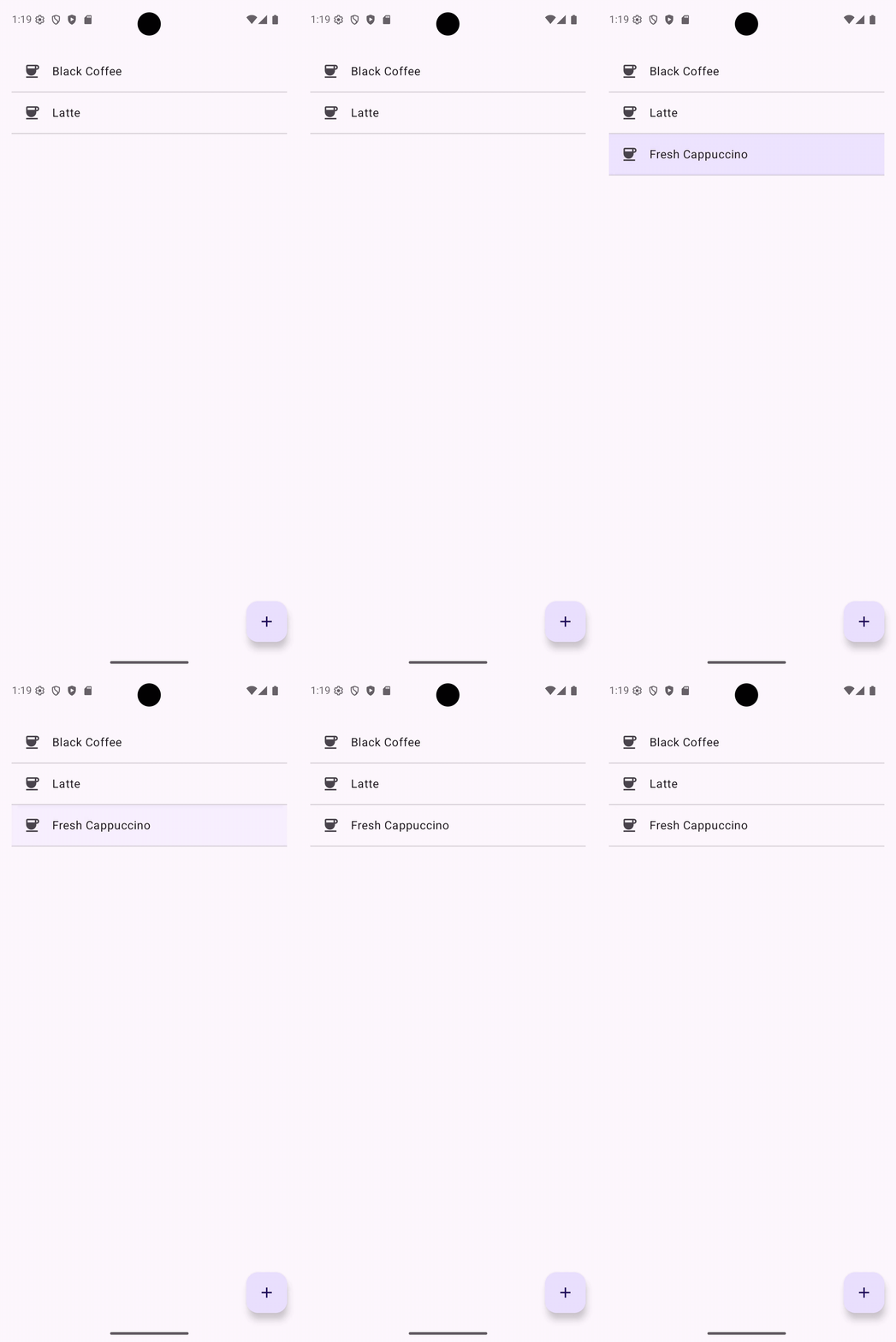
The Result: I ran the app. I added an order. The list scrolled… and nothing happened. No glow. No green. Just the same boring white row.
Why? Because ListItem is an opaque diva.
Think of Modifier.background as painting the table. Think of ListItem as a giant, solid, ceramic plate.
I was painting the table bright green, and then Compose was slamming a solid white plate right on top of it. Technially, the highlight was there — it was just suffocating underneath the UI.
The Fix: Dye the Cup, Not the Table
To fix this, we have to ask the ListItem nicely to change its own container color. We can’t use a Modifier; we have to use the specific colors parameter.
Here is the fixed code, featuring our “Flash and Fade” animation logic:
// Inside LazyColumn...
items(orders, key = { it.id }) { order ->

    // 1. Calculate the 'Freshness' Alpha (0.0 to 1.0)
    // (Managed by an Animatable in the parent - we'll get to that)
    val highlightAlpha = if (order.id == newlyBrewedId) currentAlpha else 0f

    // 2. The Secret Sauce: ListItemDefaults 🌶️
    // We create a color that overrides the default opaque surface
    val animatedColor = MaterialTheme.colorScheme.primaryContainer.copy(
        alpha = highlightAlpha
    )

    // 3. The Logic: If it's fresh, use our color. If not, be transparent.
    val myColors = if (order.id == newlyBrewedId) {
        ListItemDefaults.colors(containerColor = animatedColor)
    } else {
        ListItemDefaults.colors(containerColor = Color.Transparent)
    }

    ListItem(
        headlineContent = { Text(order.name) },
        leadingContent = { Icon(Icons.Default.Coffee, "Fresh Brew") },

        // 🏆 VICTORY: Passing the color INSIDE the component
        colors = myColors
    )
}
Now, instead of painting the table, we are effectively serving the coffee in a glowing green cup. The ListItem renders using our color, instead of covering it up.
🏃♂️ The Waiter Problem (Syncing the Scroll)
But wait, there’s more! If the new order appeared at the bottom of the list, the user wouldn’t see it. I added listState.animateScrollToItem(), but it felt… off. The highlight would flash while the list was still scrolling, looking like a glitch in the Matrix.
It was like a waiter shouting “Here is your coffee!” while he was still running across the room.
We needed a sequence:
- Run to the table (Scroll).
- Stop and catch breath (Delay).
- Present the coffee (Highlight).
We used LaunchedEffect to act as the Head Waiter orchestrating this service:
LaunchedEffect(newlyBrewedId) {
if (newlyBrewedId != null) {
val index = orders.indexOfFirst { it.id == newlyBrewedId }
// Step 1: The Sprint 🏃♂️
// This suspends! The code pauses here until the scroll is DONE.
listState.animateScrollToItem(index)
// Step 2: The Composure 🧘
// A tiny 100ms pause to let the layout settle pixels.
delay(100)
// Step 3: The Reveal ✨
// Snap opacity to 100% instantly
highlightAlpha.snapTo(1f)
// Step 4: The Fade Out 💨
highlightAlpha.animateTo(0f, animationSpec = tween(2000))
}
}
The Takeaway
- Layers Matter: If Modifier.background isn’t working, check if your component has a default containerColor(Surface) blocking your view.
- Use the API: High-level components like ListItem usually have a colors parameter. Use it.
- Don’t Rush the Waiter: When combining scrolling and animations, let the scroll finish completely (using suspend functions) before triggering the visual effects.
Now, if you’ll excuse me, my code is finally working, and my actual coffee is getting cold. ☕
The Case of the Invisible Highlight in Jetpack Compose was originally published in ProAndroidDev on Medium, where people are continuing the conversation by highlighting and responding to this story.




This Post Has 0 Comments