
In our previous article:
Building an Infinite Video Feed in Jetpack Compose: A Media3 Tutorial
We built a robust foundation for a vertical video feed. We utilized `VerticalPager` for the UI, `ExoPlayer` for playback, and a custom `PlayerPool` to manage heavy resources.
In our previous post, we actually implemented preloading manually. We used a `PlayerPool` to “warm up” upcoming players in the background, ensuring the next video was ready before the user swiped.
While that approach worked, it was heavy. We had to manage multiple `ExoPlayer` instances, coordinate their lifecycles, and write complex logic to attach and detach them from the view. It was a lot of boilerplate for a feature that is now standard.
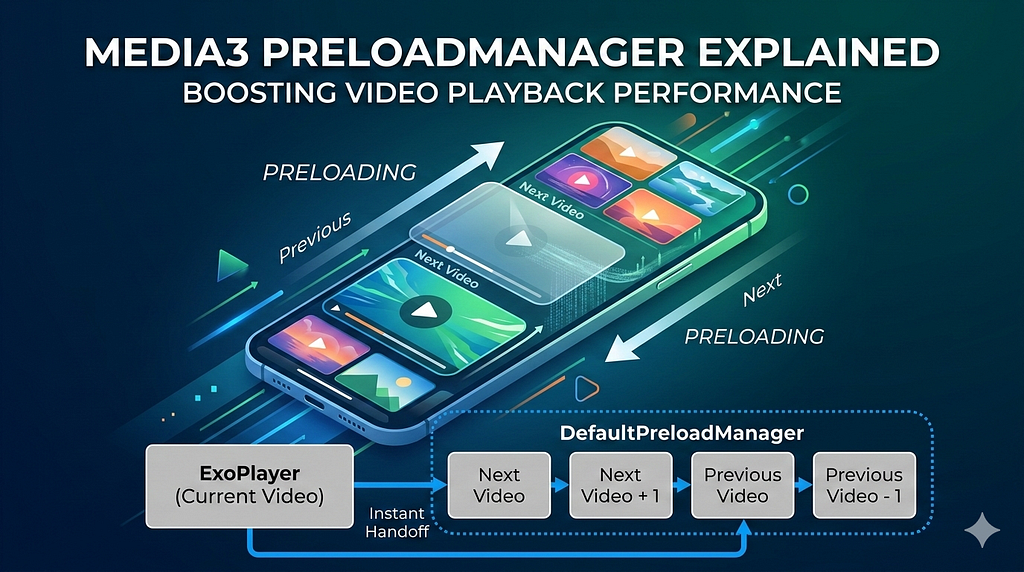
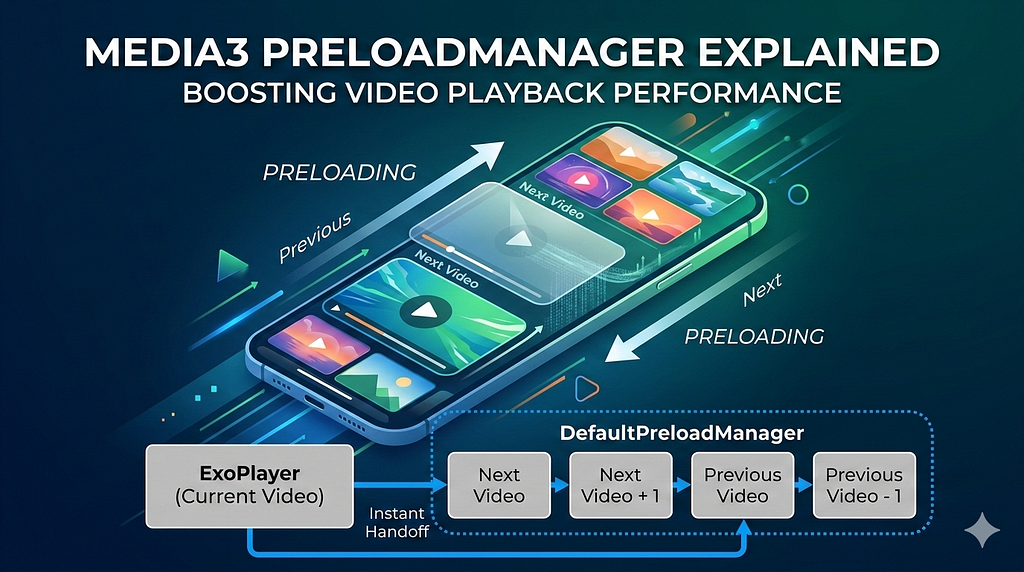
Today, we are simplifying our architecture significantly. Media3 has introduced DefaultPreloadManager, a dedicated component that handles this complexity for us. We will move from a multi-player pool to a single-player architecture that intelligently preloads content in the background.
The Problem with Manual Preloading
In our initial implementation, we tried to solve latency by keeping a few players “warm” in a pool. While this saved us the cost of creating a player, it didn’t inherently solve the data problem. We still had to tell the player to load a URL when the page settled.
We could have tried to manually buffer the next video, but that leads to a rabbit hole of complexity:
- How much do we buffer?
- What happens if the user scrolls back?
- How do we manage memory if we buffer too many videos?
- How do we ensure the preloading doesn’t kill the bandwidth for the current video?
Google’s Media3 team recognized this complexity and introduced two dedicated solutions to handle preloading natively: PreloadConfiguration and PreloadManager.
Let’s look at both to understand which one fits our “Reels” use case.
1. PreloadConfiguration: The Simple Path
PreloadConfiguration is the lightweight option. It is built directly into the player and is designed for linear playback.
When to use it: If you are building a music player, a podcast app, or a TV streaming service where users typically watch content in a specific order (Episode 1 → Episode 2 → Episode 3), this is your best friend.
How it works: You simply set a configuration on your ExoPlayer instance. The player automatically looks at the next item in its playlist and buffers it while the current item is playing.
// Preload 5 seconds of the next item
player.preloadConfiguration = PreloadConfiguration(5_000_000L)
Why we won’t use it: While PreloadConfiguration is great for linear consumption, it falls short for a Reels-style feed.
- Unidirectional: It only preloads the next item. In a feed, users often swipe back up to re-watch a previous video. PreloadConfiguration won’t have that previous video buffered.
- Lack of Granularity: We can’t tell it to “load 5 seconds for the next video, but only the metadata for the one after that.” It applies a single rule to the next item in the list.
2. PreloadManager: The Powerhouse
For complex, non-linear UIs like social feeds, carousels, or grids, we need something smarter. Enter PreloadManager.
What is it? PreloadManager is a standalone component that orchestrates media loading separate from the player. It doesn’t just “look next”; it manages a collection of media items based on their proximity to the current viewport.
Why use it for Reels? A “Reels” feed is a dynamic environment.
- Bi-directional: We need to preload the previous video just as much as the next one.
- Prioritization: We want the immediate next video to be instantly playable (heavy buffer), but videos 2 or 3 swipes away should only be lightly prepped (light buffer) to save data.
- Resource Sharing: It allows multiple preloading tasks to share the same cache and bandwidth logic as the active player, preventing them from fighting for network resources.
This is exactly what DefaultPreloadManager was built for.
The Architecture: DefaultPreloadManager
The DefaultPreloadManager is a standalone component that orchestrates media loading separate from the player. It allows us to:
- Prioritize items based on their distance from the screen.
- Share internal components (like cache and bandwidth meters) with the active player.
- Seamlessly hand off a preloaded MediaSource to the player for instant playback.
Let’s rebuild our engine.
1. The Brain: TargetPreloadStatusControl
The most powerful feature of PreloadManager is the TargetPreloadStatusControl. This interface lets you define exactly what state a video should be in based on its index.
Here is our ReelsTargetPreloadStatusControl. We want the immediate next video to have 5 seconds buffered, the previous one to have 3 seconds, and others to be partially prepared but not downloading heavy data.
@UnstableApi
class ReelsTargetPreloadStatusControl : TargetPreloadStatusControl<Int, DefaultPreloadManager.PreloadStatus> {

    var currentPlayingIndex: Int = C.INDEX_UNSET

    override fun getTargetPreloadStatus(rankingData: Int): DefaultPreloadManager.PreloadStatus {
        if (currentPlayingIndex == C.INDEX_UNSET) {
            return DefaultPreloadManager.PreloadStatus.PRELOAD_STATUS_NOT_PRELOADED
        }

        val distance = rankingData - currentPlayingIndex

        return when {
            // Next item: Preload 5 seconds for instant start
            distance == 1 -> DefaultPreloadManager.PreloadStatus.specifiedRangeLoaded(5000L)

            // Previous item: Preload 3 seconds (users swipe back less often)
            distance == -1 -> DefaultPreloadManager.PreloadStatus.specifiedRangeLoaded(3000L)

            // 2 steps away: Select tracks but don't load data yet
            abs(distance) == 2 -> DefaultPreloadManager.PreloadStatus.PRELOAD_STATUS_TRACKS_SELECTED

            // Within 4 steps: Prepare the source (fetch manifest/metadata)
            abs(distance) <= 4 -> DefaultPreloadManager.PreloadStatus.PRELOAD_STATUS_SOURCE_PREPARED

            // Too far: Do nothing
            else -> DefaultPreloadManager.PreloadStatus.PRELOAD_STATUS_NOT_PRELOADED
        }
    }
}
2. The Setup: Sharing the Core
Crucially, the PreloadManager and your ExoPlayer must share the same underlying resources (Cache, BandwidthMeter, LoadControl) to prevent them from fighting over network bandwidth.
We use the DefaultPreloadManager.Builder to create both the manager and the player.
// ... Cache and DataSource setup (same as before) ...

val targetPreloadStatusControl = ReelsTargetPreloadStatusControl()

// Create the Builder
val preloadManagerBuilder = DefaultPreloadManager.Builder(context, targetPreloadStatusControl)
    .setMediaSourceFactory(mediaSourceFactory)

// Build the Manager
val preloadManager = preloadManagerBuilder.build()

// Build the Player using the SAME builder
val player = preloadManagerBuilder.buildExoPlayer().apply {
    repeatMode = Player.REPEAT_MODE_ONE
    playWhenReady = false
}

// Add all your media items to the manager immediately
mediaItems.forEachIndexed { index, mediaItem ->
    preloadManager.add(mediaItem, index)
}
3. The Glue: Syncing with VerticalPager
Now we need to wire this up to our Compose UI. First, we need a wrapper class to hold our components together and ensure the PreloadManager and TargetPreloadStatusControl stay in sync.
@UnstableApi
class PreloadHolder(
    val player: ExoPlayer,
    val preloadManager: DefaultPreloadManager,
    private val targetPreloadStatusControl: ReelsTargetPreloadStatusControl,
    private val cache: SimpleCache
) {
    fun setCurrentPlayingIndex(index: Int) {
        // Crucial: Update BOTH the control and the manager
        targetPreloadStatusControl.currentPlayingIndex = index
        preloadManager.setCurrentPlayingIndex(index)
        preloadManager.invalidate()
    }

    fun release() {
        preloadManager.release()
        player.release()
        try { cache.release() } catch (e: Exception) { e.printStackTrace() }
    }
}
Next, we create a Composable that listens to the PagerState. When the user settles on a page, we update the manager and swap the player’s source. We also handle the Android Lifecycle to ensure playback stops when the app is backgrounded.
@Composable
private fun SyncPagerWithPreloadManager(
    pagerState: PagerState,
    preloadHolder: PreloadHolder,
    mediaItems: List<MediaItem>
) {
    // 1. Sync Pager State with Player & PreloadManager
    LaunchedEffect(pagerState, preloadHolder) {
        snapshotFlow { pagerState.settledPage }
            .distinctUntilChanged()
            .collect { settledPage ->
                val mediaItem = mediaItems[settledPage]
                // Tell the manager where we are so it can preload neighbors
                preloadHolder.setCurrentPlayingIndex(settledPage)

                // Get the preloaded source (or fallback to the item if not ready)
                val mediaSource = preloadHolder.preloadManager.getMediaSource(mediaItem)

                if (mediaSource != null) {
                    preloadHolder.player.setMediaSource(mediaSource)
                } else {
                    preloadHolder.player.setMediaItem(mediaItem)
                }

                preloadHolder.player.prepare()
                preloadHolder.player.playWhenReady = true
            }
    }

    // 2. Handle App Lifecycle (Pause/Resume)
    val lifecycleOwner = LocalLifecycleOwner.current
    DisposableEffect(lifecycleOwner) {
        val observer = LifecycleEventObserver { _, event ->
            when (event) {
                Lifecycle.Event.ON_RESUME -> preloadHolder.player.playWhenReady = true
                Lifecycle.Event.ON_PAUSE -> preloadHolder.player.playWhenReady = false
                else -> Unit
            }
        }
        lifecycleOwner.lifecycle.addObserver(observer)
        onDispose { lifecycleOwner.lifecycle.removeObserver(observer) }
    }
}
4. Analytics: Measuring Success
How do we know it’s working? DefaultPreloadManager provides a listener interface. We added this to log exactly when a preload completes or fails.
val preloadManagerListener = object : PreloadManagerListener {
    override fun onCompleted(mediaItem: MediaItem) {
        Log.d("PreloadAnalytics", "Preload completed for: ${mediaItem.mediaId}")
    }

    override fun onError(preloadException: PreloadException) {
        Log.e("PreloadAnalytics", "Preload error", preloadException)
    }
}
preloadManager.addListener(preloadManagerListener)
Now, checking Logcat, we can see onCompleted firing for the next video while we are still watching the current one. This is the magic moment: the network work is done before the user even swipes.
Conclusion
By adopting DefaultPreloadManager, we have successfully transformed our video feed from a “reactive” experience—where loading starts only after a swipe—to a “proactive” one. The player is now always one step ahead of the user, ensuring that the next video is buffered and ready to play the instant it slides into view.
This architecture not only eliminates the dreaded buffering wheel but also simplifies our codebase by offloading complex resource management to a dedicated, battle-tested component from the Media3 library. We no longer need to manually juggle player instances or write fragile caching logic in our UI layer.
The result is a production-grade “Reels” experience that feels fluid, responsive, and modern.
Resources
- GitHub – oguzhanaslann/ComposeReels
- Elevating media playback: Introducing preloading with Media3 – Part 1
- Elevating media playback : A deep dive into Media3’s PreloadManager – Part 2
Love you all.
Stay tune for upcoming blogs.
Take care.
Media3 PreloadManager Explained: Boosting Video Playback Performance was originally published in ProAndroidDev on Medium, where people are continuing the conversation by highlighting and responding to this story.





This Post Has 0 Comments