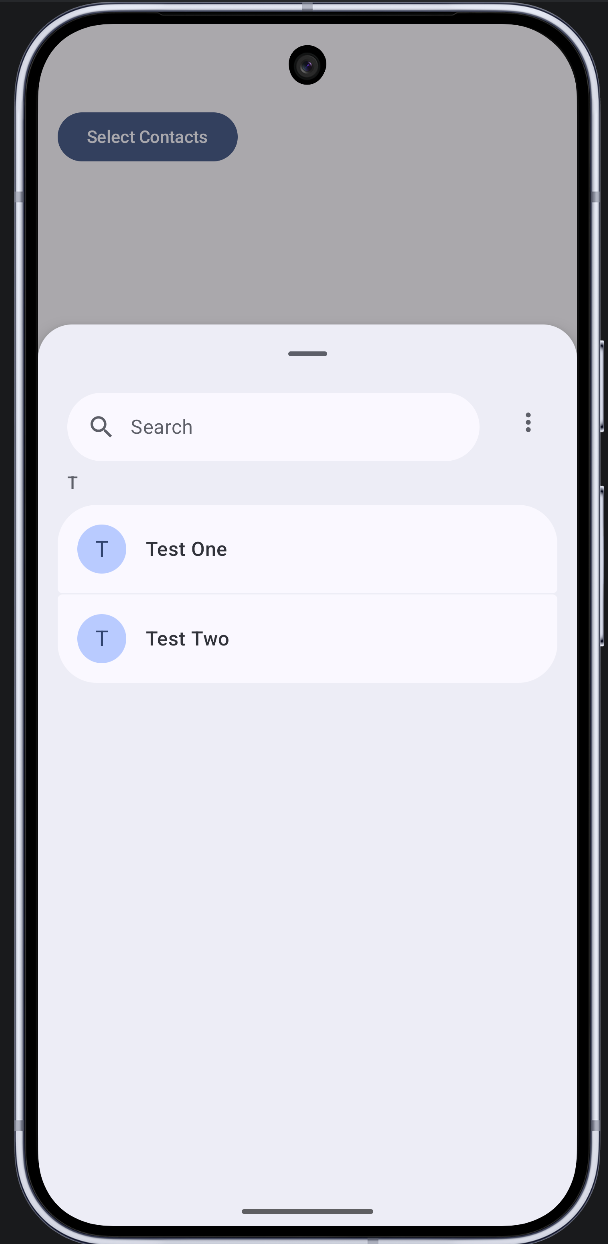

For years, the Android “Contacts” permission has been a point of friction for both developers and users. To pick a single phone number, an app historically required the READ_CONTACTS permission—effectively granting access to a user’s entire social circle.
Android 17 changes the narrative with the System-Mediated Contact Picker. This new API shifts the power back to the user, allowing them to select specific contacts and specific data fields (like just an email or just a phone number) without sharing their entire address book.
Why This Matters: The Privacy Shift
In previous versions, data access was “all or nothing”. With the Android 17 Contact Picker, the system acts as a secure intermediary.
- Granular Consent: Users select exactly which pieces of information an app receives.
- No Permissions Required: Apps do not need to declare or request the READ_CONTACTS permission in the manifest.
- Reduced Liability: Developers no longer have to manage or protect a massive database of user contacts they didn’t actually need.
Technical Deep Dive: How It Works
The new flow utilizes a Session URI. When a user selects contacts, the system generates a temporary URI. Your app uses this URI to query the ContentResolver. Once the session expires or the app process is killed, the access is revoked, ensuring long-term privacy.
Key Intent Actions
To trigger the new UI, Android 17 introduces ContactsPickerSessionContract.ACTION_PICK_CONTACTS. This intent can be customized with several extras:
- EXTRA_PICK_CONTACTS_REQUESTED_DATA_FIELDS: Limits the picker to specific data types (e.g., only show contacts with phone numbers).
- EXTRA_ALLOW_MULTIPLE: A boolean to allow selecting more than one person.
- EXTRA_PICK_CONTACTS_SELECTION_LIMIT: Hard-caps the number of contacts a user can select.
Implementation in Jetpack Compose
Modern Android development demands a reactive UI. Below is a professional implementation using Jetpack Compose, showcasing how to launch the picker and display the results in a LazyColumn.
/* * Professional Implementation: Android 17 Contact Picker
 * Note: This implementation requires Android 17 (API 35+)
 * and specific experimental ContactPickerSessionContract imports.
 */

@Composable
fun ContactPickerScreen(modifier: Modifier) {
    val context = LocalContext.current
    var selectedContacts by remember { mutableStateOf<List<ContactInfo>>(emptyList()) }

    // 1. Initialize the Launcher
    // This handles the result returned from the system contact picker activity.
    val contactPickerLauncher = rememberLauncherForActivityResult(
        contract = ActivityResultContracts.StartActivityForResult()
    ) { result ->
        if (result.resultCode == android.app.Activity.RESULT_OK) {
            val sessionUri = result.data?.data
            if (sessionUri != null) {
                val contacts = mutableListOf<ContactInfo>()

                // We define the specific columns we want to extract from the Session URI
                val projection = arrayOf(
                    ContactsContract.Data.MIMETYPE,
                    ContactsContract.Data.DATA1,
                    ContactsContract.Contacts.DISPLAY_NAME_PRIMARY
                )

                context.contentResolver.query(sessionUri, projection, null, null, null)?.use { cursor ->
                    val dataIdx = cursor.getColumnIndex(ContactsContract.Data.DATA1)
                    val nameIdx = cursor.getColumnIndex(ContactsContract.Contacts.DISPLAY_NAME_PRIMARY)

                    while (cursor.moveToNext()) {
                        val name = cursor.getString(nameIdx) ?: "Unknown"
                        val data = cursor.getString(dataIdx) ?: ""
                        contacts.add(ContactInfo(name, data))
                    }
                }
                selectedContacts = contacts
            }
        }
    }

    // 2. The Launch Logic
    val launchPicker = {
        try {
            val intent = Intent(ContactsPickerSessionContract.ACTION_PICK_CONTACTS).apply {
                // Request only Phone and Email types
                val mimeTypes = arrayListOf(
                    ContactsContract.CommonDataKinds.Phone.CONTENT_ITEM_TYPE,
                    ContactsContract.CommonDataKinds.Email.CONTENT_ITEM_TYPE
                )
                putStringArrayListExtra(
                    ContactsPickerSessionContract.EXTRA_PICK_CONTACTS_REQUESTED_DATA_FIELDS,
                    mimeTypes
                )
                putExtra(Intent.EXTRA_ALLOW_MULTIPLE, true)
                putExtra(ContactsPickerSessionContract.EXTRA_PICK_CONTACTS_SELECTION_LIMIT, 5)
            }
            contactPickerLauncher.launch(intent)
        } catch (e: Exception) {
            android.util.Log.e("ContactPicker", "Targeting error: ${e.message}")
        }
    }

    // 3. The UI Layer
    Column(modifier = modifier.padding(16.dp)) {
        Button(
            onClick = { launchPicker() },
            modifier = Modifier.fillMaxWidth()
        ) {
            Text("Select Contacts (Max 5)")
        }

        Spacer(modifier = Modifier.height(16.dp))

        if (selectedContacts.isNotEmpty()) {
            Text(
                text = "Selection Result:",
                style = MaterialTheme.typography.titleMedium
            )
            LazyColumn {
                items(selectedContacts) { contact ->
                    Column(modifier = Modifier.padding(vertical = 8.dp)) {
                        Text(text = contact.name, style = MaterialTheme.typography.bodyLarge)
                        Text(text = contact.detail, style = MaterialTheme.typography.bodyMedium, color = MaterialTheme.colorScheme.secondary)
                        HorizontalDivider(modifier = Modifier.padding(top = 8.dp))
                    }
                }
            }
        }
    }
}
Critical Considerations for Developers
1. Data Persistence: The sessionUri provided is ephemeral. If your app needs to remember these contacts (e.g., for a “Favorites” list), you must copy the data into your local SQLite or Room database immediately. Once the session ends, the URI will no longer grant access to the ContentResolver.
2. UI Filtering: By providing MIME_TYPES in the intent, the system UI automatically filters out contacts that don’t have that information. This creates a much smoother experience for the user, as they won’t accidentally select a contact that is missing an email address when your app specifically needs one.
The Android 17 Contact Picker is a masterclass in balancing utility and user privacy. By adopting this API, you not only make your app more secure but also build trust with your users by requesting only the data you truly need.
Revolutionizing Privacy: A Deep Dive into the Android 17 Contact Picker was originally published in ProAndroidDev on Medium, where people are continuing the conversation by highlighting and responding to this story.





This Post Has 0 Comments