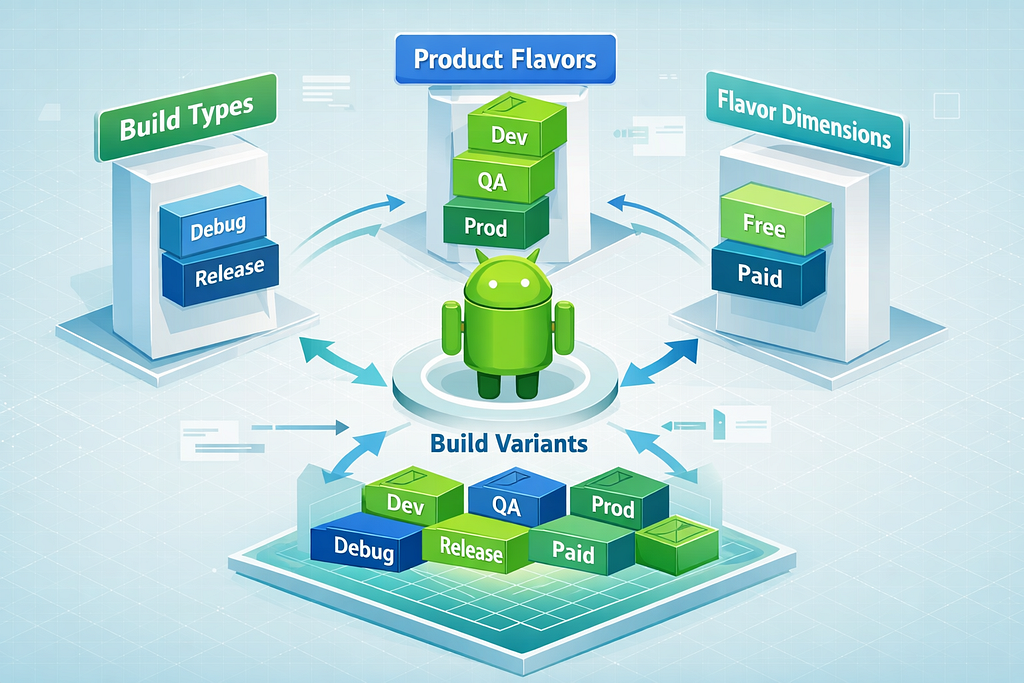

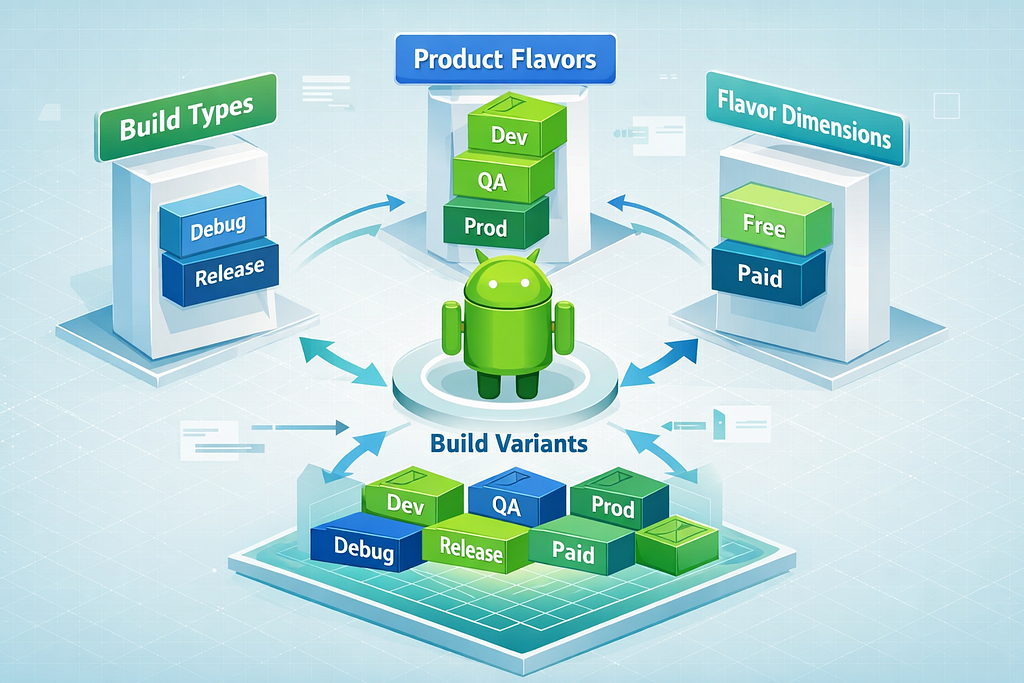
Android’s Gradle build system is extremely powerful — and frequently misunderstood. A common architectural mistake is placing environment logic (Dev, QA, UAT, Prod) inside buildTypes. While this may work initially, it breaks separation of concerns and becomes difficult to scale.
A clean, production-ready setup clearly separates:
- How the app is built → BuildTypes
- What version of the app is built → ProductFlavors
- How variations are grouped → FlavorDimensions
Let’s break this down properly.
BuildTypes — How the App Is Built
buildTypes define technical build behavior, not business environments.
They control aspects like:
- Debuggability
- Code shrinking (R8/Proguard)
- Resource shrinking
- Signing configurations
- Logging, test flags, and performance options
The most common build types are debug and release.
android {
    buildTypes {
        debug {
            isDebuggable = true
            applicationIdSuffix = ".debug"
            versionNameSuffix = "-debug"
        }

release {
            isMinifyEnabled = true
            isShrinkResources = true
            proguardFiles(
                getDefaultProguardFile("proguard-android-optimize.txt"),
                "proguard-rules.pro"
            )
            signingConfig = signingConfigs.getByName("release")
        }
    }
}
Key idea: BuildTypes represent technical packaging modes, not deployment targets.
ProductFlavors — What Version of the App Is Built
productFlavors represent functional or deployment variations of your app.
These typically include:
- Dev / QA / UAT / Prod environments
- Free vs Paid versions
- Region-specific builds
- Client-specific white-label versions
Environment configuration belongs here.
android {
    flavorDimensions += "environment"

productFlavors {
        create("dev") {
            dimension = "environment"
            applicationIdSuffix = ".dev"
            versionNameSuffix = "-dev"
            buildConfigField("String", "BASE_URL", ""https://dev.api.example.com"")
        }
        create("qa") {
            dimension = "environment"
            applicationIdSuffix = ".qa"
            versionNameSuffix = "-qa"
            buildConfigField("String", "BASE_URL", ""https://qa.api.example.com"")
        }
        create("prod") {
            dimension = "environment"
            buildConfigField("String", "BASE_URL", ""https://api.example.com"")
        }
    }
}
Key idea: Flavors model business or deployment differences, not build mechanics.
FlavorDimensions — How Variations Are Grouped
When your app varies in more than one way, you use flavorDimensions to categorize those variations.
For example, your app might vary by:
- Tier → Free vs Paid
- Environment → Dev vs QA vs Prod
android {
    flavorDimensions += listOf("tier", "environment")

productFlavors {
        // Tier dimension
        create("free") { dimension = "tier" }
        create("paid") { dimension = "tier" }
        // Environment dimension
        create("dev") { dimension = "environment" }
        create("qa") { dimension = "environment" }
        create("prod") { dimension = "environment" }
    }
}
Each dimension multiplies the variant combinations in a structured and predictable way.
Using BuildTypes + Flavors + Dimensions Together (Proper Architecture)
A real production setup combines all three, each with a clear responsibility.
android {
    compileSdk = 34defaultConfig {
        applicationId = "com.example.app"
        minSdk = 24
        targetSdk = 34
        versionCode = 1
        versionName = "1.0"
    }
    // BuildTypes → how the app is built
    buildTypes {
        debug {
            isDebuggable = true
            applicationIdSuffix = ".debug"
        }
        release {
            isMinifyEnabled = true
            isShrinkResources = true
            signingConfig = signingConfigs.getByName("release")
        }
    }
    // FlavorDimensions → categories of variation
    flavorDimensions += listOf("tier", "environment")
    // ProductFlavors → what version of the app
    productFlavors {
        // Tier
        create("free") {
            dimension = "tier"
            buildConfigField("Boolean", "ADS_ENABLED", "true")
        }
        create("paid") {
            dimension = "tier"
            buildConfigField("Boolean", "ADS_ENABLED", "false")
        }
        // Environment
        create("dev") {
            dimension = "environment"
            applicationIdSuffix = ".dev"
            buildConfigField("String", "BASE_URL", ""https://dev.api.example.com"")
        }
        create("qa") {
            dimension = "environment"
            applicationIdSuffix = ".qa"
            buildConfigField("String", "BASE_URL", ""https://qa.api.example.com"")
        }
        create("prod") {
            dimension = "environment"
            buildConfigField("String", "BASE_URL", ""https://api.example.com"")
        }
    }
}
In this structure:
- BuildTypes decide debug vs optimized builds
- Tier flavors decide feature set (free vs paid)
- Environment flavors decide backend and deployment targets
Each concern stays isolated and maintainable.
Variant-Specific Code and Resources
Gradle also allows source separation per variant:
- src/dev/java → Dev-only logic
- src/qa/res → QA resources
- src/free/java → Free version code
- src/paid/java → Paid features
- src/debug/java → Debug utilities
- src/release/java → Release-only implementations
Gradle merges these based on the selected variant, giving you precise control without hacks.
Can BuildTypes Be Used for Environments?
Yes — but only technically, not architecturally.
You could define:
buildTypes {
    create("dev") { ... }
    create("qa") { ... }
    create("prod") { ... }
}
However, this approach is discouraged because:
- BuildTypes are meant for build behavior, not environments
- It mixes deployment logic with packaging logic
- It does not scale when you add other variation axes (like free/paid or region)
- Variant combinations become confusing and harder to manage
Flavors provide a cleaner abstraction and scale properly.
Final Architectural Guideline
Use each construct for its intended purpose:
- Use BuildTypes for technical build differences (debuggable vs optimized)
- Use ProductFlavors for environment, client, tier, or regional variations
- Use FlavorDimensions when your app varies across multiple independent categories
When you respect these boundaries, your Gradle configuration remains clean, scalable, and production-ready — even as your app grows across environments, feature tiers, and distribution channels.
Stop Misusing BuildTypes : The Right Way to Use Flavors & Dimensions in Android was originally published in ProAndroidDev on Medium, where people are continuing the conversation by highlighting and responding to this story.




This Post Has 0 Comments