
I love my job because, surprisingly, over the years it keeps becoming more and more non-trivial and engaging. My story of implementing automatic eSIM installation was interesting because it was developed blindly, without any possibility to test the functionality at the time of development. This article will discuss both eSIM itself and my curious story around it.
Core Concepts
Starting from Android 9 (API level 28), it became possible to work with eSIM. This functionality can be implemented either in a Mobile Operator application or as a separate feature inside an existing application that may not be directly related to a Mobile Operator app. No additional permissions are required in the application manifest for this implementation, so there is less reason to worry about the review process on the app store side.
Let us look at the RSP (remote SIM provisioning) architecture.
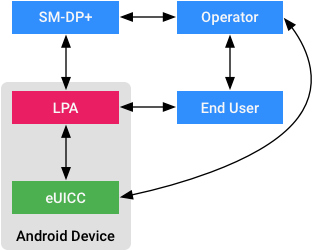
LPA (Local Profile Assistant) is an entity that serves as a universal mechanism for working with eSIM profiles on a device. LPA consists of two components:
- Backend. Works with the eUICC API to manage eSIM on the device
- Frontend. LPA UI or LUI. The visual part of the system for interacting with the user, for example when additional permission or action is required from the user.
LPA interacts with eUICC (embedded Universal Integrated Circuit Card). eUICC allows downloading, storing, and switching eSIM profiles without the presence of a physical SIM card. AOSP does not provide a default LPA implementation, which is exactly why not all phones support working with eSIM. SM-DP+ (Subscription Manager — Data Preparation) is the platform that provides access to eSIM profiles. Operator in the diagram is the mobile operator company that forms eSIM profiles and supplies them to SM-DP+ for secure distribution. The Operator also interacts with the End User for the purpose of selling its products.
I would like to note that it is possible to create your own LPA implementation on a device by creating your own backend (by extending the capabilities of android.service.euicc.EuiccService), as well as implementing your own LUI (by creating your own Activity with a specific set of parameters in intent-filter). In this article I will not talk about this approach, and instead will focus on using the LPA that is already present on the device. Let us start with downloading an eSIM profile onto the device.
Downloading an eSIM Profile
If the device supports eSIM, which can be checked by accessing EuiccManager and its isEnabled property, then you need to obtain an activationCode for downloading the eSIM profile. You can get this code, for example, by making a network request to you backend. ActivationCode consists of two parts: the smdp address and the activation token.
val smdpAddress = "SMDP.GSMA.COM"
val activationToken = "04386-AGYFT-A74Y8-3F815"
val activationCode = "1\$$smdpAddress\$$activationToken"
Next, we prepare the subscription for downloading.
val subscription = DownloadableSubscription.forActivationCode(activationCode)
val intent = EsimInstallerBroadcastReceiver.createStartIntent(context)
val pendingIntent = EsimInstallerBroadcastReceiver.createCallbackIntent(
    context,
    intent,
)
In the code above, I create a pendingIntent in order to receive a callback with the result of the eSIM profile download. Inside EsimInstallerBroadcastReceiver there are the following methods:
const val DOWNLOAD_ACTION = "download_subscription"

fun createStartIntent(context: Context): Intent {
  return Intent(DOWNLOAD_ACTION).setPackage(context.packageName)
}

fun createCallbackIntent(context: Context, startIntent: Intent): PendingIntent {
    return PendingIntent.getBroadcast(
        /* context = */ context,
        /* requestCode = */ 0,
        /* intent = */ startIntent,
        /* flags = */ PendingIntent.FLAG_UPDATE_CURRENT or PendingIntent.FLAG_MUTABLE
     )
}
After that, I can initiate profile downloading through:
val euiccManager = context.getSystemService(EUICC_SERVICE) as EuiccManager
euiccManager.downloadSubscription(
    /* subscription = */ subscription,
    /* switchAfterDownload = */ true,
    /* callbackIntent = */ callbackIntent,
)
For convenience, you can set the switchAfterDownload flag, which allows automatically switching to the installed profile. However, if necessary, you can implement enabling the downloaded profile using a separate method. You can read more about this and other eUICC capabilities in the documentation.
The downloadSubscription method requires android.Manifest.permission.WRITE_EMBEDDED_SUBSCRIPTIONS, or your application must have the rights to manage both the current active profile and the profile that will be downloaded. If these conditions are not met, then EsimInstallerBroadcastReceiver will receive a resultCode in the onRecieve method equal to EuiccManager.EMBEDDED_SUBSCRIPTION_RESULT_RESOLVABLE_ERROR. Let’s now look at how we can solve this “Resolvable error”.
Handling Profile Download Errors
After starting the profile download, the results will arrive in onReceive of our EsimInstallerBroadcastReceiver, and we will need to handle them.
override fun onReceive(context: Context, intent: Intent) {
    when {
        DOWNLOAD_ACTION != intent.action -> return
        resultCode == EuiccManager.EMBEDDED_SUBSCRIPTION_RESULT_OK -> {
            onEmbeddedSubscriptionSucceed()
        }
        resultCode == EuiccManager.EMBEDDED_SUBSCRIPTION_RESULT_RESOLVABLE_ERROR -> {
            onStartResolutionActivity(intent)
        }
        else -> onEmbeddedSubscriptionFailed()
    }
}
In the code above, I call the corresponding callbacks that I pass at the moment of creating EsimInstallerBroadcastReceiver inside the Activity of my feature. In case of success or error, you can show a success screen to the user and finish the feature flow. This event can easily be embedded into any architecture: if you have MVP, call the View, which will pass the event to the Presenter; if you have MVVP, call the view, which will pass the event to the ViewModel; if you have MVI, call the entity responsible for presentation in your architecture and pass the corresponding Wish.
In order to launch the process of resolving errors that can be resolved with the help of the user (that is, the user will be shown one or more dialogs requesting permission for certain actions), we need to once again create a pendingIntent to work with the error resolution result:
val startIntent = EsimErrorResolverBroadcastReceiver.createStartIntent(activity)
val callbackIntent = EsimErrorResolverBroadcastReceiver.createCallbackIntent(
    activity,
    startIntent,
)
Where inside EsimErrorResolverBroadcastReceiver there is:
const val START_RESOLUTION_ACTION = "start_resolution_action"

fun createStartIntent(context: Context): Intent {
    return Intent(START_RESOLUTION_ACTION).setPackage(context.packageName)
}

fun createCallbackIntent(context: Context, startIntent: Intent): PendingIntent {
    return PendingIntent.getBroadcast(
        /* context = */ context,
        /* requestCode = */ 0,
        /* intent = */ startIntent,
        /* flags = */ PendingIntent.FLAG_UPDATE_CURRENT or PendingIntent.FLAG_MUTABLE
    )
}
After that, we can launch the process of resolving resolvable errors:
euiccManager.startResolutionActivity(
    /* activity = */ activity,
    /* requestCode = */ 0,
    /* resultIntent = */ resultIntent,
    /* callbackIntent = */ callbackIntent,
)
It is important to note that resultIntent is the Intent that came to EsimInstallerBroadcastReceiver together with the EMBEDDED_SUBSCRIPTION_RESULT_RESOLVABLE_ERROR error.
After the user finishes interacting with the LUI, the result of the error resolution will arrive in the onRecieve method of our EsimErrorResolverBroadcastReceiver. Inside it, you can place a success or failure callback call.
override fun onReceive(context: Context, intent: Intent) {
    when {
        START_RESOLUTION_ACTION != intent.action -> return
        resultCode == EuiccManager.EMBEDDED_SUBSCRIPTION_RESULT_OK -> onEmbeddedSubscriptionSucceed()
        else -> onEmbeddedSubscriptionFailed()
    }
}
The received intent can be parsed into parameters and sent to the logging system if necessary. You may be interested in parameters such as:
- EXTRA_EMBEDDED_SUBSCRIPTION_ERROR_CODE
- EXTRA_EMBEDDED_SUBSCRIPTION_DETAILED_CODE
- EXTRA_EMBEDDED_SUBSCRIPTION_OPERATION_CODE
- All error params can be found on the documentation page
We have gone from downloading the profile to installing it through user-assisted error resolution. But why still might the profile not be installed?
Granting the Application Rights to Work with Profiles by the Operator
Since the operator has rights only to its own profiles, the system imposes restrictions on access to different profiles. In order for our application to receive rights to install the profile, we must provide the operator with:
- Mandatory. The public key certificate signature (SHA-1 or SHA-256) of our application.
- Optional, but strongly recommended. The application package.
Thus, if SM-DP+ and the profile contain these values, the system will grant our application rights to work with the corresponding eSIM profile.
Support for Multiple Active Profiles
Starting from Android 13 (API level 33), support for MEPs (multiple enabled profiles) appeared. This allows the user to have multiple active eSIM profiles at the same time. This can be important if you work more deeply with eUICC and manage the ports where your profiles will be installed. In my example, however, no additional adaptation for multiple profiles is needed because of the enabled switchAfterDownload parameter when starting the profile download. Thanks to this parameter, I do not need to worry about which port my profile will be installed into, because the system will decide it for me according to the following logic:
- In SS (Single SIM) mode, the profile will be downloaded and installed into the existing single slot (default port 0)
- In DSDS mode, the first available port will be found and the profile will be activated there
- If there are no active ports, the EMBEDDED_SUBSCRIPTION_RESULT_RESOLVABLE_ERROR error will be sent, and when resolving it, the user will be prompted to deactivate an existing profile.
My Story of Implementing Work with eUICC
My facial expression probably matched the moment when I first opened the Dagger2 documentation in my life, but this time I had much more confidence that this was a solvable task, even though it was completely different from ordinary tasks like changing the typography of a headline or assembling JSON for a new Server-Driven screen. The uncertainty remained only in the fact that by the time the feature was ready, the Operator still had not managed to add the necessary signature to its infrastructure, which is why the written functionality was pushed to git without any possibility to test the happy path. This story ended positively and, to my surprise (I was expecting bugs), after the Operator completed their changes, the eSIM was successfully installed for the QA specialist.
References
Integration of Automatic eSIM Installation on Android was originally published in ProAndroidDev on Medium, where people are continuing the conversation by highlighting and responding to this story.




This Post Has 0 Comments