


“If your background logic only works on a Pixel under ideal lab conditions, it is not production-ready.”
Modern Android development requires understanding:
- Doze mode
- App Standby Buckets
- Alarm batching
- Broadcast delivery rules
- Cold starts
- Background execution limits
- Foreground service policies
- OEM-specific process management This is a deep technical guide for Android engineers who want background execution that survives the real world — not just Google reference devices — as of February 2026 (Android 15+ realities included).
1. The Evolution of Android Background Restrictions
Since Android 6.0 Marshmallow, Android has aggressively optimized for battery life. Every major version tightened background behavior.
“What worked in Android 7 will not behave the same in Android 15 or 16.”
Understanding this evolution is not optional — it is architectural.
Major Background Changes by Version
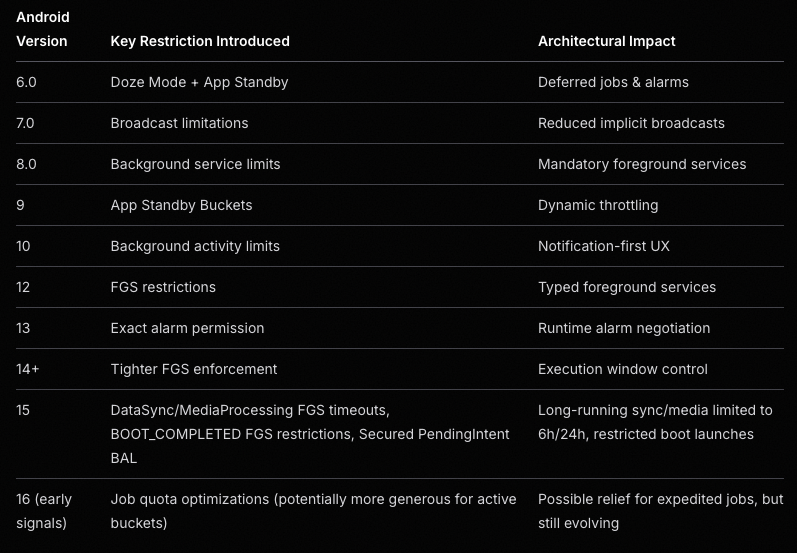
2. Doze Mode Deep Dive
What Is Doze?
When a device is:
- Screen off
- Unplugged
- Stationary Android enters Doze Mode. During Doze:
- Network access is suspended
- Wake locks are ignored
- Jobs are deferred
- Standard alarms are delayed
- Sync adapters are paused Execution only happens during maintenance windows.
“Doze optimizes for battery, not for your SLA.”

Alarm Batching in Doze
Android aggressively batches alarms to reduce wakeups. Battery improves. Timing predictability decreases.
“Exact timing is a best-effort contract — not a guarantee.”
Example: Alarm Batching Behavior
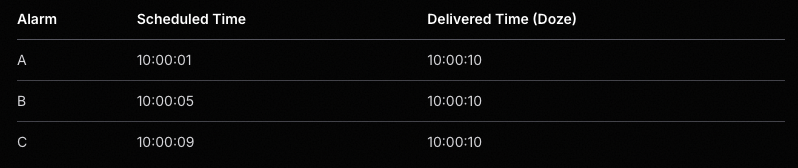
Exact Alarms & Permission Model
Modern Android introduces policy layers on top of API behavior. Even with:
- setExact()
- setExactAndAllowWhileIdle()
- SCHEDULE_EXACT_ALARM You may still experience:
- Throttling
- OEM delays
- Silent degradation
“Exact does not mean guaranteed.”
The Special Case: setAlarmClock() — Highest Reliability Option
For user-facing, time-critical events (alarm clocks, critical reminders), use setAlarmClock():
- Doze exemption: System exits Doze shortly before the alarm fires (strongest guarantee among AlarmManager APIs).
- Status bar clock icon: Shown to indicate impending alarm (improves UX and system trust).
- Priority: Treated as user-intent signal → survives Doze, Restricted bucket, Battery Saver better than other exact alarms.
- Restrictions: Requires SCHEDULE_EXACT_ALARM (Android 13+); Play Store may reject non-justified use (abuse risk high).
- OEM note: Usually most reliable on Xiaomi/Huawei/Realme, but still needs autostart + no battery restriction.
Example: Scheduling an Exact Alarm (including setAlarmClock)
val alarmManager = context.getSystemService(Context.ALARM_SERVICE) as AlarmManager
val intent = Intent(context, AlarmReceiver::class.java)
val pendingIntent = PendingIntent.getBroadcast(
    context,
    1001,
    intent,
    PendingIntent.FLAG_UPDATE_CURRENT or PendingIntent.FLAG_IMMUTABLE
)
// Standard exact (limited in Doze)
alarmManager.setExactAndAllowWhileIdle(
    AlarmManager.RTC_WAKEUP,
    triggerAtMillis,
    pendingIntent
)
// Highest reliability: setAlarmClock (Doze-exempt)
if (Build.VERSION.SDK_INT >= Build.VERSION_CODES.M) {
    val showIntent = Intent(context, AlarmActivity::class.java)
    val showPending = PendingIntent.getActivity(
        context, 0, showIntent,
        PendingIntent.FLAG_UPDATE_CURRENT or PendingIntent.FLAG_IMMUTABLE
    )
    val alarmInfo = AlarmManager.AlarmClockInfo(triggerAtMillis, showPending)
    alarmManager.setAlarmClock(alarmInfo, pendingIntent)
}
3. App Standby Buckets
Android dynamically assigns apps into buckets:
- Active
- Working Set
- Frequent
- Rare
- Restricted The lower the bucket:
- Fewer background executions
- More alarm throttling
- Stricter network limits If your app ends up in Restricted, expect major degradation.
Bucket state is a dynamic system variable — not a constant.
Bucket Behavior Overview
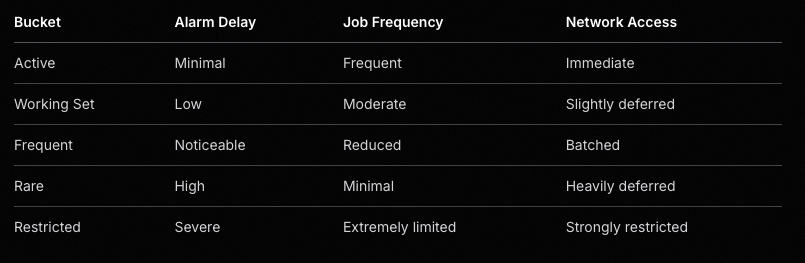
4. Background Execution Limits (Android 8+)
Since Android 8.0:
- Background services cannot run freely
- Apps must use controlled execution channels Foreground Service ≠ immunity.
“Foreground service is a privilege, not a loophole.”
Background Execution Options
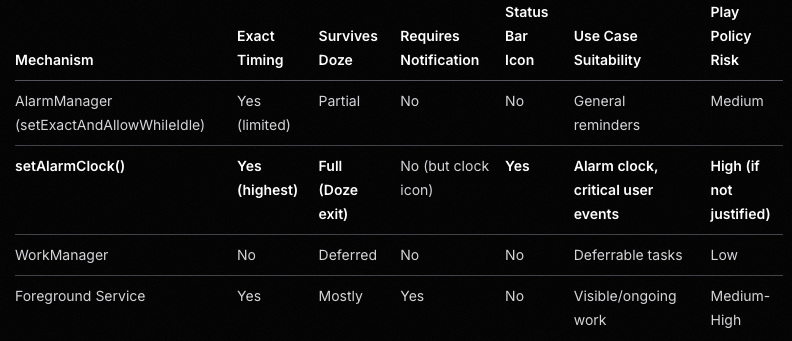
Android 15+ Foreground Service Enforcement
- New mediaProcessing type (transcoding, etc.)
- dataSync & mediaProcessing: 6-hour total limit per 24 hours (apps targeting 15+)
- After limit: onTimeout() called → must stopSelf() quickly or crash
- BOOT_COMPLETED cannot launch: dataSync, camera, mediaPlayback, phoneCall, mediaProjection, etc. → throws exception
- SYSTEM_ALERT_WINDOW apps: Background FGS only if visible overlay present
FGS is a controlled execution channel — not background freedom.
5. Broadcast Delivery Changes
Modern Android:
- Blocks many implicit broadcasts
- Requires dynamic registration
- May delay delivery during Doze
Broadcast delivery is opportunistic under battery pressure. Working on a Pixel does not validate OEM behavior.
Example: Lightweight BroadcastReceiver
class AlarmReceiver : BroadcastReceiver() {
    override fun onReceive(context: Context, intent: Intent) {
        // Keep minimal work here
        val serviceIntent = Intent(context, AlarmService::class.java)
        ContextCompat.startForegroundService(context, serviceIntent)
    }
}
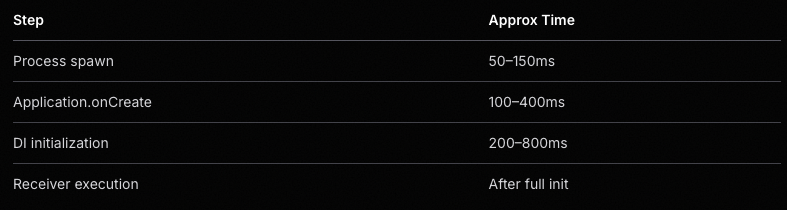
6. Cold Start & Process Death
Modern Android aggressively kills background processes. When an alarm or broadcast fires:
- Your process may not exist
- System performs a cold start
- Application is recreated
- Dependency graph is rebuilt Cold start cost:
- 100–400ms typical
- 1s+ on low-end devices
- Worse on heavily customized OEM ROMs
Hidden Cost: Dependency Graph Initialization
Heavy initialization may add 300–800ms before alarm logic runs.
“Every alarm should be designed as if it will run from a cold start.”
Cold Start Timeline Example
7. Background Activity Launch Restrictions (Android 10+)
Since Android 10: Apps cannot freely call startActivity() from the background. Otherwise it may:
- Fail silently
- Be blocked
- Work on Pixel but fail on OEM devices
Android 15+: PendingIntents default to no background activity launch (opt-in required via explicit flag).
“If the user didn’t initiate it, the system may block it.”
8. Real-World Scenarios
Scenario 1 — Alarm App
Naive implementation: AlarmManager → BroadcastReceiver → startActivity() Works: Pixel
Fails: Xiaomi, Huawei, Restricted bucket
Reliable pattern: Exact Alarm / setAlarmClock()
→ Lightweight Receiver
→ High-priority notification (full-screen intent)
→ Activity
→ Optional short-lived FGS
“User-visible work is trusted. Invisible background work is expendable.”
Scenario 2 — Reminder App
WorkManager is battery-friendly.
It is not precision-friendly. If exact timing matters:
- Use exact alarm / setAlarmClock()
- Request proper permission
- Test on OEM devices
Precision is a spectrum, not binary.
Scenario 3 — Messaging App
Background polling:
- Fails under Doze
- Fails in Restricted bucket Correct approach:
- FCM high-priority push
- Controlled foreground work
Push beats polling in power-constrained systems.
9. OEM-Specific Background Killers
Google documentation is necessary. It is not sufficient. OEMs implement:
- Custom task killers
- Aggressive battery optimizers
- Autostart restrictions
- Background process freezing Common behaviors:
- Killing Foreground Services
- Blocking BOOT_COMPLETED
- Ignoring exact alarms (less so for setAlarmClock)
- Delaying broadcasts
“Production Android ≠ Google Android.”
10. There Is No Silver Bullet
AlarmManager, WorkManager, Foreground Service — Each solves a different constraint set.
“Background execution is a systems problem, not an API selection problem.”
11. Permissions: The Hidden Layer
Modern reliability depends on explicit permissions:
- SCHEDULE_EXACT_ALARM (Android 13+; default denied on new installs)
- POST_NOTIFICATIONS
- FOREGROUND_SERVICE + type-specific (e.g., FOREGROUND_SERVICE_MEDIA_PROCESSING)
- REQUEST_IGNORE_BATTERY_OPTIMIZATIONS Without them:
- Alarms may degrade
- Notifications may fail
- FGS may crash
Permissions are architectural decisions — not implementation details.
12. Architecture Principles for Real Devices
Design assuming:
- Process death
- Alarm delay
- Broadcast batching
- OEM interference Best practices:
- Keep receivers lightweight
- Make tasks idempotent
- Avoid heavy logic in BroadcastReceiver
- Use notification-based user interaction
- Defer heavy work to controlled components
“Design for degradation, not perfection.”
13. Exact Alarm Nuances (Android 13–15+)
Exact alarms are now a negotiation between:
- API
- Permission
- Policy
- User state Important realities:
- Users can revoke privileges
- Play policy restricts abuse (declaration required)
- OEMs may still throttle If revoked:
- Behavior may silently degrade
“Silent degradation is more dangerous than a crash.”
14. Foreground Service Enforcement
Foreground Services now require:
- Declared foregroundServiceType
- Runtime alignment
- Respect for timeouts (Android 15+: dataSync/mediaProcessing → 6h/24h limit) Incorrect usage may cause:
- Immediate crash
- Background start denial
FGS is a controlled execution channel — not background freedom.
15. Alarm Delivery Is Influenced By…
Alarm timing depends on:
- Standby bucket
- Battery saver
- Thermal throttling
- OEM task managers
- User interaction frequency
- Notification history
Precision is conditional.
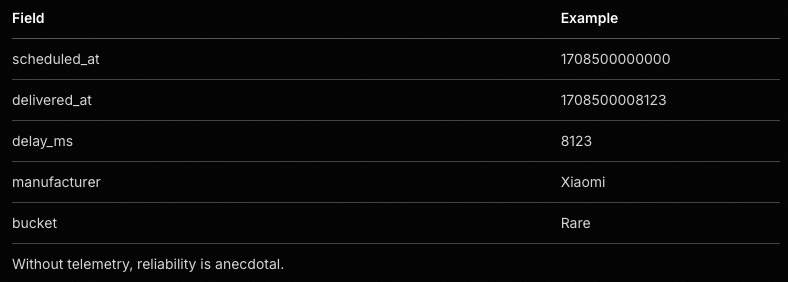
16. Telemetry: Measuring Reality
“If you are not measuring alarm delay, you are guessing.” Log:
- Scheduled trigger time
- Actual trigger time
- Device manufacturer
- Android version
- Bucket state
- Permission state Core metric:
delivery_delay_ms = actual_trigger - scheduled_trigger
Track:
- Mean delay
- P95 delay
- OEM variance Example telemetry record:
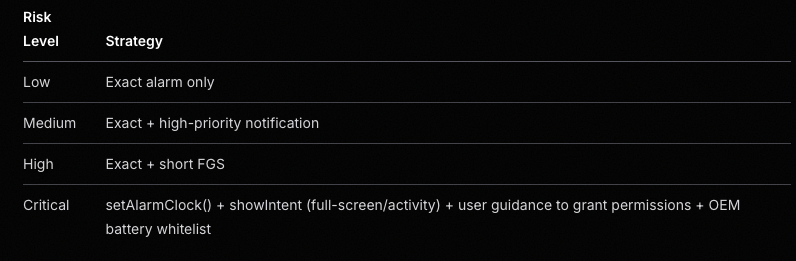
17. Adaptive Execution Strategy
Static strategies fail. Adapt based on:
- Bucket state
- Battery saver
- OEM behavior
- Permission availability
Reliability should be conditional, not rigid.
Example Strategy Matrix
18. Notification as Reliability Anchor
High-priority notifications:
- Improve execution likelihood
- Enable full-screen intents
- Justify foreground services
“User-visible value increases system tolerance.”
19. Idempotency & Reentrancy
Your logic must tolerate:
- Duplicate triggers
- Delayed triggers
- Out-of-order execution
- Missed triggers
Idempotency is mandatory in hostile execution environments.
Example guard pattern:
if (eventRepository.isAlreadyHandled(eventId)) {
    return
}
eventRepository.markHandled(eventId)
processEvent()
20. Recovery Mechanisms
If an alarm never fires:
- Detect missed events
- Reconcile expected vs actual state
- Backfill if necessary
Reliability includes recovery.
21. Testing Beyond the Emulator
Test on:
- Real OEM devices
- Battery saver ON
- Low battery
- Restricted bucket
- Revoked exact alarm permission
- Android 15+ timeout simulation (adb compat enables)
“If you only test on a plugged-in Pixel, you are not testing reality.”
Final Thoughts
Modern Android background execution is a negotiation between:
- Battery optimization
- User experience
- OEM customization
- Play policy
- App architecture Your code runs:
- On a Xiaomi
- In power-saving mode
- At 3% battery
- With the screen off Not on a plugged-in Pixel on your desk.
“Background reliability today is a systems engineering problem — not an API usage problem.”
And that reality only becomes obvious once you ship to production.
A Note From Real-World Experience
After shipping background-dependent features across multiple OEM ecosystems, one truth becomes clear:
“Background execution does not fail loudly. It degrades silently.”
- Alarms don’t always crash.
- Services don’t always throw exceptions.
- Broadcasts don’t always log errors. They simply arrive late. Or not at all. And unless you:
- Measure delivery delay
- Monitor bucket transitions
- Test under hostile conditions You may never notice the problem — until users do.
Battery is the system’s priority. User-visible value is your priority. Production-grade background architecture exists at the intersection of those two forces.
© ytapps — 2026
Beyond Doze: Building Reliable Background Execution on Modern Android (Including OEM Realities) was originally published in ProAndroidDev on Medium, where people are continuing the conversation by highlighting and responding to this story.


This Post Has 0 Comments