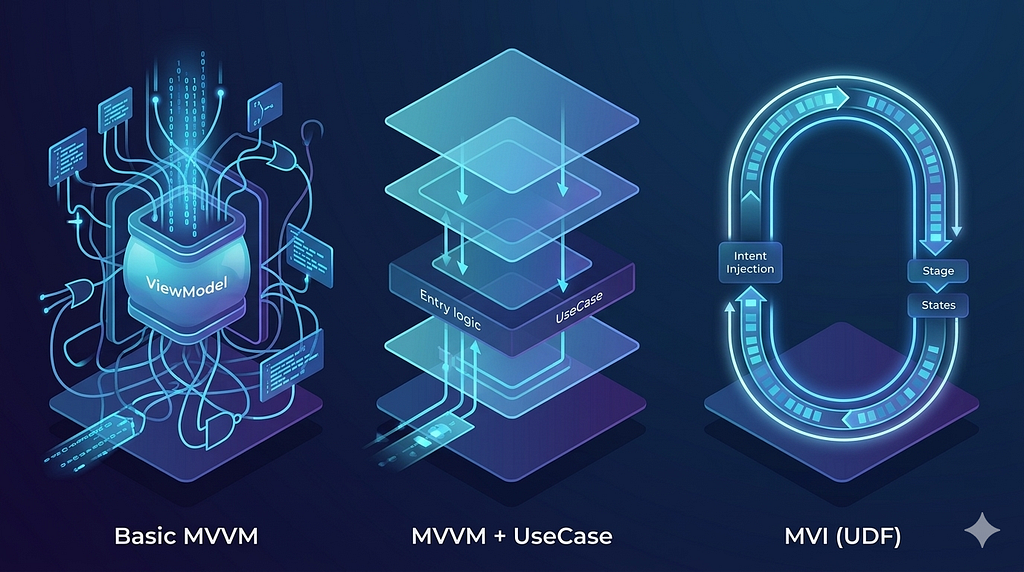

Tired of ViewModels that are over 1,000 lines long? This article details how to migrate to MVI, a clean, predictable, and testable approach.
Let’s be real — architecture in Android isn’t a “set it and forget it” kind of thing. We’ve all been there: you start a project with a clean MVVM structure, everything feels light, and you’re moving fast. But then, as the Jira tickets pile up, your once-elegant ViewModel starts ballooning into a 1,000-line monster. We call this the Fat ViewModel trap.
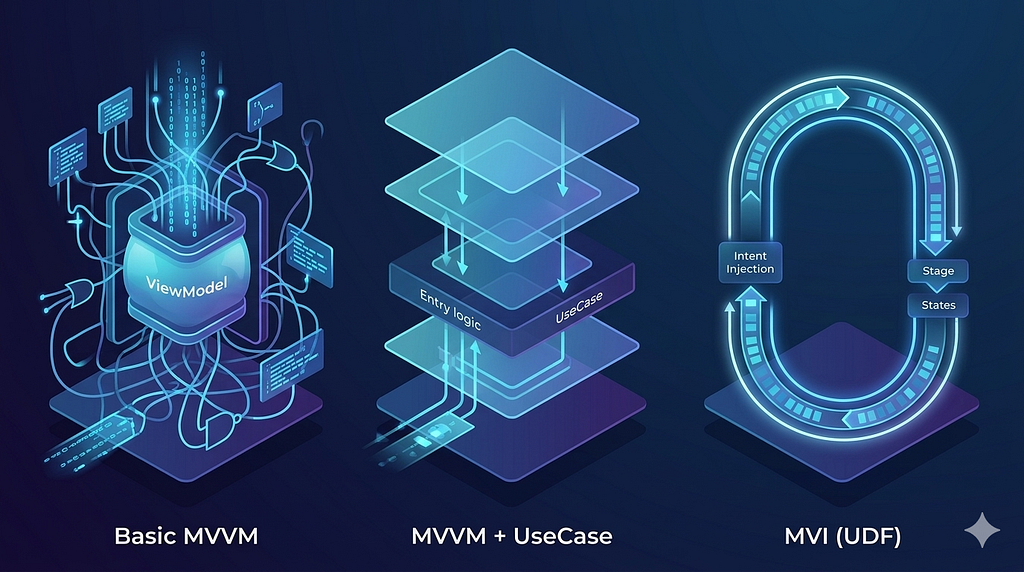
The truth is, architecture needs to breathe and grow with your app. Looking at the diagrams we often see in documentation, there’s a clear path of evolution: starting with Standard MVVM, moving toward Domain-driven UseCases, and finally landing on the rock-solid predictability of MVI (Model-View-Intent).
Here’s a breakdown of how these transitions actually look in the trenches, and why I’ve personally stopped settling for just “standard” MVVM.
1. Starting point: Basic MVVM
Standard MVVM is the industry bread-and-butter for a reason: it’s easy to wrap your head around. You’ve got a View that observes a ViewModel, which in turn talks to a Repository. Simple.
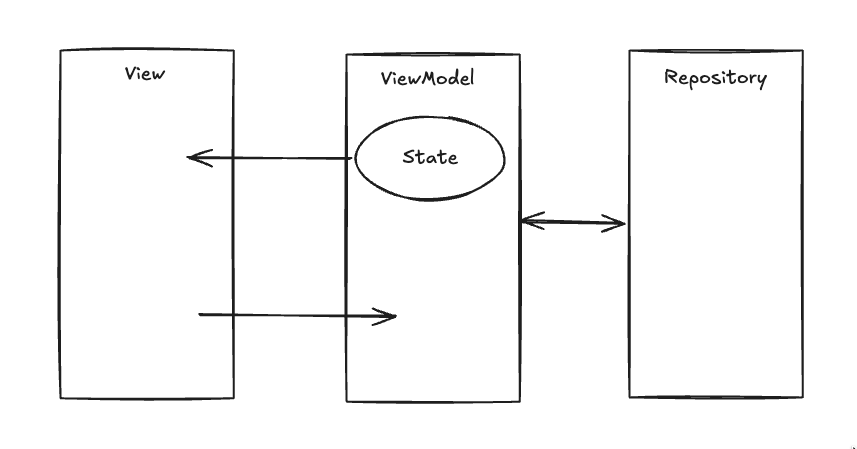
The Real-World Struggle
In the beginning, it’s great for speed. But the moment you need to format a string for the UI, or combine three different API calls, that logic usually ends up leaking into the ViewModel. Suddenly, your ViewModel isn’t just managing UI state — it’s doing heavy lifting that it shouldn’t be doing.
// --- ViewModel ---
class UserViewModel(private val repository: UserRepository) : ViewModel() {
    private val _userState = MutableStateFlow<User?>(null)
    val userState = _userState.asStateFlow()

    fun fetchUser(id: String) = viewModelScope.launch {
        _userState.value = repository.getUser(id)
    }
}
// --- View ---
@Composable
fun UserScreen(viewModel: UserViewModel) {
    val user by viewModel.userState.collectAsState()

    Column(modifier = Modifier.padding(16.dp)) {
        Text(text = "User: ${user?.name ?: "Loading..."}")
        Button(onClick = { viewModel.fetchUser("123") }) {
            Text("Refresh")
        }
    }
}
2. The Turning Point: Introducing UseCases
When your ViewModel starts feeling heavy, that’s your cue to introduce a Domain Layer. This is where UseCases come in to save your sanity.
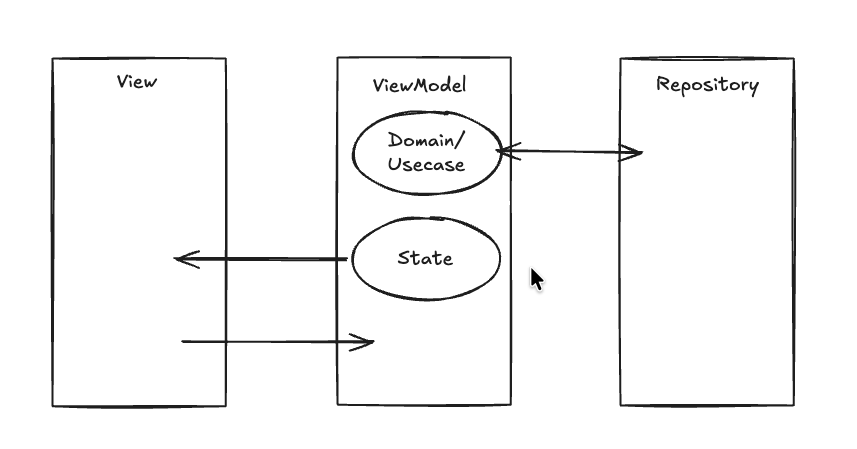
Why this changes the game
Instead of the ViewModel knowing how to fetch and format data, it just asks a UseCase to do it. The ViewModel becomes a clean orchestrator. This is a massive win for testing because your business logic is now just a pure Kotlin class, completely decoupled from the Android lifecycle.
// --- UseCase (Domain Layer) ---
class GetFormattedUserUseCase(private val repository: UserRepository) {
    suspend operator fun invoke(id: String): String {
        val user = repository.getUser(id)
        // Transformation logic stays here, not in the ViewModel
        return "User: ${user.name.uppercase()} (ID: ${user.id})"
    }
}
// --- ViewModel ---
class ProfileViewModel(private val getUserUseCase: GetFormattedUserUseCase) : ViewModel() {
    private val _displayName = MutableStateFlow("")
    val displayName = _displayName.asStateFlow()

    fun load(id: String) = viewModelScope.launch {
        _displayName.value = getUserUseCase(id)
    }
}
// --- View ---
@Composable
fun ProfileScreen(viewModel: ProfileViewModel) {
    val name by viewModel.displayName.collectAsState()

    Box(contentAlignment = Alignment.Center) {
        Text(text = name.ifEmpty { "No Profile Loaded" })
        Button(onClick = { viewModel.load("456") }) {
            Text("Load Profile")
        }
    }
}
3. The Pro Move: Transitioning to MVI
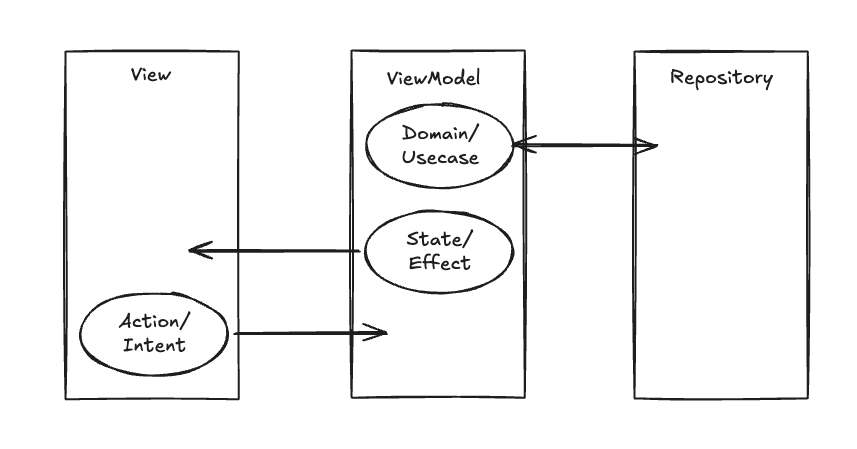
If you’re working with Jetpack Compose, MVI feels like the missing piece of the puzzle. It takes the idea of “state” and makes it incredibly strict through Unidirectional Data Flow (UDF).
Predictability Over Everything
In MVI, the UI doesn’t just call random functions. It fires Intents. The ViewModel then processes these and spits out a new, immutable State. This means no more “race conditions” where two different functions update the UI state at the same time and leave your screen in a weird half-loaded limbo.
// --- State & Intent Definitions ---
data class MainState(
    val isLoading: Boolean = false,
    val data: String = ""
)

sealed interface MainIntent {
    data class ClickFetch(val id: String) : MainIntent
}
// --- ViewModel ---
class MviViewModel(private val useCase: GetFormattedUserUseCase) : ViewModel() {
    private val _state = MutableStateFlow(MainState())
    val state = _state.asStateFlow()

    // Everything goes through this one door
    fun handleIntent(intent: MainIntent) {
        when (intent) {
            is MainIntent.ClickFetch -> fetchData(intent.id)
        }
    }

    private fun fetchData(id: String) = viewModelScope.launch {
        _state.value = _state.value.copy(isLoading = true)
        val result = useCase(id)
        _state.value = _state.value.copy(isLoading = false, data = result)
    }
}
// --- View (The UDF Way) ---
@Composable
fun MviScreen(viewModel: MviViewModel) {
    val state by viewModel.state.collectAsState()

    Column {
        if (state.isLoading) LinearProgressIndicator()

        Text(text = state.data.ifEmpty { "Ready to fetch" })

        // View only sends "Intents"
        Button(onClick = { viewModel.handleIntent(MainIntent.ClickFetch("789")) }) {
            Text("Execute Intent")
        }
    }
}
The Verdict: Which one wins?
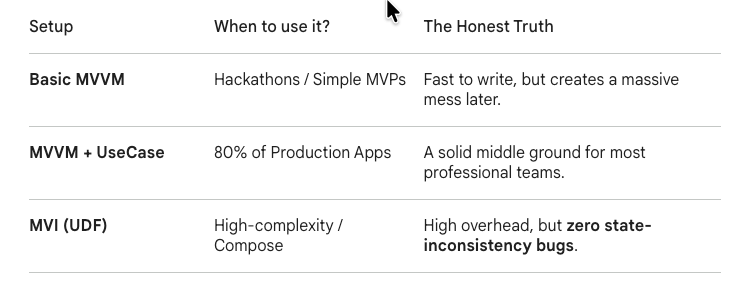
My Take: Why MVI is my favorite
To be honest, I’ve become an MVI convert.
Why? Because of Peace of Mind.
In standard MVVM, you’re always one “copy-paste error” away from a state inconsistency bug. You might have five different functions updating the same StateFlow, and tracing which one caused a bug is a headache.
MVI forces you to be intentional. Yes, it’s more code up front. Yes, you have to define sealed classes for every little action. But when you’re debugging a complex screen at 4 PM on a Friday, knowing that your data only flows in one direction is a lifesaver. It makes your UI deterministic. Given a specific State and a specific Intent, you know exactly what’s going to happen next.
Final Thoughts
Don’t over-engineer from day one. If you’re building a simple CRUD app, MVI might be overkill. But keep an eye on your ViewModels. The moment they start feeling “fat,” don’t just keep adding code — start evolving your architecture. Your future self will thank you for the extra boilerplate.
Beyond Hype: The Evolving Android Architecture from Fat View Model to MVI was originally published in ProAndroidDev on Medium, where people are continuing the conversation by highlighting and responding to this story.



This Post Has 0 Comments