
If you’re an Android developer using AI coding agents like Claude Code or Cursor, there’s a good chance your machine is slower than it should be right now.
The problem
AI agents trigger Gradle builds constantly. If your setup isn’t perfectly consistent across projects — different Gradle wrapper versions, different JDK versions — daemons don’t get reused. They pile up. Kotlin compilation daemons do the same.
No warnings, nothing crashes. Your machine just gets slower throughout the day. You blame Chrome, you blame Android Studio, you restart, and the cycle repeats.
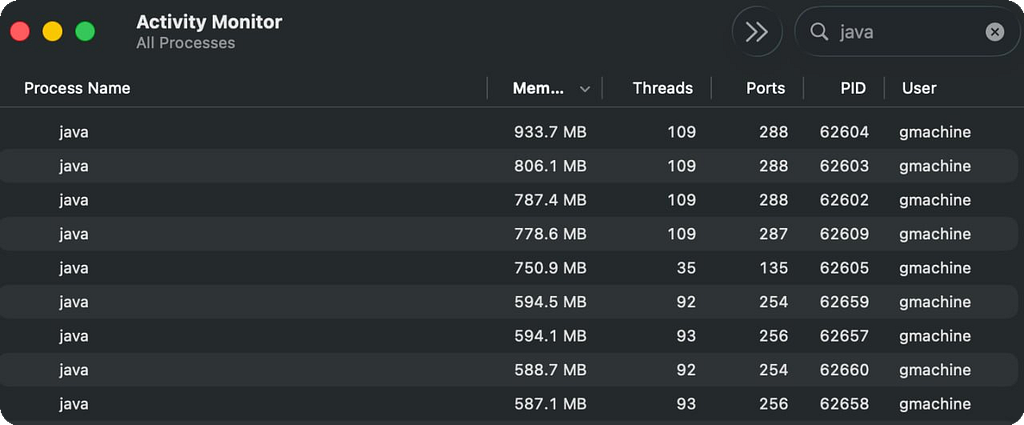
Here’s what my Activity Monitor looks like after a few hours of AI-assisted Android development across different projects:
A bunch of java processes sitting idle, eating over 7 GB of RAM combined. Gradle daemons, Kotlin compilation daemons — just waiting for a build that probably won’t come.
What I built
Java Daemon Watcher — a small macOS app that detects idle Gradle and Kotlin daemons and kills them automatically. It uses jps and CPU sampling to find idle daemons, kills them after a configurable timeout. Allowlist-based — never touches your IDE.
Saves me around 100GB of RAM per week.

How it works
The app runs a simple three-step pipeline on a configurable interval:
1. Discovery. It runs jps -lm (bundled with every JDK) to list all running Java processes with their main class names.
2. Filtering. It matches processes against an allowlist of known daemon classes:
- org.gradle.launcher.daemon.bootstrap.GradleDaemon
- org.jetbrains.kotlin.daemon.KotlinCompileDaemon
Everything else — your IDE, app servers, any other Java process — is never touched.
3. Idle detection + cleanup. For each daemon, the app samples CPU usage. If a daemon stays idle longer than the configured threshold, it gets a SIGTERM — the same graceful shutdown signal gradle –stop uses.
App Configuration
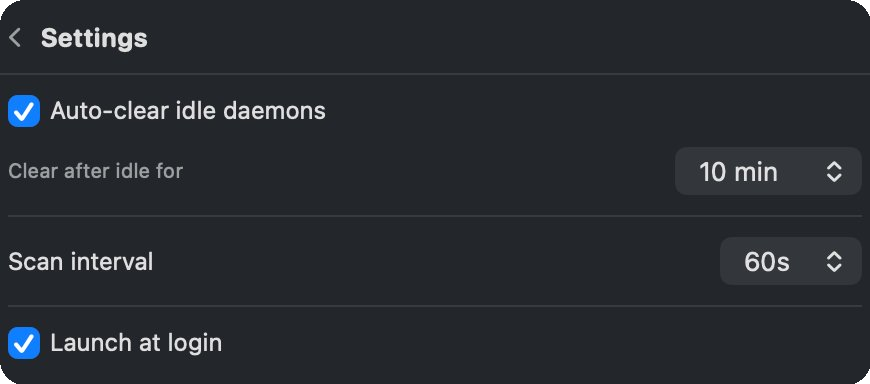
You can set the idle timeout, scan interval, and enable auto-start at login:
Open source
MIT licensed: github.com/grishaster80/java-daemon-watcher
If you try it, I’d love to hear feedback — issues, feature requests, or just a star if it helped.
Have you noticed this problem on your machine? If you try the tool — how much RAM did it save you? Would love to hear your numbers!
AI Coding Agents Are Silently Eating Your RAM If You Do Android Development was originally published in ProAndroidDev on Medium, where people are continuing the conversation by highlighting and responding to this story.



This Post Has 0 Comments