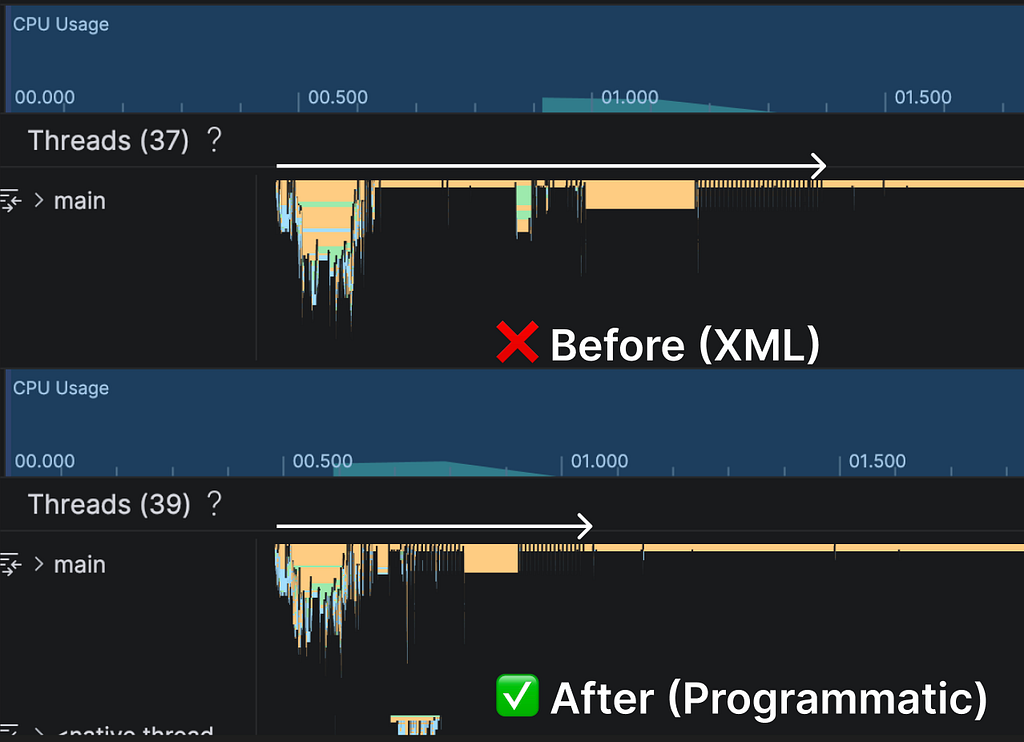

We had a delay(300) hiding a real initialization problem. Here’s what was actually happening — and the fix that made it disappear.
Our Android app loads a heavy, interactive SVG inside a WebView — think thousands of path elements, JavaScript interactivity, the works. The problem was that adding the SVG content into the WebView would cause a noticeable lag. Not a crash, not an ANR, just… a stutter. The kind of thing that makes an app feel cheap.
The workaround someone had added before?
delay(300)
// then load SVG into WebView
webView.loadDataWithBaseURL(null, svgHtml, "text/html", "UTF-8", null)
webView.visibility = View.VISIBLE
A 300ms artificial delay before loading the content, just to give the WebView time to “settle in” after inflation. Classic band-aid.
After digging in, the root cause was surprising: a single <WebView> tag in the XML layout.
What was actually happening
Here’s what the layout looked like:
<WebView
    android:id="@+id/web_view"
    android:layout_width="match_parent"
    android:layout_height="0dp"
    android:visibility="invisible"
    ... />
Looks harmless, right?
The issue is that when Android inflates this XML, it creates the WebView immediately — before the Fragment even hits onViewCreated().
And WebView isn’t just another TextView.
Under the hood it’s spinning up a Chromium renderer, allocating native memory, setting up IPC channels. On a older phone, that’s easily 100–200ms of work.
If you try to load heavy SVG content into a WebView that’s still initializing internally, the two operations compete for resources — and the result is a visible lag. That’s why the delay(300) “worked”: it was giving the WebView enough breathing room to finish setting up before throwing a complex SVG at it.
But a hardcoded delay is fragile. Too short on a slow device — lag is still there. Too long on a fast device — the user is staring at a blank screen for no reason.
The fix that actually worked
Replace the <WebView> in XML with an empty <FrameLayout>:
<FrameLayout
    android:id="@+id/web_view_container"
    android:layout_width="match_parent"
    android:layout_height="0dp"
    android:visibility="gone"
    ... />
Then create the WebView programmatically and load the content right away:
override fun onViewCreated(view: View, savedInstanceState: Bundle?) {
    super.onViewCreated(view, savedInstanceState)

    webView = WebView(requireContext().applicationContext).apply {
        layoutParams = ViewGroup.LayoutParams(MATCH_PARENT, MATCH_PARENT)
    }
    binding.webViewContainer.addView(webView)

    webView.apply {
        settings.javaScriptEnabled = true
        webViewClient = MyWebViewClient()
        loadUrl("file:///android_asset/big_svg.svg")
    }
}
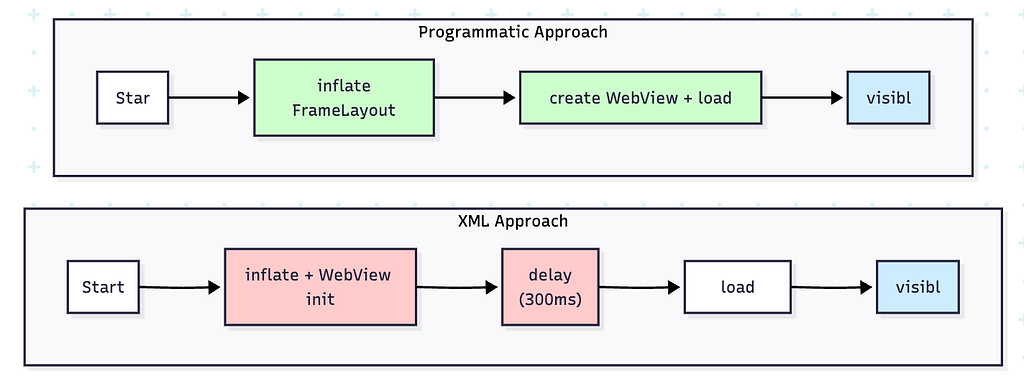
The key difference is when initialization happens relative to content loading.
When WebView lives in XML, Android inflates it eagerly — during layout inflation, before your Fragment even reaches onViewCreated(). If you immediately throw heavy SVG content at it, you’re racing against Chromium’s internal setup: renderer threads, native memory allocation, IPC channels. On a slower device, that race produces visible jank.
When you create WebView programmatically inside onViewCreated(), you control the timing explicitly. The WebView initializes, gets added to the hierarchy via addView(), and then you load content — sequentially, not in parallel. No artificial delay needed because there’s no race condition to paper over.
And don’t forget to clean up — remove the WebView from the container before destroying it:
override fun onDestroyView() {
    binding.webViewContainer.removeView(webView)
    webView.destroy()
    super.onDestroyView()
}
Why this matters more than you’d think
While working on this, a few other things became obvious about why the XML approach was problematic.
The memory leak thing. When a WebView sits in the XML layout, it’s tied to the Fragment’s context through the view hierarchy. If some JavaScript callback or pending request keeps it alive past onDestroyView(), the whole view tree leaks with it. That removeView → destroy pattern above is specifically to avoid this.
Also — and this one bit us in a different context — XML inflation uses the Activity’s context. So the WebView holds a strong reference to the Activity. We’re building an SDK, so we don’t control the host app’s lifecycle. Using requireContext().applicationContext when creating the WebView programmatically breaks that reference. Probably doesn’t matter if you’re building a regular app, but for SDK work it’s kind of essential.
And then there’s the obvious one: sometimes you don’t even know if you need the WebView yet. Config might not be loaded, user might not have permissions. With XML you pay the full cost upfront no matter what.
So when should you still use XML?
Honestly? For simple stuff.
If the WebView is showing a privacy policy or a help page — something lightweight where 200ms of inflation time doesn’t matter — XML is fine. Less code, easier to read, visible in the layout preview.
But the moment heavy content, complex layouts, SDK work, or that lag on content load comes into play — switch to programmatic.
It’s maybe 5 extra lines of Kotlin, and it solves problems you didn’t even know you had.
A <FrameLayout> replacing a delay(300) isn’t the kind of fix you’d put on a resume. But it’s the kind that makes you actually understand what WebView is doing underneath — and why timing matters more than most Android developers realize.
If you’re loading anything heavier than a static page, programmatic initialization isn’t a premature optimization. It’s just the right default.
Stop Inflating WebViews in XML: A Performance Fix for Heavy Content was originally published in ProAndroidDev on Medium, where people are continuing the conversation by highlighting and responding to this story.



This Post Has 0 Comments