


In Jetpack Compose development, you are probably rebuilding your app tens of times per day to adjust the subtle design specifications. Each rebuild takes anywhere from 1 min to several minutes (~30 mins depending on your project scale), followed by navigating back to the screen you were working on and reconstructing the state you just lost for fair self-testing.
Let’s be honest. That adds up to one to two hours of dead time per day, every day, spent waiting instead of iterating. Well, for some, it’s the perfect coffee break. For others, it’s a frustrating blocker that slows everything down. That’s exactly the problem Compose HotSwan is built to solve.
Compose HotSwan is a JetBrains IDE plugin for Android Studio/IntelliJ and a Gradle compiler plugin that performs Jetpack Compose hot reload on real physical Android devices/emulators, applying code changes to a running app in one to three seconds with full state preservation as possible.
In this article, you will explore what you can do with Compose HotSwan, the engineering constraints that make hot reload on Android difficult, how Compose HotSwan works within those constraints, and its core capabilities.
The build tax: What slow feedback actually costs you
Every Android developer knows the routine. You tweak a modifier, hit run, and wait. The build compiles, dexes, installs, and restarts your app. It launches from the home screen. You tap through multiple screens, scroll to the right position, and recreate the state just to see a one-line change.
This is not just an inconvenience. It changes how you make decisions, and the cost compounds throughout your day.
Picture this. You are working on a screen buried several layers deep. Everything is set up exactly where you need it. You change fontSize = 16.sp to 18.sp. Gradle starts building. On a small project, it takes a minute. On a large codebase, it takes much longer. The app reinstalls and restarts from the “home screen”.
All your state is gone. Now you navigate back again. Load the data again. Scroll to the same spot again. And when you finally get there, you cannot remember what the previous state looked like. The context you built up is gone after a single build cycle.
Now you do it all over again. And by the time you get back, you have already forgotten what you were comparing.

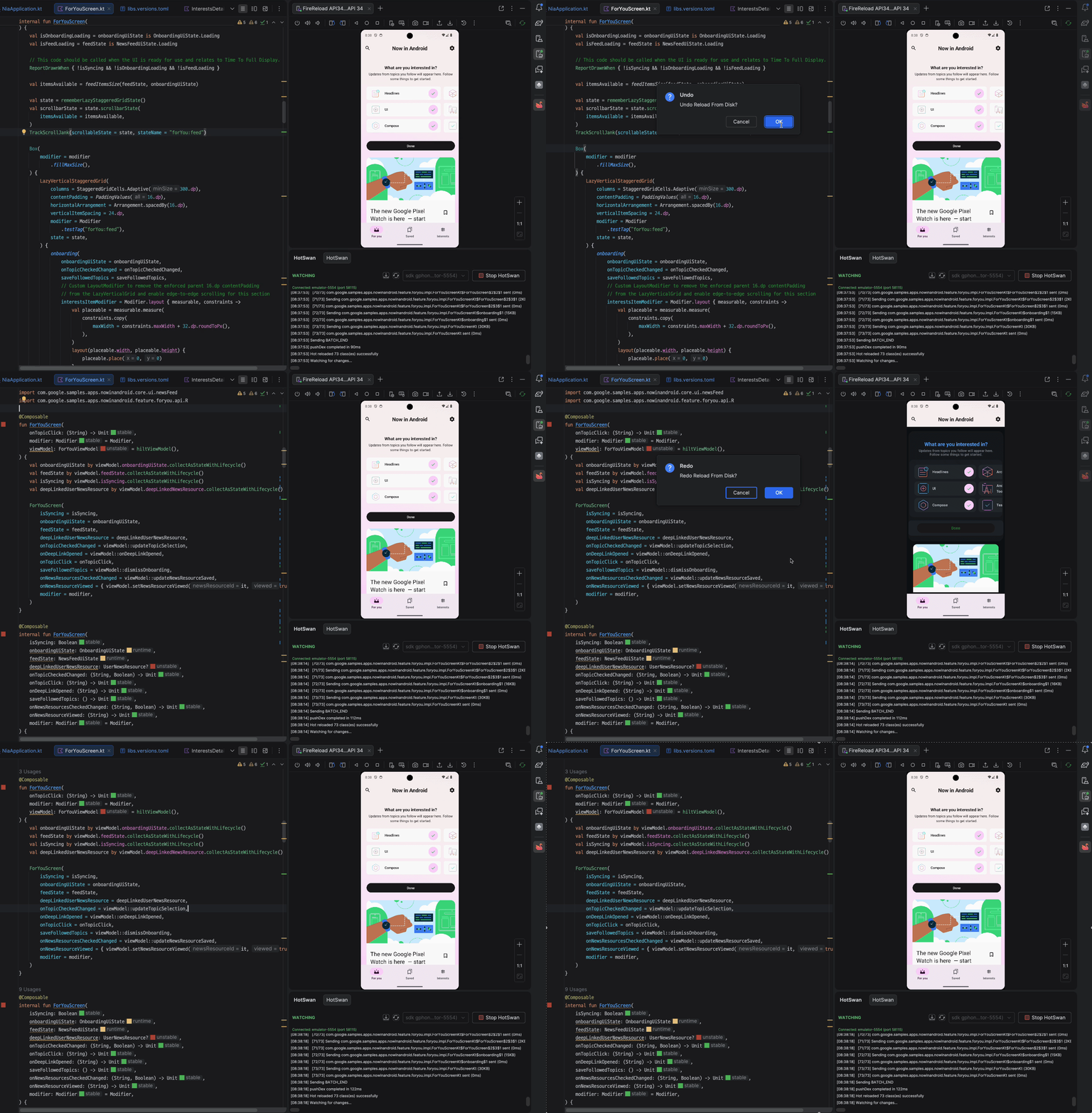
With hot reload, this entire loop collapses. You change a value, save the file, and see the result on your device in ~1 second, with the same screen, the same state, and the same scroll position still in place. The video below shows this in practice: modifying composable code and watching the running app update in real time without a rebuild or restart.
When you save a file, it compiles only the changed code via Gradle’s incremental build, extracts the modified classes from the resulting DEX, transfers them to the device, and swaps them directly in ART’s memory using a native agent. It then triggers a scoped recomposition that invalidates only the affected composable scopes while preserving the slot table structures and all embedded state.
It sounds like a compelling shift in how you build with Compose, right? But on Android, this is fundamentally harder due to ART’s strict runtime constraints, which make class swapping far more restrictive than on other platforms. The engineering behind Compose HotSwan is covered later in this article.
Installation and setup
Getting Compose HotSwan running takes three primary steps: install the IDE plugin, apply the Gradle plugin, and sync.
Requirements
Make sure your environment meets these prerequisites. Your project’s minSdk does not matter for Compose HotSwan. What matters is the API level of the device you are running on. API 30 or higher is recommended because it supports a broader range of reloadable changes, including new functions, enum values, and data class properties.
For the full requirements and Gradle configuration options, see the Requirements and Gradle Configuration documentation.
Step 1: Install the IDE plugin
Open Android Studio (Meerkat 2024.3 or later) and navigate to Settings > Plugins > Marketplace. Search for “Compose HotSwan” and install it. Restart the IDE when prompted.

Step 2: Apply the Gradle plugin
Add the HotSwan compiler plugin to your version catalog. In libs.versions.toml:
https://medium.com/media/cdb6b0e77248d055736c130403b27d91/href
For the recent version, check out the official release notes docs.
Step 3: Sync and run
Sync Gradle, build your app in debug mode, and run your app on your physical device or emulator. Once the app is running, hit the “Start HotSwan” button and wait a second. Now, you are ready to hot reload. Make a change to any Compose file, save it, and watch the update appear on your device in seconds.
1 more step: Get the Free License
Compose HotSwan is a freemium plugin, and you can start a 2-week free trial with full access to all features. This gives you plenty of time to try it in your own project and experience the impact firsthand.
You can claim your free trial in under 10 seconds by clicking the button in the Compose HotSwan panel with your JetBrains account. As for pricing, well, it’s not about the price. It’s about your time. Save hours every day writing Compose.
What you can hot reload
The scope of reloadable changes directly determines how much of your daily workflow benefits from hot reload. If a tool only handles color and text changes, it helps with a narrow slice of UI iteration. Compose HotSwan covers a broader range because the compiler plugin and native client SDK operate at the class level, not the composable level.
Composable function bodies
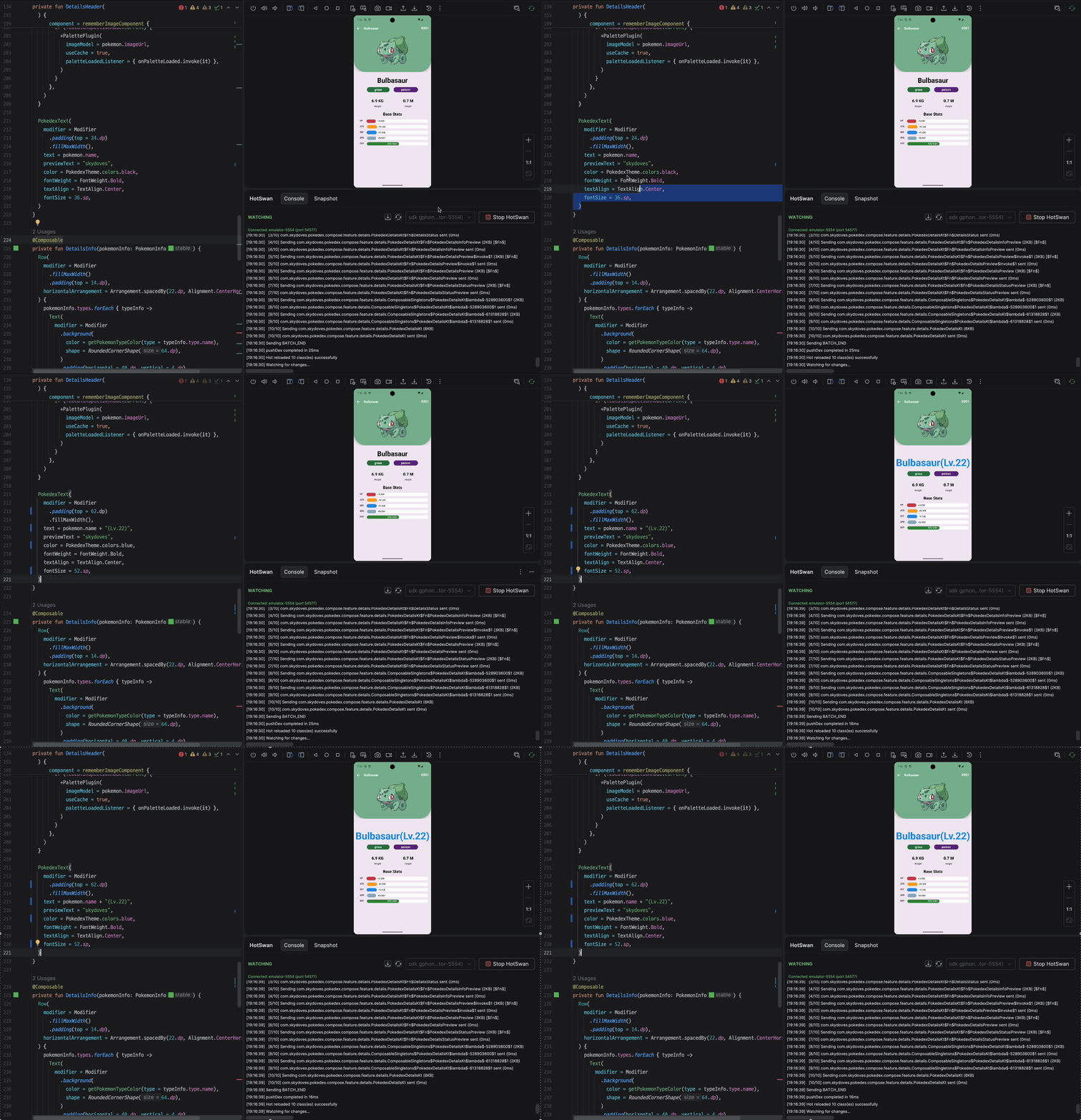
Any change inside a composable function body reloads instantly. Text, colors, font sizes, layout modifiers, padding, animation parameters, conditional logic, and child composable structure all work.
https://medium.com/media/79ba91cc108f9f9722a762a911f57c80/href
Save the file, and the running app updates in place in ~1 second. No rebuild, no reinstall, no navigation.
Adding a new Composable and reordering
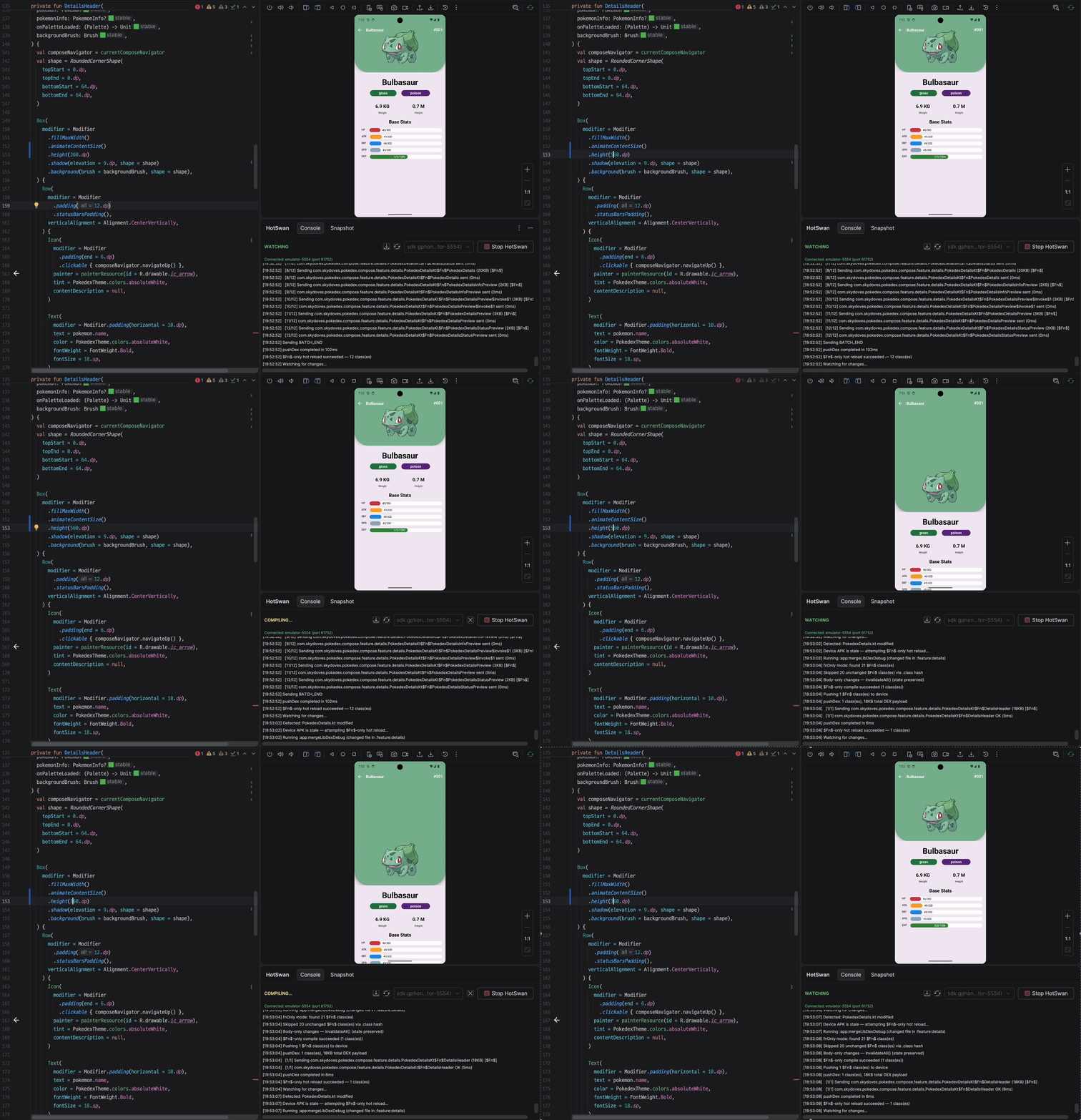
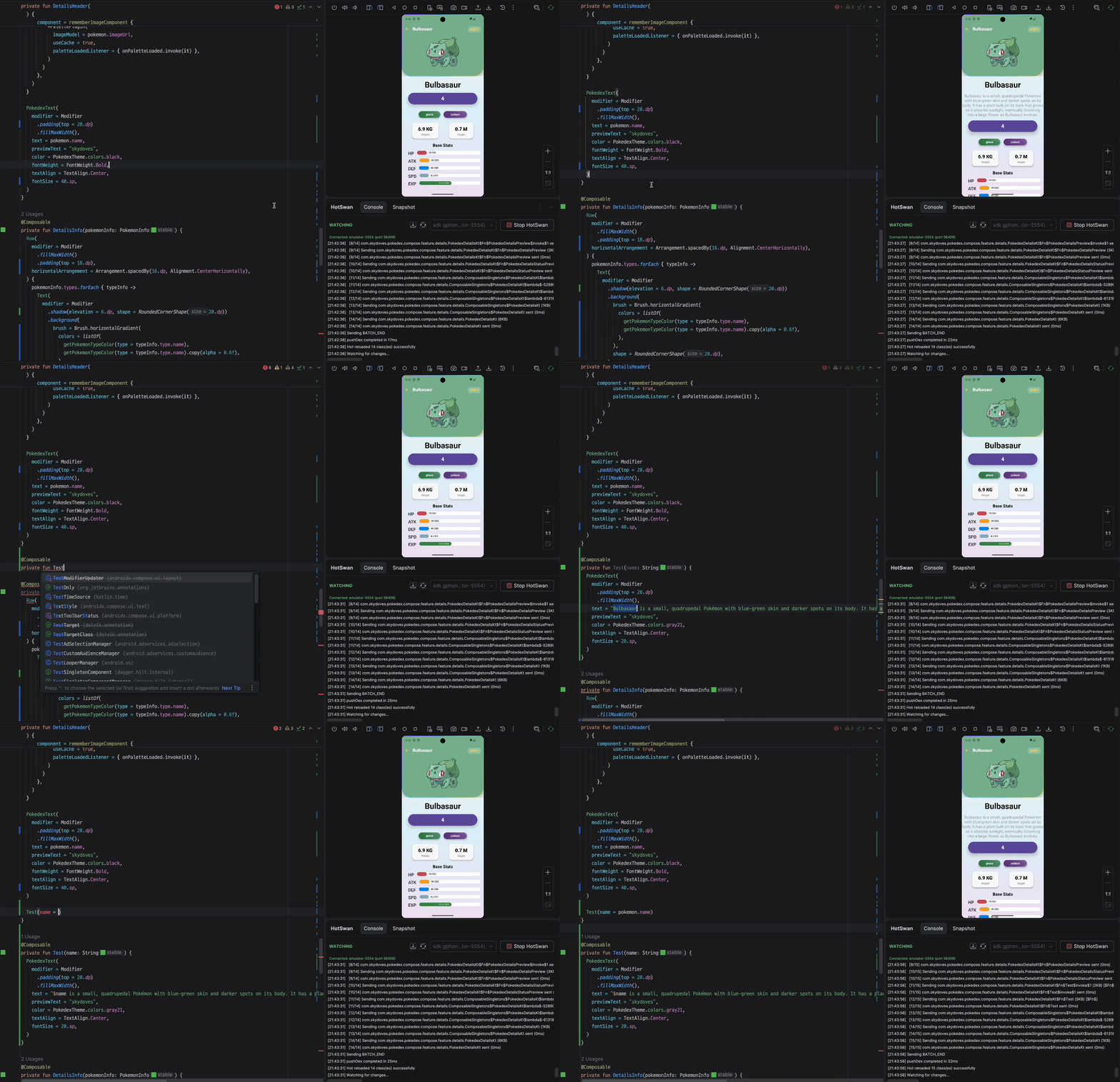
You can add a new composable function and reorder existing composable calls within a function, and the state follows each composable correctly. Compose HotSwan’s compiler plugin preserves state continuity across structural changes in your code.
Non-composable function changes
This is one of the key differences from Live Edit, which only supports changes to composable functions. Because Compose HotSwan swaps classes at the ART level, any method body change is reloadable, not just @Composable ones. Changes to ViewModel methods, repository logic, utility functions, and data mappers all hot reload:
https://medium.com/media/a0e9e525aa66de697bfa0daa9e10c048/href
Any composable that calls this function displays the updated result on the next recomposition. In practice, this means business logic iteration, not just UI tweaking, benefits from the fast feedback loop.
Resource value changes
Modify existing values in strings.xml, colors.xml, dimens.xml, and drawable files. HotSwan detects resource file changes and hot reloads all your resource value changes instantly.
https://medium.com/media/ad67dfd6f5897cfb1c2ba28e56b3a78a/href
Note that adding entirely new resources (new string keys, new color entries) changes the R class field assignments, requiring a full rebuild. Modifying existing values works because the resource IDs remain unchanged.
Data class property additions
You can add new properties to data classes, and the toString(), copy(), equals(), and hashCode() methods regenerate automatically:
https://medium.com/media/56e92b9b09a6df7760689941240837cc/href
Note that removing properties or changing their types requires a full rebuild. For the complete list of what you can and cannot hot reload, including edge cases around inline functions, lambda count changes, and cross-file references, see the Supported Changes documentation.
So, how it works: The five-stage pipeline
At a high level, Compose HotSwan executes a five-stage pipeline when you save a file: Save → Compile → Extract → Swap → Recompose. The IDE detects the changed file, identifies the Gradle module, runs an incremental compilation on just that module, extracts only the modified classes from the resulting DEX, swaps them into the device’s memory via the native ART agent, and triggers a scoped recomposition.

Each of these five stages contains layers of a waaayyyy more complexity that this summary does not begin to cover. The compilation stage alone involves custom IR transformations, each file compilation, and parameter reservation strategies. The extraction stage performs differential class analysis across lambda renumbering boundaries.
The swap stage interacts with the Android runtime under constraints that vary by API level. The recomposition stage integrates with the Compose runtime’s slot table through several invalidation strategies. For a more detailed (but still summarized) breakdown of each stage, see the How It Works documentation.
Compose HotSwan targets ART, so its architecture is fundamentally different from JVM-based hot reload and had to be built from scratch in a completely different environment. If you are curious about how hot reload works on the JVM (Desktop) side, the JetBrains team published The Journey to Compose Hot Reload 1.0.0, which covers their own path to shipping hot reload for Compose Desktop. Even that article, operating in the comparatively forgiving JVM environment, clearly had to compress an enormous amount of internal detail to fit into a single post.
Why hot reload on Android is hard
Hot reload on Flutter (Dart VM) and React Native (JavaScript engine) all exist in mature forms. Android is the outlier, and the reason is the runtime itself.
This is.. just a research-level problem
There is no public API, library, or documented technique for doing this. This is definitely NOT a toy/pet level project. The Kotlin compiler’s internals, ART’s class swapping behavior, the Compose compiler’s code generation patterns, and D8’s DEX output format all intersect in ways that no one has had to reason about jointly before.
The HotSwan compiler plugin operates at the IR (Intermediate Representation) level of the Kotlin compiler, the same layer where the Compose compiler plugin itself runs. It analyzes function bodies, tracks composable identity, and performs independent compilation so that each function can be swapped in isolation without invalidating unrelated code.
On the device side, the problem shifts to DEX bytecode. HotSwan performs structural analysis on compiled DEX files, comparing class schemas between the installed APK baseline and the newly compiled output. But “comparing class schemas” understates the complexity. The Kotlin compiler generates synthetic classes for lambdas, and these classes are assigned sequential numeric identifiers. If you add a single lambda in the middle of a file, every subsequent lambda’s class name shifts. It’s a shit.
The Data class and ViewModel… It’s another headache. Data class modifications require a binary-level schema transformation to reconcile the old memory layout with the new definition. And the Compose compiler generates its own layer of synthetic code, group keys and slot table entries, that track composable identity for recomposition. All of these interact. A change to a composable body can simultaneously trigger lambda renumbering, slot table key changes, and group restructuring, and Compose HotSwan has to handle all of it atomically.
The biggest challenge: ART treats class structure as immutable
The Android Runtime (ART) performs aggressive optimizations when it loads your app. It compiles bytecode ahead of time, inlines method calls, and lays out objects in memory based on the class definition at load time. Once a class is loaded, ART treats its structure as mostly immutable. You cannot add or remove fields, change method signatures, or alter the class hierarchy at runtime. Only method bodies can be replaced.
This is a fundamental constraint. A hot reload system for Android must work entirely within these boundaries: detect which changes are safe to swap, and fall back gracefully for everything else.
State preservation is a thing; it’s really a matter
Hot reload without state preservation is just a faster rebuild tool. You still lose navigation stacks, form data, scroll positions, and all the context you spent time constructing. The time savings from skipping the build are negated by the time spent reconstructing state.
The real engineering challenge is making the reload invisible: swapping method bodies in memory while keeping the Compose runtime’s slot table intact, so every remember{} value, every scroll position, every dialog state, and every ViewModel instance survives. This requires a compiler plugin that tracks composable identity across reloads and a bunch of multi-tier recomposition strategy that degrades gracefully when targeted invalidation is not possible.
Other platforms control their own runtime
Flutter runs Dart in the Dart VM. React Native runs JavaScript in Hermes or JSC. Both have full control over class definitions, memory layout, and code loading, which makes hot reload a solvable problem at the VM level. ART is a different kind of runtime. It was designed for production performance: ahead-of-time compilation, aggressive inlining, and fixed memory layouts.
These are the right trade-offs for shipping apps, but they work against developer iteration. Compose HotSwan does not try to replace ART or work around it. It operates within ART’s constraints, which is what makes the engineering difficult and what makes the result reliable.
For a deeper look at the full pipeline and the engineering behind each stage, see the How It Works documentation.
Do the math and save your time
To put concrete numbers on this: say you rebuild 30 times per day during active UI work, and each cycle costs you 2 minutes (build + navigate + reconstruct state). That is 60 minutes per day spent waiting. With hot reload completing in 1 to 3 seconds and preserving your full app state, those same 40 iterations take roughly 2 minutes total. That is over an hour reclaimed per day.
But 2 minutes per build is an optimistic number. It assumes a small to mid-sized project with a warm Gradle daemon. If you work at a large organization where the project has over 1,000 modules, a single incremental build can take 15 to 20 minutes. At that scale, 30 iterations per day is not realistic; developers self-limit to fewer attempts because each one is so expensive.
Even if you only rebuild 15 times at 15 minutes each, that is nearly 4 hours per day lost to the build cycle. With hot reload, those 15 iterations take under a minute. That is most of a working half-day returned to actual development, every day, for every engineer on the team. Multiply that across a team of 20, and you are looking at hundreds of engineering hours per month.
When adopted at the team level, hot reload becomes a productivity multiplier for the entire engineering organization. Fewer build cycles means less context switching, faster code reviews with visual proof of changes, tighter designer-developer iteration loops, and shorter time from prototype to production. It is not just about saving minutes per developer. It is a structural improvement to how a development team ships UI work.
Conclusion
Compose HotSwan isn’t built to showcase the technical complexity of hot reload; it’s designed to meaningfully support the Android developer ecosystem and directly improve developer productivity. Going forward, it will continue to focus on helping developers work more efficiently.
Although not covered in this post, Compose HotSwan also includes several useful features:
- Preview Runner that runs your Preview composable in ~1 second on your real device. Then you can generate full, pretty UI docs by running just a single Gradle task. This is a real gem.
- Screenshot Snapshots that automatically capture screenshots on every hot reload and generate shareable web pages for collaboration with designers
- MCP integration that connects with your AI agent to trigger hot reload and supports 20+ MCP tasks.
Compose HotSwan is available on the JetBrains Marketplace. The full documentation, including detailed guides for each feature covered in this article, is at hotswan.dev/docs. For bug reports and feature requests, file an issue on GitHub or join the Discord.
As always, happy coding!
Jetpack Compose Hot Reload on Real Android Devices: Reduce the Build Time to Seconds was originally published in ProAndroidDev on Medium, where people are continuing the conversation by highlighting and responding to this story.


This Post Has 0 Comments