
The Hook: The “Safe Zone” is Dead, and Documentation Won’t Save You
For years, Android developers treated the system bars like a DMZ — a “no-man’s land” where we didn’t have to worry about our UI. We leaned on fitsSystemWindows=”true” like a crutch, letting the OS handle the heavy lifting.
With Android 16, Google has issued an ultimatum: Edge-to-Edge (E2E) is no longer a choice; it’s the enforced reality for apps targeting SDK 35.
If you think adding enableEdgeToEdge() to your onCreate and sprinkling a few Modifier.systemBarsPadding() calls is the end of the story, you’re in for a painful release cycle. In a massive, multi-module codebase where legacy XML fragments live alongside modern Compose screens, this mandate is an architectural breaking change, not just a UI tweak.
💡 The TL’s Take: Platform Mandates are Architectural Debt
When a platform change is “mandatory,” most teams treat it as a ticket to be closed. At scale, this is a trap. If you don’t build a centralized infrastructure to handle insets now, you are effectively scattering “UI-fix debt” across every feature module. In six months, when the next foldable or “island” cutout comes along, you’ll be hunting down 200 individual padding modifiers instead of updating one internal library.
The Real-World Scenario: The “Double-Padding” Disaster
While prepping a core module for the Android 16 rollout at scale, we hit a classic production nightmare. We enabled the E2E flag, and suddenly, our primary navigation hub — a complex hybrid of a Compose Scaffold hosting a legacy View-based Fragment — went haywire.
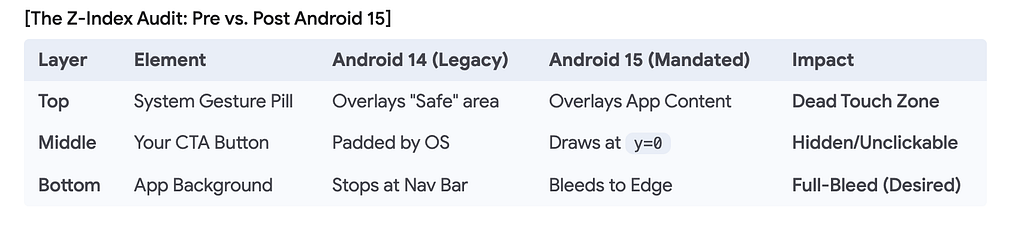
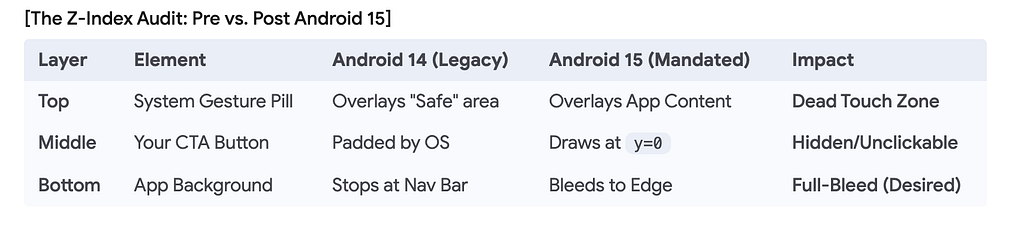
The result was The Z-Index Collision. In a pre-Android 16 world, these layers were isolated. Now, they occupy the same coordinate space:
Our TopAppBar was fine, but our primary CTA button was floating 100dp from the bottom, creating a massive, amateurish gap — the “Double-Padding” monster.
🚩 My Opinionated Take: Stop Guessing, Start Measuring.
I see too many devs “eye-balling” padding values to make the UI “look right” on their Pixel 8. This is how you break the app for the guy using a 3-button nav on an entry-level Samsung or a landscape foldable. If you find yourself hardcoding Padding(bottom = 48.dp) to “fix” an E2E overlap, you’ve already lost. Use the Inset API or don’t touch it at all.
The Deep Dive: Architecting Inset Consumption
The official documentation provides a “Hello World” solution. We’ve shifted to a “Manual Inset Consumption” pattern. Think of Inset Consumption as a Financial Ledger. Each level of the UI tree “spends” some of the available padding. If you don’t track the balance, you end up with “Double-Padding” debt.
Here is the ProductionGradeScaffold we built to automate this ledger:
/**
 * We use staticCompositionLocalOf because inset architecture
 * rarely changes mid-composition.
 */

val LocalConsumedInsets = staticCompositionLocalOf { PaddingValues(0.dp) }

@Composable
fun ProductionGradeScaffold(
    modifier: Modifier = Modifier,
    content: @Composable (PaddingValues) -> Unit
) {
    val systemBarInsets = WindowInsets.systemBars
    Scaffold(
        modifier = modifier,
        contentWindowInsets = systemBarInsets
    ) { innerPadding ->
        // Provide the 'consumed' padding to the tree
        CompositionLocalProvider(LocalConsumedInsets provides innerPadding) {
            content(innerPadding)
        }
    }
}
🛠 The Infrastructure Take: Composables Should Be “Inset-Blind”
Your Feature Composables should not know that a Status Bar exists. They should only know about the PaddingValues passed to them. By using a CompositionLocal to track what has already been “consumed,” we ensure that a nested Legacy Fragment doesn’t try to double-dip into the padding budget. Centralize the math, decentralize the rendering.
[Visual Architecture Map]
┌──────────────────────────────────────────┐  <-- Screen Edge (y=0)
│ [System Status Bar] (24dp)               │
├──────────────────────────────────────────┤
│ [ProductionGradeScaffold]                │  <-- Consumes Top/Bottom
│  │                                       │
│  ├─ [TopAppBar] (Uses innerPadding.top)  │
│  │                                       │
│  └─ [LegacyFragmentContainer]            │  <-- Reads LocalConsumedInsets
│     └─ [ConstraintLayout] (0dp Padding)  │  <-- Subtraction Logic:
│                                          │      (Required: 24 - Consumed: 24 = 0)
├──────────────────────────────────────────┤
│ [System Gesture Pill] (48dp)             │
└──────────────────────────────────────────┘  <-- Screen Edge (y=max)
The “Gotchas”: What We Learned the Hard Way
- fitsSystemWindows is a Zombie: If you have legacy XML, android:fitsSystemWindows=”true” is now a recipe for unpredictable behavior.
- Horizontal Insets on Foldables: Almost no one tests for the “hinge” or “side cutout” in landscape. Use displayCutout insets explicitly.
- Transparent Bars, Dead Touches: E2E often makes the navigation bar transparent, but it still consumes touch events!
⚠️ The UX Reality Check: Your “Transparent” Nav Bar is a Lie
Designers love the look of content bleeding behind the navigation pill. But as engineers, we know the “Gesture Zone” is a touch-event black hole. If your “Buy Now” button is in that bottom 48dp, it’s a dead button. You must advocate for “UI Safety” even when Design wants “Clean Visuals.” E2E is about drawing in the bars, not interacting in them.
My Controversial Stance: Inset Architecture is a Platform Concern
In the pursuit of “Clean Code,” we often map our ViewModels to “UI States” that include padding values. Stop doing this. If your ViewModel is calculating padding based on insets, you’ve introduced a logic round-trip for a UI-layer concern.
Insets should be handled by your Platform Infrastructure (Scaffolds and Modifiers) so that your Feature Developers don’t even have to think about them. Performance is a feature; architectural purity that causes jank is a failure.
Call to Action
Is your team prepared for the Android 16 rollout, or are you planning to just “slap a padding on it” and hope for the best? If you’ve battled the “double-padding” monster in a hybrid app, I want to hear how you killed it. Let’s argue in the comments.
Android 16’s Edge-to-Edge Mandate: Why Your “Simple Fix” Will Break at Scale was originally published in ProAndroidDev on Medium, where people are continuing the conversation by highlighting and responding to this story.



This Post Has 0 Comments