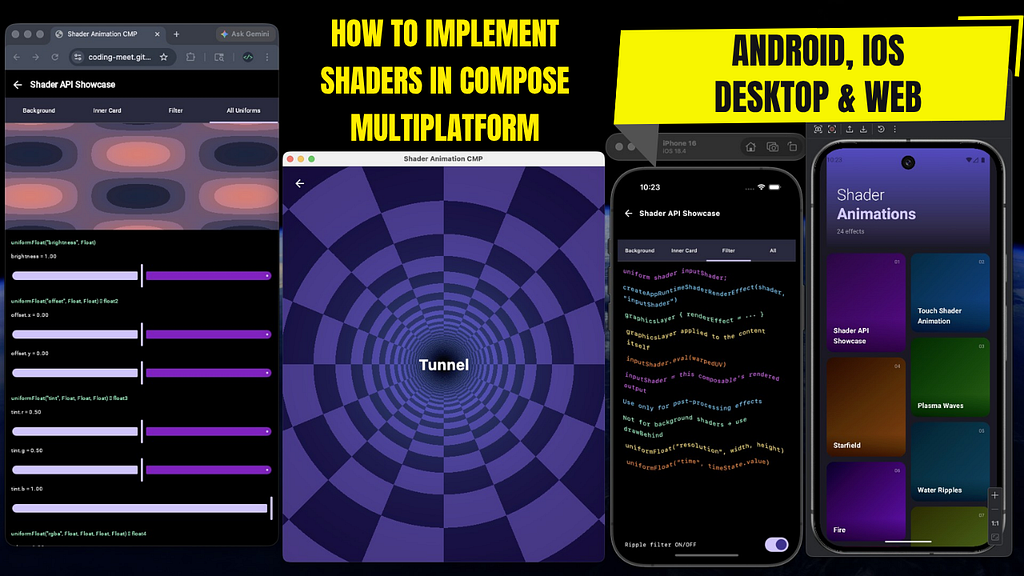

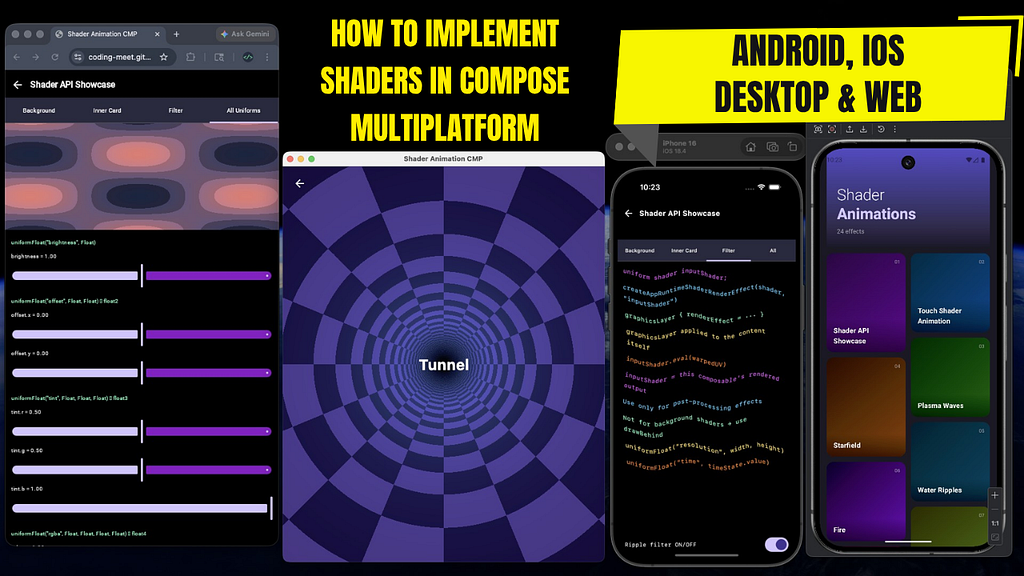
Shaders are one of the most powerful ways to create modern, high-performance UI effects — ranging from animated backgrounds to complex visual distortions. However, implementing shaders across multiple platforms has traditionally been difficult due to differences in graphics APIs and shader languages.
In this article, you’ll learn how to build a clean and reusable shader abstraction using Compose Multiplatform that works seamlessly across Android, iOS, Desktop (Windows/macOS/Linux), and Web (WASM/JS) from a shared commonMain codebase.
We will use AGSL (Android Graphics Shading Language) on Android and SkSL (Skia Shading Language) on all other platforms, while writing shader code in a unified way so it runs everywhere with minimal changes.
By the end of this guide, you’ll have:
- A platform-agnostic shader architecture using expect/actual
- A consistent way to pass uniforms like time, resolution, and colors
- Support for both background rendering (drawBehind) and post-processing effects (graphicsLayer)
- Safe fallbacks for unsupported Android versions (API < 33)
This approach allows you to write shader-driven UI once and run it across all Compose Multiplatform targets efficiently and cleanly.
Step 1: Project Setup
If you haven’t already created a Compose Multiplatform project, head over to the Kotlin Multiplatform Wizard website.
- Select the platforms: Android, iOS, Desktop and Web.
- Make sure that the Share UI option is selected for both iOS and Web.
(There will be a platform configuration step later — whatever you select here, some related code will be generated there. I’ll explain that in the next steps.)
- Project Name: You can set this to Shader-Animation-CMP (or any name you like)
- Project ID: You can use com.meet.shader.animation.cmp (or customize as needed)
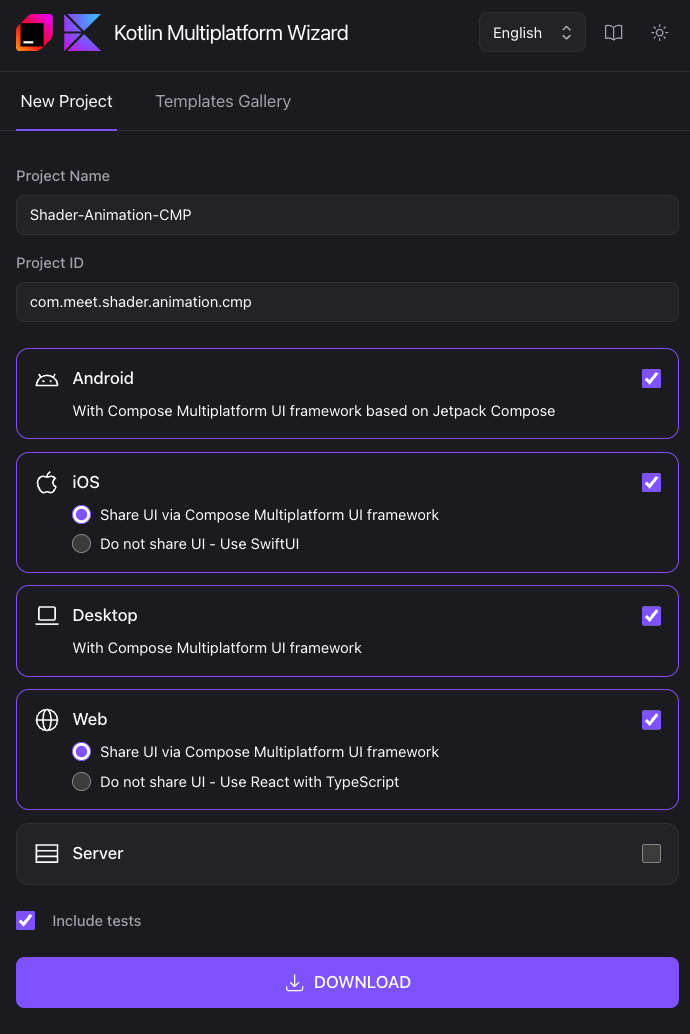
After configuring your options, download the generated project template.
Once downloaded, open the project in Android Studio or IntelliJ IDEA.
Step 2: Configure build.gradle.kts (composeApp module)
Open the build.gradle.kts file inside the composeApp module.
Add the following configuration:
// build.gradle.kts (composeApp module)
import org.jetbrains.kotlin.gradle.ExperimentalKotlinGradlePluginApi

plugins {
    ....
}

kotlin {
    @OptIn(ExperimentalKotlinGradlePluginApi::class)
    applyDefaultHierarchyTemplate {
        common {
            group("skikoCommon") {
                withJvm() // Enable this if Desktop platform is selected, otherwise comment it
                withApple() // Enable this if iOS platform is selected, otherwise comment it
                // Enable these if Web platform is selected, otherwise comment them
                withJs()
                withWasmJs()
            }
        }
    }
    ....
}
This setup ensures that shared code can be properly organized across different platforms based on your selection.
Why skikoCommon?
iOS, Desktop, and all Web targets in Compose Multiplatform use Skia as their 2D rendering engine. By grouping them under skikoCommon, code in skikoCommonMain compiles for all four targets. Android has its own androidMain because it uses Android’s proprietary RuntimeShader API (AGSL) which is unavailable on other platforms.
This gives us exactly two actual implementation sites for the entire shader layer:
- androidMain — Android AGSL
- skikoCommonMain — everything else (Skia/SkSL)
Reference:
Hierarchical project structure | Kotlin Multiplatform
Step 3: Create expect_shader Package and Files
Inside commonMain/kotlin/<your/package>/, create a sub-package named expect_shader. Then create two empty Kotlin files inside it:
- ShaderProvider.kt
- ShaderUtils.kt
These files live in commonMain and are visible to all platforms. The actual implementations will be placed in androidMain and skikoCommonMain.
composeApp/src/
├── commonMain/.../expect_shader/
│   ├── ShaderProvider.kt           ← interface (all platforms)
│   └── ShaderUtils.kt              ← expect declarations + composable helpers
│
├── androidMain/.../expect_shader/
│   ├── ShaderProviderImpl.kt       ← Android 13+ (RuntimeShader)
│   └── ShaderUtils.android.kt      ← Android actual implementations
│
└── skikoCommonMain/.../expect_shader/
    ├── ShaderProviderImpl.kt       ← iOS / Desktop / Web (Skia)
    └── ShaderUtils.skikoCommon.kt  ← iOS / Desktop / Web actual implementations
Step 4: ShaderProvider.kt — The Uniform Interface
Open ShaderProvider.kt and add the following interface. This is shared across all platforms. it defines how you pass data (time, resolution, colors, etc.) from Kotlin into the shader.
// composeApp/src/commonMain/kotlin/<your/package>/expect_shader/ShaderProvider.kt

package com.meet.shader.animation.cmp.expect_shader

import androidx.compose.ui.graphics.Color

interface ShaderProvider {
    fun uniformInt(name: String, value: Int)
    fun uniformInt(name: String, value1: Int, value2: Int)
    fun uniformInt(name: String, value1: Int, value2: Int, value3: Int)
    fun uniformInt(name: String, value1: Int, value2: Int, value3: Int, value4: Int)

    fun uniformFloat(name: String, value: Float)
    fun uniformFloat(name: String, value1: Float, value2: Float)
    fun uniformFloat(name: String, value1: Float, value2: Float, value3: Float)
    fun uniformFloat(name: String, value1: Float, value2: Float, value3: Float, value4: Float)
    fun uniformFloat(name: String, values: List<Float>)

    fun uniformColor(name: String, r: Float, g: Float, b: Float, a: Float)
    fun uniformColor(name: String, color: Color)

    fun update(block: ShaderProvider.() -> Unit) { this.block() }
}
Each method maps directly to a GLSL uniform declaration in your shader string:
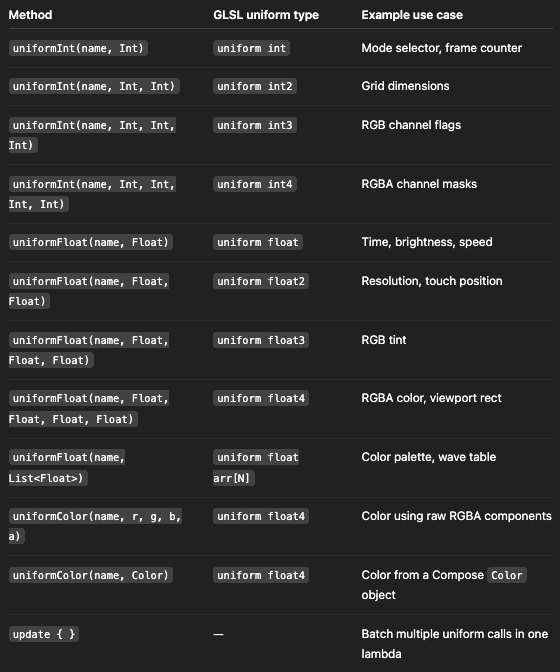
Always match the Kotlin method call with the GLSL uniform type declared in your shader. Mismatched types can lead to silent failures or runtime crashes.
Step 5: ShaderUtils.kt — Core expect Functions
Open ShaderUtils.kt and add the following expect declarations. These are platform-neutral contracts that must be implemented on each platform.
// composeApp/src/commonMain/kotlin/<your/package>/expect_shader/ShaderUtils.kt

package com.meet.shader.animation.cmp.expect_shader

import androidx.compose.ui.graphics.RenderEffect
import androidx.compose.ui.graphics.Shader

// Returns false on Android < 13, true everywhere else.
// Always guard shader logic with this check.
expect fun isShaderAvailable(): Boolean

// The platform-specific shader object.
//   Android  → android.graphics.RuntimeShader
//   Skiko    → org.jetbrains.skia.RuntimeShaderBuilder
@Suppress("EXPECT_ACTUAL_CLASSIFIERS_ARE_IN_BETA_WARNING")
expect class AppRuntimeShader

// Compiles an AGSL/SkSL string into a shader object.
// This is a heavy operation — always call inside remember { }.
expect fun createAppRuntimeShader(shaderCode: String): AppRuntimeShader

// Converts a shader into a RenderEffect for use with graphicsLayer { }.
//
// Use this only when your shader declares: uniform shader inputShader;
// The shaderName argument must exactly match that uniform's name.
//
// The shader receives the composable's own rendered output as inputShader,
// allowing post-processing (distortion, blur, color grading, etc.).
expect fun createAppRuntimeShaderRenderEffect(
    appRuntimeShader: AppRuntimeShader,
    shaderName: String
): RenderEffect

// Returns a ShaderProvider for setting uniform values
// (time, resolution, touch position, colors, etc.)
expect fun createShaderProvider(appRuntimeShader: AppRuntimeShader): ShaderProvider

// Converts AppRuntimeShader → Shader for use with ShaderBrush and drawBehind { }.
// Use this for background shaders and bounded inner composables.
expect fun createShader(appRuntimeShader: AppRuntimeShader): Shader
Two rendering paths:
Background shader  (drawBehind)
────────────────────────────────────────────────────────────
createAppRuntimeShader(code)
  └─ createShaderProvider(shader)         ← set uniforms
  └─ createShader(shader)                 ← convert to Shader
  └─ ShaderBrush(createShader(shader))
  └─ drawRect(brush) inside drawBehind { }


Filter / post-processing  (graphicsLayer)
────────────────────────────────────────────────────────────
createAppRuntimeShader(code)              ← must declare uniform shader inputShader;
  └─ createShaderProvider(shader)         ← set uniforms
  └─ createAppRuntimeShaderRenderEffect(shader, "inputShader")
  └─ graphicsLayer { renderEffect = ... }
Step 6: Platform actual Implementations
6a — Android (androidMain)
Create ShaderUtils.android.kt inside androidMain/…/expect_shader/:
// composeApp/src/androidMain/kotlin/<your/package>/expect_shader/ShaderUtils.android.kt

package com.meet.shader.animation.cmp.expect_shader

import android.graphics.RuntimeShader
import android.os.Build
import androidx.annotation.RequiresApi
import androidx.compose.ui.graphics.RenderEffect
import androidx.compose.ui.graphics.Shader
import androidx.compose.ui.graphics.asComposeRenderEffect

actual fun isShaderAvailable(): Boolean =
    Build.VERSION.SDK_INT >= Build.VERSION_CODES.TIRAMISU  // API 33

actual typealias AppRuntimeShader = RuntimeShader

@RequiresApi(Build.VERSION_CODES.TIRAMISU)
actual fun createAppRuntimeShader(shaderCode: String): AppRuntimeShader =
    RuntimeShader(shaderCode)

@RequiresApi(Build.VERSION_CODES.TIRAMISU)
actual fun createAppRuntimeShaderRenderEffect(
    appRuntimeShader: AppRuntimeShader,
    shaderName: String
): RenderEffect =
    android.graphics.RenderEffect
        .createRuntimeShaderEffect(appRuntimeShader, shaderName)
        .asComposeRenderEffect()

@RequiresApi(Build.VERSION_CODES.TIRAMISU)
actual fun createShaderProvider(appRuntimeShader: AppRuntimeShader): ShaderProvider =
    ShaderProviderImpl(appRuntimeShader)

@RequiresApi(Build.VERSION_CODES.TIRAMISU)
actual fun createShader(appRuntimeShader: AppRuntimeShader): Shader =
    appRuntimeShader  // RuntimeShader already extends android.graphics.Shader
Key points:
- AppRuntimeShader is a typealias for android.graphics.RuntimeShader, which already extends android.graphics.Shader, so createShader simply returns it.
- Every actual function requires @RequiresApi(Build.VERSION_CODES.TIRAMISU). Android Lint enforces this and will warn if missing at call sites.
- isShaderAvailable() performs a runtime API check, allowing minSdk = 24 while enabling shaders on Android 13+ devices.
Create ShaderProviderImpl.kt inside androidMain/…/expect_shader/:
// composeApp/src/androidMain/kotlin/<your/package>/expect_shader/ShaderProviderImpl.kt

package com.meet.shader.animation.cmp.expect_shader

import android.graphics.RuntimeShader
import android.os.Build
import androidx.annotation.RequiresApi
import androidx.compose.ui.graphics.Color

@RequiresApi(Build.VERSION_CODES.TIRAMISU)
class ShaderProviderImpl(
    private val runtimeShader: RuntimeShader,
) : ShaderProvider {

    override fun uniformInt(name: String, value: Int) =
        runtimeShader.setIntUniform(name, value)

    override fun uniformInt(name: String, value1: Int, value2: Int) =
        runtimeShader.setIntUniform(name, value1, value2)

    override fun uniformInt(name: String, value1: Int, value2: Int, value3: Int) =
        runtimeShader.setIntUniform(name, value1, value2, value3)

    override fun uniformInt(name: String, value1: Int, value2: Int, value3: Int, value4: Int) =
        runtimeShader.setIntUniform(name, value1, value2, value3, value4)

    override fun uniformFloat(name: String, value: Float) =
        runtimeShader.setFloatUniform(name, value)

    override fun uniformFloat(name: String, value1: Float, value2: Float) =
        runtimeShader.setFloatUniform(name, value1, value2)

    override fun uniformFloat(name: String, value1: Float, value2: Float, value3: Float) =
        runtimeShader.setFloatUniform(name, value1, value2, value3)

    override fun uniformFloat(name: String, value1: Float, value2: Float, value3: Float, value4: Float) =
        runtimeShader.setFloatUniform(name, value1, value2, value3, value4)

    override fun uniformFloat(name: String, values: List<Float>) =
        runtimeShader.setFloatUniform(name, values.toFloatArray())

    override fun uniformColor(name: String, r: Float, g: Float, b: Float, a: Float) =
        runtimeShader.setFloatUniform(name, r, g, b, a)

    override fun uniformColor(name: String, color: Color) =
        uniformColor(name, color.red, color.green, color.blue, color.alpha)
}
6b — iOS / Desktop / Web (skikoCommonMain)
Create ShaderUtils.skikoCommon.kt inside skikoCommonMain/…/expect_shader/:
// composeApp/src/skikoCommonMain/kotlin/<your/package>/expect_shader/ShaderUtils.skikoCommon.kt

package com.meet.shader.animation.cmp.expect_shader

import androidx.compose.ui.graphics.RenderEffect
import androidx.compose.ui.graphics.Shader
import androidx.compose.ui.graphics.asComposeRenderEffect
import org.jetbrains.skia.ImageFilter
import org.jetbrains.skia.RuntimeEffect
import org.jetbrains.skia.RuntimeShaderBuilder

actual fun isShaderAvailable(): Boolean = true  // Skia always supports shaders

actual typealias AppRuntimeShader = RuntimeShaderBuilder

actual fun createAppRuntimeShader(shaderCode: String): AppRuntimeShader {
    val effect = RuntimeEffect.makeForShader(shaderCode)
    return RuntimeShaderBuilder(effect)
}

actual fun createAppRuntimeShaderRenderEffect(
    appRuntimeShader: AppRuntimeShader,
    shaderName: String
): RenderEffect =
    ImageFilter.makeRuntimeShader(appRuntimeShader, shaderName, null)
        .asComposeRenderEffect()

actual fun createShaderProvider(appRuntimeShader: AppRuntimeShader): ShaderProvider =
    ShaderProviderImpl(appRuntimeShader)

actual fun createShader(appRuntimeShader: AppRuntimeShader): Shader =
    appRuntimeShader.makeShader()
Key points:
- AppRuntimeShader is a typealias for org.jetbrains.skia.RuntimeShaderBuilder.
- RuntimeEffect.makeForShader(code) compiles the SkSL shader string.
- RuntimeShaderBuilder wraps the compiled effect and allows setting uniforms via .uniform(…).
- makeShader() returns a org.jetbrains.skia.Shader used with ShaderBrush.
- ImageFilter.makeRuntimeShader wraps it as a Skia image filter and converts it to a Compose RenderEffect.
Create ShaderProviderImpl.kt inside skikoCommonMain/…/expect_shader/:
// composeApp/src/skikoCommonMain/kotlin/<your/package>/expect_shader/ShaderProviderImpl.kt

package com.meet.shader.animation.cmp.expect_shader

import androidx.compose.ui.graphics.Color
import org.jetbrains.skia.RuntimeShaderBuilder

class ShaderProviderImpl(
    private val runtimeShaderBuilder: RuntimeShaderBuilder,
) : ShaderProvider {

    override fun uniformInt(name: String, value: Int) =
        runtimeShaderBuilder.uniform(name, value)

    override fun uniformInt(name: String, value1: Int, value2: Int) =
        runtimeShaderBuilder.uniform(name, value1, value2)

    override fun uniformInt(name: String, value1: Int, value2: Int, value3: Int) =
        runtimeShaderBuilder.uniform(name, value1, value2, value3)

    override fun uniformInt(name: String, value1: Int, value2: Int, value3: Int, value4: Int) =
        runtimeShaderBuilder.uniform(name, value1, value2, value3, value4)

    override fun uniformFloat(name: String, value: Float) =
        runtimeShaderBuilder.uniform(name, value)

    override fun uniformFloat(name: String, value1: Float, value2: Float) =
        runtimeShaderBuilder.uniform(name, value1, value2)

    override fun uniformFloat(name: String, value1: Float, value2: Float, value3: Float) =
        runtimeShaderBuilder.uniform(name, value1, value2, value3)

    override fun uniformFloat(name: String, value1: Float, value2: Float, value3: Float, value4: Float) =
        runtimeShaderBuilder.uniform(name, value1, value2, value3, value4)

    override fun uniformFloat(name: String, values: List<Float>) =
        runtimeShaderBuilder.uniform(name, values.toFloatArray())

    override fun uniformColor(name: String, r: Float, g: Float, b: Float, a: Float) =
        runtimeShaderBuilder.uniform(name, r, g, b, a)

    override fun uniformColor(name: String, color: Color) =
        uniformColor(name, color.red, color.green, color.blue, color.alpha)
}
AGSL vs SkSL — Key Differences
Both are very close to GLSL ES 1.0. In practice, shaders written for AGSL will run on Skiko platforms without changes, except for one limitation.

Write shaders targeting AGSL for best compatibility across all platforms. Avoid dynamic array indexing to ensure they work everywhere.
Step 7: ShaderUtils.kt — Add Composable Helpers
Add these three composable functions to the bottom of ShaderUtils.kt. These are part of commonMain, so no expect/actual is required.
// composeApp/src/commonMain/kotlin/<your/package>/expect_shader/ShaderUtils.kt

package com.meet.shader.animation.cmp.expect_shader

import androidx.compose.animation.core.withInfiniteAnimationFrameMillis
import androidx.compose.runtime.Composable
import androidx.compose.runtime.produceState
import androidx.compose.runtime.remember
import kotlin.time.Clock

// Use when shader availability is already confirmed.
// Will crash on Android < 13 if called without a guard.
@Composable
fun rememberShaderInstance(
    shaderCode: String,
): Pair<AppRuntimeShader, ShaderProvider> {
    val shader = remember { createAppRuntimeShader(shaderCode) }
    val provider = remember(shader) { createShaderProvider(shader) }
    return Pair(shader, provider)
}

// Safe default. Returns a null pair on Android < 13.
// Always check: if (isShaderAvailable() && shader != null && provider != null)
@Composable
fun rememberShaderInstanceOrNull(
    shaderCode: String,
): Pair<AppRuntimeShader?, ShaderProvider?> {
    val shader = remember {
        if (isShaderAvailable()) createAppRuntimeShader(shaderCode) else null
    }
    val provider = remember(shader) {
        if (shader != null) createShaderProvider(shader) else null
    }
    return Pair(shader, provider)
}

// Returns State<Float> — elapsed seconds since first composition.
// Read .value inside drawBehind { } or graphicsLayer { } for deferred reads.
@Composable
fun rememberShaderTime() = produceState(0f) {
    val start = Clock.System.now().toEpochMilliseconds()
    while (true) {
        withInfiniteAnimationFrameMillis {
            val now = Clock.System.now().toEpochMilliseconds()
            value = (now - start) / 1000f
        }
    }
}
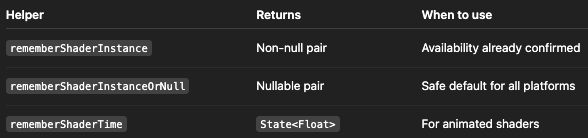
rememberShaderInstance
Returns a non-null Pair<AppRuntimeShader, ShaderProvider>. Use only when isShaderAvailable() is already confirmed — otherwise it will crash on Android < 13.
rememberShaderInstanceOrNull
Safe default. Returns null on unsupported platforms. Always check before using the shader.
rememberShaderTime
Returns State<Float> representing elapsed time in seconds. Using .value inside drawBehind { } or graphicsLayer { } avoids full recomposition and improves performance.
Step 8: Usage Examples
Example 1 — Full-Screen Background Shader
private const val PLASMA_SHADER = """
uniform float2 resolution;
uniform float time;

half4 main(float2 fragCoord) {
    float2 uv = fragCoord / resolution * 2.0 - 1.0;
    float v = sin(uv.x * 4.0 + time)
            + sin(uv.y * 4.0 + time)
            + sin((uv.x + uv.y) * 3.0 + time * 1.3);
    float r = 0.5 + 0.5 * sin(v * 3.14159);
    float g = 0.5 + 0.5 * sin(v * 3.14159 + 2.09);
    float b = 0.5 + 0.5 * sin(v * 3.14159 + 4.19);
    return half4(r, g, b, 1.0);
}
"""

@Composable
fun PlasmaBackground(modifier: Modifier = Modifier) {
    val time by rememberShaderTime()
    val (shader, provider) = rememberShaderInstanceOrNull(PLASMA_SHADER)

    Box(
        modifier = modifier
            .fillMaxSize()
            .drawBehind {
                if (isShaderAvailable() && shader != null && provider != null) {
                    provider.uniformFloat("resolution", size.width, size.height)
                    provider.uniformFloat("time", time)
                    drawRect(ShaderBrush(createShader(shader)))
                }
            }
    )
}
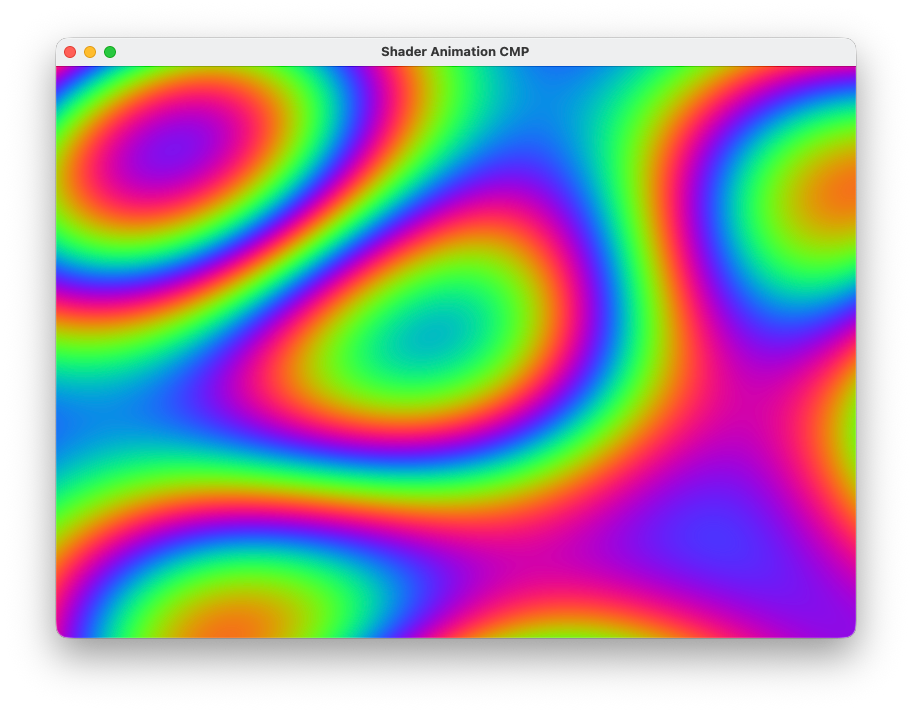
- drawBehind runs in the draw phase. Reading time here defers the state read, avoiding full recomposition every frame.
- ShaderBrush(createShader(shader)) wraps the platform-specific Shader as a Brush.
- isShaderAvailable() inside drawBehind is safe — it always returns true on Skiko platforms.
Example 2 — Bounded Inner Shader Card
@Composable
fun ShaderCard(modifier: Modifier = Modifier) {
    val time by rememberShaderTime()
    val (shader, provider) = rememberShaderInstanceOrNull(PLASMA_SHADER)

    Box(
        modifier = modifier
            .size(200.dp)
            .clipToBounds()   // optional
            .drawBehind {
                if (isShaderAvailable() && shader != null && provider != null) {
                    provider.uniformFloat("resolution", size.width, size.height)
                    provider.uniformFloat("time", time)
                    drawRect(ShaderBrush(createShader(shader)))
                }
            }
    )
}
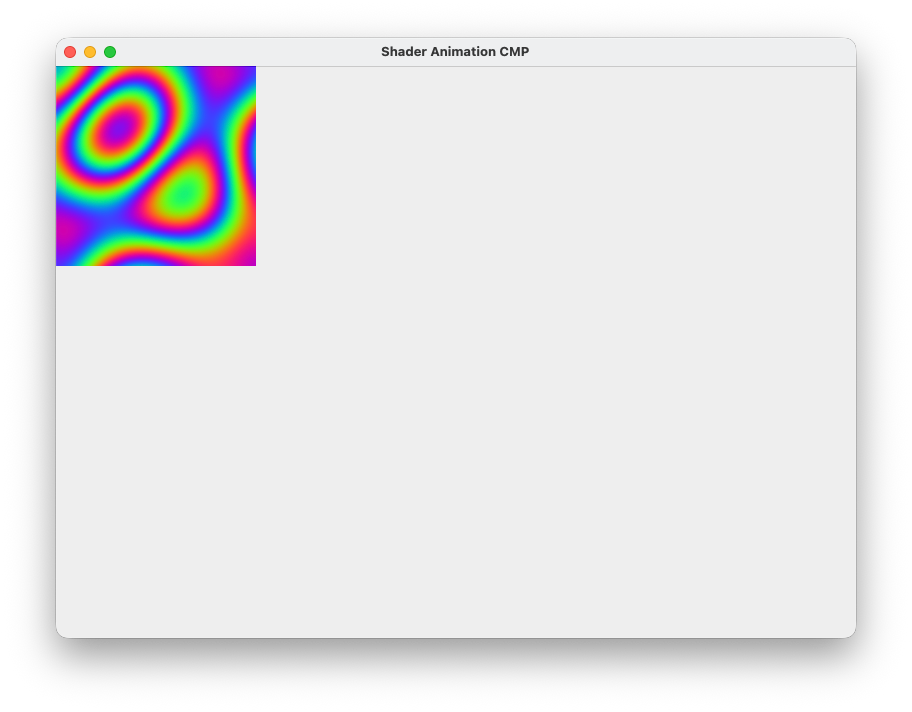
- clipToBounds() is optional. In this example, the shader renders fully within the composable bounds, so clipping is not required.
- Only use clipToBounds() when your shader may draw outside its bounds (e.g., blur, distortion, or offset-based effects).
Example 3 — Filter / Post-Processing with graphicsLayer
private const val RIPPLE_SHADER = """
uniform shader inputShader;
uniform float2 resolution;
uniform float time;

half4 main(float2 fragCoord) {
    float2 uv = fragCoord / resolution;
    float2 offset = float2(
        sin(uv.y * 20.0 + time * 3.0) * 0.008,
        cos(uv.x * 20.0 + time * 3.0) * 0.008
    );
    return inputShader.eval(fragCoord + offset * resolution);
}
"""

@Composable
fun RippleFilterScreen() {
    val time by rememberShaderTime()
    val (shader, provider) = rememberShaderInstanceOrNull(RIPPLE_SHADER)

    LazyVerticalStaggeredGrid(
        columns = StaggeredGridCells.Fixed(3),
        modifier = Modifier
            .fillMaxSize()
            .graphicsLayer {
                if (isShaderAvailable() && shader != null && provider != null) {
                    provider.uniformFloat("resolution", size.width, size.height)
                    provider.uniformFloat("time", time)
                    renderEffect = createAppRuntimeShaderRenderEffect(shader, "inputShader")
                }
            }
    ) {
        items(50) { index ->
            Text("Row $index", modifier = Modifier.padding(16.dp))
        }
    }
}
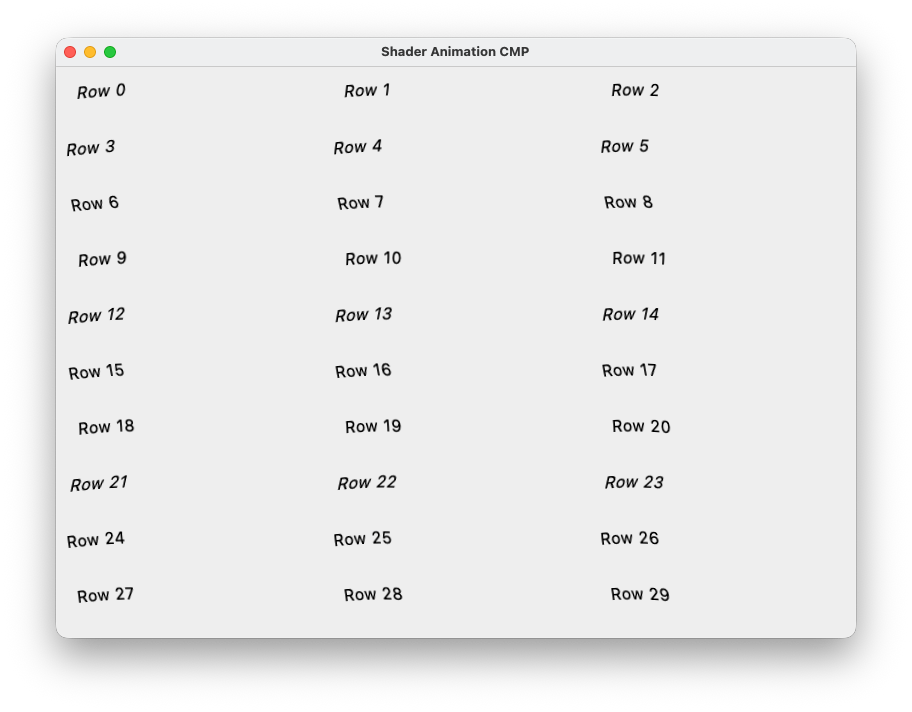
- Apply graphicsLayer directly to the composable whose content you want to filter.
- “inputShader” must exactly match the shader’s uniform shader inputShader;.
- If isShaderAvailable() is false (Android < 13), no renderEffect is applied and the UI renders normally (graceful fallback).
Best Practices
1. isShaderAvailable() everywhere
Always guard every shader code path with this check. On Skiko platforms (iOS, Desktop, Web) it always returns true at zero cost. On Android, it prevents crashes on API < 33.
2. @RequiresApi(TIRAMISU) on every Android actual
Android Lint enforces this. Any call site without a version check will produce a warning. The isShaderAvailable() guard at the call site satisfies Lint.
3. Shader compilation is expensive
createAppRuntimeShader(code) compiles the shader string into GPU bytecode. Never call it outside remember { }. Compile once per composable lifecycle and reuse it.
4. Deferred state reads for performance
Read time inside drawBehind { } or graphicsLayer { }, not in the composable body. This defers the state read to the draw phase. The composable does not recompose every frame—only the draw layer is invalidated. At 60 fps, this avoids 60 full recompositions per second per shader.
5. drawBehind vs graphicsLayer — the rule

6. Keep minSdk = 24
Do not increase minSdk to 33 just for shaders. Use isShaderAvailable() at runtime and provide a fallback for older Android versions.
Summary
You now have a clean, reusable shader abstraction that:
- Works on Android 13+, iOS, Desktop (Windows/macOS/Linux), and Web (WASM/JS) from shared commonMain code
- Uses AGSL on Android and SkSL on other platforms with the same shader code
- Provides null-safe composable helpers with graceful fallback behavior
- Supports both rendering paths: drawBehind (background) and graphicsLayer (post-processing)
Demo & Resources
Explore the full working implementation with 20+ animated shader screens across all platforms:
Web demo:
Demo Video:
https://github.com/user-attachments/assets/bdee06b1-c11c-41f4-bd18-36069f7d26b1
Full project:
GitHub – Coding-Meet/Shader-Animation-CMP
This project demonstrates real-world shader usage in Compose Multiplatform, including background effects, interactive animations, and post-processing filters — all built using a shared architecture.
If you’re interested in learning more about Kotlin Multiplatform and Compose Multiplatform, check out my playlist on YouTube Channel:
Kotlin Multiplatform & Compose Multiplatform
Thank you for reading! 🙌🙏✌ I hope you found this guide useful.
Don’t forget to clap 👏 to support me and follow for more insightful articles about Android Development, Kotlin, and KMP. If you need any help related to Android, Kotlin, and KMP, I’m always happy to assist.
Explore More Projects
If you’re interested in seeing full applications built with Kotlin Multiplatform and Jetpack Compose, check out these open-source projects:
- DevAnalyzer (Supports Windows, macOS, Linux):
DevAnalyzer helps developers analyze, understand, and optimize their entire development setup — from project structure to SDK and IDE storage — all in one unified tool.
GitHub Repository: DevAnalyzer - Pokemon App — MVI Compose Multiplatform Template (Supports Android, iOS, Windows, macOS, Linux):
A beautiful, modern Pokemon application built with Compose Multiplatform featuring MVI architecture, type-safe navigation, and dynamic theming. Explore Pokemon, manage favorites, and enjoy a seamless experience across Android, Desktop, and iOS platforms.
GitHub Repository: CMP-MVI-Template - News Kotlin Multiplatform App (Supports Android, iOS, Windows, macOS, Linux):
News KMP App is a Kotlin Compose Multiplatform (KMP) project that aims to provide a consistent news reading experience across multiple platforms, including Android, iOS, Windows, macOS, and Linux. This project leverages Kotlin’s multiplatform capabilities to share code and logic while using Compose for UI, ensuring a seamless and native experience on each platform.
GitHub Repository: News-KMP-App - Gemini AI Kotlin Multiplatform App (Supports Android, iOS, Windows, macOS, Linux, and Web):
Gemini AI KMP App is a Kotlin Compose Multiplatform project designed by Gemini AI where you can retrieve information from text and images in a conversational format. Additionally, it allows storing chats group-wise using SQLDelight and KStore, and facilitates changing the Gemini API key.
GitHub Repository: Gemini-AI-KMP-App
Follow me on
My Portfolio Website , YouTube , GitHub , Instagram , LinkedIn , Buy Me a Coffee , Twitter , DM Me For Freelancing Project
How to Implement Shaders in Compose Multiplatform (Android, iOS, Desktop & Web) was originally published in ProAndroidDev on Medium, where people are continuing the conversation by highlighting and responding to this story.




This Post Has 0 Comments