

Target Android, iOS and Desktop (JVM) with platform-specific APIs

Sentiment classification is the process of identifying the sentiment/tone/polarity of a given text. The text could either be ‘POSITIVE’ (ex. ‘We won the football match last night’) or ‘NEGATIVE’ (ex. ‘The village was devastated after the landslide’) or ‘NEUTRAL’ (ex. ‘The girl is playing a guitar’). The techniques used to perform sentiment classification may assign numbers to these classes (like -1 for ‘NEGATIVE’ and 1 for ‘POSITIVE’) or predict a real number in the range [-1, 1] to quantify the extent of the sentiment.
Using a sentiment classifier in mobile apps can help developers and end-users in multiple ways,
- On-device sentiment classification allows smart keyboards to provide real-time tone suggestions, helping users adjust their messaging for better professional or social impact.
- Wellness apps can use local processing to track mood trends in private journals, offering proactive mental health support without ever uploading sensitive personal thoughts to the cloud.
- Customer service tools can instantly prioritize urgent feedback by identifying high-polarity negative text locally, enabling immediate empathetic responses even when the user is offline.
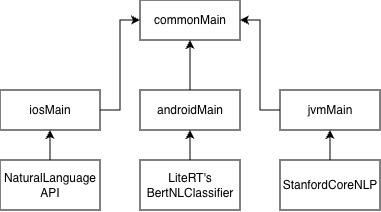
In this blog, we discuss how to implement a sentiment classifier in a Kotlin Multiplatform application that runs on Android, iOS and Desktop devices. We specifically learn how to leverage platform-specific APIs in KMP apps by implementing this classifier.
Our problem is to build a sentiment analyzer for a KMP application targeting Android, iOS and JVM platforms.
Find the source code for this project on GitHub:
Experiments/sentiment-classification at main · shubham0204/Experiments
Common
To implement platform-specific APIs for sentiment classification, we use the expect / actual pattern in KMP. In the commonMain module, we declare the getSentimentScore(String): Sentiment method in the SentimentClassifier class. The definition/implementation of this method will be created in the androidMain , iosMain and jvmMain modules for Android, iOS and JVM/Desktop targets respectively.
// SentimentClassifier.kt
package io.shubham0204.sentimentclassify

enum class Sentiment {
    POSITIVE,
    NEGATIVE,
    NEUTRAL
}

expect class SentimentClassifier {
    fun getSentimentScore(text: String): Sentiment
}
We also setup Koin as a dependency injection framework. The global variable targetModule will be container for all dependencies and it will be implemented for each platform module. For iosMain and jvmMain , the module should look the same, except for androidMain , where we need to inject the android.content.Context instance.
package io.shubham0204.sentimentclassify

import org.koin.core.module.Module
import org.koin.dsl.KoinConfiguration

expect val targetModule: Module

fun createKoinConfiguration(): KoinConfiguration {
    return KoinConfiguration {
        modules(targetModule)
    }
}
In App.kt for commonMain , we define the UI shared across all platforms,
@Composable
fun App(
    onThemeChanged: @Composable (isDark: Boolean) -> Unit = {}
) {
    KoinMultiplatformApplication(
        config = createKoinConfiguration(),
    ) {
        AppTheme(onThemeChanged) {
            val sentimentClassifier = koinInject<SentimentClassifier>()
            var text by rememberSaveable { mutableStateOf("") }
            var sentiment by rememberSaveable{ mutableStateOf<Sentiment?>(null) }
            Column(modifier = Modifier.fillMaxSize()) {
                TextField(
                    modifier = Modifier
                        .fillMaxWidth()
                        .windowInsetsPadding(WindowInsets.safeDrawing)
                        .padding(16.dp)
                        .widthIn(max = 600.dp)
                        .align(Alignment.CenterHorizontally),
                    value = text,
                    onValueChange = { text = it },
                    label = {
                        Text("Enter text to classify sentiment" )
                    }
                )
                Spacer(modifier = Modifier.height(16.dp))
                Button(onClick = {
                    val sentiment = sentimentClassifier.getSentimentScore(text)
                    println("Sentiment: $sentiment")
                }) {
                    Text("Classify Sentiment")
                }
                Spacer(modifier = Modifier.height(16.dp))
                if (sentiment != null) {
                    Text(
                        modifier = Modifier
                            .padding(16.dp)
                            .align(Alignment.CenterHorizontally),
                        text = "Sentiment: $sentiment"
                    )
                }
            }
        }
    }
}
Android
For Android, we use the BertNLClassifier API from LiteRT (previously TensorFlow Lite) to perform sentiment classification. LiteRT is a lightweight runtime that can execute a ML model (encoded as a .litert or .tflite file) on the given inputs. The BertNLClassifier API is a high-level Java API built on top of LiteRT to execute BERT-based text classification models.
We add the dependency in sharedUI/build.gradle.kts as a dependency for the androidMain module,
// sharedUI/build.gradle.kts
androidMain.dependencies {
    implementation("org.tensorflow:tensorflow-lite-task-text:0.4.4")
}
As BertNLClassifier.createFromFile reads the model file from the Android app’s assets folder, we need a android.content.Context instance to access the model asset file.
// SentimentClassifier.android.kt
package io.shubham0204.sentimentclassify

import android.content.Context
import org.tensorflow.lite.support.label.Category
import org.tensorflow.lite.task.text.nlclassifier.BertNLClassifier

actual class SentimentClassifier(
    context: Context
) {

    private val classifier =
        BertNLClassifier.createFromFile(context, "mobilebert.tflite")

    actual fun getSentimentScore(text: String): Sentiment {
        val results: MutableList<Category?>? = classifier.classify(text)
        val negativeScore = results?.get(0)?.score ?: 0f
        val positiveScore = results?.get(1)?.score ?: 0f
        val score = negativeScore - positiveScore
        return when {
            score > 0.5f -> Sentiment.NEGATIVE
            score < -0.5f -> Sentiment.POSITIVE
            else -> Sentiment.NEUTRAL
        }
    }
}
The mobilebert.tflite model can be downloaded and placed in the androidApp/src/main/assets directory.
To provide an instance of Context to SentimentClassifier , we use Koin to inject the instance automatically when an instance of SentimentClassifier is created:
package io.shubham0204.sentimentclassify

import org.koin.dsl.module

actual val targetModule = module {
    single { SentimentClassifier(context = get()) }
}
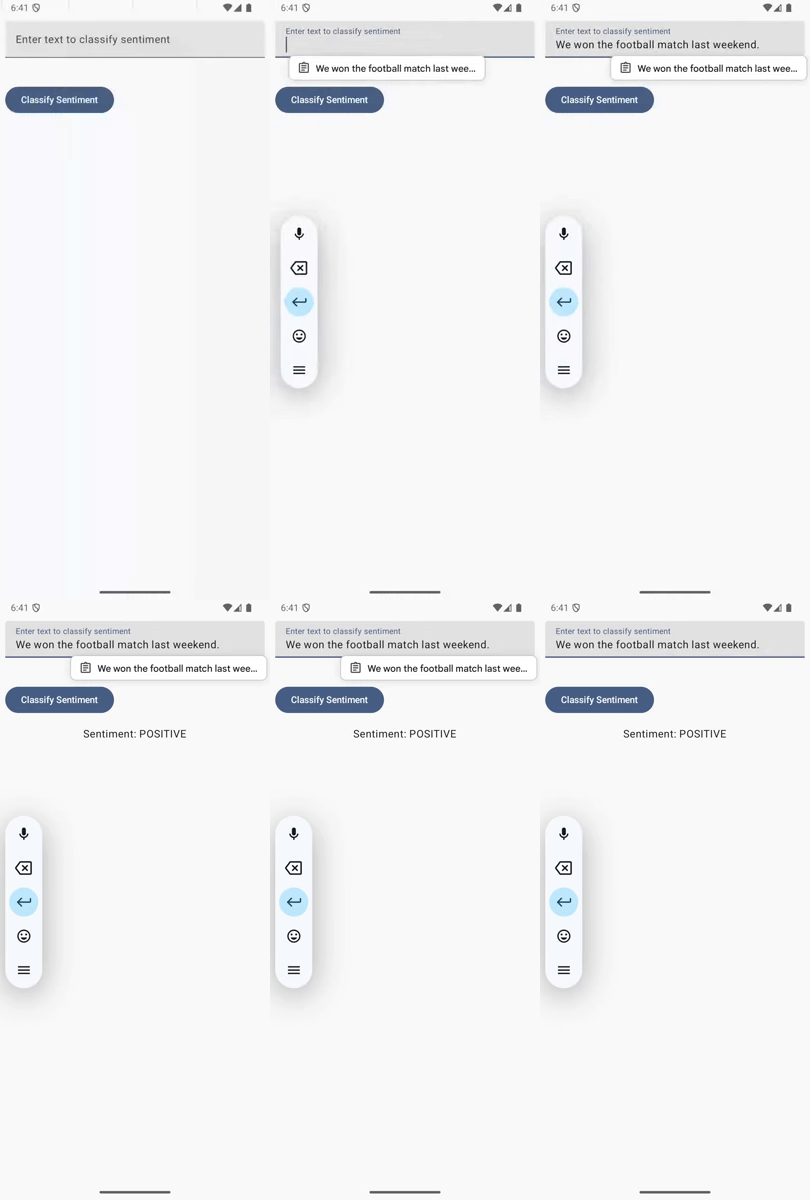
Here’s a screen cast with the app in action on an Android emulator:
iOS
The BertNLClassifier API from LiteRT is also available for iOS as a CocoaPods dependency. KMP allows adding CocoaPods dependencies to the iosMain module. However, the problem is that the TensorFlowLiteTaskText pod does not support the iOS simulator target. Testing without support for iOS simulator is difficult, especially for developers without a physical iPhone device.
Instead of using the BertNLClassifier API, the NaturalLanguage library available in all Apple operating systems provides a sentiment analysis service. AsNaturalLanguage is a platform API, we can access it in SentimentClassifier.ios.kt with import platform.NaturalLanguage in Kotlin. For the iosMain module, Kotlin interops with ObjC/Swift APIs that are natively available across Apple operating systems.
We specifically make use of the NLTagger API that helps identify the lemma, sentiment, parts-of-speech of the words from the given text (much like NLTK in Python). Here’s a good tutorial on how to use this API in a native iOS application in Swift.
// SentimentClassifier.ios.kt
package io.shubham0204.sentimentclassify

import kotlinx.cinterop.ExperimentalForeignApi
import platform.Foundation.NSMakeRange
import platform.NaturalLanguage.NLTagSchemeSentimentScore
import platform.NaturalLanguage.NLTagger
import platform.NaturalLanguage.NLTokenUnit

actual class SentimentClassifier {
    @OptIn(ExperimentalForeignApi::class)
    actual fun getSentimentScore(text: String): Sentiment {
        val tagger = NLTagger(listOf(NLTagSchemeSentimentScore))
        var sentiment = Sentiment.NEUTRAL
        tagger.string = text
        tagger.enumerateTagsInRange(
            range = NSMakeRange(0u, text.length.toULong()),
            unit = NLTokenUnit.NLTokenUnitParagraph,
            scheme = NLTagSchemeSentimentScore,
            options = 0u,
            usingBlock = { tag, tokenRange, _ ->
                if (tag != null) {
                    val sentimentScore = tag.toFloat()
                    sentiment = if (sentimentScore > 0.3) {
                        Sentiment.POSITIVE
                    } else if (sentimentScore < -0.3) {
                        Sentiment.NEGATIVE
                    } else {
                        Sentiment.NEUTRAL
                    }
                }
            }
        )
        return sentiment
    }
}
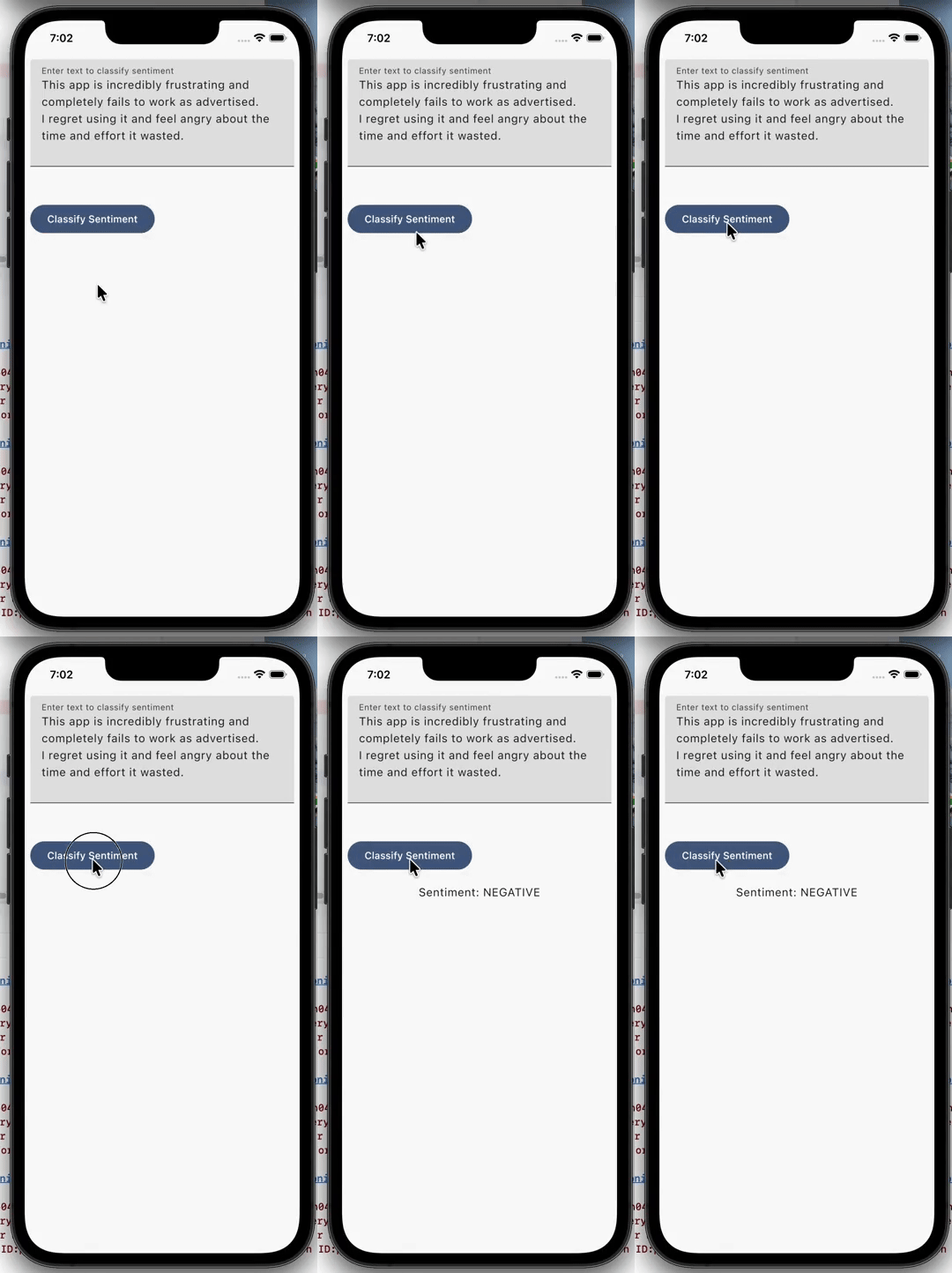
Here’s a screen cast with the app in action on an iOS Simulator:
Desktop (JVM)
The LiteRT runtime used in the Android target is specifically built for Android applications. Desktop applications running on the JVM do not have access to the Android device filesystem or libraries, hence, using BertNLClassifier is not possible.
To perform sentiment classification in the JVM, we can use the Stanford CoreNLP library. It provides multiple routines to perform NLP tasks in Java codebases. We add the Maven dependencies in the jvmMain target,
// sharedUI/build.gradle.kts
jvmMain.dependencies {
    implementation("edu.stanford.nlp:stanford-corenlp:4.5.10")
    implementation("edu.stanford.nlp:stanford-corenlp:4.5.10:models")
}
In the JVM implementation of SentimentClassifier , we use the StanfordCoreNLP API to construct an annotation pipeline,
// SentimentClassifier.jvm.kt
package io.shubham0204.sentimentclassify

import edu.stanford.nlp.ling.CoreAnnotations.SentencesAnnotation
import edu.stanford.nlp.neural.rnn.RNNCoreAnnotations
import edu.stanford.nlp.pipeline.Annotation
import edu.stanford.nlp.pipeline.StanfordCoreNLP
import edu.stanford.nlp.sentiment.SentimentCoreAnnotations
import edu.stanford.nlp.util.CoreMap
import java.util.Properties

actual class SentimentClassifier {

    private val pipeline: StanfordCoreNLP

    init {
        val properties = Properties()
        properties.setProperty("tokenize.whitespace", "true")
        properties.setProperty("ssplit.eolonly", "true")
        properties.setProperty("annotators", "tokenize, ssplit, parse, sentiment")
        pipeline = StanfordCoreNLP(properties)
    }

    actual fun getSentimentScore(text: String): Sentiment {
        val annotation = Annotation(text)
        pipeline.annotate(annotation)
        val sentence: CoreMap = annotation.get(SentencesAnnotation::class.java)[0]        val sentiment = sentence.get(SentimentCoreAnnotations.SentimentAnnotatedTree::class.java)
        return when (RNNCoreAnnotations.getPredictedClass(sentiment)) {
            0, 1 -> Sentiment.NEGATIVE
            3, 4 -> Sentiment.POSITIVE
            2 -> Sentiment.NEUTRAL
            else -> Sentiment.NEUTRAL
        }
    }
}
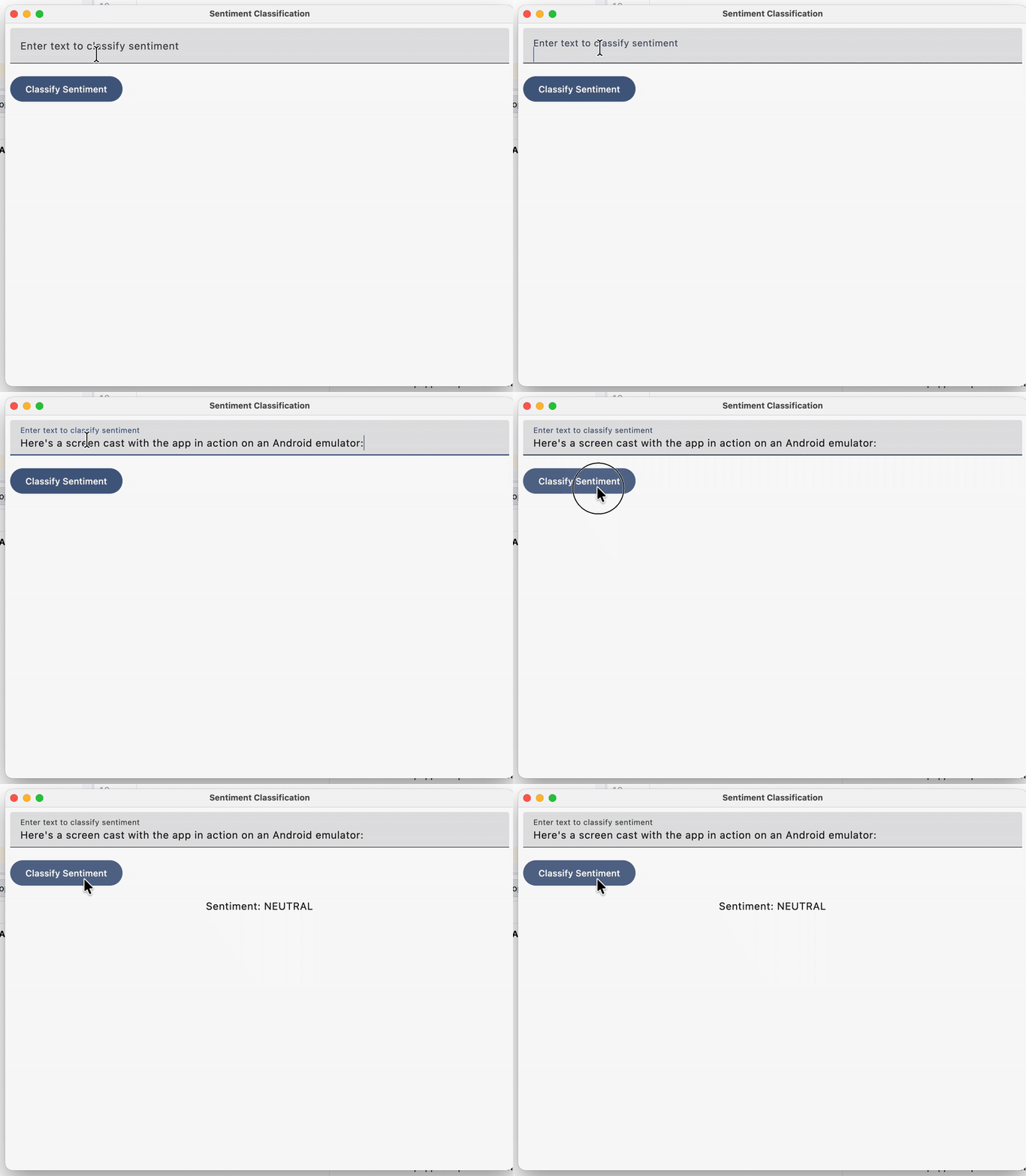
Here’s a screen cast with the app in action on macOS:
Conclusion
By leveraging KMP and the expect/actual pattern, we’ve successfully built a cross-platform sentiment analyzer that taps into the best-in-class tools for each environment: LiteRT for Android, Apple’s native NaturalLanguage framework for iOS, and Stanford CoreNLP for the JVM.
This approach demonstrates the true power of KMP — enabling a shared UI and business logic while maintaining the flexibility to use platform-specific ML libraries. By processing sentiment on-device, your application gains the advantages of offline capability, reduced latency, and enhanced user privacy.
Whether you’re building for mobile or desktop, this architecture provides a scalable way to integrate intelligent features without sacrificing performance or platform-native capabilities.
Building a Text Sentiment Classifier in Kotlin Multiplatform was originally published in ProAndroidDev on Medium, where people are continuing the conversation by highlighting and responding to this story.




This Post Has 0 Comments