


Modernizing EV Charging Infrastructure with Kotlin and Coroutines
Introduction
Electric vehicle adoption is accelerating globally, and with it comes the need for robust charging infrastructure. At the heart of EV charging communication lies OCPP (Open Charge Point Protocol) — the industry standard for communication between charging stations and central management systems.
While working on an EV charging project, I discovered a gap: there was no modern, type-safe Kotlin library for OCPP. Most existing solutions were Java-based, callback-heavy, and didn’t leverage Kotlin’s powerful features. So I built one.
In this article, I’ll walk you through the architecture of OCPP Kotlin — an open-source library that brings OCPP to the Kotlin/Android ecosystem with coroutines, Flow, and compile-time type safety.
What is OCPP?
OCPP is a WebSocket-based protocol used by EV chargers to communicate with backend systems (called CSMS — Charging Station Management System). It defines messages for:
- Authentication — Authorize users via RFID, app, or credit card
- Transactions — Start/stop charging sessions
- Monitoring — Report meter values, connector status
- Remote Control — Remotely start/stop charging, reset stations
The protocol has two major versions in production:
- OCPP 1.6 — Widely deployed, simpler message set
- OCPP 2.0.1 — Modern, feature-rich, more complex
Our library supports both.
Note on Hardware: This library operates at the protocol level, making it compatible with any physical connector type (Type 2, CCS, CHAdeMO, etc.). It supports managing multiple connectors/EVSEs via standard OCPP identifiers, leaving specific hardware control to the firmware.
Architecture Overview
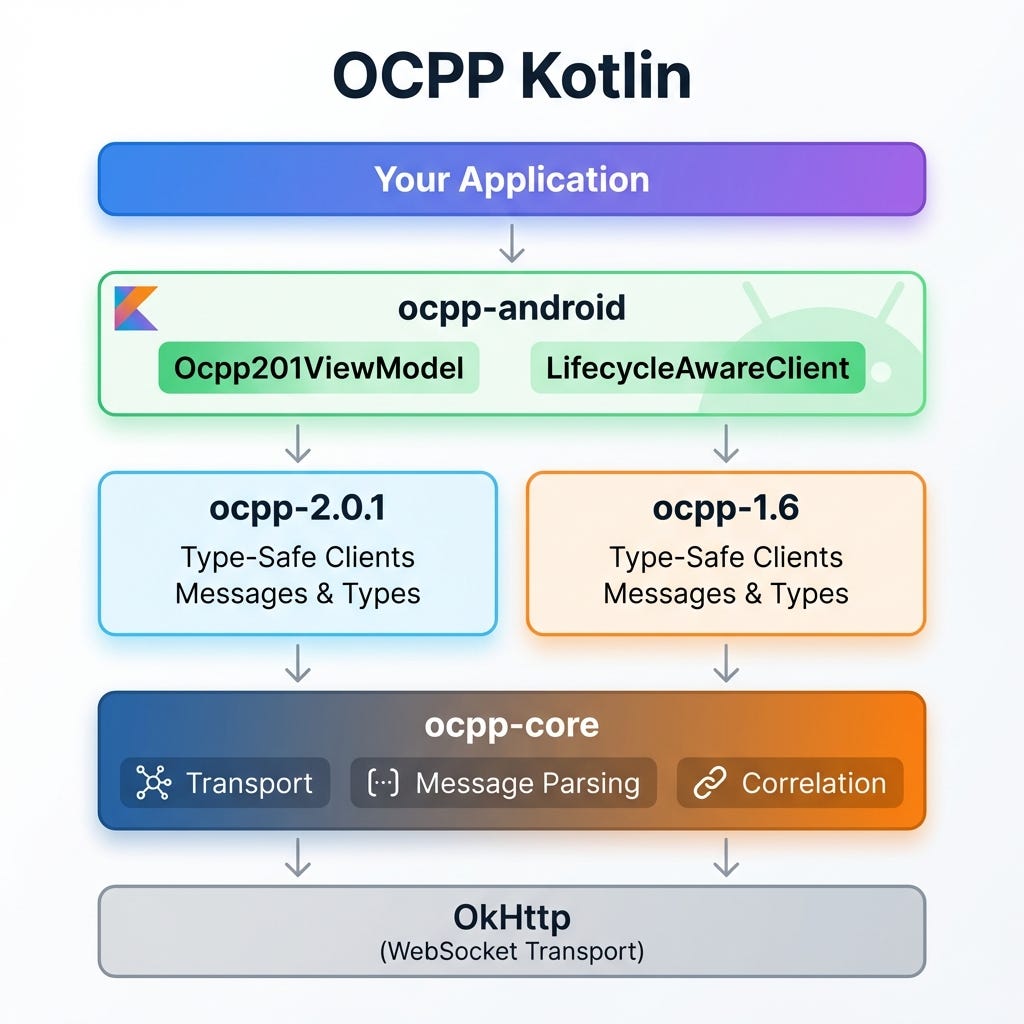
The library is built on a modular architecture separating transport, core logic, and version-specific implementations.
- ocpp-core — Version-agnostic transport, message parsing, request correlation
- ocpp-1.6 / ocpp-2.0.1 — Type-safe clients with all message definitions
- ocpp-android — Android lifecycle integration with ViewModel support
Key Design Decisions
1. Coroutines Over Callbacks
Traditional OCPP libraries use callbacks, leading to callback hell:
// ❌ Traditional callback approach
client.sendBootNotification(request, new Callback<BootNotificationResponse>() {
    @Override
    public void onSuccess(BootNotificationResponse response) {
        client.sendHeartbeat(new Callback<HeartbeatResponse>() {
            // More nesting...
        });
    }
    @Override
    public void onError(Exception e) { }
});
With Kotlin coroutines, this becomes linear and readable:
// ✅ The coroutine approach
val bootResponse = client.bootNotification(station, reason).getOrThrow()
val heartbeatResponse = client.heartbeat().getOrThrow()
2. Type Safety with Sealed Classes
OCPP messages have complex type hierarchies. We use Kotlin’s sealed classes and enums for compile-time safety:
@Serializable
enum class RegistrationStatusEnumType {
    @SerialName("Accepted") Accepted,
    @SerialName("Pending") Pending,
    @SerialName("Rejected") Rejected
}
// Compiler ensures you handle all cases
when (response.status) {
    Accepted -> startHeartbeat()
    Pending -> waitForAcceptance()
    Rejected -> handleRejection()
}
3. Generic API for Version Independence
Real-world apps often need to support multiple OCPP versions. We created a GenericOcppClient interface:
interface GenericOcppClient {
    suspend fun bootNotification(model: String, vendor: String): Result<BootNotificationResult>
    suspend fun startTransaction(connectorId: Int, idToken: String, meterStart: Int): Result<TransactionResult>
    // ... version-agnostic operations
}
// Usage - same code works for both versions!
val client: GenericOcppClient = when (config.version) {
    "1.6" -> GenericOcpp16Adapter()
    "2.0.1" -> GenericOcpp201Adapter()
}
4. Android Lifecycle Integration
For Android apps, we provide lifecycle-aware ViewModels:
class ChargingViewModel : Ocpp201ViewModel() {

    init {
        // Connection state automatically observed
        connectionState.collect { state ->
            when (state) {
                is Connected -> updateUI()
                is Disconnected -> showReconnecting()
            }
        }
    }

    fun startCharging(customerId: String) {
        viewModelScope.launch {
            authorize(customerId)
                .onSuccess { startTransaction(...) }
                .onFailure { showError(it) }
        }
    }
}
Handling the OCPP Message Format
OCPP uses a JSON-RPC-like format over WebSocket:
// Request: [MessageTypeId, MessageId, Action, Payload][2, "abc123", "BootNotification", {"chargingStation": {...}, "reason": "PowerUp"}]// Response: [MessageTypeId, MessageId, Payload]
[3, "abc123", {"status": "Accepted", "interval": 300}]
The message parser handles this with kotlinx.serialization:
sealed class OcppMessage {
    data class Call(val messageId: String, val action: String, val payload: JsonObject) : OcppMessage()
    data class CallResult(val messageId: String, val payload: JsonObject) : OcppMessage()
    data class CallError(val messageId: String, val errorCode: String, val description: String) : OcppMessage()
}
Request-Response Correlation
One challenge with WebSocket protocols is matching responses to requests. We use a CompletableDeferred map:
private val pendingRequests = ConcurrentHashMap<String, CompletableDeferred<CallResult>>()
suspend fun sendCall(action: String, payload: JsonObject): Result<CallResult> {
    val messageId = UUID.randomUUID().toString()
    val deferred = CompletableDeferred<CallResult>()
    pendingRequests[messageId] = deferred

    transport.send(formatCall(messageId, action, payload))

    return withTimeoutOrNull(30.seconds) {
        deferred.await()
    }?.let { Result.success(it) }
        ?: Result.failure(TimeoutException())
}
When a response arrives, we complete the corresponding deferred:
private fun handleCallResult(result: CallResult) {
    pendingRequests.remove(result.messageId)?.complete(result)
}
Auto-Reconnection with Exponential Backoff
Network reliability is crucial for charging stations. We implemented automatic reconnection:
private suspend fun reconnectWithBackoff() {
    var delay = 1.seconds
    val maxDelay = 60.seconds

    while (isActive) {
        try {
            connect(lastUrl, lastChargePointId)
            return // Success!
        } catch (e: Exception) {
            delay(delay)
            delay = minOf(delay * 2, maxDelay) // Exponential backoff
        }
    }
}
Testing with the Simulator
The library includes a CSMS simulator for testing:
./gradlew :ocpp-simulator:run
# Starts WebSocket server on ws://localhost:8080/ocpp
This lets you test your charging app without a real CSMS backend.
Getting Started
Add JitPack to your settings.gradle.kts:
dependencyResolutionManagement {
    repositories {
        maven { url = uri("https://jitpack.io") }
    }
}
Add dependencies:
dependencies {
    implementation("com.github.Jaypatelbond.ocpp-kotlin:ocpp-core:1.1.0")
    implementation("com.github.Jaypatelbond.ocpp-kotlin:ocpp-2.0.1:1.1.0")
    implementation("com.github.Jaypatelbond.ocpp-kotlin:ocpp-android:1.1.0") // For Android
}
Quick example:
val client = Ocpp201Client()
client.connect("ws://csms.example.com/ocpp", "CP001")
val result = client.bootNotification(
    chargingStation = ChargingStationType(model = "FastCharger", vendorName = "MyCompany"),
    reason = BootReasonEnumType.PowerUp
)
if (result.status == RegistrationStatusEnumType.Accepted) {
    println("Charger registered! Heartbeat every ${result.interval} seconds")
}
What’s Next?
The library is actively maintained with plans for:
- CSMS Server Module — Build your own charging backend
- SOAP Transport — For legacy OCPP 1.5 systems
- More Functional Blocks — ISO 15118, Smart Charging profiles
Conclusion
Building a protocol library taught me the value of:
- Type safety — Catch errors at compile time, not runtime
- Coroutines — Clean async code that’s easy to reason about
- Modularity — Let users pick only what they need
If you’re working on EV charging infrastructure, give OCPP Kotlin a try. Contributions and feedback are welcome!
GitHub: github.com/Jaypatelbond/ocpp-kotlin
Happy Coding! ⚡️
Building a Type-Safe OCPP Client Library for Kotlin & Android was originally published in ProAndroidDev on Medium, where people are continuing the conversation by highlighting and responding to this story.


This Post Has 0 Comments