
Turning voice and OCR into structured, app-ready AI output
In my previous article, Serverless AI for Android with Firebase AI Logic, I covered the core concepts behind Firebase AI Logic: how it enables Android apps to interact with generative models without managing backend infrastructure, and how system instructions, prompts, and structured outputs work together.
That article focused on what Firebase AI Logic is and how it works.
This one is about what you can actually build with it.
To explore that, I put together a showcase repository where I experimented with multiple real-world scenarios:
- Audio input combined with system instructions and structured output
- On-device OCR using ML Kit + AI-powered data extraction
This article walks through those implementations, the architectural patterns behind them, and the lessons learned along the way.
Why Firebase AI Logic works well for practical Android use cases
Before diving into the examples, it’s worth highlighting why Firebase AI Logic fits these scenarios so well.
At a high level, it gives you:
- Serverless execution of AI-related logic
- Strong separation between client UI and AI reasoning
- Structured outputs that map cleanly to app logic
That last point is crucial. Instead of treating AI responses as plain text, Firebase AI Logic encourages you to think in terms of functions, schemas, and contracts, which gives us a much higher level of reliability when working with LLMs.
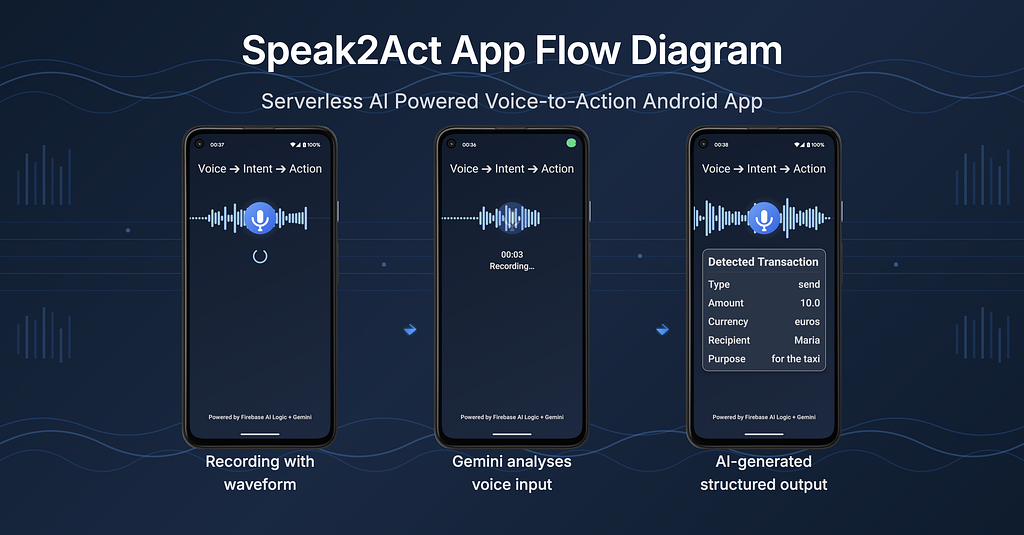
Audio input → structured output → internal API call
The problem
Voice input is powerful, and yes, there are on-device transcription models (with trade-offs around model size, latency, accuracy and maintenance). But free-form text outputs are hard to integrate into real app logic. If a user speaks a command, the app shouldn’t interpret intent heuristically — it should receive a clear, machine-readable decision.
The approach
In this experiment:
- Audio input is captured in the Android app
- The audio is sent to Firebase AI Logic
- A system instruction defines:
– What the model is allowed to do
– The exact structure of the expected output - The model returns a function-like response with structured arguments
- That structured output is mapped to a function call inside the app

Instead of plain transcription like:
“Send Maria 10 euros for the taxi.”
The response becomes:
{
  "name": "executeTransaction",
  "parameters": {
    "action": "send",
    "amount": 10.0,
    "currency": "euro",
    "person": "Maria",
    "description": "for the taxi"
  }
}
Why this matters
This pattern turns generative AI into a decision layer, not a UI feature. The Android app stays deterministic, testable and safe — while still benefiting from natural language input.
This is especially useful for:
- Voice-driven workflows
- Accessibility features
- Assistant-style interactions inside apps
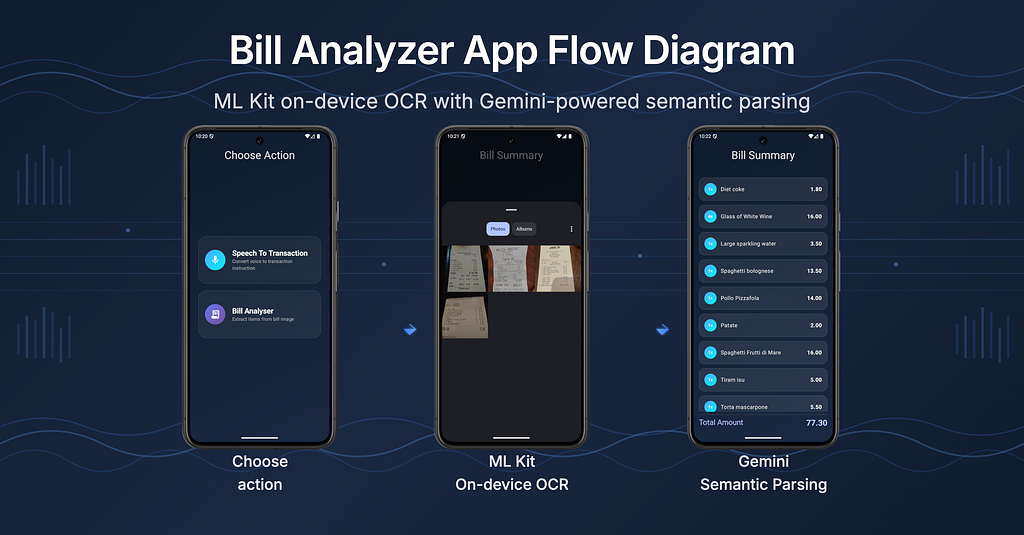
On-device OCR + AI-powered semantic parsing
The problem
Extracting structured data from bill images is tricky because OCR returns raw text blocks, not logical rows. ML Kit OCR doesn’t read text the way humans do (left-to-right, top-to-bottom). Instead it groups text by visual similarity and alignment. Lastly, it returns results ordered by spatial heuristics, not semantic meaning.
That’s why a bill’s output is often grouped in a way that lists quantities together, descriptions together and prices together. So the model groups them by column, not by row. This makes bills one of the worst-case inputs for OCR. Besides this problem, every bill has a different layout, which adds another level of complexity. And hard-coded parsing rules don’t scale. This is where LLM comes into play.
The approach
This implementation combines on-device ML with cloud-based reasoning:
- ML Kit OCR runs entirely on device. It’s fast, private and offline friendly.
- The extracted text is sent as part of the prompt to Firebase AI Logic
- System instructions define the expected JSON schema
- The LLM returns clean, structured JSON object
For example, the bill image could be:

And its OCR output is:
MELITA GARDENS
CAFE 1
FRI
IDMEJDA STREET
BALZAN
TEL. 21470663/4
Table 29
1 ESPRESSO
1 ESPRESSO
Sub/Ttl
VAT F:
Decaffeinated
3/09/21
== Chk Copy 2] =**
Taxable Amount F
Total Tax
Check 10006
10:58am
Total Due
0.58
3.22
0.58
1.85 F
1.85 F
0.10 F
3.80
3.80
THANK YOU - GRAZZI
LOOKING FOR A VENUE FOR A PRIVATE PARTY?
NE OFFER A RANGE OF MENUS & VENUES FOR
0OCASIONS OF ANY SIZE. PLEASE ASK TO
VIEN OUR PRIVATE AREAS
After Gemini’s reasoning, the output becomes:
{
  "merchant_name": "MELITA GARDENS CAFE 1",
  "address": "IDMEJDA STREET, BALZAN",
  "phone": "21470663/4",
  "date": "03/09/21",
  "day": "FRI",
  "time": "10:58am",
  "table_number": "29",
  "check_number": "10006",
  "items": [
    {
      "quantity": 1,
      "description": "ESPRESSO",
      "price": 1.85
    },
    {
      "quantity": 1,
      "description": "ESPRESSO",
      "price": 1.85
    },
    {
      "quantity": 1,
      "description": "Decaffeinated",
      "price": 0.10
    }
  ],
  "subtotal": 3.80,
  "taxable_amount": 3.22,
  "total_tax": 0.58,
  "total_due": 3.80
}
Why this works so well
- ML Kit OCR does what it’s good at: text recognition
- LLM does what it’s good at: semantic understanding
The result is a pipeline that’s far more robust than trying to solve everything on-device or everything in the cloud.
Common architectural patterns across both use cases
While these examples differ in input modality, they both follow the same underlying architectural principles. Across experiments, a few patterns kept showing up:
1. Treat AI as a backend capability, not a UI feature
The UI sends intent, the backend returns structure.
2. System instructions are more important than prompts
A clear system instruction:
- Reduces hallucinations
- Improves consistency
- Makes outputs safer to consume
3. Structured output is the real superpower
Once AI responses map cleanly to data classes or functions, they stop feeling like “magic” and start behaving like a service.
When Firebase AI Logic makes sense
It shines when:
- You don’t want to manage backend infrastructure
- You need structured outputs
- You need the prototype fast
It may not be ideal when:
- You need to work with sensitive data
- Everything must run fully offline
- You want a long-term solution without usage-based pricing
Final thoughts
Firebase AI Logic is fun to play around with. It shows current possibilities of LLMs delivered as a service through an SDK that feels familiar to Android developers.
By combining on-device ML (ML Kit) and serverless AI reasoning (Firebase AI Logic), you can build features that are genuinely useful and in the era of AI hype — a compelling differentiator for user-facing features and demos.
If you’re curious, the full implementation is available in the showcase repository, and the earlier article covers the foundational concepts in more detail. I’m actively experimenting with additional pipelines and would love feedback or ideas from anyone working in this space.
One of the experiments that came out of this work is a personalised action-figure pipeline, starting from image generation and potentially extending into 3D modeling and printing. I’ll explore that idea in a follow-up article.
Building AI features on Android with Firebase AI Logic was originally published in ProAndroidDev on Medium, where people are continuing the conversation by highlighting and responding to this story.





This Post Has 0 Comments