
My observations from building mobile apps with the Q1 2026 AI developer toolbox after a five-year break from hands-on coding — how much easier it has become to build and ship, and where the process still feels stubbornly manual.
Preface
I started building software professionally in 2011, first with Java backend systems and later with Android apps of different sizes. Natural career progression and people skills led me to the Engineering Management track, which kept me busy over the last five years.
EM in a big tech company is a very broad role. You need to oversee execution across many areas, understand complex systems, align people, and constantly switch context. That leaves little time for hands-on coding, and without practice, builder skills get rusty.
Starting in H2 2025, we all saw how much AI developer tooling improved. For people like me, that created a new path back into building. This is because the biggest blocker was never architectural thinking, but all the small errors, syntax details, environment issues, and repeated friction that used to require many extra hours to overcome.
In this post, I want to share my experience of building an app for both Android and iOS from scratch, shipping it to the app stores, and publishing it on GitHub.
Choose the problem to experiment on
Before starting this project, I already spent some time making small code changes and even running (together with senior engineers) a bootcamp-style course for EMs who wanted to get more hands-on. That helped me realize I needed a project small enough to finish over a couple of weekends, but still real enough to experience the modern workflow in full.
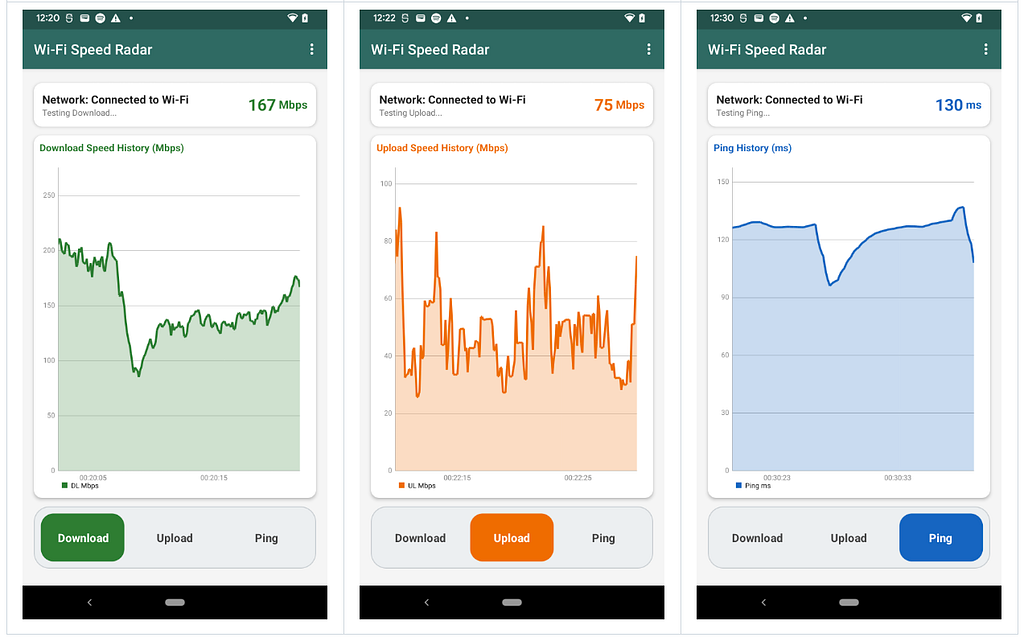
I decided not to build yet another notes app. I wanted something with clear exit criteria, some real business logic, and enough practical value to be more than a toy. That is how the idea of Wi-Fi Speed Radar was born. It is a simple one-screen app, does not collect user data, does not require sign-up, and solves a real problem people have: testing the network speed and latency.
Dev Environment Setup
My objective was to build the app for both Android and iOS. Android was the natural place to start because I have a lot of Android development experience, and thanks to the ProAndroidDev publication (which I started back in 2017), I continued to keep an eye on major ecosystem changes even while I was no longer coding day to day.
It was also interesting to observe how quickly the tool landscape changed between January 2026, when I started the Android project, and late February, when both apps were already published in the stores. In this space, even a few weeks now feel like a long time.
iOS was not exactly an unknown platform, since my teams shipped iOS features over the years. But I had never personally gone through the Apple App Store flow end to end, and I had not written any significant amount of Swift or Objective-C code myself. That meant I had to spend some extra time learning the rules of the game and setting up the tooling.
As an Android engineer, finally building an iOS app also felt rewarding on a personal level. For years, I saw iOS as an interesting parallel world, but I never had enough time to properly explore it. AI developer tools made that jump much easier, and I genuinely enjoyed the thrill of building for a new platform.
Several LLM-powered tools have appeared recently that promise a new way of building apps, with much less dependence on a traditional IDE and dev environment setup, such as Rork and Replit. I am intentionally leaving them out of this post because they belong to a different tool category, and here I wanted to focus on refreshing my own hands-on app development skills.
The app stack and business logic
On Android, I ended up with a fairly classic stack: Kotlin, Android Views with XML layouts, AndroidViewModel, Coroutines with StateFlow, OkHttp, and MPAndroidChart. Even though Compose is clearly the new norm on Android, I kept layouts because they were something I knew very well from the old days; that part is definitely on the list to refactor later.
On iOS, which was a new territory for me, I relied more on AI for the stack choices and landed on SwiftUI, Swift Charts, URLSession async/await, native ICMP ping via BSD sockets, and NWPathMonitor.
I kept the apps as separate native codebases rather than trying to force a shared cross-platform layer. In the age of abundant AI-generated code, sharing and connecting business logic across platforms feels much more approachable than it used to, and that is something worth exploring next.
For the business logic, I was inspired by Fast.com — simple and focused on the three signals most users actually care about: download, upload, and latency (in the form of ping). For throughput, both apps use Cloudflare’s public speed-test endpoints. For latency, both apps target speed.cloudflare.com with ICMP-based ping; on iOS, this is implemented via BSD sockets, while on Android, the app uses the platform ping command when available and falls back to HTTP latency only when ICMP is unavailable.
Interestingly, the first AI-generated versions leaned on HTTP-based latency checks, and those did not hold up as a real substitute for ping. I had to actively steer the AI toward an ICMP-based approach on both platforms, and it took quite a few prompts to get there. Basic knowledge of network protocols — together with running real ping tests on-device — helped me catch the problem early. Without that human steering, the app could have easily ended up giving users misleading latency numbers.
From assisted coding to agentic workflow
I intentionally omit some details here because the tools are evolving so fast that a full diary would become outdated very quickly. Instead, I want to focus on a few observations that stayed true throughout January to early March 2026.
I started the Android app in January with Claude Code Opus 4.5. It was powerful, but I ran through tokens too quickly, and the cost added enough friction that I did not want to stay in that workflow for long.
From there, I switched to Gemini inside Android Studio. Gemini was useful, especially because it lived closer to the Android workflow, but it required a fair amount of handholding and back-and-forth, and Android Studio didn’t allow integration with any other LLMs at that time. I kept looking for a setup that felt more autonomous and less like I was still commanding every code change manually.
The Codex MacOS app turned out to be the most convenient tool for this particular project. The UI was clean, the agent felt more independent, and it was able to work through things like the adb screenshot loop and then use that feedback to iterate on the UI. That was the point where the process started to feel like actual delegation of execution.
For the iOS app, which I started in mid-February, I went directly to Codex and used Xcode mostly for the necessary build and App Store submission steps. I found Xcode to be a real outlier in developer experience; it looks and feels like the 2010s. Maybe Android engineers are spoiled by IntelliJ-based tools, but the contrast is hard not to notice once you switch back and forth between the two worlds.
What AI did vs what I still had to do
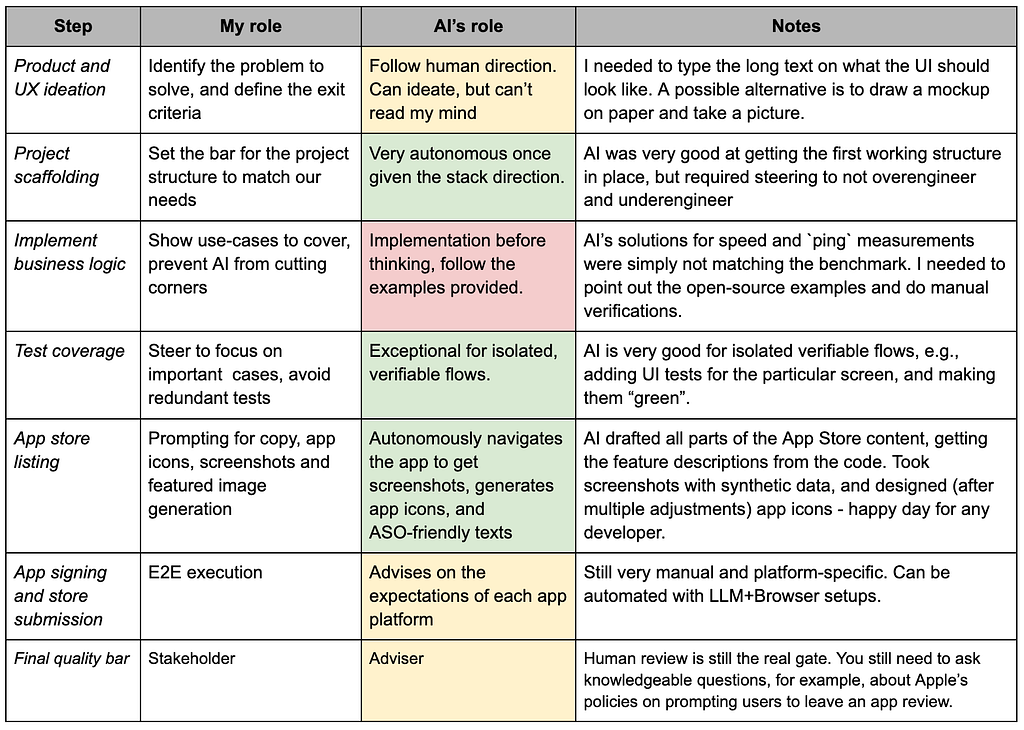
I see a lot of debate around Codex vs Claude usage. In the table below, I refer to them simply as “AI” for convenience, since on this kind of project the difference was not distinct enough to be especially important. Assuming you are using SOTA models, the choice depends more on your way of working and on how well each tool fits into the integrations and workflow you already use.
Let me summarize the experience through the main steps required to build and ship the app. Not surprisingly, AI leveled up every step of the process, even if not every step was improved equally. It made mistakes in the business logic, required some understanding of network protocols, and some real thinking about how the UI should be presented to the user.
Test Automation
Historically, engineering teams liked unit tests because the value was immediate, they were easy to write, and the output/signal was consistent. Opposite in almost every possible way, the UI testing lagged in every big and small project I worked on during my career.
This is one of the areas where AI is genuinely changing the game. Generating verification flows, mock data, and first-pass test cases comes with ~0 developer effort now. There are no excuses to skip UI tests for user-facing products anymore.
Test automation becomes even more important in the agentic engineering loop. If agents keep adding and changing features, protecting the already working functionality becomes a much more central concern. In that sense, AI does not reduce the need for tests — it increases it.
Launch the app on app stores
The part that remained almost unchanged in the last few years is the Play Store and App Store process. Google added pre-publishing app review in 2025, similar to Apple’s, and the overall flow still feels much more manual than the coding experience itself.
For both Android and iOS versions of Wi-Fi Speed Radar, I still spent several hours preparing the listings, screenshots, and release metadata. With the full agentic developer loop, Codex performed screenshot tests on both platforms while running the app in different modes and feeding it synthetic data, and also generated ASO-friendly app store listing text.
The developer console for both Android and iOS app launches felt archaic and required a lot of clicks. This can be automated by the third-party AI browser tools, but I don’t feel like entrusting app releases to automation that can hallucinate. I bet that “native” integrations are arriving soon, directly bridging Claude/Codex to the app publishing flows.
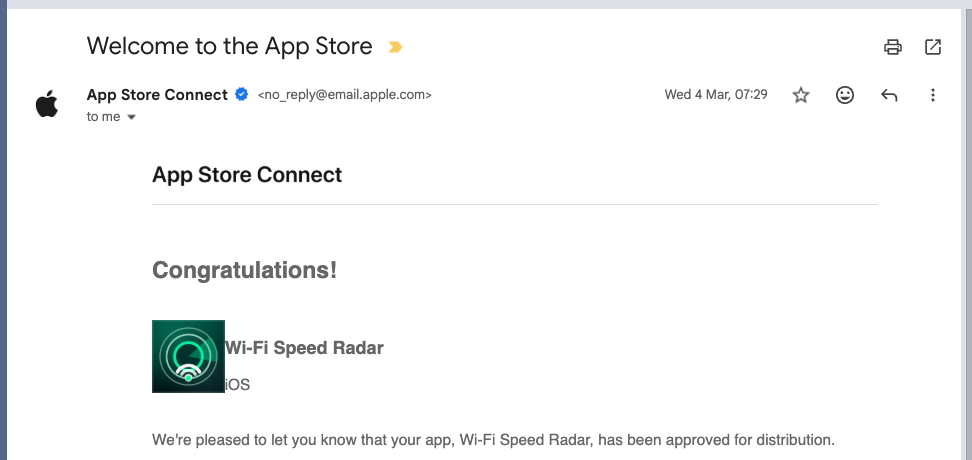
I want to give credit to the review teams at Apple and Google. Initial reviews for both apps took less than two business days, faster than I expected in the age of abundance of AI-built apps. You can find the Wi-Fi Speed Radar apps on the Google Play Store and the Apple App Store, and here are the corresponding GitHub repositories for Android and iOS.
Takeaways / Learnings
If I compare this experience to how hard the same project would have felt just a few years ago, the difference is groundbreaking. Shipping even a simple app on a new mobile platform would likely have taken me 5x-10x more effort. In early 2026, I spent less than 10 focused hours getting both apps out.
What changed even more than the raw hours was the cognitive load. Those hours were simply less painful than the early days of learning mobile development, when half the battle was fighting the environment, unclear errors, and the feeling that things were broken for reasons you could not yet understand.
At the same time, shipping apps to the stores still requires preparation and patience. I can imagine a world where the barrier gets lower, but would platform owners (Google, Apple) want to fully optimize for one-day “vibe-coded” apps flooding the stores? Some friction may be intentional to keep the quality bar.
And no, we are not out of jobs yet. Writing code was never the only hard part of building software products. Designing a good user experience, understanding the business needs, and figuring out how to acquire users at scale are still deeply human tasks.
Have you launched any pet projects in the last few months using the new AI developer tools, and/or got back to building after a long break? Share what you built in the comments or tag me on X.
I Stopped Coding for 5 Years. AI Helped Me Ship Mobile Apps Again was originally published in ProAndroidDev on Medium, where people are continuing the conversation by highlighting and responding to this story.



This Post Has 0 Comments