


One of the most critical decisions in Jetpack Compose development is choosing where to store your UI state.
If you pick the wrong tool, your users will lose their data when they rotate their phone or switch tabs.
To master this, you need to understand the 4-stage hierarchy of state persistence.
Let’s break down how state “survives” as we move through each layer.
1. remember (The Volatile Layer)
Lifespan: Only as long as the Composable is in the tree.
remember stores data in the Composition Memory. It is the lightest way to keep state, but it is also the most fragile.
- Survival: It survives Recomposition (when the UI updates).
- The Difference: It fails if you rotate the screen. Because the Activity is destroyed and recreated, the memory is wiped.
- Best for: Local, unimportant UI logic like a temporary animation state or a “isHovered” fla
// Gone if you rotate the phone!
var count by remember { mutableStateOf(0) }
2. rememberSaveable (The Configuration-Proof Layer)
Lifespan: Survives Activity recreation.
rememberSavable saves data to the SavedInstanceState (Bundle). This is the standard for most Android UI states.
- Survival: It survives Screen Rotation and System-initiated Process Death (when the OS kills your app in the background to save RAM).
- The Difference: It fails if you navigate away from the screen or switch tabs in a way that removes the Composable from the UI tree.
- Best for: Form inputs, search queries, or the current scroll position.
// Stays safe during rotation!
var text by rememberSaveable { mutableStateOf("") }
Passing a complex object intended for rememberSerializable to rememberSavable will typically result in the following exception:
java.lang.IllegalArgumentException:
Type of the key <YourType> is not supported.
On Android you can only use types which can be stored inside the Bundle.
java.lang.IllegalArgumentException: MutableState containing HomeTab cannot be saved using the current SaveableStateRegistry.
The default implementation only supports types which can be stored inside the Bundle.
Please consider implementing a custom Saver for this class and pass it as a stateSaver parameter to rememberSaveable().
3. rememberSerializable (The Object Layer)
Lifespan: Survives process death for complex structures.
Sometimes a simple Stringor Intisn’t enough. rememberSerializableis designed to handle Custom Objects.
- Survival: It survives Process Death by serializing the entire object.
- The Difference: It allows you to save Complex Data Classes easily without manually writing a “Saver” or implementing Parcelable.
- Best for: Filter settings models or user profile objects that need to persist as a single unit.
data class FilterState(
    val category: String,
    val minPrice: Int
) : Serializable

val filter by rememberSerializable { mutableStateOf(FilterState("Tech", 0)) }
4. rememberNavBackStack (The Navigation Layer)
Lifespan: Tied to the Navigation Backstack entry.
This is the “Strongest” level, introduced for Compose Navigation 3. It links the state directly to the screen’s history.
- Survival: It survives Tab Switching and Back Navigation.
- The Difference: With L1 to L3, switching from “Tab A” to “Tab B” usually destroys the state of Tab A. rememberNavBackStackkeeps the state alive in the background until the screen is explicitly removed from the history.
- Best for: Multi-tab apps where users expect to switch back and forth without losing their place.
// Tied to the screen's lifecycle, not just the Composable!
val screenState = rememberNavBackStack()
Summary Table: Which one should you use?
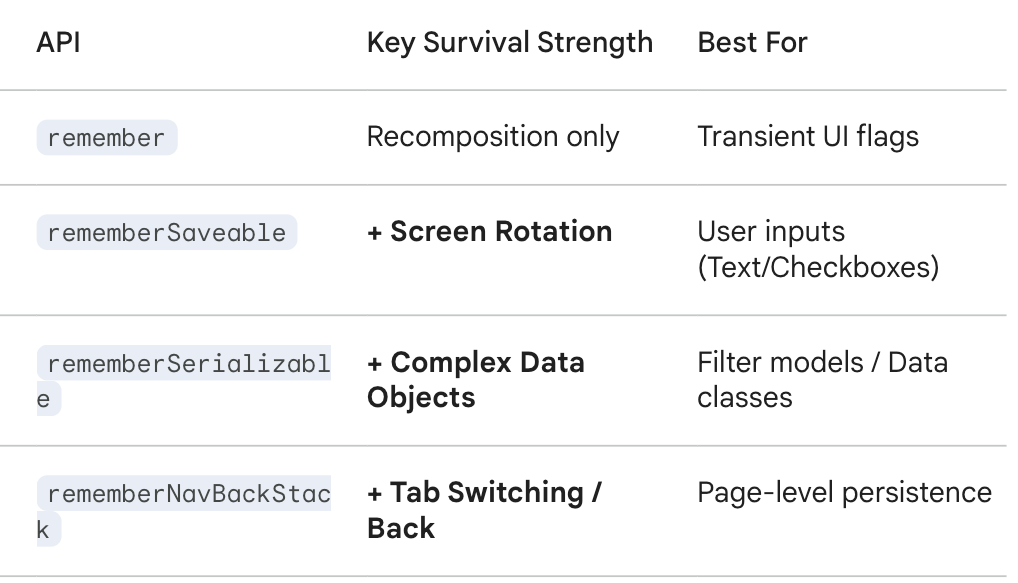
The “User Frustration” Test: Which API to choose?Final Strategy
When designing your UI state, the easiest way to choose the right API is to ask: “How much would it annoy the user if this data disappeared right now?”
1. “It doesn’t matter at all” → remember
If the data is purely visual and resetting it doesn’t interrupt the user’s flow, keep it light.
- Example: A temporary highlight on a clicked button or an expanding/collapsing animation state.
2. “They would have to re-type or re-select it” → rememberSaveable
If the user loses progress upon rotating their phone or receiving a phone call, they will be frustrated.
- Example: Text entered into a form, a checkbox selection, or the current position of a scroll list.
3. “They would lose a complex set of configurations” → rememberSerializable
If the user has spent time setting up a specific view with multiple filters or custom objects, use this to ensure the data survives even if the app process is killed.
- Example: A complex SearchQueryobject containing categories, price ranges, and sort orders.
4. “They would lose their entire current task or context” → rememberNavBackStack
If the user expects to jump between different parts of the app (like checking a setting and coming back) and find everything exactly as they left it, this is the strongest option.
- Example: A half-finished multi-step registration process or a specific product detail page they were viewing before switching to the “Cart” tab.
Conclusion : Key Takeaways for Navigation 3

Navigation
   │
   ├ rememberNavBackStack // Holds the stack for the entire navigation
   │
   ├ Screen A
   │   ├ remember         // For scroll position or animations
   │   └ rememberSaveable // For things like input forms
   │
   └ Screen B
       └ rememberSerializable // For complex objects such as filter conditions
- rememberSerializable vs rememberSavable : Use Serializable specifically when you have custom data classes and want to avoid the boilerplate of implementing Prcelable or custom Saver logic.
- The Power of NavBackStack: While the first three are tied to the Composition lifecycle (they die if the Composable leaves the screen), rememberNavBackStack is tied to the Navigation history. This is the critical shift in Compose Navigation 3 for maintaining state during tab switching.
Start with the Simple Idea: Migrating from Jetpack Compose Navigation2 to Navigation3 For Now
Before You Go
You may already want to manage navigation stacks per tab using Map<Tab, NavBackStack<Route>>. We’ll dive into that next time.
This approach allows for a more flexible, state-driven multi-stack navigation that perfectly aligns with the declarative nature of Navigation 3.
I’ll keep sharing more insights and articles on Jetpack Compose.
Happy composing 🚀
Thanks for reading!
👏 Clap to support the article
⭐ Follow me for more Android and Jetpack Compose tips
🔔 Turn on email notifications so you never miss a post
Jetpack Compose State Survival Guide: From remember to rememberNavBackStack was originally published in ProAndroidDev on Medium, where people are continuing the conversation by highlighting and responding to this story.




This Post Has 0 Comments