


As a part of keeping the code base in my working apps clean, up to date and ready for Kotlin multiplatform we migrated from Java Time to Kotlin Time. Before starting, there were no clear migration instructions. To help fellow engineers, I will share our experience and the insight gained from the process.
Before we start, I will explain Kotlin Time and why you might need to migrate.
What is Kotlin Time?
For convenience, this article refers to a number of date- and time-related APIs made by the Kotlin team as the Kotlin Time. It consists of two main parts:
- Package kotlin.time — an API for measuring time intervals and calculating durations. The main class here is Duration.
Instant and Clock types were added to the Kotlin standard library in 2.1.20 as an experimental API and they will replace corresponding types from the kotlinx-datetime. - Library kotlinx-datetime — the rest API for working with date and time. It includes classes like Local(Date)?(Time)?, Date(Time)?Period, and helpers.
Why migrate to Kotlin?
Both parts of Kotlin Time are written in pure Kotlin but are underpinned by “platform” API. It has four main benefits versus Java Time:
Kotlin-first syntax.
For example, instead of Duration.ofDays(1), you can use the extension 1.days and operator overloads like end – start instead of Duration.between(start, end).
A clear boundary between the physical time of an instant and the local, time-zone-dependent civil time.
To truly understand the problem this solves, you must understand how Java Time is designed. The How to get time zones right with Java article is useful, especially the following illustration from it:
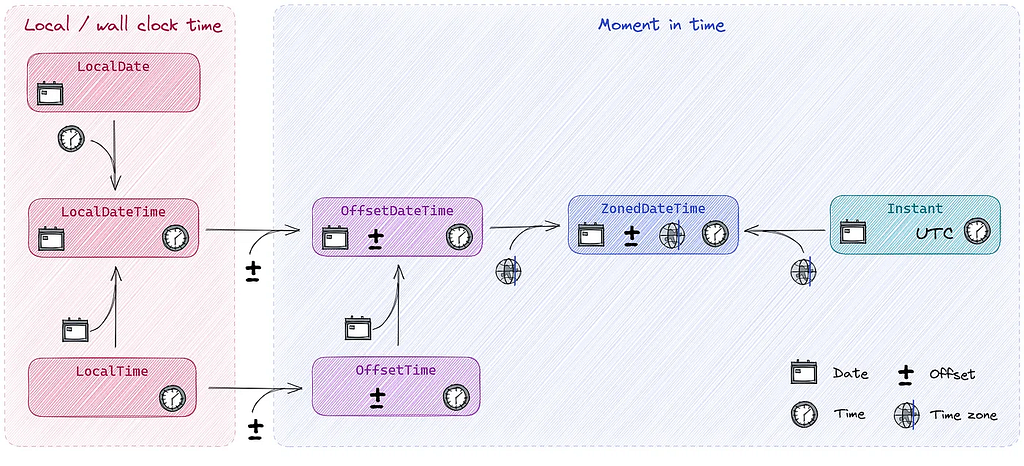
It shows how OffsetDateTime and ZonedDateTime try to combine local and instant time in one entity.
Kotlin Time avoids these extra combinations for making the code easier to understand and containing less bugs. This will be described in detail in the next parts.
Kotlin multiplatform support
This encapsulates Java Time in JVM, js-joda in JS/WASM and ThreeTen-Backport in native.
JDK version independence
Veteran Android developers will recall the pain of Java limitations. Previous versions of Android were built on Java 6 APIs , which meant no Java Time was available in Android SDK, necessitating the use of some backport. With Kotlin Time, you do not need to backport or migrate.
It is worth noting that the library is still under development and, as for now, it has no localised date formatting. It is expected to be implemented before beta.
How to migrate
Before starting, add the kotlinx-datetime Library dependencies to the project. Refer to the actual ReadMe for that. Additional steps may be needed if you are building for KMP, JS or Wasm.
Migrating similar classes
Next, proceed with the easiest part — migrate classes that are the same as in Java Time.
These are:
- Instant
- Duration
- LocalDate, LocalTime, LocalDateTime
- Period -> replaced to DatePeriod or DateTimePeriod
These are easy to find in code by searching import java.time.
Our first attempt was to replace all imports in the project and try to compile the project. Try not to repeat this mistake, because it will require some manual interventions:
- For Duration, replace the way you create its instances from Duration.ofDays(1) to 1.days or similar things.
- Instant.now is deprecated; you need to replace it with Clock.System.now (auto refactoring should work, though).
- You have no LocalDateTime.now() anymore. This is intentional to distinguish instant and local times.
- You will have dependent code using incompatible Java Time APIs.
Instead, the recommended approach is to perform the refactoring incrementally, on a file-by-file basis. The library provides several compatibility APIs — forward and backward — which are straightforward to use and remember. For Java Time, use toKotlin*(); for Kotlin Time, use toJava*(). For example, toKotlinLocalDate(). The full list can be found here.
These changes should be safe if no typos are made, but should be safer if you already have some unit test suite. Alternatively, start from unit tests before the migration to “concrete” the existing logic.
Dealing with date periods
Period can be replaced by two classes: DatePeriod (most close) and DateTimePeriod (a superclass of DatePeriod). It might not be obvious how to use them combined with Instant and LocalDateTime.
In Java Time, you can use the plus (+) operator for LocalDateTime and Period: LocalDateTime.ofInstant(instant, utc) + Period.ofYears(1)
In Kotlin Time, you cannot do this. Instead do the following:
- With no need for a time component: LocalDate(…).plus(DatePeriod(…)
- Needing a time component: instant.plus(DateTimePeriod(years = 1), TimeZone.UTC)
This last overload is hard to find, because Instant can be easily summed up with Duration.
Definition of done
While processing file to file, the question arises of when the process can be considered complete. Because Java Time is not a library, you cannot use its dependency removed as a definition of done for the migration.
Luckily there is another way — using static analysis.
For example, Detekt — which is used in our project — has a rule called ForbiddenImport. You can set it up in config as follows:
ForbiddenImport:
  active: true
  imports:
    - reason: 'Use Kotlin Time in new code'
      value: 'java.util.concurrent.TimeUnit'
    - reason: 'Use Kotlin Time in new code'
      value: 'java.time.*'
(Note: TimeUnit is here because it can be replaced by Kotlin Duration in most cases.)
After that, your project will fail on Detekt. You need to set up/update the baselines file in each module for it. The number of lines in the baselines can be considered as new “tech debt” metrics.
Using this static analysis rule works in two directions:
- Firstly, it helps to determine how much of migration work is left.
- Secondly, it prevents your colleagues from introducing new code using Java Time while and after migrating to Kotlin Time.
Referring to our experience, the main part of the migration is finished, but these baseline files are still not empty in the project. There are two reasons for that:
- Some libraries, like OkHttp, are not compatible with Kotlin Duration and need TimeUnit.
- Some parts will remain because of localised time formatting needs.
I made an abstraction over it, by putting all platform- (JVM) dependent parts left in a couple of files. They can be either replaced by the library or implemented in KMP manually in future.
Changes requiring deeper understanding of the Java Time API
After we have estimated the quantity of the new “tech debt,” we move to parts of Java Time which cannot be replaced easily by Kotlin.
As mentioned at the beginning, Kotlin Time intentionally has no analogues of OffsetDateTime and ZonedDateTime.
Instead it intentionally divides moments in time, represented as Instant from Local/Wall clock time, represented as LocalDateTime.
TimeZone and UtcOffset are separate.
For a fuller explanation, I refer to the How to get time zones right with Java article again which contains a fantastic illustration of OffsetDateTime. For ease, the specific illustration is below:
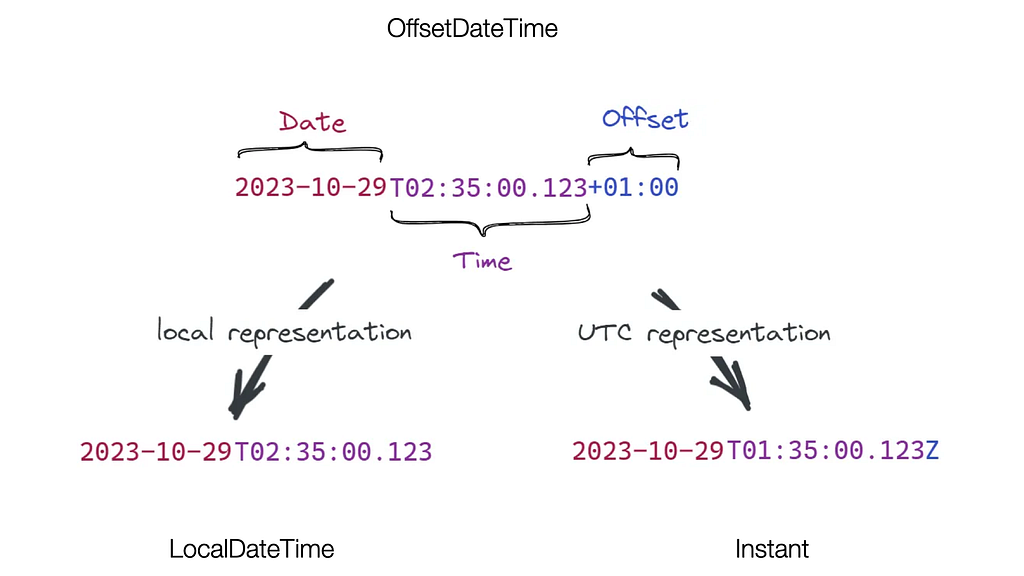
You can also see the concept in the code of OffsetDateTime:
// OffsetDateTime.java
/**
 * The local date-time.
 */
private final LocalDateTime dateTime;
/**
 * The offset from UTC/Greenwich.
 */
private final ZoneOffset offset;
The question arises of why we need this class if it is just a pair of already existing ones: LocalDateTime and ZoneOffset?
And it is the same question for the below in Java:
// ZonedDateTime.java
/**
 * The local date-time.
 */
private final LocalDateTime dateTime;
/**
 * The offset from UTC/Greenwich.
 */
private final ZoneOffset offset;
/**
 * The time-zone.
 */
private final ZoneId zone;
This knowledge should help you to replace existing OffsetDateTime and ZonedDateTime occurrences in your code. But is it really needed?
In our case most of OffsetDateTime usages led to misuse in the API layer. According to the API specification backend almost never used the offset component and sent it separately. So these occurrences were simply replaced with Instant.
These changes are more dangerous though, so it is recommended to cover them by tests before refactoring.
If you want more information on how Java Time API intersects with full-stack perspective, JSON and database formats, read the blog How to get time zones right with Java.
Results
The article should give more clarity on Kotlin Time API and its design concepts for those wanting or considering a migration — allowing them to remove some overengineering in any time-related code.
Migration of Android App from Java Time API to Kotlin Time was originally published in ProAndroidDev on Medium, where people are continuing the conversation by highlighting and responding to this story.




This Post Has 0 Comments