


The wheel that felt wrong
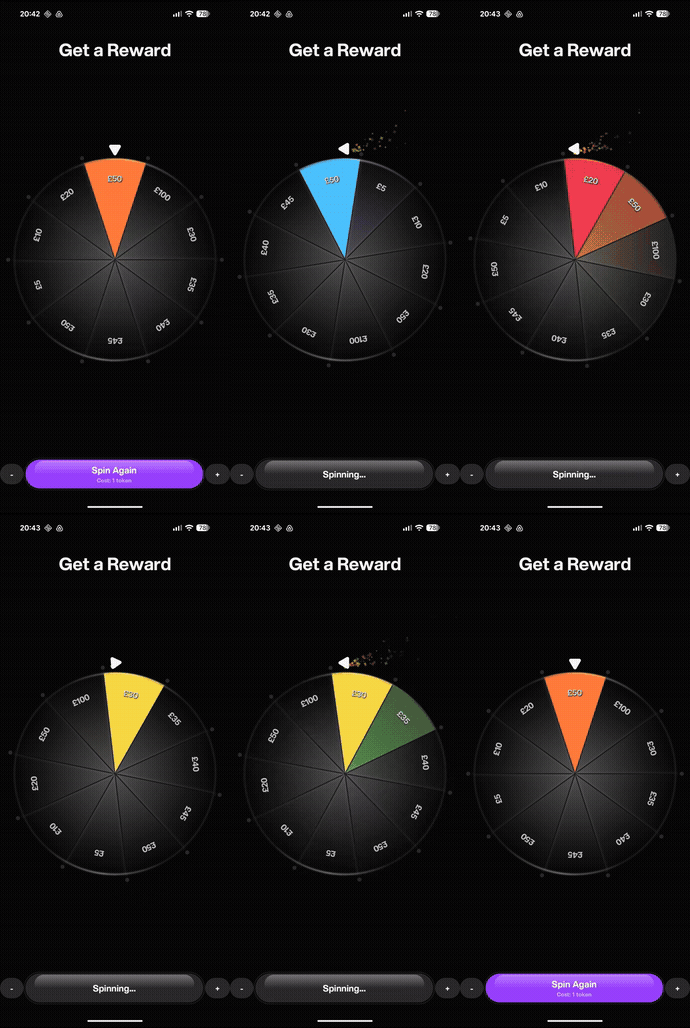
We were building a referral reward feature — a Fortune Wheel that spins and lands on a prize segment. The animation logic worked. The physics felt right. Deceleration, overshoot, settle. But
watching it spin at full speed, something was off. It looked like a screenshot rotating, not a wheel. Every segment was razor-sharp, perfectly readable, even at 450 degrees per second. Real
spinning objects don’t look like that.
The wheel needed motion blur.
Drawing the Wheel: The Foundation
Before we talk about blur, the wheel’s draw structure matters enormously — the blur solution depends on it.
The wheel is a Canvas composable. Each segment is an arc filled with a radial gradient, outlined with a stroke, bordered by glowing radial lines, and labelled with price text rotated to face
outward. All of this lives in a single DrawScope extension function.
  private fun DrawScope.drawWheelSegment(
      segment: RandomReferralRewardSegment,
      startAngle: Float,
      sweepAngle: Float,
      radius: Float,
      textMeasurer: TextMeasurer,
      segmentInnerColor: Color,
      segmentOuterColor: Color,
  ) {
      val center = Offset(size.width / 2f, size.height / 2f)

      // Glow on radial dividers — Screen blend + blur mask
      drawIntoCanvas { canvas ->
        drawArc(brush = fillBrush, startAngle = startAngle,
          sweepAngle = sweepAngle, useCenter = true,
          topLeft = Offset(center.x - radius, center.y - radius),
          size = Size(radius * 2f, radius * 2f))

        // Outline stroke
        drawArc(color = ColorTokens.neutral1.a76, startAngle = startAngle,
          sweepAngle = sweepAngle, useCenter = true,
          topLeft = Offset(center.x - radius, center.y - radius),
          size = Size(radius * 2f, radius * 2f),
          style = Stroke(width = outlineWidth))

        // Price text, rotated to face outward
        val textLayoutResult = textMeasurer.measure(priceText, textStyle)
        val middleAngle = startAngle + sweepAngle / 2f
        val angleInRadians = (middleAngle * PI / 180f).toFloat()
        val textX = center.x + radius * 0.8f * cos(angleInRadians) - textLayoutResult.size.width / 2f
        val textY = center.y + radius * 0.8f * sin(angleInRadians) - textLayoutResult.size.height / 2f

        rotate(degrees = middleAngle + 90f,
             pivot = Offset(textX + textLayoutResult.size.width / 2f,
                            textY + textLayoutResult.size.height / 2f)) {
          drawText(textLayoutResult, topLeft = Offset(textX, textY))
      }
  }
All segments and indicator dots are then gathered into a single lambda:
  val drawWheelContent: DrawScope.() -> Unit = {
      segments.forEach { segment ->
          drawWheelSegment(segment, startAngle, sweepAngle, radius, ...)
      }
      segments.forEachIndexed { index, _ ->
          drawIndicatorDot(startAngle = startAngleOffset + index * sweepAngle, ...)
      }
  }
This is the most important structural decision in the whole implementation. drawWheelContent is a typed function reference — DrawScope.() -> Unit — so it can be passed to any number of Canvas
composables. The drawing logic is defined once; the canvas can be instantiated as many times as needed. Everything that follows depends on this.
Measuring Velocity
Motion blur intensity should reflect how fast the wheel is actually moving. We measure real velocity from the Animatable that drives the rotation, using snapshotFlow to observe frame-by-frame
value changes:
  var motionBlurVelocity by remember { mutableFloatStateOf(0f) }

  LaunchedEffect(rotateAnimatable) {
      var prevValue = rotateAnimatable.value
      var prevTimeMs = System.currentTimeMillis()
      snapshotFlow { rotateAnimatable.value }.collect { value ->
          val nowMs = System.currentTimeMillis()
          val dt = nowMs - prevTimeMs
          if (dt > 0) {
              motionBlurVelocity = (value - prevValue) / dt * 1000f // deg/s
          }
          prevValue = value
          prevTimeMs = nowMs
      }
  }
From velocity we derive a blurMultiplier in [0, 1]. Phase 1 spins at a constant 450 deg/s. Blur fades in from half that speed so it doesn’t snap on suddenly:
val phase1VelocityDegPerSec = 360f / LINEAR_ROTATION_DURATION * 1000f // 450 deg/s
  val motionBlurThreshold = phase1VelocityDegPerSec / 2f                 // 225 deg/s

  val blurMultiplier = ((abs(motionBlurVelocity) - motionBlurThreshold) / motionBlurThreshold)
      .coerceIn(0f, 1f)

  val spinDirection = if (motionBlurVelocity >= 0f) 1f else -1f
Both blur implementations below are driven by the same two values: blurMultiplier and spinDirection.
The Shader Solution (API 33+)
The physically correct way to blur a rotating object is a rotational accumulation blur — sample the image at multiple positions rotated behind the current frame and blend them together. On
Android 13 (API 33) and above, this is possible with AGSL (RuntimeShader) applied as a RenderEffect directly on the composable layer.
Writing the AGSL Shader
AGSL (Android Graphics Shading Language) is Google’s shading language for Android, closely related to GLSL. A RuntimeShader receives the composable’s rendered layer as a uniform shader and can
sample it at arbitrary coordinates using .eval().
The shader takes 16 samples, each rotated slightly further in the trailing direction. Weights fall off linearly from 1.0 at the current frame to 0.15 at the farthest trailing sample:
  private const val ROTATIONAL_BLUR_AGSL = """
  uniform shader image;
  uniform float blurAngle;
  uniform float centerX;
  uniform float centerY;
  uniform float spinDir;

  half4 main(float2 coord) {
      const int SAMPLES = 16;
      half4 color = half4(0.0, 0.0, 0.0, 0.0);
      float totalWeight = 0.0;
      for (int i = 0; i < SAMPLES; i++) {
          float t     = float(i) / float(SAMPLES - 1);
          float angle = -t * blurAngle * spinDir;
          float2 delta   = coord - float2(centerX, centerY);
          float cosA     = cos(angle);
          float sinA     = sin(angle);
          float2 rotated = float2(
              delta.x * cosA - delta.y * sinA,
              delta.x * sinA + delta.y * cosA
          ) + float2(centerX, centerY);
          float weight = 1.0 - t * 0.85;
          color       += image.eval(rotated) * weight;
          totalWeight += weight;
      }
      return totalWeight > 0.0 ? color / totalWeight : half4(0.0, 0.0, 0.0, 0.0);
  }
  """
blurAngle is the total angular spread in radians. spinDir (+1 or −1) ensures the smear always trails behind the direction of rotation. The image.eval(rotated) call samples the rendered wheel
bitmap at a rotated coordinate — this is what makes the blur rotational rather than linear.
Applying the Shader
The helper function compiles the shader program and binds it to the layer:
  @RequiresApi(Build.VERSION_CODES.TIRAMISU)
  private fun rotationalBlurEffect(
      blurAngleRad: Float,
      spinDirection: Float,
      centerX: Float,
      centerY: Float,
  ): RenderEffect {
      val shader = RuntimeShader(ROTATIONAL_BLUR_AGSL)
      shader.setFloatUniform("blurAngle", blurAngleRad)
      shader.setFloatUniform("centerX", centerX)
      shader.setFloatUniform("centerY", centerY)
      shader.setFloatUniform("spinDir", spinDirection)
      return RenderEffect.createRuntimeShaderEffect(shader, "image")
  }
The “image” string is the name of the uniform shader in the AGSL source — it tells the system which uniform receives the layer’s rendered output.
This is applied in the graphicsLayer of the main wheel canvas. Note that graphicsLayer { renderEffect } expects androidx.compose.ui.graphics.RenderEffect, not the platform
android.graphics.RenderEffect — the .asComposeRenderEffect() extension handles the conversion:
  Canvas(
      modifier = Modifier
          .matchParentSize()
          .graphicsLayer {
              compositingStrategy = CompositingStrategy.Offscreen
              rotationZ = visualRotation
              if (Build.VERSION.SDK_INT >= Build.VERSION_CODES.TIRAMISU) {
                  // Max angular spread at full speed: 8 degrees (~0.14 rad).
                  renderEffect = if (blurMultiplier > 0f) {
                      rotationalBlurEffect(
                          blurAngleRad = Math.toRadians(blurMultiplier * 8.0).toFloat(),
                          spinDirection = spinDirection,
                          centerX = size.width / 2f,
                          centerY = size.height / 2f,
                      ).asComposeRenderEffect()
                  } else null
              }
          }
          .padding(16.dp),
      onDraw = drawWheelContent
  )
The rotationZ rotates the wheel to the current frame’s position. The renderEffect is applied to the layer’s content in local space before the rotation transform is composited by the renderer.
This means the blur smear is computed on the wheel pixels, and the whole blurred result is then placed at the correct rotation angle — which is exactly the right order of operations.
The API Level Constraint
RuntimeShader was introduced in API 33 (Android 13, codename Tiramisu). It is not available in API 31 or 32, even though RenderEffect itself arrived in API 31. The built-in RenderEffect factory
methods from API 31 (createBlurEffect, createColorFilterEffect, etc.) do not include rotational or directional blur — only Gaussian blur. A custom AGSL shader is the only way to get rotational
blur, and that requires API 33.
The Ghost Layer Fallback (API 32 and Below)
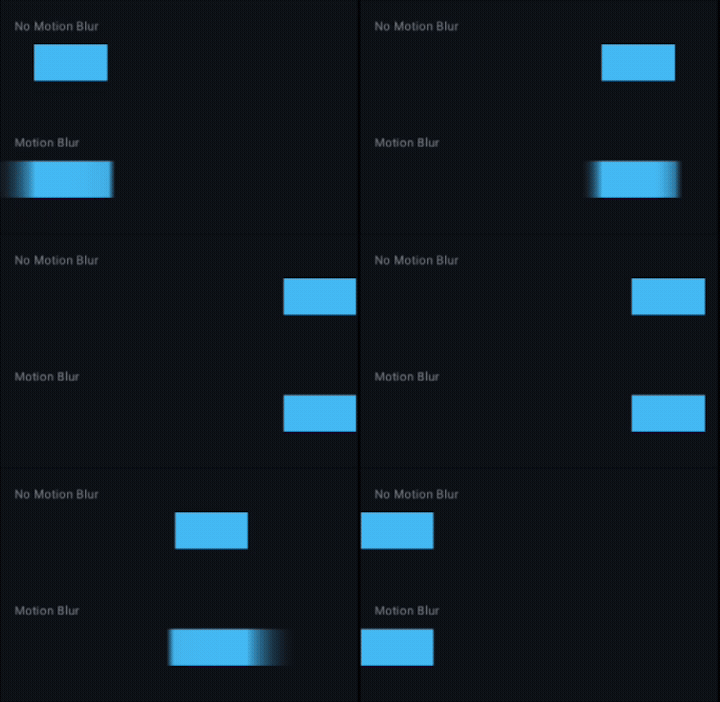
For devices below API 33, we approximate the same visual result using a technique that works on every Android version: render the wheel multiple times at slightly different rotation angles, each
with decreasing opacity. When layered on top of each other, the result reads as a trailing smear.
This is where drawWheelContent being a reusable lambda pays off — we pass the same lambda to multiple Canvas composables. The drawing cost is real (each canvas traversal re-executes all the
segment fills, gradients, text, and glow lines), but three additional layers during a 1.5-second spin is imperceptible on any device that can run Compose at all.
  if (blurMultiplier > 0f && Build.VERSION.SDK_INT < Build.VERSION_CODES.TIRAMISU) {
      // Closest trail: 2° behind, 80% max opacity
      Canvas(
          modifier = Modifier.matchParentSize().graphicsLayer {
              compositingStrategy = CompositingStrategy.Offscreen
              rotationZ = visualRotation - 2f * spinDirection
              alpha = 0.8f * blurMultiplier
          }.padding(16.dp),
          onDraw = drawWheelContent
      )
      // 4° behind, 60% max opacity
      Canvas(
          modifier = Modifier.matchParentSize().graphicsLayer {
              compositingStrategy = CompositingStrategy.Offscreen
              rotationZ = visualRotation - 4f * spinDirection
              alpha = 0.6f * blurMultiplier
          }.padding(16.dp),
          onDraw = drawWheelContent
      )
      // 6° behind, 40% max opacity
      Canvas(
          modifier = Modifier.matchParentSize().graphicsLayer {
              compositingStrategy = CompositingStrategy.Offscreen
              rotationZ = visualRotation - 6f * spinDirection
              alpha = 0.4f * blurMultiplier
          }.padding(16.dp),
          onDraw = drawWheelContent
      )
      // 8° behind, 30% max opacity (farthest trail)
      Canvas(
          modifier = Modifier.matchParentSize().graphicsLayer {
              compositingStrategy = CompositingStrategy.Offscreen
              rotationZ = visualRotation - 8f * spinDirection
              alpha = 0.3f * blurMultiplier
          }.padding(16.dp),
          onDraw = drawWheelContent
      )
  }
CompositingStrategy.Offscreen forces each layer into its own intermediate bitmap before blending. This ensures BlendMode operations inside the wheel drawing (the Screen blend on the glow lines)
work correctly, and that alpha is applied to the whole composited layer rather than per-pixel independently.
The ghost layers are fully absent from the composition tree when blurMultiplier == 0 — the if guard means Compose never lays them out or draws them at rest.
Performance: Canvas in Compose
A Canvas composable does not trigger Compose recomposition on every frame. Once placed, its onDraw lambda executes on the render thread directly via DrawScope — the Compose wrappers are thin
adapters over native android.graphics primitives. The wheel itself redraws every frame only because its graphicsLayer rotationZ changes; this is a layer matrix update, handled by the render
thread without touching the Compose node tree.
For the shader path, RuntimeShader compilation happens once per rotationalBlurEffect() call. AGSL programs are not cached by the system between calls, which means a new
RuntimeShader(AGSL_SOURCE) on each recomposition would compile on every frame during spinning — a non-trivial cost. If profiling reveals a problem, the fix is to remember the RuntimeShader
instance and update its uniforms in-place, then remember the RenderEffect wrapping it.
For the ghost layer path, each additional canvas re-executes drawWheelContent fully. Four ghost layers means four times the draw work during spinning. In practice, on mid-range devices, this
adds no perceptible jank across a 1.5-second spin phase, but it is real GPU work. A stricter optimisation would be to reduce ghost layers at lower frame rates.
Putting It Together
The blurMultiplier is the single control surface for both implementations. Zero means no blur anywhere. One means the shader is at full angular spread (or all ghost layers at full opacity). The
transition between those states is driven by real measured velocity, so the blur naturally fades out during deceleration without any additional code — the wheel slows down, blurMultiplier drops,
and the blur dissolves.
The end result: a wheel that feels physically plausible on every supported Android version. Shader-quality rotational blur on API 33 and above, a convincing approximation on everything below —
same velocity measurement, same blurMultiplier control, different render paths.
Thanks for reading. Happy composing.
Special thanks to Rebecca Franks for sparking the ghost-layer idea, and to Romain Guy for pointing the way to RuntimeShader and explaining how
path-based sampling turns a blur into true rotational motion.
Motion Blur for a Spinning Wheel in Jetpack Compose was originally published in ProAndroidDev on Medium, where people are continuing the conversation by highlighting and responding to this story.




This Post Has 0 Comments