


We ship web content inside native Android and iOS apps. A lot of it. The web team builds features, the apps host them in WebViews, and the two sides need to talk to each other. Device info, navigation bars, safe area insets, haptics, secure storage, lifecycle events. The usual.
Here’s how that communication layer went from platform-specific callback spaghetti to one function call.
Two platforms, two APIs, zero consistency
Android gives you @JavascriptInterface. You annotate a method, it shows up on window. It receives strings. It runs on a background thread. You call back into JavaScript via evaluateJavascript(), which runs on the main thread, so you need to dispatch. The callback is a raw string you shove into window and hope nobody overwrites.
iOS gives you WKScriptMessageHandler. Messages go through webkit.messageHandlers. It receives structured objects. Responses go through evaluateJavaScript(). The callback mechanism is completely different from Android’s.
Web developers don’t care about any of this. They want to call a function and get a result.
Here’s what a real checkout flow looks like without an abstraction layer. Five native calls: hide the tab bar, configure the top bar, load a token from secure storage, track a screen view, show a toast on failure:
Five calls, five platform forks. The secure storage call nests everything inside a callback on window, so the function reads inside-out. No timeouts anywhere. Every developer who touches this file will add the next call the same way, because there’s no shared helper and nobody wants to be the one to refactor it mid-sprint.
Now the same flow with the bridge:
async function enterCheckout() {
  await jsbridge.call('bottomNavigation', { isVisible: false });
  await jsbridge.call('topNavigation', { isVisible: true, title: 'Checkout', showUpArrow: true });

  const { value: token } = await jsbridge.call('loadSecureData', { key: 'auth_token' });
  if (!token) {
    await jsbridge.call('showToast', { message: 'Please log in again' });
    return;
  }
  jsbridge.call('trackScreen', { screenName: 'Checkout', userId: token.substr(0, 8) });
  renderCheckout(token);
}
Twelve lines. Reads top to bottom. Built-in timeouts. The tracking call has no await because you don’t need the result. No platform detection, no JSON juggling. Works identically on Android, iOS, and desktop with a mock handler.
What the bridge looks like
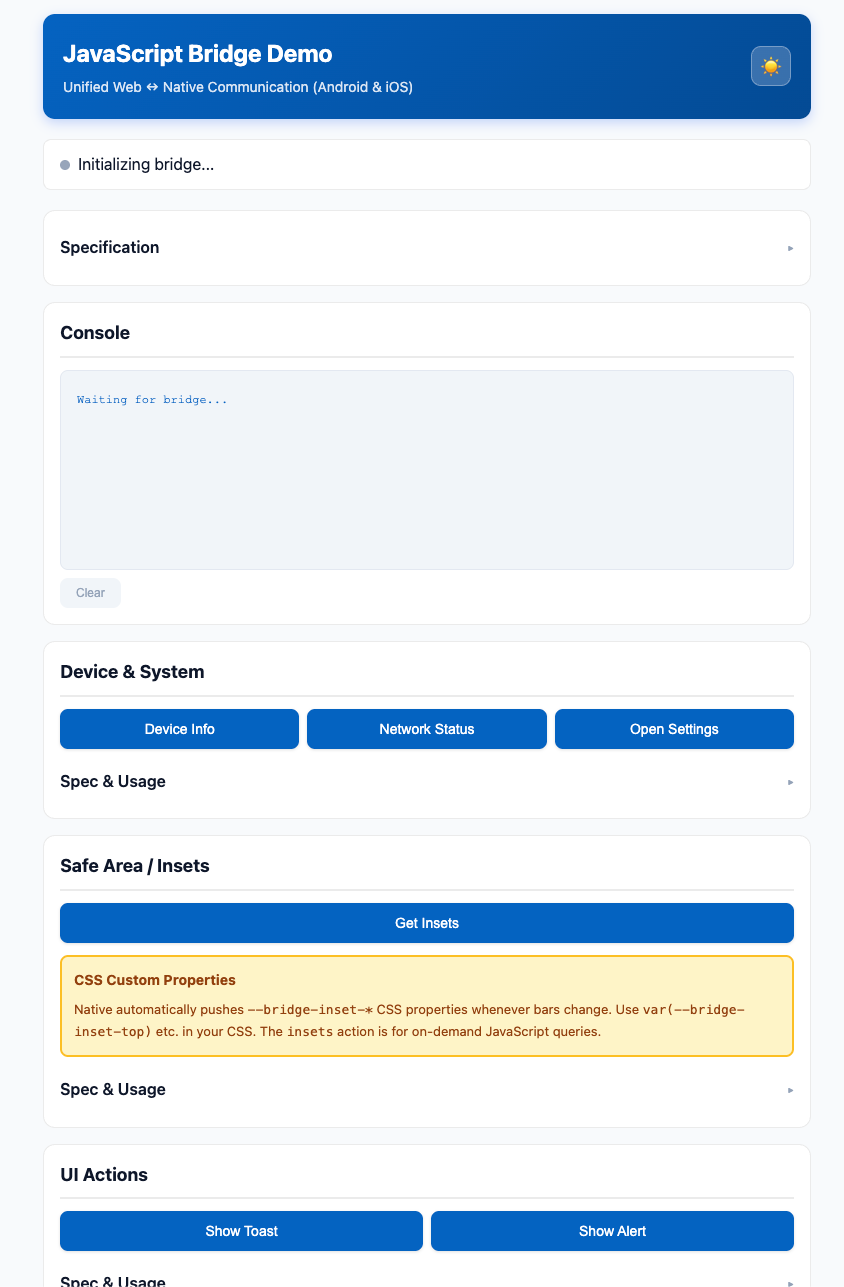
One JavaScript file. Both platforms inject it into the WebView at document start. It auto-detects whether it’s running on Android, iOS, or a desktop browser, wraps the platform-specific messaging in a promise-based API, and manages message IDs, timeouts, and response correlation.
If you don’t await a call (analytics, haptics), it’s fire-and-forget with sub-millisecond overhead. If you’re tearing down a screen, cancelAll() rejects every pending promise and clears their timeouts in one call. When the bridge finishes initializing, it resolves a ready() promise and dispatches a bridgeReady CustomEvent on window so page scripts that loaded before injection can pick it up.
bridge.js has no dependencies, no build step, no bundler. It’s a single IIFE that both native platforms embed as a raw resource file. Android reads it from res/raw/bridge.js, iOS from an SPM bundle resource. They template in two variables (the bridge name and the schema version) and inject it. That’s the entire integration story.
Component naming
Before diving into the API: iOS, Android, and web all have different names for the same screen regions. Apple says “Navigation Bar,” Android says “Toolbar.” Apple says “Tab Bar,” Android says “BottomNavigationView.” The status bar, the system gesture area, the safe area insets: each platform has its own terminology, and the documentation rarely cross-references the other.
We unified the naming:
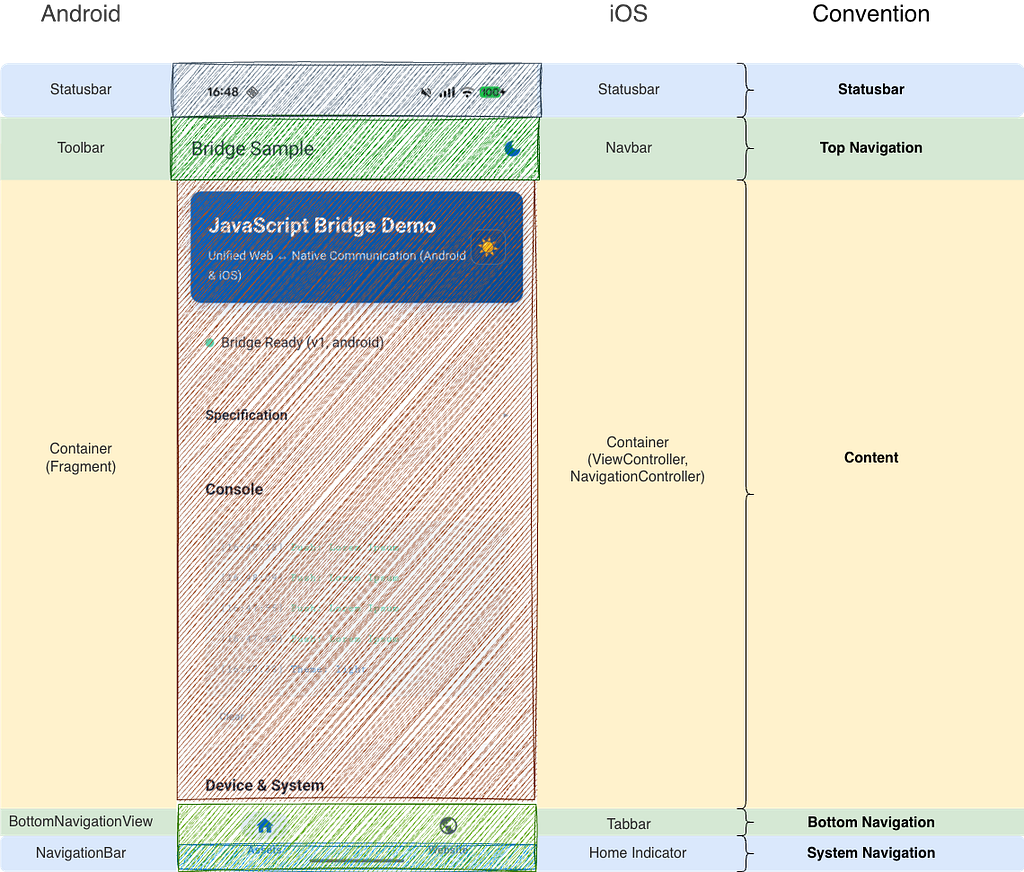
- topNavigation = the native top bar (UINavigationBar on iOS, Toolbar on Android)
- bottomNavigation = the tab bar (UITabBar on iOS, BottomNavigationView on Android)
- systemBars = the OS-level chrome: status bar at the top, system navigation (gesture bar or button bar) at the bottom
- CSS variables follow the same convention: –bridge-inset-top accounts for whichever combination of bars is currently visible above your content
The content area in the middle is where the WebView lives. Everything around it is native.
For web developers
Promises, Not Callbacks
The callback pattern for WebView bridges is bad. You register a function on window, pass its name to native as a string, native calls it with a string argument, you parse the string, you delete the global. Every step is a place where things break silently.
call() generates a unique message ID, stashes { resolve, reject, timeoutId } in a map, and sends the message to native. Native processes it and calls a global response handler with { id, data } or { id, error }. The response handler looks up the ID, resolves or rejects, clears the timeout, removes the entry. If native never responds, the timeout rejects the promise after 30 seconds (configurable).
Because it’s just promises, you get the entire async ecosystem for free:
const [device, network] = await Promise.all([
  jsbridge.call('deviceInfo'),
  jsbridge.call('networkState'),
]);

await jsbridge.call('topNavigation', { isVisible: false });
jsbridge.call('trackScreen', { screenName: 'Gallery' }); // fire-and-forget
jsbridge.call('haptic', { vibrate: true });              // same
try {
  await jsbridge.call('saveSecureData',
    { key: 'token', value: jwt },
    { timeout: 3000 }
  );
} catch (e) {
  showFallbackStorage();
}
Standard JavaScript. No bridge-level plumbing required.
Schema Versions
Semver is for packages. Bridge APIs have a simpler problem: “does the app I’m running in support this call?”
We use a single integer. It’s attached to every message automatically. If the native side receives a message with a version higher than its own, it silently drops it. The web side’s promise times out, and the web code can fall back gracefully.
This is deliberate. The alternative (native responding with “unsupported version” errors) requires the web code to handle a new error type and the native code to parse the version and generate the error. The timeout approach requires zero code on either side. The version check is three lines in the native message handler.
if (jsbridge.schemaVersion >= 3) {
  // new hotness
} else {
  // old path still works
}
No semver library. No platform-specific version strings. No if (android && appVersion >= ‘4.2.1’ || ios && appVersion >= ‘4.1.0’) matrices. We had those matrices. We don’t miss them.
Controlling Native UI from JavaScript
One of the highest-value features for iteration speed. The web team controls the native app chrome directly. No coordination tickets, no “can you add a flag for this screen” PRs to the native repos. The web deploys, the native bar changes:
// onboarding flow: no distractions
await jsbridge.call('topNavigation', { isVisible: false });
await jsbridge.call('bottomNavigation', { isVisible: false });

// checkout: custom title, back arrow, no tab bar
await jsbridge.call('topNavigation', {
  isVisible: true, title: 'Checkout', showUpArrow: true
});
await jsbridge.call('bottomNavigation', { isVisible: false });
// deep link landing: branded header
await jsbridge.call('topNavigation', {
  isVisible: true, showLogo: true, showProfileIconWidget: true
});

Edge-to-Edge and Safe Area Insets
Edge-to-edge layouts mean your web content extends behind the status bar and the navigation bar. You need the inset values to position interactive elements correctly. The obvious approach: web calls native, gets the insets, applies them.
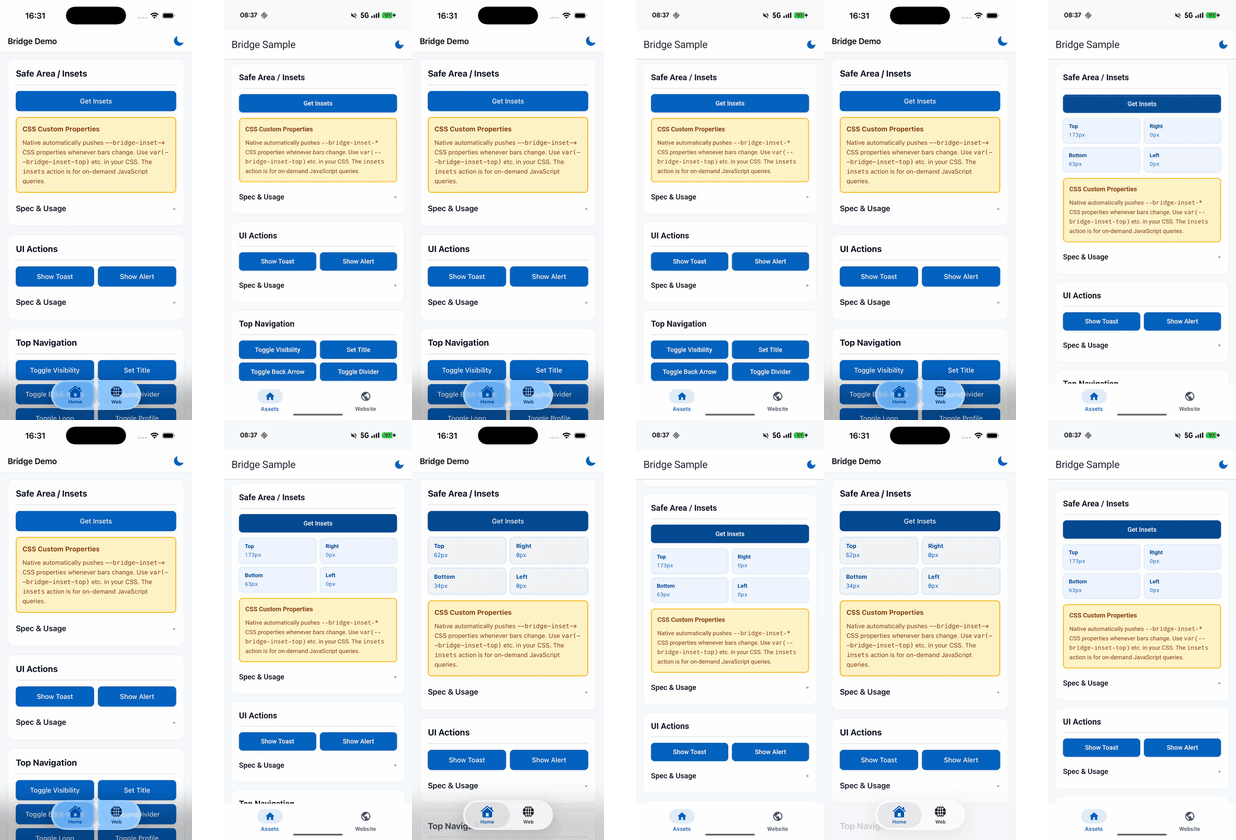
The problem: insets change. The keyboard appears. A navigation bar toggles. The device rotates. If web is polling, it’s either too slow (stale layout) or too frequent (wasted bridge calls). If web isn’t polling, it doesn’t know about changes at all.
Native pushes CSS custom properties onto document.documentElement whenever insets change. Web just uses var() in CSS. No polling, no bridge calls, no JavaScript layout code. When a native command toggles a navigation bar, the command handler itself recalculates insets and pushes them. The web layout updates in the same frame.
.back-button {
  top: calc(12px + var(--bridge-inset-top, env(safe-area-inset-top, 0px)));
}
The var() → env() → 0px fallback chain means this CSS works in the app, in a regular mobile browser, and on desktop. No conditionals.
When the native top bar is visible, –bridge-inset-top is 0 because the native bar already covers the status bar. When you hide it, the web content extends to the top of the screen, including behind the status bar. Native detects this and pushes –bridge-inset-top with the status bar height included. Making native the single source of truth for insets eliminated an entire class of layout bugs.
The Gallery Problem
Full-screen photo gallery. Content should go edge-to-edge, behind the status bar, behind the system navigation. But the close button needs to be tappable, so it can’t sit under the status bar. And the bottom controls need to clear the gesture navigation area.

async function enterGallery() {
  await Promise.all([
    jsbridge.call('topNavigation', { isVisible: false }),
    jsbridge.call('bottomNavigation', { isVisible: false }),
    jsbridge.call('systemBars', {
      showStatusBar: false, showSystemNavigation: false
    }),
  ]);
}

async function exitGallery() {
  await Promise.all([
    jsbridge.call('topNavigation', { isVisible: true, title: 'Photos' }),
    jsbridge.call('bottomNavigation', { isVisible: true }),
    jsbridge.call('systemBars', {
      showStatusBar: true, showSystemNavigation: true
    }),
  ]);
}
The CSS is the same var(–bridge-inset-*) pattern from above. Content goes position: fixed; inset: 0 for edge-to-edge, interactive elements offset themselves by the bridge inset variables. No JavaScript reads the inset values, no JavaScript sets inline styles. When you exit the gallery and show the bars again, the insets update automatically.
Focus Awareness
A WebView doesn’t receive visibilitychange events when a native modal covers it. Or when a bottom sheet slides over it. Or when the user switches tabs and the WebView is still technically “loaded” but completely hidden behind another fragment.
The standard browser visibility API is useless here. Your JavaScript thinks the page is in the foreground. Your polling intervals keep running. Your animations keep animating. Your users’ battery keeps draining.
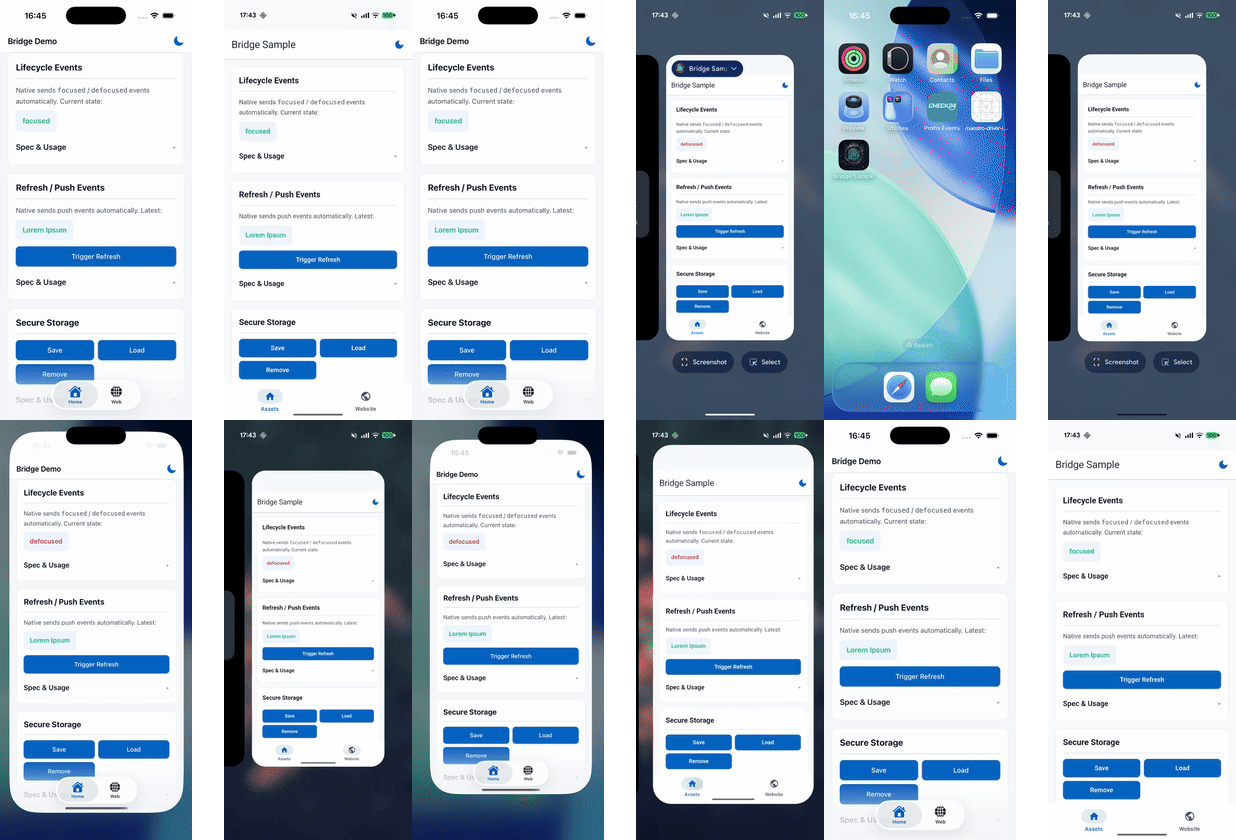
Native sends lifecycle events: focused when the WebView’s screen is actually visible and interactive, defocused when anything covers it:
jsbridge.on((msg) => {
  if (msg.data.action === 'lifecycle') {
    if (msg.data.content.event === 'focused') refetchStaleData();
    if (msg.data.content.event === 'defocused') pausePolling();
  }
});
On focused, native also re-pushes the safe area CSS. If the user went to another screen where the navigation bar state was different, the insets might have changed. By re-pushing on focus, the layout is always correct when the user comes back.
The UIViewController Focus Problem (And How We Actually Solved It)
Secure Storage
Web apps in WebViews can’t use localStorage reliably (it gets cleared, isn’t encrypted, doesn’t survive app updates on some devices). One bridge call gives you Keychain on iOS and EncryptedSharedPreferences on Android:
await jsbridge.call('saveSecureData', {
  key: 'refresh_token', value: token
});

// later, possibly after app restart
const { value } = await jsbridge.call('loadSecureData', {
  key: 'refresh_token'
});
The web code doesn’t know or care which encryption mechanism is backing it.
Testing Without a Phone
When bridge.js doesn’t detect Android or iOS, it sets platform to ‘desktop’. Register a mock handler that receives the same message objects and returns the same response shapes:
jsbridge.setMockHandler(async (msg) => {
  const { action, content } = msg.data;
  if (action === 'deviceInfo')
    return { platform: 'desktop', model: 'Chrome' };
  if (action === 'saveSecureData') {
    localStorage.setItem(content.key, content.value);
    return {};
  }
  if (action === 'loadSecureData')
    return { value: localStorage.getItem(content.key) };
  if (action === 'showAlert')
    return { buttonIndex: confirm(content.message) ? 0 : 1 };
  return {};
});
Sync or async, doesn’t matter. The bridge handles both. Your bridge code runs identically on desktop Chrome during development. No emulator needed for most feature work.
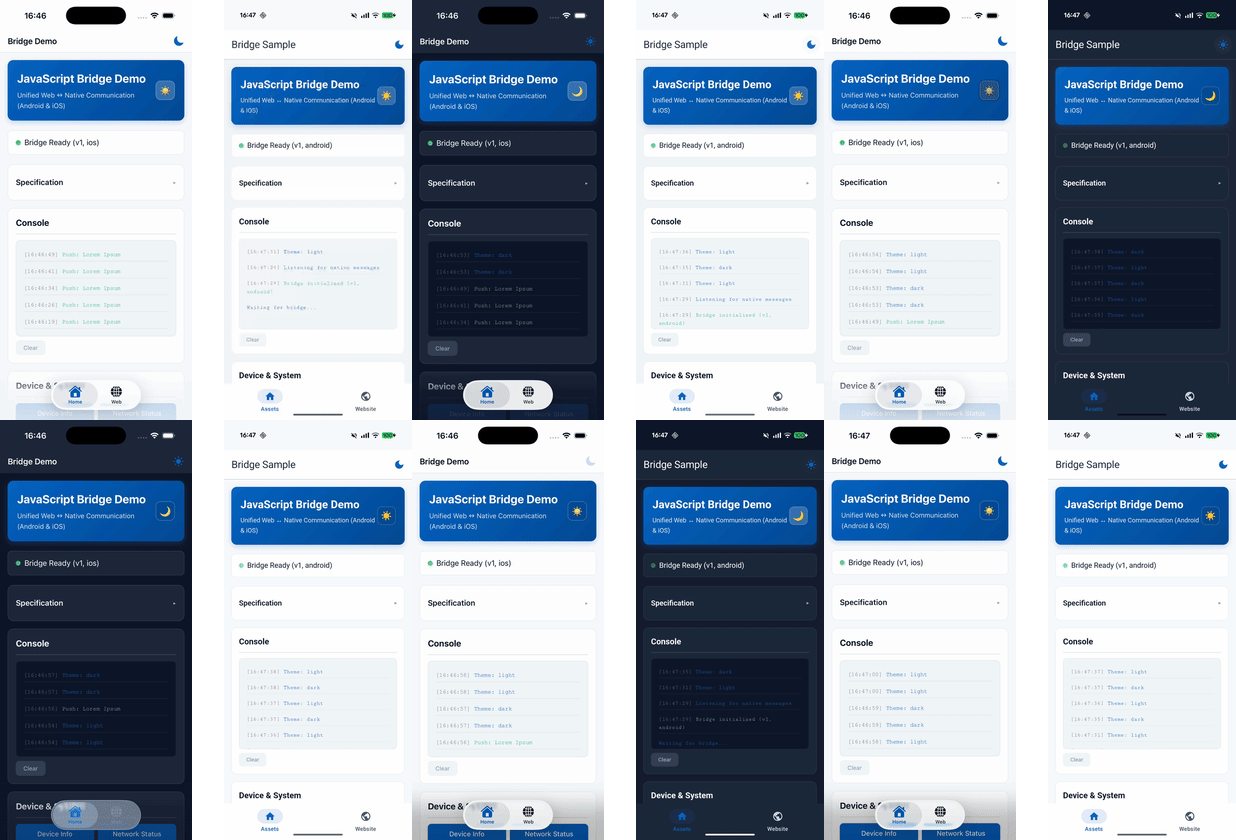
You can verify this yourself: kibotu.github.io/jsbridge is a single index.html that exercises every bridge command. Open it in Chrome on your laptop, it runs with a mock handler. Load it in the Android sample app’s WebView, same page, real native calls. Load it in the iOS sample app, same page, real native calls. One HTML file, three platforms, identical behavior.
For on-device debugging: chrome://inspect for Android WebViews, Safari’s Develop menu for iOS. Both give you a full console where you can await jsbridge.call(…) interactively. jsbridge.setDebug(true) logs every message in both directions. jsbridge.getStats() tells you how many promises are pending, which is usually the first thing to check when something feels stuck.
For Native Developers
Integration
The bridge ships as a library module on both platforms. Android: a Gradle dependency published to Maven Central (and JitPack). iOS: a Swift Package.
Android (Gradle)
Add the dependency:
// build.gradle.kts
dependencies {
    implementation("net.kibotu:jsbridge:<version>")
}
Wire it up wherever you create a WebView:
val webView = WebView(context).apply {
    @SuppressLint("SetJavaScriptEnabled")
    settings.javaScriptEnabled = true
    settings.domStorageEnabled = true

    val bridge = JavaScriptBridge.inject(
        webView = this,
        commands = DefaultCommands.all()
    )
    loadUrl("https://kibotu.github.io/jsbridge/")
}
JavaScriptBridge.inject() does three things: registers a @JavascriptInterface handler, wraps your existing WebViewClient with one that injects bridge.js on every page load, and returns the bridge instance.
DefaultCommands.all() returns every built-in command: device info, navigation, system bars, haptics, secure storage, analytics, the lot. To add your own, just append:
val commands = DefaultCommands.all() + listOf(
    MyCustomCommand(),
    AnotherCommand(someDependency),
)
Clean up when the WebView is done:
bridge.destroy()
In Compose, that’s a DisposableEffect:
DisposableEffect(Unit) {
    onDispose { bridge.destroy() }
}
iOS (Swift Package Manager)
Add the package dependency in Xcode (File → Add Package Dependencies → paste the URL) or in your Package.swift:
.package(url: "https://github.com/kibotu/jsbridge", from: "1.0.0")
Then add the product to your target:
.product(name: "JSBridge", package: "jsbridge")
Create the bridge in your view controller:
import JSBridge

override func viewDidLoad() {
    super.viewDidLoad()
    let configuration = WKWebViewConfiguration()
    let webView = WKWebView(frame: view.bounds, configuration: configuration)
    webView.scrollView.contentInsetAdjustmentBehavior = .never
    view.addSubview(webView)
    let bridge = JavaScriptBridge(
        webView: webView,
        viewController: self,
        commands: DefaultCommands.all()
    )
    webView.load(URLRequest(
        url: URL(string: "https://kibotu.github.io/jsbridge/")!
    ))
}
The initializer registers a WKScriptMessageHandler, injects bridge.js as a WKUserScript at document start, and registers all commands. No additional setup steps.
Same pattern for custom commands:
let commands = DefaultCommands.all() + [
    MyCustomCommand(),
]
let bridge = JavaScriptBridge(
    webView: webView,
    viewController: self,
    commands: commands
)
The bridge removes its script message handler in deinit. No manual cleanup needed.
What bridge.js Injection Looks Like Under the Hood
Both platforms embed bridge.js as a raw resource file. At injection time, they template in two variables:
- __BRIDGE_NAME__ : the name of the global object (defaults to “jsbridge”)
- __SCHEMA_VERSION__ : the integer version number
Android reads from res/raw/bridge.js and evaluates it via evaluateJavascript() on every onPageStarted. iOS adds it as a WKUserScript with injectionTime: .atDocumentStart once during initialization. Both approaches guarantee the bridge is available before any page script runs.
You never touch bridge.js directly. The library owns it.
Async on the Native Side Too
The callback pattern is just as bad in native code. The handler receives a raw message, does its work, then has to manually serialize a response and call evaluateJavaScript() with the right callback name. Miss one step and the web side hangs forever.
Command handlers are suspend fun on Android and async throws on iOS. The bridge infrastructure handles threading, serialization, and response dispatch. You write a function that takes input and returns output.
Command pattern, not a switch statement
Every native action is a separate class implementing a two-method interface: a string property for the action name, and an async function that takes the content and returns a result (or null for fire-and-forget).
The bridge holds a list of these handlers. When a message arrives, it finds the handler whose action name matches, calls it, sends back the result. Adding a new native command means writing one class and appending it to the list. You don’t touch the bridge, the JS, or any other command.
We considered a single handler with a switch statement. Switch statements in bridge handlers have a 100% historical rate of growing to 500+ lines with shared mutable state between cases. The command pattern keeps each action isolated and testable.
Here’s topNavigation, the most-used command. On Android, a suspend fun that runs on Dispatchers.Main, updates a reactive StateFlow, and pushes the recalculated safe area insets back to the web:
class TopNavigationCommand(
    private val getBridge: () -> JavaScriptBridge?
) : BridgeCommand {

    override val action = "topNavigation"

    override suspend fun handle(content: Any?): JSONObject = withContext(Dispatchers.Main) {
        val isVisible = BridgeParsingUtils.parseBoolean(content, "isVisible")
        val title = BridgeParsingUtils.parseString(content, "title")
        val showUpArrow = BridgeParsingUtils.parseBoolean(content, "showUpArrow")
        val showLogo = BridgeParsingUtils.parseBoolean(content, "showLogo")
        TopNavigationService.applyConfig(
            TopNavigationConfig(
                isVisible = isVisible == true,
                title = title.takeIf { it.isNotEmpty() },
                showUpArrow = showUpArrow == true,
                showLogo = showLogo == true,
            )
        )
        SafeAreaService.pushToBridge(getBridge())
        BridgeResponseUtils.createSuccessResponse()
    }
}
TopNavigationService exposes a StateFlow<TopNavigationConfig>. The native UI (Activity, Fragment, Compose) observes it and re-renders. The command author doesn’t manage any views directly.
On iOS, the same structure with async throws. The service is an ObservableObject with @Published properties, so SwiftUI picks up changes automatically:
class TopNavigationCommand: BridgeCommand {
    let action = "topNavigation"
    weak var bridge: JavaScriptBridge?

    @MainActor
    func handle(content: [String: Any]?) async throws -> [String: Any]? {
        guard let content else { throw BridgeError.invalidParameter("content") }
        TopNavigationService.shared.update(
            isVisible: content["isVisible"] as? Bool,
            title: content["title"] as? String,
            showBackButton: content["showUpArrow"] as? Bool,
            showLogo: content["showLogo"] as? Bool,
            showProfileIconWidget: content["showProfileIconWidget"] as? Bool
        )
        SafeAreaService.shared.pushToBridge(bridge)
        return nil
    }
}
The bridge infrastructure launches the coroutine (Android) or Task (iOS), waits for the return value, serializes it, and sends the response back to JS. Return a value, return nil for fire-and-forget, throw an error if something goes wrong. The bridge translates all three into the right JS outcome: promise resolution, no response, or promise rejection.
Both commands call SafeAreaService.pushToBridge() after updating the bar. Toggling the top bar changes the safe area, so the command itself recalculates and pushes the new CSS inset variables to the web. The layout updates in the same frame.
Register it: commands = DefaultCommands.all() + TopNavigationCommand(). New action? Write a class. Append it to the list. The bridge, the JS, and every other command stay untouched.
One JS File, Not Two
We considered having platform-specific JS adapters. Rejected that immediately. Two files means two potential behavior divergences. One file means every platform fix is automatically a both-platform fix. The JS detects the platform in four lines and routes sendToNative() accordingly. The rest of the code is platform-agnostic.
Freeze the Bridge Object
window.jsbridge is Object.freeze()’d and defined with writable: false, configurable: false. Third-party scripts can’t overwrite it, monkey-patch it, or add properties to it. This isn’t paranoia. It’s happened. Ad SDKs and analytics libraries have a habit of reassigning globals they find interesting.
What We’d Do Differently
Not much. The architecture has been stable through three major versions.
The biggest change was extracting the bridge from the sample apps into proper library modules (Kotlin library module, Swift Package) so other apps could depend on them without copy-pasting. That forced us to make command registration explicit instead of magic, which turned out to be a better design anyway. Along the way we added support for multiple named bridges on a single WebView (one for core functionality, one for analytics, whatever makes sense for your domain boundaries).
Some things we added later that probably should have been there from the start: the themeChanged command (native pushes light/dark mode changes to web so it can react without polling prefers-color-scheme), and pull-to-refresh coordination (native owns the refresh gesture, web tells the bridge when it’s done loading). Both are small, but they eliminated real coordination overhead between teams.
If we were starting today, we’d probably write bridge.js in TypeScript and compile it down. The current file is vanilla ES5 for maximum compatibility (some WebViews are old), and the var declarations and for loops are a little painful to look at. Then again, zero build step, zero toolchain, runs on everything. We can live with var.
The Full Reference
The code is at github.com/kibotu/jsbridge. The README covers the full API reference, setup instructions for both platforms, code examples for every command, and the complete CSS custom property reference. The bridge.js source is ~314 lines and genuinely worth reading. The live demo page lets you test every command in your browser right now.
jsbridge is open source and essentially used in production at CHECK24. Contributions, bug reports, and strongly-worded opinions about our design decisions are all welcome. If it saved you some time or a few platform if statements, buy me a coffee.
One await to Rule Them All: A Unified WebView Bridge for Android and iOS was originally published in ProAndroidDev on Medium, where people are continuing the conversation by highlighting and responding to this story.





This Post Has 0 Comments