
Video previews in a scrolling UI look deceptively simple: “just show a tiny player in each cell.”
In reality, every preview is a small pile of work:
- buffering + networking
- decoders + renderers
- surfaces + frame delivery
- lifecycle + timing (first frame is the whole game)
If you naively create and dispose an ExoPlayer per item while the user flings a LazyRow, you’ll often get exactly what you deserve: jank, flicker, black tiles, “why did that cell show the previous cell’s last frame?”, and a phone that turns warm enough to toast bread.
This article is about a practical mental model for preview carousels:
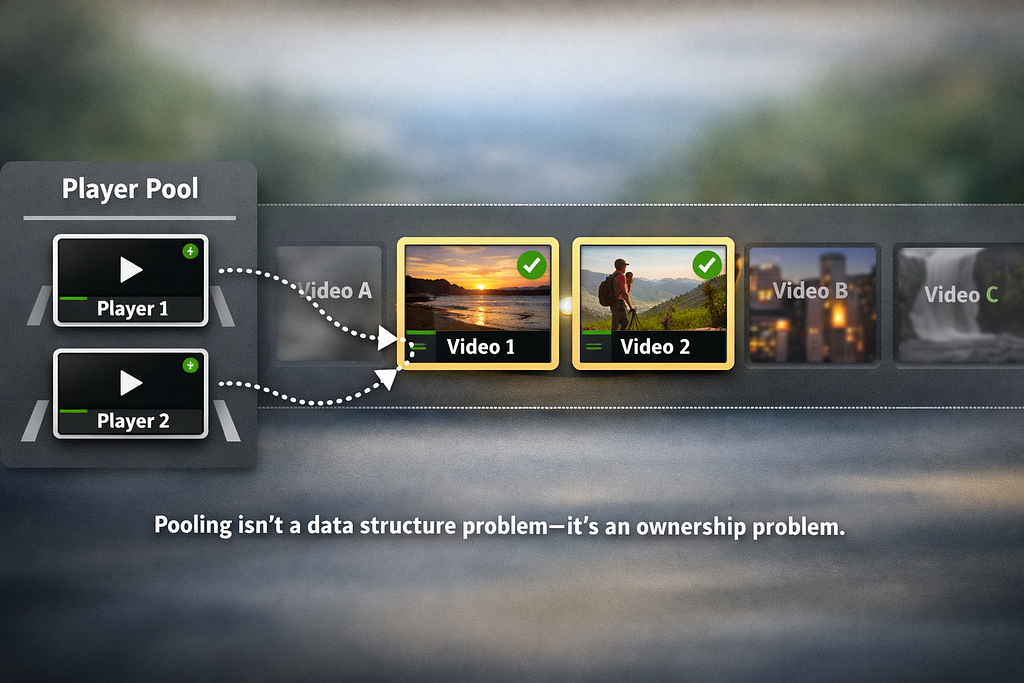
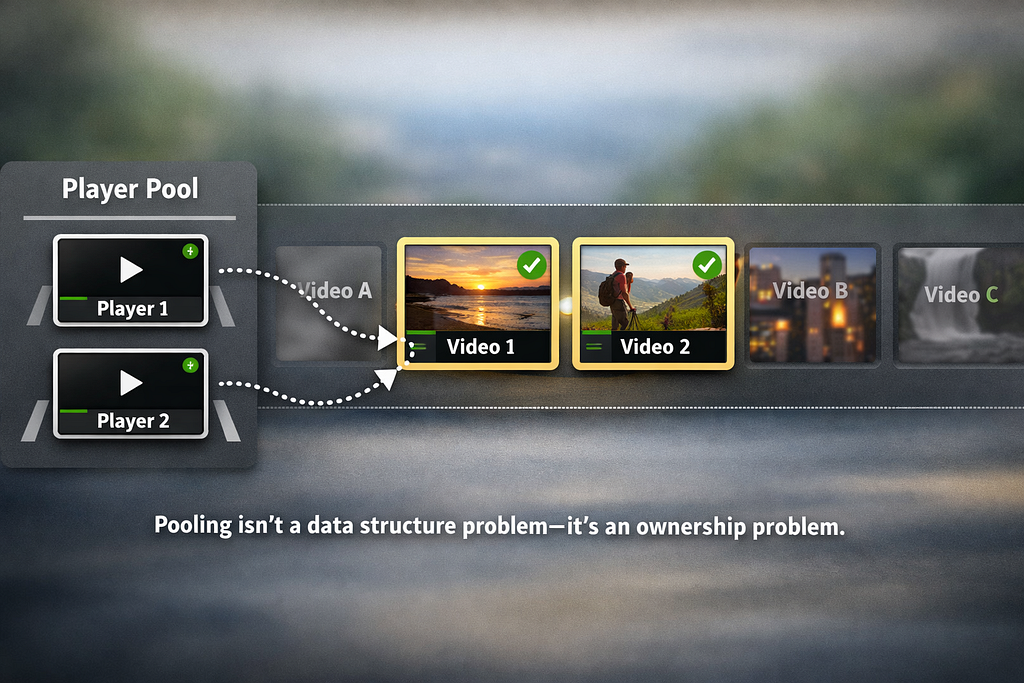
Treat players as scarce resources and lend them only to the few items that currently deserve them.
Not “one player per cell”. Not “everything visible plays”. More like a tiny fleet of rental cars. You don’t manufacture a new car every time someone wants to drive a week through Iceland. You keep a fleet, hand out keys to the current drivers, and when they’re done — you take the car back, reset it, and rent it again.
What this is (and isn’t)
This is not a TikTok-style full-screen feed. Full-screen feeds typically optimize for handoff between one active item and the next. If you’re building a TikTok-style full-screen feed — here is a good article.
This is about many small previews in a scrolling row / carousel, where the enemy is:
- player churn (creating/destroying players as items enter/leave composition)
- surface churn (surfaces attaching/detaching in ways that leak frames across cells)
- decoder budget (too many videos decoding at once)
The core idea: budgets + ownership
Two rules make the entire approach work:
- Activation policy: decide which items are active (eligible to play).
- Strict ownership discipline: a player is owned by exactly one tile at a time, and is cleaned up before being reused.
Everything else (cache, tuning knobs, lifecycle gating, first-frame UX) supports these two rules.
Code
Want to poke the code while you read? Repo available here.
I haven’t worked with ExoPlayer/Media3 deeply in a while, so there may be mistakes or suboptimal choices in here. Treat this as a learning experiment and a working mental model — not a production-ready recipe.
Part 1 — Who is allowed to play?
Pick a small number, and commit to it. For example:
internal const val MAX_PLAYERS = 2
This is your hard budget: at most 2 decoders at once. Even if 6 tiles are visible, only 2 may play.
Now you need a policy to choose those 2.
For a carousel, a reasonable default is: items closest to the viewport center. It matches attention and tends to be stable while scrolling (less “flapping” than “anything visible”).
In Compose, you can compute active indices as pure derived state from LazyListState.layoutInfo:
@Composable
fun rememberActiveIndicesForVideo(
    listState: LazyListState,
    maxActive: Int
): Set<Int> {
    return remember(listState, maxActive) {
        derivedStateOf {
            val info = listState.layoutInfo
            val visible = info.visibleItemsInfo
            if (visible.isEmpty() || maxActive <= 0) return@derivedStateOf emptySet()
val viewportCenter = (info.viewportStartOffset + info.viewportEndOffset) / 2
            // Small top-K selection: keep only maxActive closest items without sorting all.
            val best = ArrayList<Pair<Int, Int>>(maxActive) // (distance, index)
            for (item in visible) {
                val itemCenter = item.offset + item.size / 2
                val dist = kotlin.math.abs(itemCenter - viewportCenter)
                if (best.size < maxActive) {
                    best.add(dist to item.index)
                    if (best.size == maxActive) best.sortByDescending { it.first }
                } else if (dist < best[0].first) {
                    best[0] = dist to item.index
                    best.sortByDescending { it.first }
                }
            }
            buildSet(best.size) { best.forEach { add(it.second) } }
        }
    }.value
}
Why “top-K” instead of sorting? Because this code can run every scroll frame. A full sortedBy().take().map().toSet() allocates intermediate lists. Here, K is tiny (often 1–3), so it’s cheaper to keep only the best candidates.
Your policy can be different
The important part is the contract: the policy returns at most MAX_PLAYERS items.
Other reasonable policies:
- fully visible only
- largest visible area
- snap-based (“only after scroll settles”)
- hysteresis (“stickiness” to reduce rapid switching)
Part 2 — Pooling players safely: strict ownership
A pool is not a fancy data structure. It’s a way to enforce ownership and cleanup.
Requirements for a usable pool
A pool needs to guarantee:
- cap: never exceed MAX_PLAYERS
- exclusive ownership: a player is rented to exactly one tile at a time
- no surface leakage: a returned player must not keep rendering into the old surface
- cancellable acquisition: if a tile becomes active and players are exhausted, it can wait without breaking the budget
Here’s a minimal API shape:
- acquire() → returns a player immediately or null
- acquireOrWait() → suspends until a player is available (or the pool is disposed)
- release(player) → hard-reset and return to the pool
The most important line: detach the surface
When returning a player, you must detach any video output target:
player.clearVideoSurface() // critical: breaks surface ownership
Without it, the player may continue to render into an old surface and you’ll get “haunted frames” (wrong tile shows old content).
A representative “release” cleanup looks like:
fun release(player: ExoPlayer) {
    player.playWhenReady = false
    player.stop()
    player.clearMediaItems()
    player.clearVideoSurface()
    // ...return to queue...
}
A suspension-friendly acquire
Even if your activation policy normally caps active tiles, it’s useful to have a safe “wait until available” path:
suspend fun acquireOrWait(): ExoPlayer {
    acquire()?.let { return it }
    while (true) {
        val received = signal.receiveCatching()
        if (!received.isSuccess) throw CancellationException("Pool disposed")
        acquire()?.let { return it }
    }
}
This allows a tile to say: “If I’m active, I’ll eventually get a player,” while still respecting the decoder budget.
Part 3 — Compose integration: one pool per list, not per tile
Pooling only works if many cells share the same pool. In Compose, the easiest footgun is accidentally creating a pool per item.
Keep the pool owned by the list composable:
@Composable
fun VideoRow() {
    val listState = rememberLazyListState()
    val pool = rememberExoPlayerPool(maxSize = MAX_PLAYERS)
    val active = rememberActiveIndicesForVideo(listState, maxActive = MAX_PLAYERS)
    LazyRow(state = listState) {
        itemsIndexed(items, key = { _, it -> it.id }) { index, item ->
            VideoTile(
                isActive = index in active,
                urls = item.urls,
                pool = pool
            )
        }
    }
}
Use stable keys. Pooling is “resource ownership by identity.” If your keys aren’t stable, Compose can reuse item slots in surprising ways and you’ll chase ghosts that look like surface bugs.
Part 4 — A tile shouldn’t “own playback logic”
A carousel cell should stay declarative: “here’s my UI; if I have a player, render it.”
The imperative part — acquiring a player, preparing media, awaiting first frame, slot timing, releasing — belongs in a small controller/state machine that runs in a coroutine.
The tile: stable surface + overlay placeholder
A useful trick with SurfaceView:
- keep the video layer straightforward
- animate a Compose overlay on top (predictable)
- only fade the overlay once you actually have a first frame
Box(modifier = modifier.clip(shape)) {
    // Only create surface when needed to avoid long-list SurfaceView overhead.
    if (isActive || controller.player != null) {
        PlayerSurface(
            modifier = Modifier.fillMaxSize(),
            player = controller.player,
            surfaceType = SURFACE_TYPE_SURFACE_VIEW
        )
    }
    // Placeholder overlay fades out after first frame.
    Box(
        modifier = Modifier
            .fillMaxSize()
            .alpha(placeholderAlpha)
            .background(MaterialTheme.colorScheme.surface)
    ) {
        Text(
            text = title,
            modifier = Modifier.align(Alignment.Center)
        )
    }
}
Why not animate the video directly? Because with SurfaceView, certain Compose effects (alpha, clipping, transforms) don’t behave like normal composited UI. An overlay is normal Compose, so the fade is reliable.
Part 5 — The first-frame gate: no black rectangles
This is the UX detail that makes preview playback feel intentional rather than glitchy.
Preparing a player doesn’t mean you can safely show the video layer. If you reveal immediately after prepare(), you often get:
- a black surface
- a stale frame from previous content
- “first frame arrives later” flicker
Instead: wait for onRenderedFirstFrame() with a timeout. Only then hide the placeholder.
private suspend fun playAndAwaitFirstFrame(player: ExoPlayer): Boolean {
    return withTimeoutOrNull(FIRST_FRAME_TIMEOUT_MS) {
        suspendCancellableCoroutine { cont ->
            lateinit var listener: Player.Listener

            fun finish(ok: Boolean) {
                player.removeListener(listener)
                if (!cont.isCompleted) cont.resume(ok)
            }

            listener = object : Player.Listener {
                override fun onRenderedFirstFrame() = finish(true)
                override fun onPlayerError(error: PlaybackException) = finish(false)
                override fun onPlaybackStateChanged(state: Int) {
                    if (state == Player.STATE_ENDED) finish(false)
                }
            }

            player.addListener(listener)
            cont.invokeOnCancellation { player.removeListener(listener) }

            player.playWhenReady = true
            player.play()
        }
    } == true
}
If this returns false (timeout/error/end), keep showing the placeholder, reset the player, and move on.
Part 6 — Preview players are not “full players”
Pooling limits count. You still need to control weight.
For tiny previews, decoding multiple high-bitrate 1080p+ streams is a great way to lose your smooth scroll even with a pool.
A practical preview configuration:
- cap resolution (e.g. 848×480)
- cap bitrate (e.g. ~1.2 Mbps)
- disable audio selection
- shorten buffers (trade some stability for faster start)
val trackSelector = DefaultTrackSelector(context).apply {
    setParameters(
        buildUponParameters()
            .setMaxVideoSize(848, 480)
            .setMaxVideoBitrate(1_200_000)
            .setRendererDisabled(C.TRACK_TYPE_AUDIO, true)
    )
}
val loadControl = DefaultLoadControl.Builder()
    .setBufferDurationsMs(1_500, 6_000, 300, 600)
    .build()
Those numbers are just a starting point. Tune them based on:
- tile size on screen
- network conditions you care about
- how quickly you need first frame
- how much rebuffering is acceptable
Part 7 — Lifecycle: don’t keep previews running in the background
A preview carousel should behave in a way of saving resources:
- pause on background
- resume only if the tile was actually playing
- avoid starting new work while backgrounded
One simple approach: gate the controller loop on a StateFlow set by lifecycle events, and pause playback on onPause().
The key idea isn’t the exact wiring — it’s that background time shouldn’t silently continue consuming decode/network.
Why this feels smoother
This approach changes the shape of work:
- player instances stop being created/destroyed mid-scroll
- decoders are capped by design
- surfaces are reused, but ownership is enforced (clearVideoSurface())
- the UI reveal is predictable (first-frame gate)
- “active set” gives you a place to reason about fairness and stability
One caveat: pooling doesn’t remove the very first cost. Cold start still has to create players once. If first impression matters, prewarm 1–2 players early (off the critical scroll path), then let the pool handle reuse during scrolling.
Practical extensions (if you take this further)
If you adapt this pattern in a real app, these are the upgrades that tend to matter:
- hysteresis / stickiness in active selection to reduce rapid switching near boundaries
- snap-based activation (only reassign players after a snap settles)
- priority queue if more candidates can request players than your pool size
- better error UX (fallback thumbnails, backoff, per-URL health tracking)
- prefetch/cache strategy tuned to your media + CDN
- renderers factory customization if you truly want a minimal “no-audio” player
Takeaway
Pooling in a scrolling UI isn’t really about the pool.
It’s about ownership:
- decide which items deserve scarce resources
- lend those resources exclusively
- reset aggressively on return (including surface detachment)
- never reveal the “real” layer until it’s actually ready (first frame)
If you keep those invariants intact, the details (policy choice, buffer tuning, cache wiring) become manageable engineering decisions instead of a whack-a-mole of flicker and jank.
Pooling ExoPlayer in Jetpack Compose for smooth video previews was originally published in ProAndroidDev on Medium, where people are continuing the conversation by highlighting and responding to this story.




This Post Has 0 Comments