
Handle partial tokens gracefully with Markwon and a simple buffering strategy
If you’ve built an Android app that streams responses from an LLM like Claude or ChatGPT, you’ve probably noticed something: the AI responds in markdown. Bold text, code blocks, bullet lists — it’s all there. But rendering markdown in real-time as tokens stream in? That’s where things get tricky.
In my previous article, I covered how to implement streaming LLM responses using OkHttp and Kotlin Flow. This article picks up where that left off: how to render markdown beautifully while tokens are still arriving.
The Problem
When Claude streams a response, you receive text in small chunks:
Chunk 1: "Here's how to use "
Chunk 2: "**bold"
Chunk 3: "** text in markdown"
If you render each chunk immediately, users briefly see raw ** characters before the closing marker arrives. The text flickers between **bold and bold — not a great experience.
The same problem applies to:
- Italic text (*word*)
- Inline code (`code`)
- Code fences (“`)
What We’ll Build
By the end of this tutorial, you’ll have:
- A MarkdownText composable that renders markdown using Markwon
- A MarkdownBuffer that hides unclosed formatting tokens
- A clean streaming experience with no visual flicker
Here’s the final result:
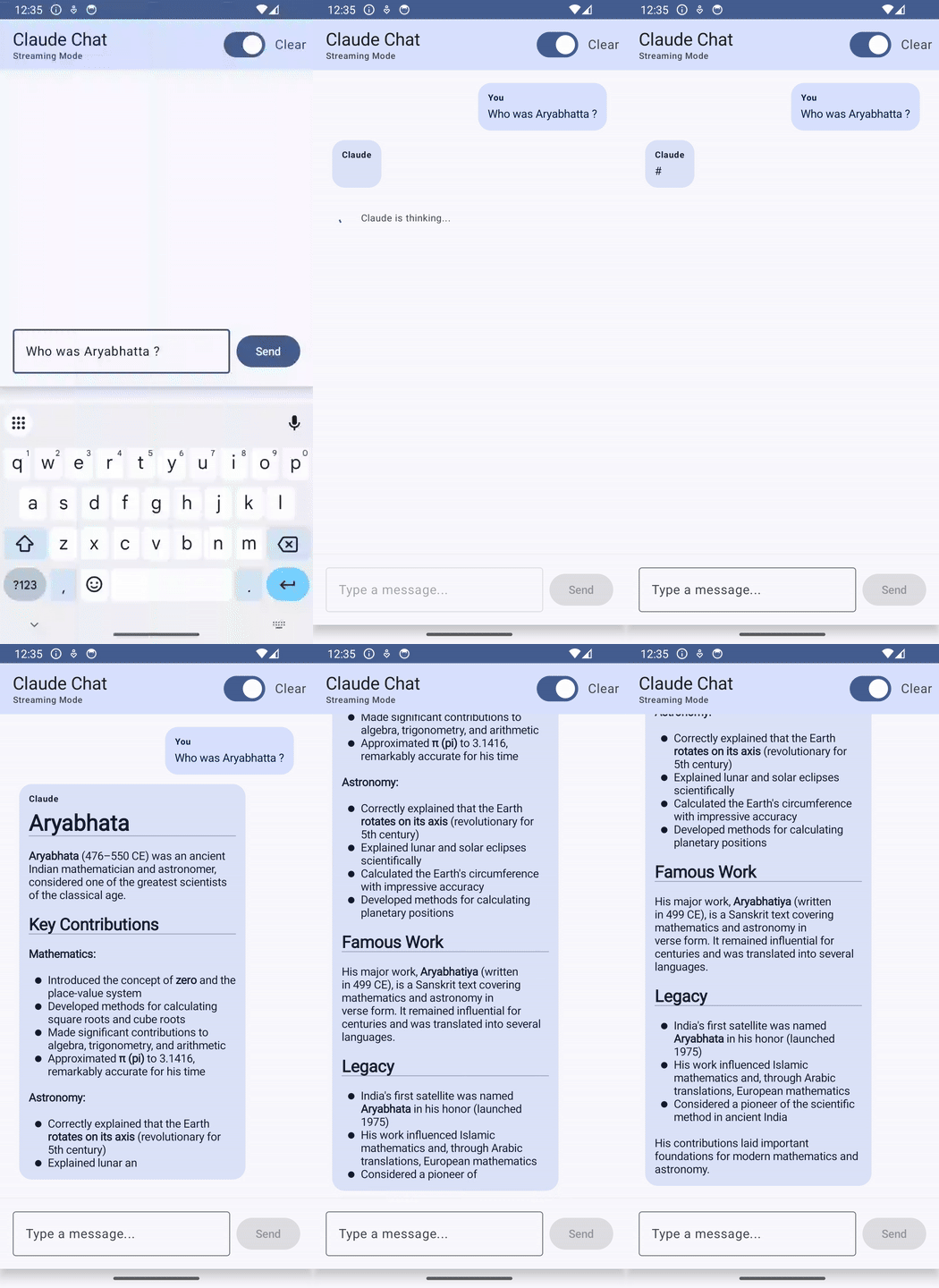
Prerequisites: A working streaming implementation. If you don’t have one, check out my previous article first.
Step 1: Add Markwon Dependencies
Markwon is a battle-tested Android library for rendering markdown. It’s View-based (uses TextView), but we’ll wrap it in a Composable.
Add to your app/build.gradle.kts:
dependencies {
    // Markwon for markdown rendering
    implementation("io.noties.markwon:core:4.6.2")

    // Optional: strikethrough and tables support
    implementation("io.noties.markwon:ext-strikethrough:4.6.2")
    implementation("io.noties.markwon:ext-tables:4.6.2")
}
Sync Gradle.
Step 2: Create a Basic MarkdownText Composable
Since Markwon uses Android Views, we’ll wrap a TextView using Compose’s AndroidView:
package com.example.claudeapp.ui

import android.widget.TextView
import androidx.compose.runtime.Composable
import androidx.compose.runtime.remember
import androidx.compose.ui.Modifier
import androidx.compose.ui.graphics.Color
import androidx.compose.ui.graphics.toArgb
import androidx.compose.ui.platform.LocalContext
import androidx.compose.ui.viewinterop.AndroidView
import io.noties.markwon.Markwon

@Composable
fun MarkdownText(
    text: String,
    modifier: Modifier = Modifier,
    color: Color = Color.Unspecified
) {
    val context = LocalContext.current
    val markwon = remember { Markwon.create(context) }

    AndroidView(
        modifier = modifier,
        factory = { ctx ->
            TextView(ctx).apply {
                textSize = 14f
            }
        },
        update = { textView ->
            markwon.setMarkdown(textView, text)
            if (color != Color.Unspecified) {
                textView.setTextColor(color.toArgb())
            }
        }
    )
}
Replace your Text() composable with MarkdownText() in your message bubble:
// Before
Text(text = message.text)

// After
MarkdownText(text = message.text)
Try it out. Send a message asking for markdown formatting. You’ll see it renders correctly — but watch closely during streaming. You’ll notice ** and other markers briefly flash before formatting applies.
Step 3: Understanding the Flicker
What is flicker? When streaming markdown, users see a jarring visual effect: raw formatting characters like ** or ` briefly appear on screen, then suddenly disappear as the text transforms into formatted bold or code. This rapid switch between raw and formatted text creates a “flicker” — the UI feels unstable and unpolished, like watching someone type in a word processor with formatting applied after every keystroke.
Here’s what happens when Claude streams **bold**:
- T1: Accumulated text is **bol → User sees **bol (raw markers visible)
- T2: Accumulated text is **bold → User sees **bold (still raw)
- T3: Accumulated text is **bold** → User sees bold (finally formatted!)
Here’s what the flicker looks like in practice:
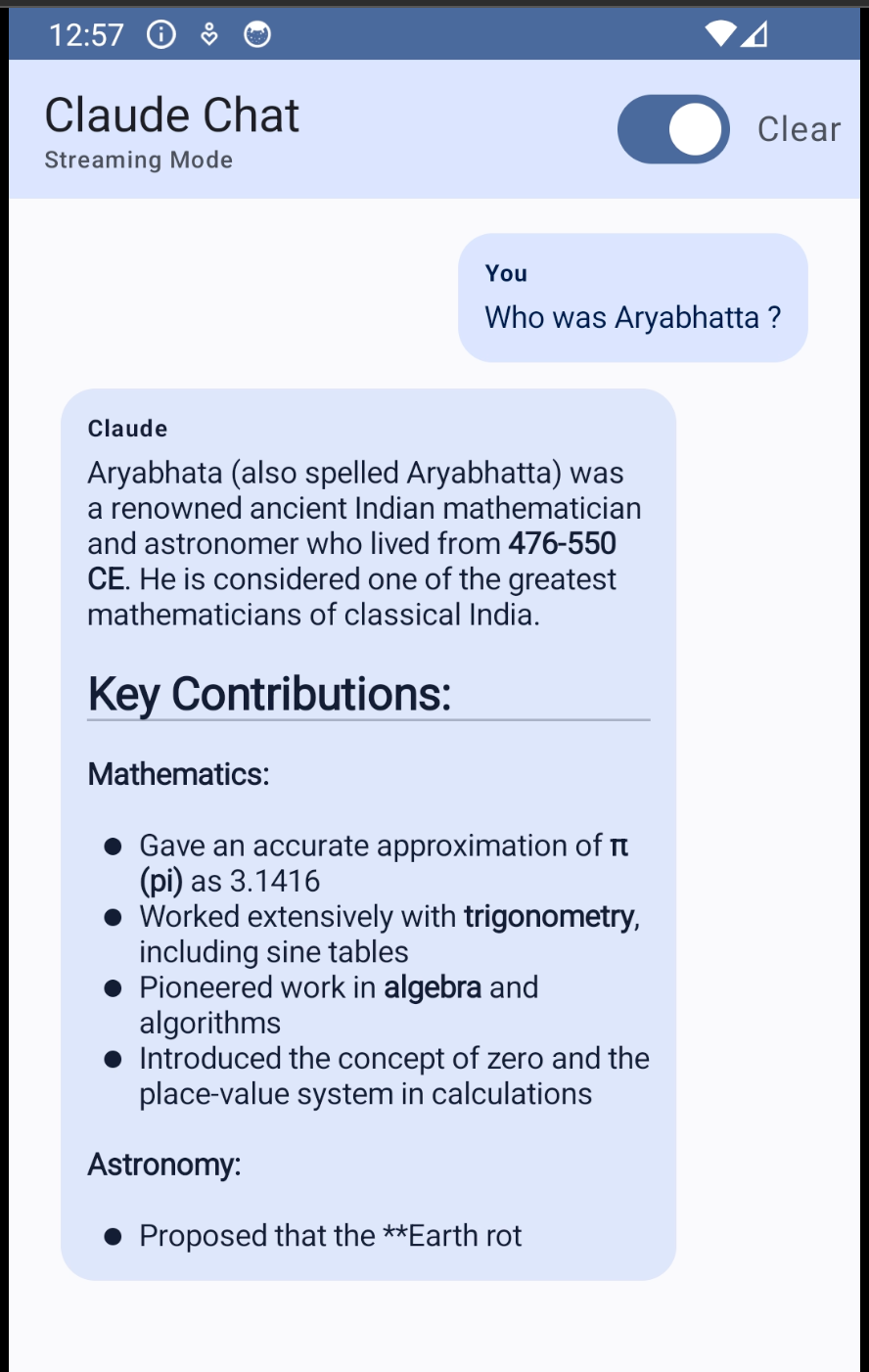
Markwon can’t format **bold as bold because the closing ** hasn’t arrived yet. So it renders the raw text.
The solution: Don’t show text with unclosed markdown tokens. Buffer it until the closing marker arrives.
Step 4: Build the Markdown Buffer
The core idea: Markdown formatting always comes in pairs — ** opens bold and ** closes it. If we count the markers and find an odd number, we know the last one is unclosed. The solution is simple: hide everything from the unclosed marker onwards until its partner arrives.
For example, if we have Hello **wor, we count one ** (odd), so we hide from that marker onwards and display just Hello . When the next chunk brings Hello **world**, we count two ** (even), so we display the full formatted text.
The MarkdownBuffer applies this logic to each markdown syntax:
package com.example.claudeapp.ui
/**
 * Extracts the "safe to render" portion of streaming markdown.
 * Hides unclosed formatting tokens to prevent visual flicker.
 */
object MarkdownBuffer {

    fun getSafeText(text: String): String {
        var result = text

        // Order matters! Code fences first (``` before `)
        result = hideUnclosedCodeFence(result)
        result = hideUnclosed(result, "**")
        result = hideUnclosedItalic(result)
        result = hideUnclosedInlineCode(result)

        return result
    }

    private fun hideUnclosedCodeFence(text: String): String {
        val pattern = "```"
        var count = 0
        var index = 0
        var lastFenceStart = -1

        while (index <= text.length - 3) {
            if (text.substring(index, index + 3) == pattern) {
                count++
                lastFenceStart = index
                index += 3
            } else {
                index++
            }
        }

        // Odd count means unclosed fence
        if (count % 2 == 1 && lastFenceStart != -1) {
            return text.substring(0, lastFenceStart)
        }
        return text
    }

    private fun hideUnclosed(text: String, marker: String): String {
        var count = 0
        var index = 0
        var lastIndex = -1

        while (index <= text.length - marker.length) {
            if (text.substring(index, index + marker.length) == marker) {
                count++
                lastIndex = index
                index += marker.length
            } else {
                index++
            }
        }

        if (count % 2 == 1 && lastIndex != -1) {
            return text.substring(0, lastIndex)
        }
        return text
    }

    private fun hideUnclosedItalic(text: String): String {
        var count = 0
        var lastSingleIndex = -1
        var i = 0

        while (i < text.length) {
            if (text[i] == '*') {
                val prevIsStar = i > 0 && text[i - 1] == '*'
                val nextIsStar = i < text.length - 1 && text[i + 1] == '*'

                // Only count standalone * (not part of **)
                if (!prevIsStar && !nextIsStar) {
                    count++
                    lastSingleIndex = i
                } else if (!prevIsStar && nextIsStar) {
                    i++ // Skip next star
                }
            }
            i++
        }

        if (count % 2 == 1 && lastSingleIndex != -1) {
            return text.substring(0, lastSingleIndex)
        }
        return text
    }

    private fun hideUnclosedInlineCode(text: String): String {
        var count = 0
        var lastSingleIndex = -1
        var i = 0

        while (i < text.length) {
            if (text[i] == '`') {
                // Skip if part of code fence (```)
                val isTripleStart = i <= text.length - 3 &&
                    text.substring(i, i + 3) == "```"
                val isTripleMid = i > 0 && i < text.length - 1 &&
                    text[i - 1] == '`' && text[i + 1] == '`'
                val isTripleEnd = i >= 2 &&
                    text.substring(i - 2, i + 1) == "```"

                if (!isTripleStart && !isTripleMid && !isTripleEnd) {
                    count++
                    lastSingleIndex = i
                } else if (isTripleStart) {
                    i += 2
                }
            }
            i++
        }

        if (count % 2 == 1 && lastSingleIndex != -1) {
            return text.substring(0, lastSingleIndex)
        }
        return text
    }
}
Key insight: Order matters! We process code fences (“`) before inline code (`) to avoid false matches.
Using the buffer: Now update MarkdownText to use the buffer:
@Composable
fun MarkdownText(
    text: String,
    modifier: Modifier = Modifier,
    color: Color = Color.Unspecified
) {
    val context = LocalContext.current
    val markwon = remember { Markwon.create(context) }

    // Use the buffer to hide unclosed markdown
    val displayText = MarkdownBuffer.getSafeText(text)

    AndroidView(
        modifier = modifier,
        factory = { ctx ->
            TextView(ctx).apply {
                textSize = 14f
            }
        },
        update = { textView ->
            markwon.setMarkdown(textView, displayText)
            if (color != Color.Unspecified) {
                textView.setTextColor(color.toArgb())
            }
        }
    )
}
This works, but there’s a problem — we’re always buffering. What if the final response intentionally contains an odd marker? Let’s fix that in the next step
Step 5: Add Streaming Awareness
Why do we need this? The buffer hides text with unclosed markers — but what if Claude’s final response intentionally contains an odd marker? For example: “Use * for multiplication in Python” or “The ** operator means exponentiation.”
If we always buffer, that text would be hidden forever. By tracking whether we’re actively streaming, we can buffer only during streaming and show the complete, unmodified text once the response finishes. This gives us the best of both worlds: no flicker during streaming, and full fidelity for completed messages.
Update your ChatMessage data class:
data class ChatMessage(
    val text: String,
    val isUser: Boolean,
    val timestamp: Long = System.currentTimeMillis(),
    val isStreaming: Boolean = false  // Add this
)
Update MarkdownText to use the buffer conditionally:
@Composable
fun MarkdownText(
    text: String,
    modifier: Modifier = Modifier,
    color: Color = Color.Unspecified,
    isStreaming: Boolean = false  // Add this parameter
) {
    val context = LocalContext.current
    val markwon = remember { Markwon.create(context) }

    // Only buffer during streaming
    val displayText = if (isStreaming) {
        MarkdownBuffer.getSafeText(text)
    } else {
        text
    }

    AndroidView(
        modifier = modifier,
        factory = { ctx ->
            TextView(ctx).apply {
                textSize = 14f
            }
        },
        update = { textView ->
            markwon.setMarkdown(textView, displayText)
            if (color != Color.Unspecified) {
                textView.setTextColor(color.toArgb())
            }
        }
    )
}
Update your message bubble:
MarkdownText(
    text = message.text,
    color = if (message.isUser) {
        MaterialTheme.colorScheme.onPrimaryContainer
    } else {
        MaterialTheme.colorScheme.onSecondaryContainer
    },
    isStreaming = message.isStreaming  // Pass the flag
)
Step 6: Update the ViewModel
Finally, manage the isStreaming flag in your ViewModel:
fun sendStreamingMessage(message: String) {
    if (message.isBlank()) return

    viewModelScope.launch {
        // Add user message
        _uiState.update { state ->
            state.copy(
                messages = state.messages + ChatMessage(
                    text = message,
                    isUser = true
                ),
                isLoading = true
            )
        }

        // Create assistant message with streaming = true
        val assistantMessageIndex = _uiState.value.messages.size
        _uiState.update { state ->
            state.copy(
                messages = state.messages + ChatMessage(
                    text = "",
                    isUser = false,
                    isStreaming = true  // ← Start streaming
                )
            )
        }

        try {
            apiService.sendStreamingMessage(message)
                .collect { chunk ->
                    _uiState.update { state ->
                        val messages = state.messages.toMutableList()
                        val current = messages[assistantMessageIndex]                        messages[assistantMessageIndex] = current.copy(
                            text = current.text + chunk
                            // isStreaming stays true
                        )
                        state.copy(messages = messages, isLoading = false)
                    }
                }

            // Mark streaming complete
            _uiState.update { state ->
                val messages = state.messages.toMutableList()
                messages[assistantMessageIndex] = messages[assistantMessageIndex].copy(
                    isStreaming = false  // ← Done streaming
                )
                state.copy(messages = messages)
            }

        } catch (e: Exception) {
            _uiState.update { state ->
                val messages = state.messages.toMutableList()
                if (assistantMessageIndex < messages.size) {
                    messages[assistantMessageIndex] = messages[assistantMessageIndex].copy(
                        isStreaming = false  // ← Also mark complete on error
                    )
                }
                state.copy(
                    messages = messages,
                    isLoading = false,
                    error = "Error: ${e.message}"
                )
            }
        }
    }
}
The Result
With buffering in place:
- T1: Text is **bol → Buffer hides it → User sees previous text only
- T2: Text is **bold → Buffer hides it → User sees previous text only
- T3: Text is **bold** → Buffer shows it → User sees bold
No more flicker. The ** markers stay hidden until formatting can be applied.
Edge Cases to Consider
Nested formatting: ***bold italic*** uses three asterisks. The current buffer handles this because it processes ** before *.
Code inside bold: **use code here** works correctly because we process different markers independently.
Incomplete code blocks: When Claude writes a code fence, the entire block stays hidden until the closing “` arrives. This prevents users from seeing partial code that might look broken.
Conclusion
Rendering markdown in streaming LLM responses requires handling one key challenge: unclosed formatting tokens. The solution is straightforward:
- Use Markwon — A robust, well-maintained markdown library for Android
- Buffer during streaming — Hide text with unclosed markers until they complete
- Track streaming state — Show the full text once streaming ends
The complete source code is available on GitHub.
Have questions or improvements? Share your experiences in the comments or reach out on LinkedIn.
Rendering Markdown in Streaming LLM Responses on Android was originally published in ProAndroidDev on Medium, where people are continuing the conversation by highlighting and responding to this story.




This Post Has 0 Comments