

Building generative, multimodal features on Android without managing backend infrastructure
A few years ago, Firebase ML Kit was a brand-new service that many Android engineers didn’t trust. Concerns around cost, performance, and privacy were everywhere.
At the time, I worked on an app where barcode scanning was a core feature. We were paying significant annual cost for a third-party SDK due to the scale of usage, with millions of users scanning barcodes daily. When we suggested switching to Firebase ML Kit, which was free at the time, business stakeholders considered it a risky move.
After months of A/B testing (also powered by Firebase), we fully switched. The result? Same quality, no regressions, and zero licensing cost.
That experience shaped how I look at new Firebase services today. And it’s exactly why Firebase AI Logic caught my attention.
This article aims to show why Serverless AI on Android is finally practical, and how Firebase AI Logic makes it surprisingly simple.
What is Firebase AI Logic?
At its core, Firebase AI Logic is a bridge between your Android app and generative AI models.
You interact with a simple SDK, and Firebase takes care of:
- Model invocation
- Authentication
- Infrastructure
- Scaling
- Security
No custom backend. No token handling. No REST boilerplate. For Android developers, this means you can prototype generative AI features in hours instead of days.
Firebase AI Logic is Generative, Multimodal and Serverless. Making it serverless, for Android developers means we don’t have to develop backend services, without that we don’t have to maintain infrastructure. This leads us to faster iterations and less organisational frictions.
High-level architecture
The integration follows three simple steps:
- Connect your Android app to Firebase
- Initialise a generative model
- Interact with it via the Gemini Developer API
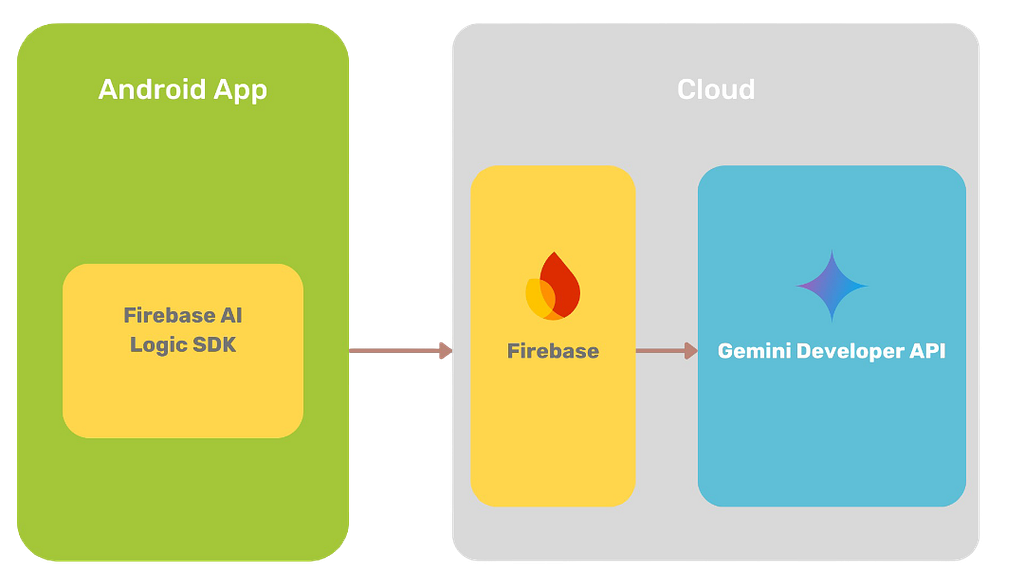
Once your Firebase project is set up, everything else is done within your Android codebase.
Getting started on Android
Add Firebase dependencies using the BoM:
dependencies {
    // Import the BoM for the Firebase platform
    implementation(platform("com.google.firebase:firebase-bom:34.7.0"))

    // Add the dependency for the Firebase AI Logic library
    implementation("com.google.firebase:firebase-ai")
}
Then:
- Create a Firebase project in the console
- Add google-services.json to your app
- Sync and you’re ready to go
That’s it. No backend required.
Creating a generative model
Here’s where Firebase AI Logic really shines. Once Firebase is configured, creating a generative model is straightforward:
fun createGenerativeModel(): GenerativeModel =
    Firebase.ai(backend = GenerativeBackend.googleAI())
        .generativeModel(
            modelName = "gemini-3-flash-preview",
            generationConfig = generationConfig {
                responseModalities = listOf(TEXT)
            },
            safetySettings = listOf(
                SafetySetting(HATE_SPEECH, MEDIUM_AND_ABOVE)
            ),
            systemInstruction = content { "You are a banking app. " +
                "The user records an audio message specifying an action (pay, split, or request money), " +
                        "the amount in Swiss francs, and the recipient." +
                        "A transaction reason may be included optionally."
            }
        )
With a few lines of Kotlin, you:
- Choose a Gemini model
- Define output types (text, image, audio)
- Apply safety filters
- Give the model a clear persona
- Enable advanced tools (for example, Google Search or code execution)
No tokens. No HTTP clients. Just structured Kotlin.
Supported Gemini models
Firebase AI Logic gives you access to a wide range of Gemini models:
- Gemini Pro → depth and accuracy
- Gemini Flash → speed
- Flash Lite → low latency
- Image generation models → text-to-image
- Live models → low-latency text & audio streaming
Choosing the right model is a UX decision: speed vs cost vs quality.
Model configuration basics
generationConfig {
    temperature = 0.2f
    stopSequences = listOf("n")
    responseModalities = listOf(TEXT)
}
Key concepts:
- Temperature controls randomness*
- Stop sequences define termination rules
- Response modalities define output format
*Lower temperature = deterministic, higher temperature = creative
Safety settings (output control)
Safety settings let you filter what the model outputs, not what it analyses.
You can control categories like:
- Hate speech
- Harassment
- Explicit content
And choose thresholds:
- Low and above
- Medium and above
- High and above
This is critical for production apps, especially the ones which are facing consumers.
System instructions: defining behaviour
System instructions define who the model is and how it behaves.
Examples:
- “You are an IDE assistant”
- “Return only Java code”
- “Be formal and neutral”
They help ensure:
- Predictable output
- Consistent tone
- Structured responses
This is one of the most powerful (and underrated) features.
Tools: connecting AI to real systems
Firebase AI Logic supports advanced tools like:
1. Function calling
Let the model call your internal APIs.
FunctionDeclaration(
    EXECUTE_TRANSACTION_FUNCTION_NAME,
    "Execute transaction with extracted parameters",
    mapOf(
        EXECUTE_TRANSACTION_FUNCTION_ACTION_PARAM to Schema.string("Send, receive or split money."),
        EXECUTE_TRANSACTION_FUNCTION_RECIPIENT_PARAM to Schema.string("The person involved in the transaction."),
        EXECUTE_TRANSACTION_FUNCTION_AMOUNT_PARAM to Schema.string("The amount of the transaction."),
        EXECUTE_TRANSACTION_FUNCTION_REASON_PARAM to Schema.string("The description of the transaction.")
    )
In our case, input is an audio file. The model first extracts the user’s intent and key parameters. Once it determines that a transaction is requested and all required parameters are present, Firebase AI Logic matches the request to the declared function and invokes our implementation.
The response from our internal API is then passed back to the model to generate the final user-facing response.
This is a great example of AI combined with real business logic, not just a conversational interface.
2. Grounding with Google Search
One major limitation of LLMs is knowledge cutoff.
Grounding solves this by:
- Fetching real-time web data
- Providing sources
- Improving factual accuracy
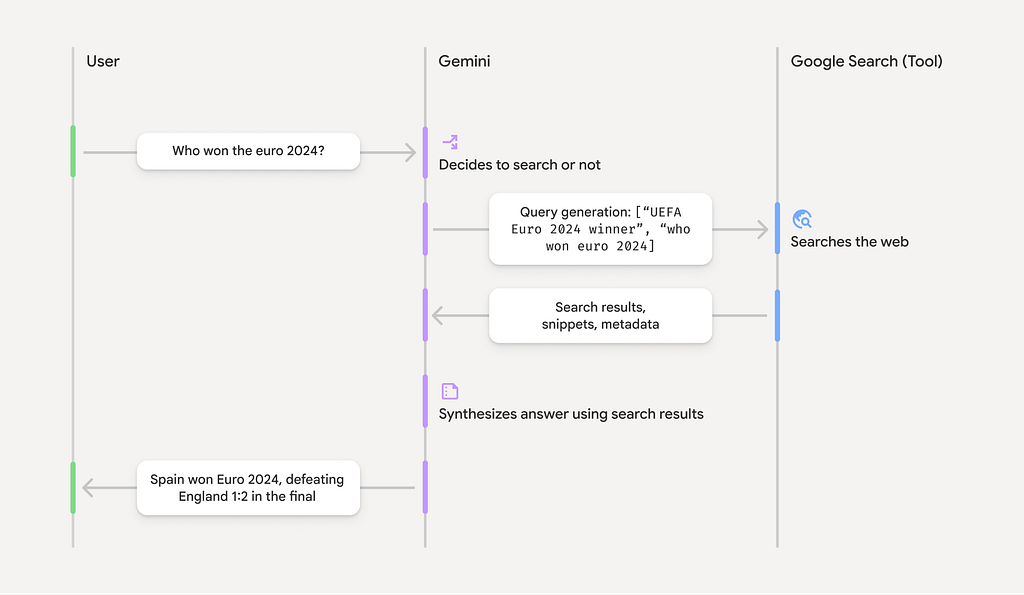
The model handles the entire search → process → cite workflow automatically. This is a big step toward trustworthy AI experiences.
3. Code execution
The model can generate and execute Python code, learn from results, and iterate until it produces a final answer.
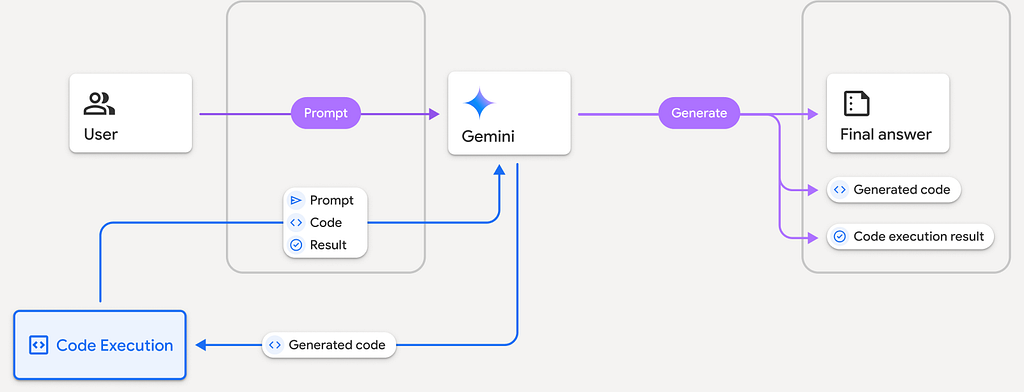
This enables use cases like data analysis, algorithm validation and complex reasoning flows.
Hybrid on-device inference
Firebase AI Logic also supports hybrid inference preferring on-device models when available and automatically falling back to cloud-hosted models when necessary. This provides better privacy, lower latency, reduced cost and seamless UX. Unfortunately this is currently available on Web and we hope it will expand further on mobile SDKs.
Conclusion
Firebase AI Logic proves that AI inference can be serverless. Multimodal AI is now accessible directly from Android and advanced AI features no longer require backend teams. That’s a big shift because prototyping AI is now an Android-level concern. Just like ML Kit years ago, this is one of those tools that feels experimental today and inevitable tomorrow.
If you’ve been curious about adding AI features to your Android app but avoided it due to complexity, I encourage you to try it out with Firebase AI Logic.
Have you experimented with Firebase AI Logic yet? I’d love to hear your experiences. If you’re experimenting with Firebase AI Logic or considering it for production, I’d be happy to discuss approaches and trade-offs in the comments.
I recently presented this topic at the JavaCro25 conference. If you’re interested, you can find the full slide deck here.
Serverless AI for Android with Firebase AI Logic was originally published in ProAndroidDev on Medium, where people are continuing the conversation by highlighting and responding to this story.




This Post Has 0 Comments