


The Simplest Navigation3 Pattern You Can Actually Use
Isn’t the official sample too complicated?
If you’ve looked at the official Navigation3 samples, you’ve probably thought:
“This is way too much.”
- Migrate from Navigation 2 to Navigation 3 | App architecture | Android Developers
- nav3-recipes/app/src/main/java/com/example/nav3recipes/multiplestacks at main · android/nav3-recipes
They’re packed with features, abstractions, and edge cases.
Great for production-level apps — but overwhelming when you just want something simple.
So let’s strip it down to the core idea.
🧭 How Real Apps Handle Bottom Navigation
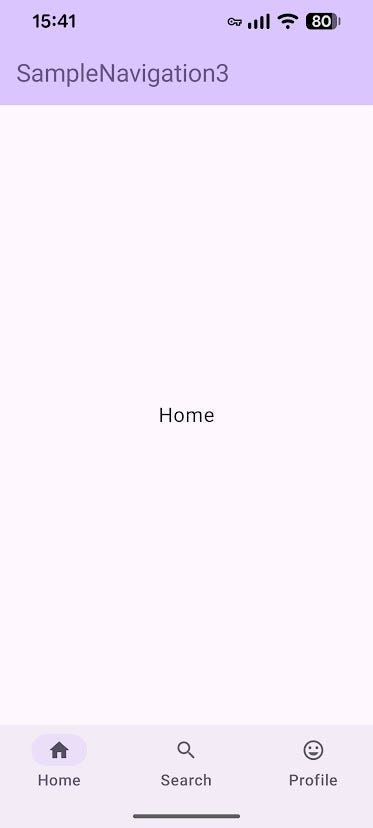
Before jumping into implementation, let’s look at how major apps behave:
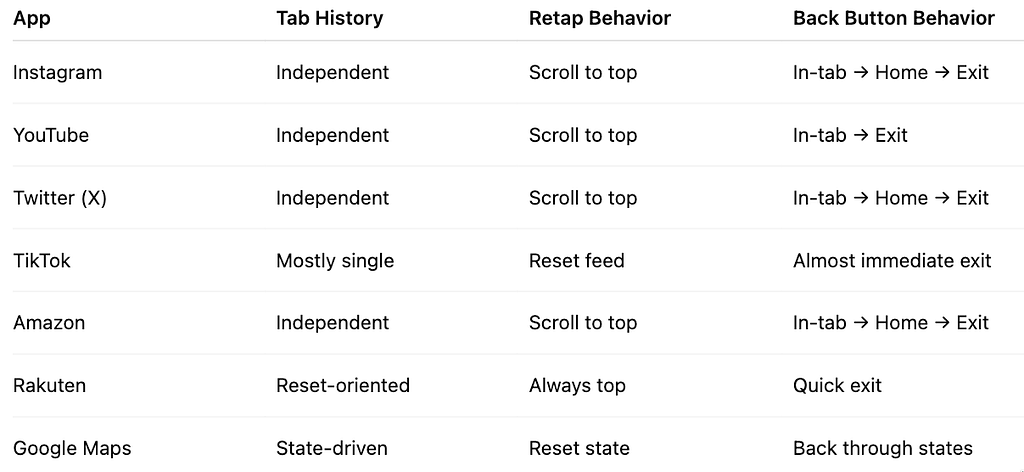
🧩 Common Patterns
Most apps follow one of these:
- Independent back stack per tab (most common)
- Single shared back stack (simplest)
- Reset-on-switch (always go back to root)
🔙 Back Button Behavior (Android Standard)
In-tab history → Tab root → Exit app
- Tabs are switched manually (not via back button)
- Each tab maintains its own history
- When history is empty → app exits
- Retapping a tab → resets that tab to root
- Number of tabs is fixed
🧱 Core Idea
Use a Map of BackStacks, keyed by tab.
That’s it.
No complex state holders required.
🧩 Key Components
- NavKey
- NavBackStack
- NavigationBar / NavigationBarItem
- NavDisplay
🧠 Navigation Model
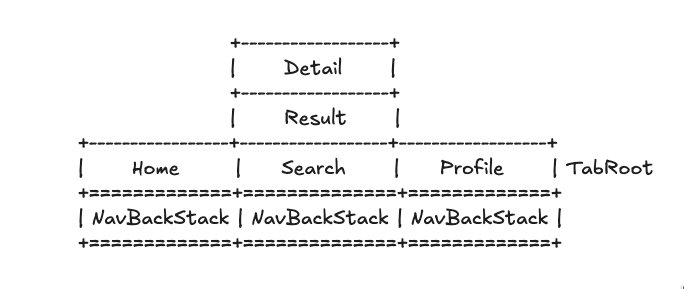
NavKey
├── TabRoot (entry points)
│   ├── Home
│   ├── Search
│   └── Profile
│
├── Result (search result screen)
└── Detail (search detail screen)
@Serializable
sealed interface TabRoot : NavKey {
  val label: String
  val selectedIcon: ImageVector
  val unselectedIcon: ImageVector

  companion object {
    val entries = listOf(Home, Search, Profile)
  }
}

@Serializable
data object Home : TabRoot {
  override val label = "Home"
  override val selectedIcon = Icons.Filled.Home
  override val unselectedIcon = Icons.Outlined.Home
}

@Serializable
data object Search : TabRoot {
  override val label = "Search"
  override val selectedIcon = Icons.Filled.Search
  override val unselectedIcon = Icons.Outlined.Search
}

@Serializable
data object Profile : TabRoot {
  override val label = "Profile"
  override val selectedIcon = Icons.Filled.TagFaces
  override val unselectedIcon = Icons.Outlined.TagFaces
}

@Serializable
data class Result(val keyword: String) : NavKey

@Serializable
data class Detail(val id: String) : NavKey
Why this works well
- Single, type-safe navigation model
- Tabs and screens share the same system
- @Serializable enables state restoration
- sealed + object ensures compile-time safety
🧩 State Management
1. Selected Tab
var currentTab by rememberSerializable {
    mutableStateOf<TabRoot>(Home)
}
- Survives configuration changes (e.g., rotation)
- Fully Compose-friendly
2. Multiple BackStacks
val stacks = TabRoot.entries.associateWith { root ->
    rememberNavBackStack(root)
}
Important insight
- The Map is recreated on recomposition
- But each NavBackStack is NOT recreated
So this is safe and simple.
🔍 What Actually Happens
Map instance  → recreated
BackStacks    → preserved
fun log(
  currentTab: TabRoot,
  stacks: Map<TabRoot, NavBackStack<NavKey>>
) {
  Timber.d("current tab: $currentTab")
  Timber.d("map: ${System.identityHashCode(stacks)}")
  stacks.forEach { (tab, stack) ->
    Timber.d("stack ${System.identityHashCode(stack)} for $tab: ${stack.toList()}")
  }
  Timber.d("---"
}
// Log Output

current tab: Home
map: 23983824
stack 83358302 for Home: [Home]stack 203359807 for Search: [Search]stack 14093068 for Profile: [Profile]---
current tab: Search
map: 90874977
stack 83358302 for Home: [Home]stack 203359807 for Search: [Search]stack 14093068 for Profile: [Profile]---
current tab: Search
map: 115541743
stack 83358302 for Home: [Home]stack 203359807 for Search: [Search, Result(keyword=555)]stack 14093068 for Profile: [Profile]---
current tab: Search
map: 115541743
stack 83358302 for Home: [Home]stack 203359807 for Search: [Search, Result(keyword=555), Detail(id=555)]stack 14093068 for Profile: [Profile]---
current tab: Search
map: 115541743
stack 83358302 for Home: [Home]stack 203359807 for Search: [Search, Result(keyword=555)]stack 14093068 for Profile: [Profile]---
current tab: Search
map: 115541743
stack 83358302 for Home: [Home]stack 203359807 for Search: [Search]stack 14093068 for Profile: [Profile]---
current tab: Profile
map: 115541743
stack 83358302 for Home: [Home]stack 203359807 for Search: [Search]stack 14093068 for Profile: [Profile]---
This means:
- No need for remember {} around the Map
- No need for custom Saver
- No need to over-engineer
3. Current BackStack
val currentStack = stacks[currentTab]!!
In Compose:
- This automatically updates when currentTabchanges
- No manual syncing required
4. Switching Tabs
onClick = {
  currentTab = root
}
That’s all.
5. Navigation (Push)
onClick = {
  currentStack.add(Result(keyword))
}
6. Back Navigation (Pop)
NavDisplay(
  onBack = {
    currentStack.removeAt(currentStack.lastIndex)
  }
- If root is removed → app exits
- Matches Android default behavior
7. Retap Behavior (Reset)
if (selected) {
    currentStack.clear()
    currentStack.add(tabRoot)
}
- Tapping the active tab resets it
- Matches Instagram / Twitter behavior
✅ Final Minimal Pattern
var currentTab by rememberSerializable {
    mutableStateOf<TabRoot>(Home)
}

val stacks = TabRoot.entries.associateWith { root ->
    rememberNavBackStack(root)
}

val currentStack = stacks[currentTab]!!
🚀 Why This Approach Works
- Minimal code
- Matches real-world app behavior
- Fully Compose-native
- Easy to migrate later
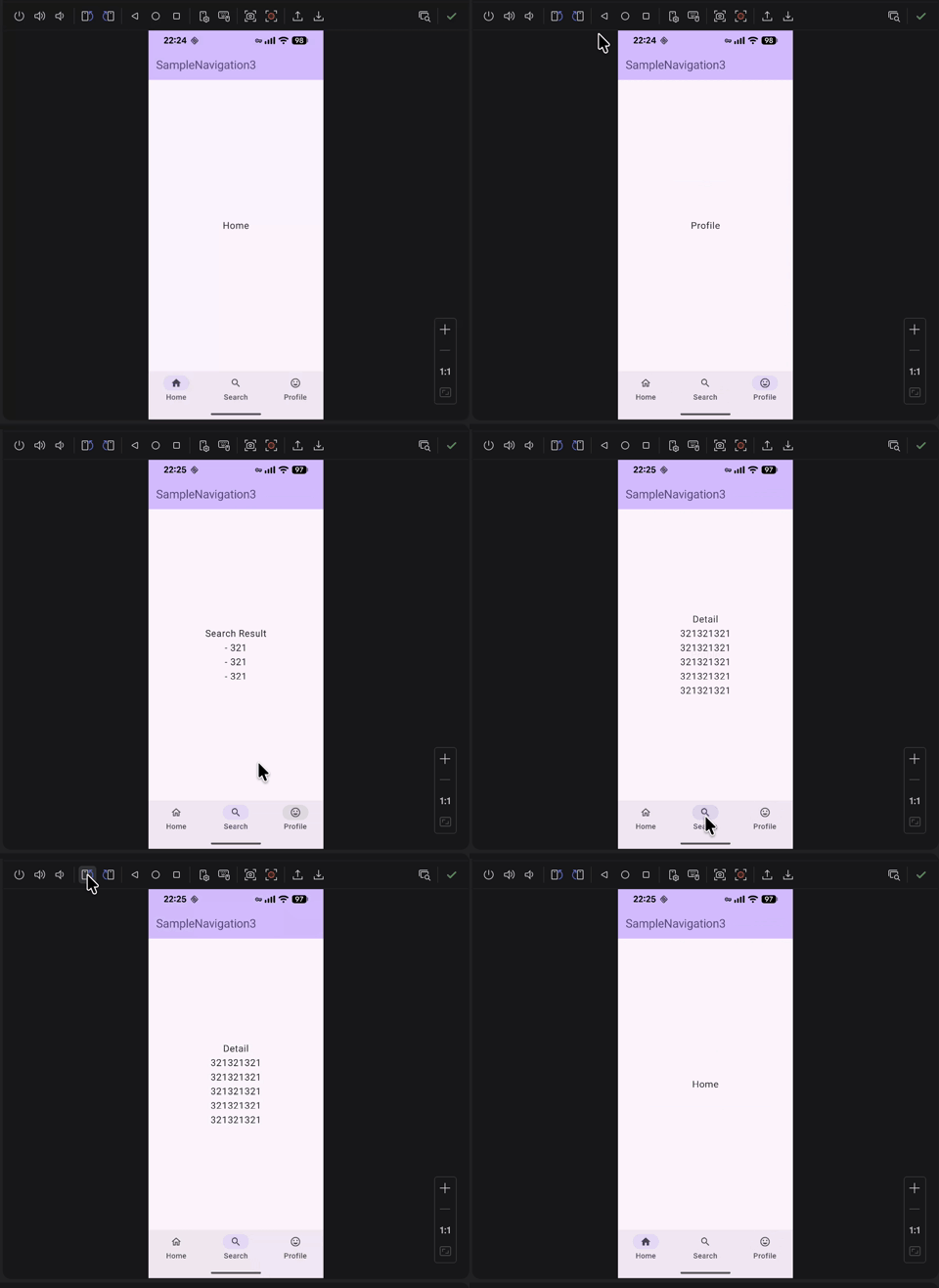
Check out the full code on GitHub Gist:
👉️ Navigation3+BottomNavigation.kt
🔮 Future-Proofing
The Navigation3 API is still evolving.
But if you keep things this simple:
- Moving to a ViewModel
- Introducing a StateHolder
…becomes trivial.
☀️ Bonus: Custom Saver Approach
If you want more control, you can implement your own Saver:
https://medium.com/media/6d782d44cc8abfb60e5af2d87ae17af6/href
val stacks = rememberNavStacks()
But honestly?
👉 You probably don’t need it.
✍️ Wrap-up
Stop overthinking Navigation3.
Start with this:
- One cuurentTab
- One Map<TabRoot, NavBackStack<NavKey>>
- One currentStack
That’s enough for most apps.
Let me know what you think — and follow for more simple Compose insights.
Stop Fighting Multiple BackStacks in Jetpack Compose Navigation3 was originally published in ProAndroidDev on Medium, where people are continuing the conversation by highlighting and responding to this story.




This Post Has 0 Comments