
Learn how to implement real-time AI streaming in Android apps using OkHttp, Kotlin Flow, and proper architecture patterns
Introduction: Why Streaming Matters for LLM Integration
Picture this: You tap “Send” in ChatGPT and watch words materialize on screen, character by character. Now imagine the same interaction, but the app freezes for 10 seconds before dumping the entire response at once. Which feels better?
This isn’t just about perceived performance — it’s about creating AI experiences that feel natural and responsive. When integrating Large Language Models (LLMs) into Android apps, the difference between streaming and non-streaming responses can make or break the user experience.
In this article, I’ll walk you through building a production-ready Android app that integrates Claude’s API with real-time streaming. We’ll use modern Android architecture patterns — MVVM, Kotlin Flow, and Jetpack Compose — and solve real problems you’ll encounter in production.
What you’ll learn:
- How to parse Server-Sent Events (SSE) with OkHttp
- The correct way to handle Flow context for streaming
- Building reactive UI with StateFlow and Compose
- Production considerations: error handling, API key security, and performance
What you’ll build: A complete chat interface that streams responses from Claude in real-time, with proper architecture, error handling, and a polished Material 3 UI.
Prerequisites: Intermediate Android development knowledge, familiarity with Kotlin coroutines and basic Compose.
See It In Action
Before we dive into the implementation, here’s what we’re building:
Real-time AI responses streaming character-by-character — notice the natural conversational flow
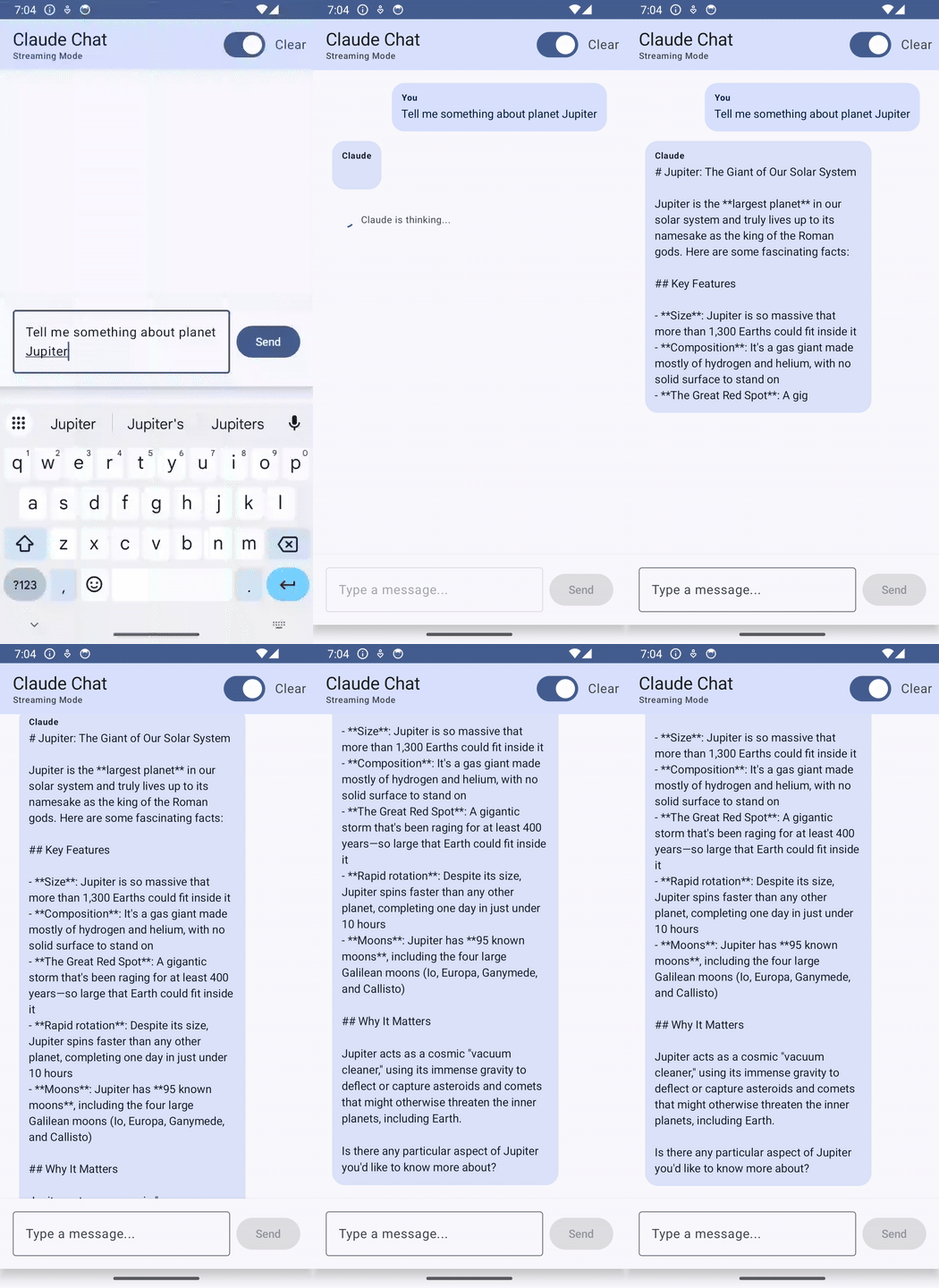
Video: Author’s screen recording
The app handles both streaming (real-time) and non-streaming (complete response) modes, with a clean Material 3 UI that updates reactively as chunks arrive. Now let’s build it.
Architecture: Building for Streaming
Why Traditional Approaches Fall Short
Most Android networking tutorials teach you to use Retrofit with REST APIs that return complete JSON responses. This works great for traditional APIs, but streaming introduces new challenges:
- Response arrives over time: You don’t get one JSON response — you get a stream of events
- Backpressure matters: UI updates can’t keep up with fast streams
- Context switching is critical: Network I/O on background threads, UI updates on Main
- Cancellation must propagate: When user navigates away, the stream should stop
These requirements push us toward a specific architecture.
The Architecture Stack
Here’s what we’ll use and why:
┌─────────────────────────────────────────────┐
│  UI Layer (Jetpack Compose)                 │
│  - ClaudeScreen.kt (Material 3 UI)          │
│  - State observation with collectAsState()  │
└────────────┬────────────────────────────────┘
             │ observes StateFlow
             ▼
┌─────────────────────────────────────────────┐
│  Presentation Layer (ViewModel)              │
│  - ClaudeViewModel.kt                        │
│  - StateFlow for UI state                    │
│  - Business logic & state management         │
└────────────┬────────────────────────────────┘
             │ calls suspend functions / collects Flow
             ▼
┌─────────────────────────────────────────────┐
│  Data Layer (API Service)                    │
│  - ClaudeApiService.kt                       │
│  - OkHttp client                             │
│  - SSE parsing logic                         │
│  - Returns Flow<String> for streaming        │
└────────────┬────────────────────────────────┘
             │ HTTPS
             ▼
┌─────────────────────────────────────────────┐
│  Claude API (api.anthropic.com)              │
│  - Streaming endpoint (/v1/messages)         │
│  - Server-Sent Events format                 │
└─────────────────────────────────────────────┘
Key decisions:
MVVM Pattern: Separates concerns and makes the app testable. ViewModel holds business logic, UI just renders state.
Kotlin Flow for streaming: Perfect for handling continuous data streams with built-in backpressure and cancellation support.
StateFlow for UI state: Reactive state management that works seamlessly with Compose. UI automatically recomposes when state changes.
Threading Model
Understanding where code runs is critical for streaming:
Main Thread (UI)
    ├─ Compose UI rendering
    ├─ State observation (collectAsState)
    └─ StateFlow updates (_uiState.update { ... })
         │
         ▼
ViewModelScope (Dispatchers.Main)
    ├─ Flow collection (.collect { })
    ├─ Business logic
    └─ Launches coroutines for API calls
         │
         ▼
Flow with .flowOn(Dispatchers.IO)
    ├─ Network I/O (OkHttp)
    ├─ SSE parsing
    └─ JSON deserialization
         │
         ▼
OkHttp Thread Pool
    └─ HTTP communication
The flow:
- UI collects from StateFlow (Main thread)
- ViewModel collects from API Flow (Main thread)
- API Flow emits on IO thread (via .flowOn())
- Flow infrastructure automatically bridges contexts
- StateFlow update happens on Main thread
- Compose recomposes (Main thread)
Understanding Server-Sent Events (SSE)
Before we implement streaming, let’s understand the protocol we’re working with.
What is SSE?
Server-Sent Events is a standard for servers to push real-time updates to clients over HTTP. Unlike WebSockets (bidirectional), SSE is unidirectional — server sends, client receives.
Format:
event: message_start
data: {"type":"message_start","message":{...}}
event: content_block_delta
data: {"type":"content_block_delta","delta":{"text":"Hello"}}
event: content_block_delta
data: {"type":"content_block_delta","delta":{"text":" world"}}
event: message_stop
data: {"type":"message_stop"}
Structure:
- Lines starting with event: specify the event type
- Lines starting with data: contain the payload (usually JSON)
- Empty lines separate events
- Events arrive sequentially over a single HTTP connection
Why Claude uses SSE:
- Simple to implement (just HTTP)
- Works through proxies and firewalls
- Natural fit for streaming text generation
- Browser and mobile client support
Claude’s Streaming Format
When you make a streaming request to Claude, you get these event types:
- message_start – Stream initialization (no text)
- content_block_start – New content block begins (no text)
- content_block_delta ⭐ – Actual text chunk (Yes, contains text!)
- content_block_stop – Content block ends (no text)
- message_delta – Usage stats update (no text)
- message_stop – Stream complete (no text)
- ping – Keep-alive (no text)
We only care about content_block_delta – that’s where the actual response text lives. All other events are metadata that we can safely ignore for basic streaming.
Implementation: The API Service Layer
Let’s build the core of our streaming implementation.
Setting Up OkHttp
First, configure OkHttp with proper timeouts for long-running streams:
class ClaudeApiService(private val apiKey: String) {

    private val json = Json {
        ignoreUnknownKeys = true
        prettyPrint = false
    }

    private val client = OkHttpClient.Builder()
        .addInterceptor(HttpLoggingInterceptor().apply {
            level = HttpLoggingInterceptor.Level.BASIC
        })
        .connectTimeout(30, TimeUnit.SECONDS)
        .readTimeout(60, TimeUnit.SECONDS)  // Long timeout for streaming
        .writeTimeout(30, TimeUnit.SECONDS)
        .build()
Key configuration:
- readTimeout(60, SECONDS): Streaming responses can take time. 60 seconds allows for longer generations without timing out.
- HttpLoggingInterceptor: Helps debug issues. Use BASIC in production, BODY for debugging.
- Json { ignoreUnknownKeys = true }: Claude’s API evolves; ignore fields we don’t need.
Building the Streaming Request
Here’s the core streaming function:
fun sendStreamingMessage(
    message: String,
    model: String = "claude-sonnet-4-5-20250929"
): Flow<String> = flow {
    val requestBody = ClaudeRequest(
        model = model,
        maxTokens = 1024,
        messages = listOf(
            Message(role = "user", content = message)
        ),
        stream = true  // Enable streaming
    )

    val request = Request.Builder()
        .url("https://api.anthropic.com/v1/messages")
        .addHeader("x-api-key", apiKey)
        .addHeader("anthropic-version", "2023-06-01")
        .addHeader("content-type", "application/json")
        .post(json.encodeToString(requestBody).toRequestBody("application/json".toMediaType()))
        .build()

    client.newCall(request).execute().use { response ->
        if (!response.isSuccessful) {
            throw ClaudeApiException("API call failed: ${response.code} ${response.message}")
        }

        response.body?.charStream()?.buffered()?.use { reader ->
            processStreamingResponse(reader) { chunk ->
                emit(chunk)
            }
        }
    }
}.flowOn(Dispatchers.IO)  // Critical: Run on IO thread
Critical details:
Return type Flow<String>: Each emission is a text chunk. Consumers collect the flow to receive chunks as they arrive.
stream = true in request body: Tells Claude to stream the response. Without this, you get a single complete response.
response.body?.charStream(): Gets a character stream from the response body. We buffer it for line-by-line reading.
.flowOn(Dispatchers.IO): This is crucial. We’ll discuss why in detail shortly.
Parsing SSE: The State Machine
SSE parsing is essentially a state machine. We read line by line and build up events:
private suspend fun processStreamingResponse(
    reader: BufferedReader,
    onChunk: suspend (String) -> Unit
) {
    var line: String?
    var eventType: String? = null
    val dataBuilder = StringBuilder()

    while (reader.readLine().also { line = it } != null) {
        when {
            line!!.startsWith("event:") -> {
                // Event type line
                eventType = line!!.substring(6).trim()
            }
            line!!.startsWith("data:") -> {
                // Data line - can span multiple lines
                dataBuilder.append(line!!.substring(5).trim())
            }
            line!!.isEmpty() -> {
                // Empty line = end of event, process it
                if (dataBuilder.isNotEmpty()) {
                    processStreamEvent(eventType, dataBuilder.toString(), onChunk)
                    dataBuilder.clear()
                }
                eventType = null
            }
        }
    }
}
The state machine:
- Read event: line → Store event type
- Read data: line(s) → Accumulate in StringBuilder
- Read empty line → Event complete, process it
- Repeat until stream ends
Why StringBuilder? Data can span multiple lines. We accumulate all data: lines for an event before processing.
Extracting Text from Events
Now we parse the JSON and extract text chunks:
private suspend fun processStreamEvent(
    eventType: String?,
    data: String,
    onChunk: suspend (String) -> Unit
) {
    when (eventType) {
        "content_block_delta" -> {
            try {
                val delta = json.decodeFromString<ContentBlockDelta>(data)
                delta.delta.text?.let { onChunk(it) }
            } catch (e: Exception) {
                // Ignore parsing errors for non-critical events
            }
        }
        "message_stop" -> {
            // Stream ended - nothing to do
        }
        // Ignore all other event types
    }
}
Data classes for JSON:
@Serializable
data class ContentBlockDelta(
    val type: String,
    val index: Int,
    val delta: Delta
)
@Serializable
data class Delta(
    val type: String,
    val text: String? = null
)
Why nullable text? Not all deltas contain text (some are metadata). Making it nullable prevents crashes on unexpected formats.
The Flow Context Problem: A Real Debugging Story
When I first implemented this, the app would get stuck at “Claude is thinking…” forever. The streaming request completed successfully, text chunks were arriving from the API, but nothing appeared on screen.
After adding extensive logging, I saw this in LogCat:
D/ClaudeApp: Emitting chunk: Hello
E/ClaudeApp: Error parsing delta: Flow invariant is violated:
    Flow was collected in [Dispatchers.Main.immediate],
    but emission happened in [Dispatchers.IO].
The problem: Flow’s context safety check was failing.
Understanding the Error
Let me show you the broken code first:
// ❌ BROKEN CODE
fun sendStreamingMessage(message: String): Flow<String> = flow {
    val request = buildRequest(message)

    withContext(Dispatchers.IO) {
        client.newCall(request).execute().use { response ->
            processStreamingResponse(reader) { chunk ->
                emit(chunk)  // ❌ Emitting from IO context!
            }
        }
    }
}
In the ViewModel:
viewModelScope.launch {  // Runs on Dispatchers.Main
    apiService.sendStreamingMessage(message)
        .collect { chunk ->  // Collecting on Main
            updateState(chunk)
        }
}
What’s happening:
- ViewModel collects Flow on Main thread (viewModelScope default)
- emit() is called inside withContext(Dispatchers.IO), so it runs on IO thread
- Flow detects: “You’re collecting on Main but emitting from IO!”
- Exception thrown to prevent potential threading issues
Why Flow Enforces This
Flow has a strict rule: The context where you collect must be the same context where you emit.
This isn’t arbitrary — it prevents race conditions. Consider this scenario:
flow {
    val list = mutableListOf<String>()  // Created on Main thread

    withContext(Dispatchers.IO) {
        repeat(100) {
            list.add("item $it")  // ❌ Modifying from IO thread!
            emit(list.size)
        }
    }
}
If Flow allowed this:
- Thread A (Main): Reading list during collection
- Thread B (IO): Writing to list during emission
- Result: 💥 ConcurrentModificationException
Flow’s context enforcement prevents these bugs at compile time.
The Solution: .flowOn()
Here’s the corrected code:
// ✅ CORRECT CODE
fun sendStreamingMessage(message: String): Flow<String> = flow {
    val request = buildRequest(message)

    // No withContext wrapper!
    client.newCall(request).execute().use { response ->
        processStreamingResponse(reader) { chunk ->
            emit(chunk)  // Emits in flow's context
        }
    }
}.flowOn(Dispatchers.IO)  // Changes flow's execution context
What .flowOn() does:
It creates infrastructure to safely move data between contexts. Internally, it uses a Channel:
┌─────────────────────────────────┐
│  Upstream (Dispatchers.IO)      │
│                                 │
│  flow {                         │
│    emit("Hello") ──────┐        │
│    emit(" world") ─────┤        │
│  }                     │        │
└────────────────────────┼────────┘
                         │
                         ▼
                  ┌─────────────┐
                  │   Channel   │ ← Flow creates this
                  │  (Buffer)   │    automatically
                  └─────────────┘
                         │
                         ▼
┌────────────────────────┼────────┐
│  Downstream (Main)     │        │
│                        │        │
│  collect {             │        │
│    println(it) ←───────┘        │
│  }                              │
└─────────────────────────────────┘
The key insight:
- withContext: You manually switch contexts, but Flow doesn’t know about it
- .flowOn(): Flow builds infrastructure (Channel) to safely bridge contexts
Why This Pattern Is Ideal
// API Layer - runs on IO
fun getData(): Flow<Data> = flow {
    // Network I/O
    emit(data)
}.flowOn(Dispatchers.IO)
// ViewModel - collects on Main
viewModelScope.launch {
    repository.getData()
        .collect { data ->
            _uiState.update { it.copy(data = data) }
        }
}
Benefits:
- Network I/O on background thread: No ANRs
- UI updates on Main thread: Safe StateFlow updates
- Automatic backpressure: Flow suspends if collector is slow
- Proper cancellation: Cancel collector → cancels network call
- Context isolation: Each layer owns its threading concern
This is the standard pattern for repository/data layer functions in modern Android apps.
ViewModel: Managing Streaming State
Now let’s handle the streaming data in the ViewModel.
State Definition
First, define what state the UI needs:
data class ClaudeUiState(
    val messages: List<ChatMessage> = emptyList(),
    val isLoading: Boolean = false,
    val isStreamingEnabled: Boolean = true,
    val error: String? = null
)
data class ChatMessage(
    val text: String,
    val isUser: Boolean,
    val timestamp: Long = System.currentTimeMillis()
)
Design decisions:
Immutable state: Each update creates a new state object. Compose can efficiently detect changes.
Single state object: UI observes one StateFlow, gets all state in one place.
Error as nullable string: Simple error handling. Could be enhanced with sealed classes for different error types.
Streaming Message Handler
Here’s how we handle streaming in the ViewModel:
class ClaudeViewModel(
    private val apiService: ClaudeApiService
) : ViewModel() {

    private val _uiState = MutableStateFlow(ClaudeUiState())
    val uiState: StateFlow<ClaudeUiState> = _uiState.asStateFlow()

    fun sendStreamingMessage(message: String) {
        if (message.isBlank()) return

        viewModelScope.launch {
            // Add user message
            _uiState.update { currentState ->
                currentState.copy(
                    messages = currentState.messages + ChatMessage(
                        text = message,
                        isUser = true
                    ),
                    isLoading = true,
                    error = null
                )
            }

            // Pre-create empty assistant message
            val assistantMessageIndex = _uiState.value.messages.size
            _uiState.update { currentState ->
                currentState.copy(
                    messages = currentState.messages + ChatMessage(
                        text = "",
                        isUser = false
                    )
                )
            }

            try {
                // Collect streaming response
                apiService.sendStreamingMessage(message)
                    .catch { error ->
                        _uiState.update { currentState ->
                            currentState.copy(
                                isLoading = false,
                                error = "Error: ${error.message}"
                            )
                        }
                    }
                    .collect { chunk ->
                        // Accumulate chunks in the assistant message
                        _uiState.update { currentState ->
                            val updatedMessages = currentState.messages.toMutableList()
                            val currentMessage = updatedMessages[assistantMessageIndex]                            updatedMessages[assistantMessageIndex] = currentMessage.copy(
                                text = currentMessage.text + chunk
                            )
                            currentState.copy(
                                messages = updatedMessages,
                                isLoading = false
                            )
                        }
                    }
            } catch (e: Exception) {
                _uiState.update { currentState ->
                    currentState.copy(
                        isLoading = false,
                        error = "Error: ${e.message}"
                    )
                }
            }
        }
    }
}
Key patterns:
Pre-create empty message: We create an empty assistant message before streaming starts. This gives us a stable index to update as chunks arrive.
String concatenation per chunk: currentMessage.text + chunk. For typical LLM responses (< 10K chars), this is fine. For very long responses, consider using StringBuilder.
Error handling at two levels:
- .catch { } on the Flow catches emissions errors
- try/catch catches collection errors
State updates are atomic: Each .update { } is a single state change. Compose efficiently recomposes only affected parts.
Why Pre-create the Message?
Alternative approach (don’t do this):
// ❌ Bad: Index changes as messages are added
.collect { chunk ->
    val messages = _uiState.value.messages.toMutableList()
    val lastMessage = messages.lastOrNull()

    if (lastMessage?.isUser == false) {
        messages[messages.size - 1] = lastMessage.copy(text = lastMessage.text + chunk)
    } else {
        messages.add(ChatMessage(text = chunk, isUser = false))
    }
}
Problems:
- Race condition: What if two chunks arrive simultaneously?
- Index instability: lastOrNull() can change between check and use
- More complex logic: Harder to reason about
Pre-creating the message:
- Stable index: assistantMessageIndex never changes
- Simple logic: Just update that index
- Race-safe: Each update is atomic
UI Layer: Reactive Compose Interface
Finally, let’s build the UI.
Main Screen Structure
@OptIn(ExperimentalMaterial3Api::class)
@Composable
fun ClaudeScreen(
    viewModel: ClaudeViewModel,
    modifier: Modifier = Modifier
) {
    val uiState by viewModel.uiState.collectAsStateWithLifecycle()
    val listState = rememberLazyListState()
    val scope = rememberCoroutineScope()

    // Auto-scroll to bottom when new messages arrive
    LaunchedEffect(uiState.messages.size) {
        if (uiState.messages.isNotEmpty()) {
            scope.launch {
                listState.animateScrollToItem(uiState.messages.size - 1)
            }
        }
    }

    Scaffold(
        topBar = {
            TopAppBar(
                title = { Text("Claude Chat") },
                actions = {
                    // Streaming toggle
                    Switch(
                        checked = uiState.isStreamingEnabled,
                        onCheckedChange = { viewModel.toggleStreamingMode() }
                    )
                }
            )
        }
    ) { paddingValues ->
        Column(
            modifier = modifier
                .fillMaxSize()
                .padding(paddingValues)
        ) {
            // Messages list
            LazyColumn(
                state = listState,
                modifier = Modifier.weight(1f),
                contentPadding = PaddingValues(16.dp),
                verticalArrangement = Arrangement.spacedBy(12.dp)
            ) {
                items(uiState.messages) { message ->
                    MessageBubble(message = message)
                }

                if (uiState.isLoading) {
                    item {
                        CircularProgressIndicator()
                    }
                }
            }

            // Input field
            MessageInput(
                onSendMessage = { text ->
                    if (uiState.isStreamingEnabled) {
                        viewModel.sendStreamingMessage(text)
                    } else {
                        viewModel.sendMessage(text)
                    }
                },
                enabled = !uiState.isLoading
            )
        }
    }
}
Compose patterns:
collectAsStateWithLifecycle(): Automatically stops collection when app goes to background, resumes on foreground. More efficient than collectAsState().
LaunchedEffect(uiState.messages.size): Triggers when message count changes. We use it to auto-scroll to new messages.
rememberCoroutineScope(): Get a coroutine scope tied to Composable lifecycle. Used for animated scrolling.
items(uiState.messages): LazyColumn renders messages efficiently. Only visible items are composed.
Message Bubble Component
@Composable
fun MessageBubble(
    message: ChatMessage,
    modifier: Modifier = Modifier
) {
    Row(
        modifier = modifier.fillMaxWidth(),
        horizontalArrangement = if (message.isUser) Arrangement.End else Arrangement.Start
    ) {
        Surface(
            shape = RoundedCornerShape(16.dp),
            color = if (message.isUser) {
                MaterialTheme.colorScheme.primaryContainer
            } else {
                MaterialTheme.colorScheme.secondaryContainer
            },
            modifier = Modifier.widthIn(max = 300.dp)
        ) {
            Column(modifier = Modifier.padding(12.dp)) {
                Text(
                    text = if (message.isUser) "You" else "Claude",
                    style = MaterialTheme.typography.labelSmall,
                    fontWeight = FontWeight.Bold
                )
                Spacer(modifier = Modifier.height(4.dp))
                Text(
                    text = message.text,
                    style = MaterialTheme.typography.bodyMedium
                )
            }
        }
    }
}
Design choices:
Material 3 colors: primaryContainer for user, secondaryContainer for assistant. Adapts to light/dark theme automatically.
Max width constraint: widthIn(max = 300.dp) prevents bubbles from being too wide on tablets.
Alignment based on sender: User messages align right, assistant messages align left.
Streaming Performance
Question: Won’t frequent recompositions hurt performance?
Answer: No, Compose is remarkably efficient here.
Why it’s fast:
- Scoped recomposition: Only the specific MessageBubble being updated recomposes
- Structural equality: Compose compares ChatMessage objects. If text is the same, no recomposition
- Lazy rendering: LazyColumn only composes visible items
- Text measurement caching: Compose caches text layout measurements
Production Considerations
API Key Security
Never hardcode API keys:
// ❌ NEVER DO THIS
val apiKey = "sk-ant-api03-..."
Use BuildConfig:
In app/build.gradle.kts:
import java.util.Properties
android {
    defaultConfig {
        // Read from local.properties
        val properties = Properties()
        properties.load(project.rootProject.file("local.properties").inputStream())
        buildConfigField(
            "String",
            "CLAUDE_API_KEY",
            ""${properties.getProperty("CLAUDE_API_KEY")}""
        )
    }

    buildFeatures {
        buildConfig = true
    }
}
In local.properties (add to .gitignore):
CLAUDE_API_KEY=sk-ant-api03-your-key-here
In code:
val apiKey = BuildConfig.CLAUDE_API_KEY
For production apps: Use a backend proxy. Never ship API keys in mobile apps — they can be extracted via reverse engineering.
Error Handling Strategy
Handle errors at multiple levels:
Network level:
client.newCall(request).execute().use { response ->
    when (response.code) {
        401 -> throw ClaudeApiException("Invalid API key")
        429 -> throw ClaudeApiException("Rate limit exceeded. Try again later.")
        500, 502, 503 -> throw ClaudeApiException("Service temporarily unavailable")
        else -> throw ClaudeApiException("API error: ${response.code}")
    }
}
Flow level:
apiService.sendStreamingMessage(message)
    .catch { error ->
        // Handle stream-specific errors
        emit("") // or handle appropriately
    }
    .collect { chunk -> ... }
ViewModel level:
try {
    apiService.sendStreamingMessage(message).collect { ... }
} catch (e: IOException) {
    _uiState.update { it.copy(error = "Network error. Check connection.") }
} catch (e: Exception) {
    _uiState.update { it.copy(error = "Unexpected error: ${e.message}") }
}
UI level:
uiState.error?.let { errorMessage ->
    Snackbar(
        action = {
            TextButton(onClick = { viewModel.dismissError() }) {
                Text("Dismiss")
            }
        }
    ) {
        Text(errorMessage)
    }
}
Rate Limiting
Anthropic enforces rate limits. Handle them gracefully:
Client-side protection:
class RateLimitedApiService(private val apiService: ClaudeApiService) {
    private val semaphore = Semaphore(5)  // Max 5 concurrent requests

    suspend fun sendMessage(message: String): String {
        semaphore.acquire()
        try {
            return apiService.sendMessage(message)
        } finally {
            semaphore.release()
        }
    }
}
Exponential backoff:
suspend fun <T> retryWithBackoff(
    maxRetries: Int = 3,
    initialDelay: Long = 1000,
    maxDelay: Long = 10000,
    factor: Double = 2.0,
    block: suspend () -> T
): T {
    var currentDelay = initialDelay
    repeat(maxRetries - 1) { attempt ->
        try {
            return block()
        } catch (e: ClaudeApiException) {
            if (e.message?.contains("429") == true) {
                delay(currentDelay)
                currentDelay = (currentDelay * factor).toLong().coerceAtMost(maxDelay)
            } else {
                throw e
            }
        }
    }
    return block() // Last attempt
}
Conclusion
Building streaming LLM integrations in Android requires careful attention to architecture, threading, and state management. Let’s recap the key lessons:
Critical Patterns:
- Use .flowOn(Dispatchers.IO) for Flow-based streaming, never withContext inside flow builders
- Pre-create UI state objects to avoid index instability during streaming
- Handle errors at multiple levels: network, Flow, ViewModel, UI
- Use StateFlow for reactive UI that automatically handles recomposition
Architecture Wins:
- MVVM keeps business logic separate from UI
- OkHttp gives fine-grained control over response streams
- Kotlin Flow provides backpressure and cancellation for free
- Compose makes reactive UI straightforward
Production Readiness:
- Never ship API keys in apps — use backend proxies
- Handle rate limiting with exponential backoff
- Profile memory and performance regularly
What’s Next:
This implementation is solid, but you can extend it:
- Add conversation persistence with Room
- Implement message editing/regeneration
- Add support for Claude’s tool use (function calling)
- Build multi-turn conversation context management
- Add image support for vision models
The complete code is available on GitHub. Clone it, experiment with it, and adapt it for your needs.
Have questions or improvements? Share your experiences in the comments or reach out on LinkedIn.
Streaming LLM Responses in Android: Beyond Request-Response was originally published in ProAndroidDev on Medium, where people are continuing the conversation by highlighting and responding to this story.




This Post Has 0 Comments