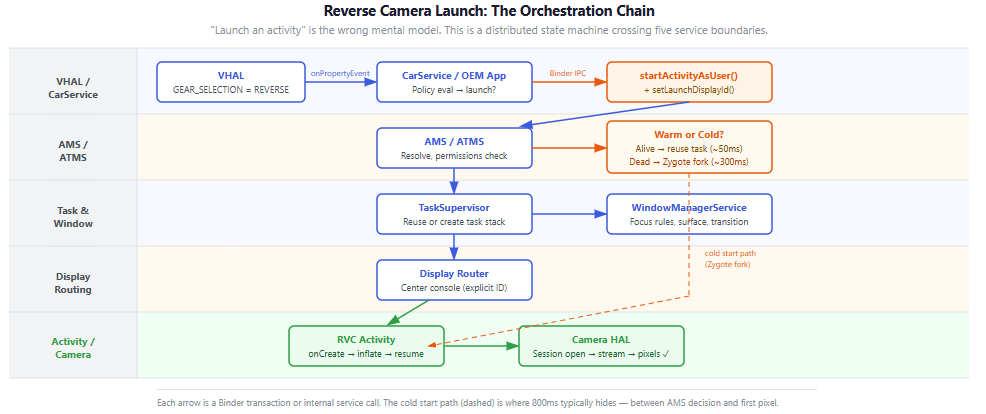

Android Automotive System Internals — Part 2: ActivityManagerService & Lifecycle Orchestration
The speedometer problem was solved.
Binder was behaving. Threads were stable. IPC was clean.
Then we shifted into reverse.
And the screen stayed black.
Not frozen. Not crashed. Just late.
Eight hundred milliseconds late.
Why 800ms Is an Engineering Emergency
Before diving into traces, the regulatory context matters.
FMVSS 111 — the U.S. federal safety standard for rear visibility — mandates that the camera image must be visible within 2.0 seconds of the driver shifting into reverse. If you miss this window, you do not ship the car. It is a hard gating requirement.
Two seconds sounds generous. It isn’t. By the time you account for CAN bus propagation, VHAL processing, CarService policy evaluation, and the UI orchestration chain we’re about to trace, 800ms of ActivityManager overhead consumes 40% of your entire compliance budget before a single pixel appears.
What made this tricky: every usual suspect came back innocent. The reverse signal was correct. The policy fired. The intent was dispatched. The delay lived somewhere else — inside the activity/task/window machine that brings pixels to the screen.
When you transition from an RTOS — where UI updates are near-instantaneous — to AAOS, the reality of ActivityManagerService, Zygote forks, and Window orchestration hits hard. That collision is what this article is about.
First: Know Which Problem You’re Debugging
Most articles on RVC latency skip this boundary. Don’t.
If the driver shifts into reverse within seconds of cold-booting the vehicle, Android’s framework will never be fast enough. AOSP addresses this through the EVS (Exterior View System) HAL — a C++ layer that streams camera frames directly to the display, bypassing ActivityManager, SurfaceFlinger, and CarService entirely until user space is ready.
If you’re debugging cold-boot camera latency, you’re in the wrong layer. You need the EVS HAL, not activity traces.
This article is about runtime RVC: the OS is fully running, the driver shifts into reverse during normal operation. EVS is dormant. The Activity framework is in charge. That’s where the 800ms lives.
The Architecture of a Shift
The instinct when you first work with AAOS: “camera in reverse = launch an activity.” One intent, one hop.
That mental model breaks the moment you trace it.
What actually happens when a driver shifts into reverse is better described as advancing a distributed state machine across five service boundaries, each with its own Binder domain and thread pool.
The chain begins in the VHAL. When the CAN bus broadcasts a gear change, the VHAL emits VehicleProperty::GEAR_SELECTION (Property ID: 0x11400400). One critical detail: this property’s change mode must be ON_CHANGE, not continuous. If your framework is polling the VHAL for gear state on a timer, you have already lost the latency battle before the UI knows anything has happened.
At the application layer, your CarPropertyManager callback fires:
carPropertyManager.registerCallback(
    object : CarPropertyEventCallback {
        override fun onChangeEvent(value: CarPropertyValue<*>) {
            val gear = value.value as Int
            if (gear == VehicleGear.GEAR_REVERSE) {
                launchRearViewCamera()  // Time is ticking.
            }
        }
        override fun onErrorEvent(propId: Int, zone: Int) {
            Log.e(TAG, "VHAL error: $propId")
        }
    },
    VehiclePropertyIds.GEAR_SELECTION,
    CarPropertyManager.SENSOR_RATE_ONCHANGE  // Event-driven, not polled
)
Once launchRearViewCamera() fires, control passes to ActivityManagerService. This is where our 800ms went.
Tracing the Gap
For AAOS UI latency, logcat tells you that something is slow. Perfetto tells you where the time went. You need a unified timeline of the CPU scheduler, Binder transactions, and Window Manager in a single view.
Capture three signals simultaneously:
- sched_switch — shows when critical threads are runnable but not actually scheduled. A RUNNABLE thread sitting idle is a scheduling policy problem, not an app bug.
- am / wm atrace categories — exposes ActivityManager and WindowManager internal state transitions as named slices.
- binder_driver — confirms whether cost is in orchestration or IPC queueing.
./record_android_trace -o rvc_launch.perfetto-trace -t 10s -b 32mb
  sched freq idle am wm gfx binder_driver hal camera
Shift into reverse during capture. Load the trace at ui.perfetto.dev and anchor on ActivityTaskManager slices within the am category.
What the Trace Actually Shows
Here’s the concrete breakdown from a trace on this problem. The numbers are representative of this class of issue — measure your own hardware, but expect this pattern:

Warm start (process alive):
T+0   ms  Reverse event recognized
T+15  ms  CarPropertyManager callback fires
T+30  ms  am resolves target, routes to existing task
T+80  ms  wm applies focus + transition
T+150 ms  First pixel on screen ✓
Cold start (process killed by lmkd):
T+0   ms  Reverse event recognized
T+15  ms  CarPropertyManager callback fires
T+300 ms  Zygote finishes forking the RVC process
T+450 ms  Activity.onCreate() + onResume() complete
T+800 ms  SurfaceFlinger composites the first camera frame
The brutal detail in that cold start timeline: the Activity was “resumed” at T+450ms, but the driver saw nothing until T+800ms. There’s a 350ms gap between “the framework thinks we’re done” and “pixels on glass.” That’s the camera HAL initialization and surface buffer fill cost — and it’s invisible until you instrument reportFullyDrawn() separately from Displayed.
The Zygote fork alone is 200–400ms on automotive silicon. That cost runs before a single line of your application code executes.
Solution 1: Keep the Process Warm
If your trace shows the delay dominated by Zygote fork + bindApplication, the fix is not to optimize those operations. The fix is to ensure the process is never dead when reverse fires.
The true cost of android:persistent=”true”
You might reach for this in the manifest:
<application android:persistent="true" android:process=":rear_camera" />
In a standard Android app, the OS silently ignores this. In AAOS, three system-level requirements must all be met before the flag is honored:
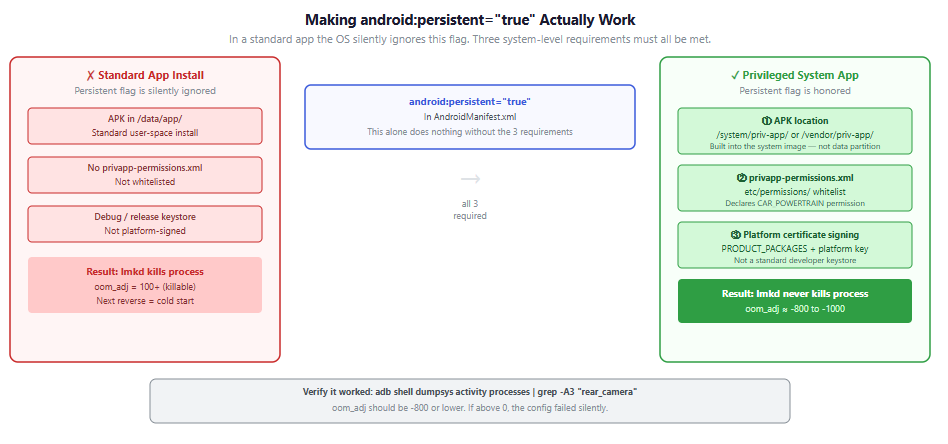
① APK location — the app must be installed as a privileged system app in /system/priv-app/ or /vendor/priv-app/. Not in the data partition.
② privapp-permissions.xml whitelist — the package must be explicitly declared in etc/permissions/privapp-permissions.xml:
<privapp-permissions package="com.oem.car.camera">
    <permission name="android.car.permission.CAR_POWERTRAIN"/>
</privapp-permissions>
③ Platform certificate — the APK must be signed with the platform key, not a standard developer keystore.
Verify the configuration actually worked:
adb shell dumpsys activity processes | grep -A3 "rear_camera"
# oom_adj should be -800 or lower.
# If it's above 0, the persistence config failed silently.
The tradeoff is real. Memory allocated to this process — camera pipeline, rendering surfaces, class-loaded code — is permanently unavailable to other apps. In a vehicle with fixed hardware where RVC is safety-critical, this is usually the right call. Evaluate it deliberately.
Pre-warm as an alternative
For builds where full persistence is too aggressive, start the RVC process on ignition or user unlock:
- Initialize class loading and open the camera session early — session open is often the most expensive single operation in onCreate().
- Pre-allocate a SurfaceView or TextureView in a hidden state so the buffer is waiting when onResume() fires.
- Keep the process warm without permanently pinning it against memory pressure.
Solution 2: Force Predictable Task Reuse
Even with a warm process, you need the task stack to behave predictably across repeated reverse events.
<activity
    android:name=".RearViewCameraActivity"
    android:launchMode="singleTask" />
Pair this with FLAG_ACTIVITY_CLEAR_TOP in the intent:
rvcIntent.addFlags(Intent.FLAG_ACTIVITY_NEW_TASK or Intent.FLAG_ACTIVITY_CLEAR_TOP)
This handles the real-world pattern: reverse → drive → reverse. The second event reuses the existing task instance instead of creating a new stack entry. Without CLEAR_TOP, repeated reverse cycles can accumulate task entries that produce inconsistent launch behavior over time.
One edge case to test explicitly: shift reverse → drive → reverse faster than the first launch completes. Watch dumpsys activity activities during rapid changes. If you see task duplication, add a debounce or state guard in the orchestrator before the startActivityAsUser() call.
Solution 3: Launch for the Right User
This is the detail that silently breaks systems for engineers coming from phone development.
AAOS uses Headless System User Mode (HSUM). System services run as User 0. The driver’s UI runs as User 10 (or another non-zero profile). If you call context.startActivity() from a system context without specifying the target user, the activity may launch for User 0 — which has no visible display surface. You get no error, no crash, just nothing on screen.
context.startActivityAsUser(rvcIntent, options.toBundle(), UserHandle.CURRENT)
UserHandle.CURRENT routes to the visible user’s UI space. Always specify it explicitly when launching from system context.
Quick Verification Commands
Three commands to run before you reach for Perfetto:
# Is the process alive? What's its oom_adj?
# If oom_adj is high, lmkd killed it before the reverse event.
adb shell dumpsys activity processes | grep -A3 "rear_camera"

# Is the task on the correct display?
# Do you have duplicate instances from repeated reverse events?
adb shell dumpsys activity activities | grep -A5 "RearViewCamera"

# Baseline launch time - run 20 cycles, check variance not just mean.
# High variance = cold start randomness. Low variance = consistently warm.
adb shell am start-activity -W -n com.oem.camera/.RearViewCameraActivity
Closing
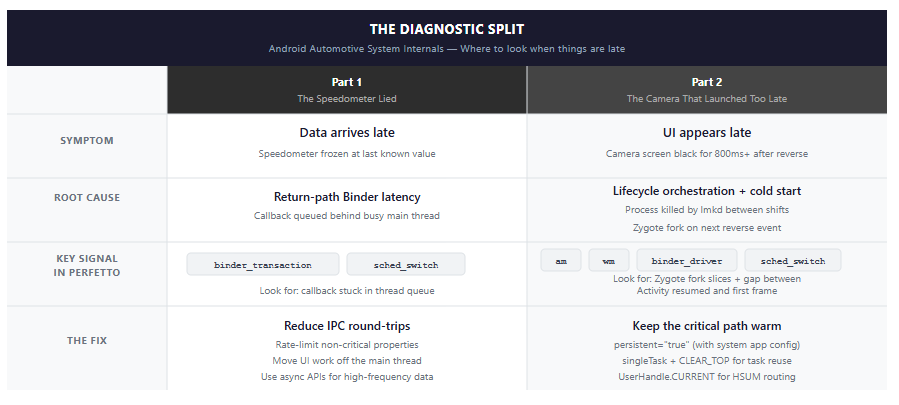
Part 1 taught: “working” isn’t the same as “timely.”
Part 2 narrows that to automotive: the reverse camera can be architecturally correct, compliant on paper, and still fail the driver if the process is cold when reverse fires.
When RVC is late, one question cuts to the answer:
Did we pay for IPC, or did we pay for lifecycle?
If the trace shows Zygote fork dominating, fix the orchestration layer — not the camera driver, not the rendering pipeline:
- Keep the process warm. Understand what persistent=”true” actually requires.
- Force task reuse. singleTask + CLEAR_TOP, not just one or the other.
- Route to the right user. UserHandle.CURRENT — always explicit from system context.
In vehicles, lifecycle isn’t an app concern.
Lifecycle is infrastructure.
Part 3 covers WindowManager and multi-display orchestration — what actually happens inside wm during the transition, why display targeting without setLaunchDisplayId() is unreliable across OEM configurations, and how to keep the cluster display stable while the center console transitions.
Resources
AOSP Source
- ActivityManagerService
- ActivityTaskManagerService
- CarPropertyManager
- Camera HAL
- EVS Manager/Stack
- Privileged app permissions
Tools
Related Reading
In this series
Android documentation
- App startup time — cold, warm, and hot starts
- Activity launch modes
- Multi-display activity launch (AOSP)
- Android Binder IPC architecture
- AAOS developer guide
The Camera That Launched Too Late was originally published in ProAndroidDev on Medium, where people are continuing the conversation by highlighting and responding to this story.





This Post Has 0 Comments