
 [[{“value”:”
Apple has made a major announcement this week that could affect the software you use, especially if it’s an older app, and you are using an M-series Mac. In a support document, Apple wrote that it will start to phase out Rosetta functionality with macOS 28. That means in two years, apps that were written for Intel-based Macs will no longer run on M-series Macs, except for “certain older, unmaintained games.”
When Apple began its switch from Intel chips to its own M-series chips in 2020, it changed the architecture of the underlying workings of the Mac. To help navigate the transition, Apple created Rosetta, which acts as a translator of Intel-based apps so they can run on M-series Macs. Rosetta will be included in macOS 27, which is expected to be released this fall. After that, Apple will limit the Rosetta implementation in macOS 28.
It’s been over five years since the first M1 Macs debuted. By the time macOS 28 is released in the fall of 2027, it’ll be seven years–Apple has a history of deprecating products after such time.
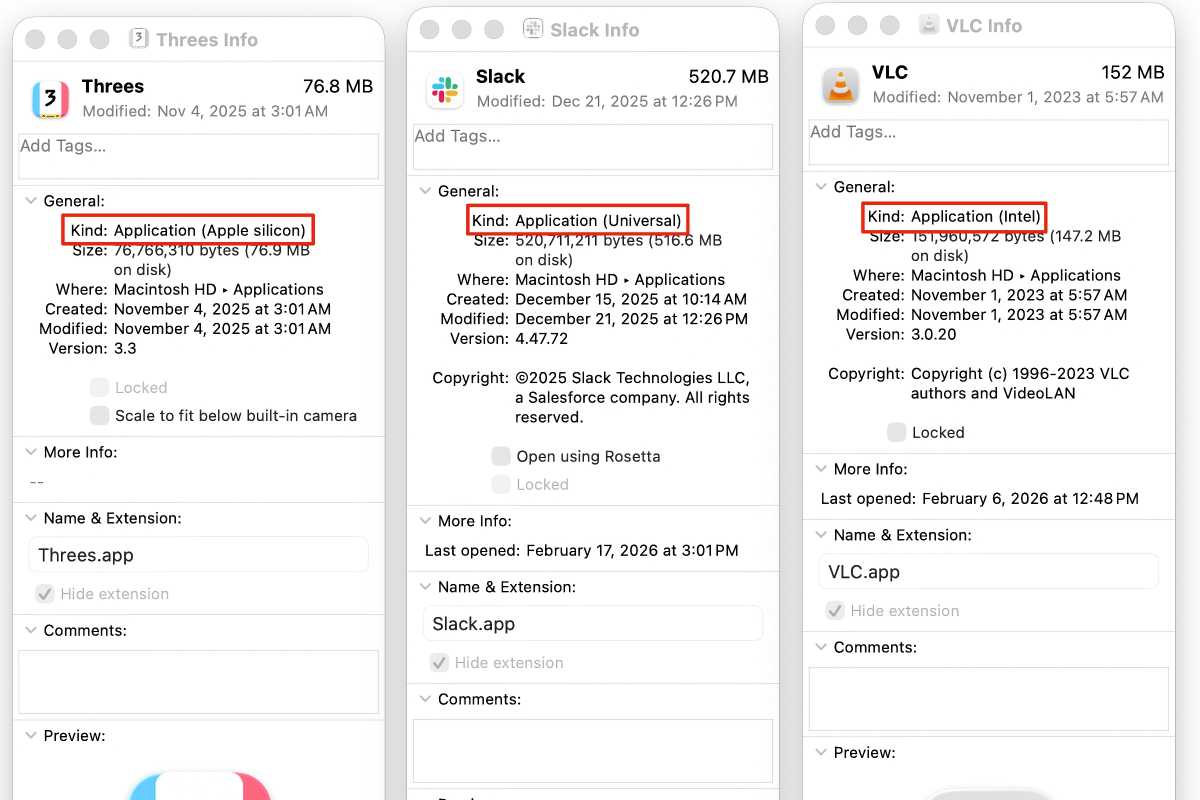
Developers have had plenty of time to update their software to either support M-series Macs exclusively or run universally on either chip. You can check an app’s compatibility by selecting the app’s icon and pressing Command+I on the keyboard. This will open a software info window, and in the General section, look at the listing for Kind. This will show one of the following:
- Application (Apple silicon): The app was written for Apple chips
- Application (Universal): The app was written for both Apple and Intel chips
- Application (Intel): The app was written for Intel chips and will stop working with macOS 28
Foundry
If an app is “Apple silicon” or “Universal,” it will continue to work when macOS 28 arrives. However, if an app is “Intel,” it will stop working (unless it’s one of those older games Apple has yet to identify). If the developer doesn’t update the app between now and then, you may need to find an Apple silicon or Universal alternative.
These are your options: If you bought the app in the Mac App Store, check for any updates between now and then in the store. If you downloaded the app from a third-party site, check the app’s settings or the developer’s website for an update. If none become available between now and 2027, your options become a bit more dramatic. You can look for a new app altogether, or you can put off upgrading to macOS 28 (which we don’t recommend). Finally, if you have an older, secondary Mac, you can use it to run any Intel apps when you need them.
If you’re still using an Intel Mac, you don’t have to worry about macOS 28, because it’s not compatible. Apple announced that macOS 26 Tahoe (the current version of macOS) is the last version that runs on Intel Macs.
“}]]




This Post Has 0 Comments