

Android Automotive System Internals — GPU Memory and Composition on AAOS

The vehicle looked fine on screen.
The 3D model was rendering. The launcher card showed exactly what the designer intended. The QA checklist had a green checkmark next to it.
Then a colleague asked a simple question: “What size surface are we actually handing to the GPU?”
We looked. It was nearly five times what the design specified.
It had been shipping that way for months.
A Figma Spec and a TextureView
The AAOS infotainment launcher hosts multiple views simultaneously. One of them renders a real-time 3D vehicle view — a live model of the car sitting in a card on the home screen. Under the hood, this means a TextureView connected to an OEM-integrated native 3D rendering SDK via a shared buffer queue. The SDK writes frames into the buffer. Android composites that buffer onto the display.
Simple enough.
The Compose code that had been in production looked like this:
TextureViewOverlay(
    modifier = Modifier.fillMaxSize(),
    activity = activity,
    onReady = vehicleStatusViewAction,
)
fillMaxSize(). Fill the container. Simple. Obvious.
Wrong.
What TextureView Actually Allocates
Every TextureView is backed by a SurfaceTexture, which sits on a BufferQueue. When you set the size of a TextureView, you are not just telling the layout system how large to draw it. You are telling the graphics pipeline how many pixels to allocate in GPU memory. The formula is exact:
GPU memory = 3 buffers × width × height × 4 bytes
Triple buffering exists to prevent frame tearing. All three buffers are sized to the TextureView dimensions and allocated before first render — not when the rendering SDK connects, not when the first frame appears.
A note on Android 15 Adaptive Refresh Rate (ARR): In AAOS, the system may throttle the display refresh rate to 30Hz or 1Hz on static screens. Bus bandwidth usage drops with refresh rate, but the GPU memory allocation remains fixed — Gralloc allocates those buffers upfront at surface creation regardless of refresh rate. The cost model in this article remains fully accurate under ARR.
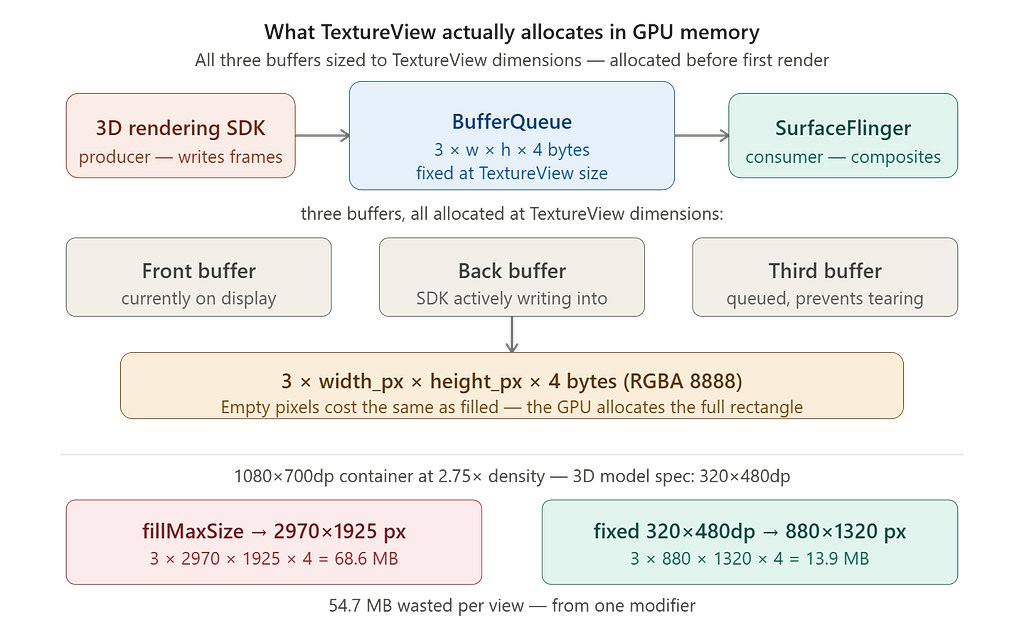
Consider a typical AAOS launcher view: a full-width card spanning a 1080×700dp container at 2.75× density, hosting a 3D vehicle view whose design spec calls for a 320×480dp surface. With fillMaxSize, the TextureView allocates at the full container size:
fillMaxSize:  3 × 2970 × 1925 × 4 = 68.6 MB
Correct size: 3 ×  880 × 1320 × 4 = 13.9 MB
54.7 MB wasted. Per view. From one modifier.
Empty pixels are not free. A TextureView with nothing rendered into it costs exactly as much GPU memory as one fully filled with content. The buffer is allocated at the full TextureView dimensions, regardless of what the rendering SDK does with it.
The Rendering Pipeline Nobody Draws
There is a second cost that is harder to see.
TextureView sits inside the Android view hierarchy. This is its great flexibility — you can animate it, fade it, apply transforms to it just like any other view. But this flexibility comes with a compositing price that fires on every single frame.
In AAOS infotainment systems, 3D vehicle views are typically rendered by an OEM-integrated native rendering SDK that connects to the Android UI layer via a shared BufferQueue. That SDK has no visibility into the Android view hierarchy’s compositing model — it simply writes frames into the buffer it was handed. What happens after that is Android’s responsibility.
And what happens after that costs far more than it needs to.

With TextureView, every frame passes through the GPU twice: once when the GL compositor blends the TextureView content into the app UI layer, and once when SurfaceFlinger composites the final display. With SurfaceView, the rendering SDK’s buffer goes directly to a hardware overlay plane — one pass, no intermediate blend.
This is not a theoretical concern. The Chromium team documented exactly this tradeoff when switching their Android compositor from TextureView to SurfaceView: TextureView always composites using GL, while SurfaceView can be backed by a hardware overlay which uses less memory bandwidth and power.
At the dimensions above, the difference is immediate:
fillMaxSize TextureView:  2970×1925 × 2 × 60fps = 685M pixels/sec
Fixed-size TextureView:    880×1320 × 2 × 60fps = 139M pixels/sec
SurfaceView is the architecturally correct path for high-frequency rendered content in Android. The catch: the rendering SDK has to expose a SurfaceView-compatible surface path. Not all embedded 3D SDKs do. Verify with your SDK team before treating migration as an option.
For a TextureView-only SDK, the composition cost is fixed and unavoidable. What you can control is the surface size — and that directly determines the per-frame cost.
The Composition Cost Does Not Scale With Render Rate
One subtlety worth understanding before you conclude this only matters for high-frequency 3D content.
The GL composition pass happens at the display refresh rate, not the rendering SDK’s frame rate. Even if your 3D engine is rendering at 1fps — a rotating idle animation, a static vehicle pose — SurfaceFlinger wakes on every VSYNC and composites your TextureView into the app UI layer. 60 times per second. Because the display refreshes 60 times per second, and your TextureView is declared as part of the UI hierarchy it must process.
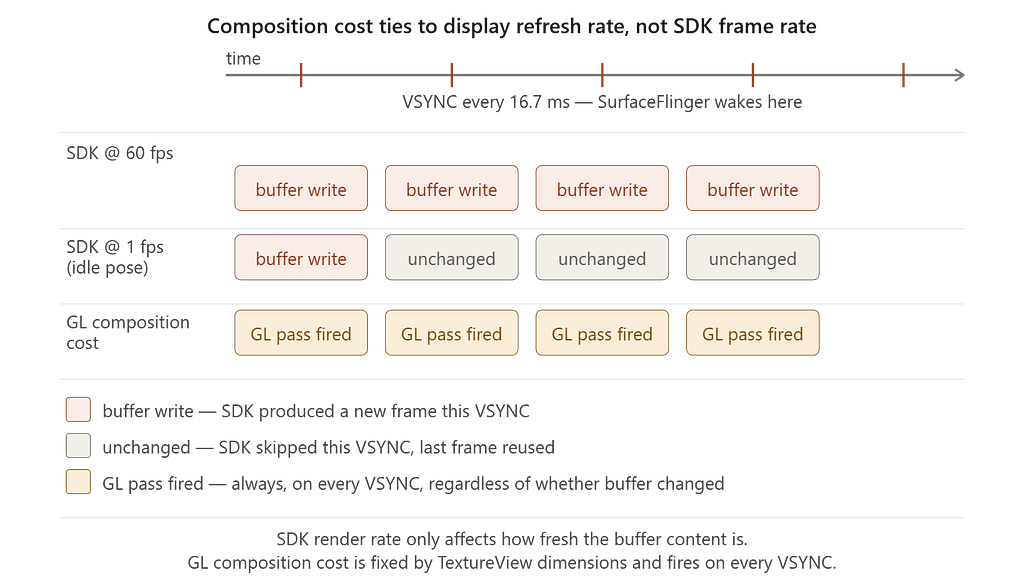
The only thing the rendering frame rate affects is how often the buffer contents change. The composition cost is fixed from surface creation, determined entirely by the TextureView dimensions.
A correctly sized TextureView reduces the pixel count in every one of those 60 composition passes per second, for the duration of every drive.
The Measurement
Diagnosing this correctly requires measuring what the rendering SDK actually receives — not what the layout system reports, not what dumpsys meminfo shows.
dumpsys meminfo captures the entire process. On a vehicle with a shared rendering service managing multiple view instances simultaneously, that number includes the SDK runtime, 3D asset data, shader cache, and all active instances. It is too noisy to isolate a single surface.
The right measurement is one callback:
override fun onSurfaceTextureAvailable(st: SurfaceTexture, w: Int, h: Int) {
    if (BuildConfig.DEBUG) {
        Log.d("SurfaceSize", "surface w=$w h=$h")
    }
    connectRenderer()
}
This reports the exact pixel dimensions handed to the SDK at connection time. No inference. No process-level noise.
Capture it:
adb shell am force-stop <your.package>
adb logcat | grep SurfaceSize
Compare the reported dimensions against your Figma spec converted to pixels at your device’s actual density. If they don’t match, you have a surface sizing problem.
Always measure on your actual target hardware. Automotive HUs vary significantly in screen density — commonly between 1.0× and 2.75×. Back-calculate your device’s density from the measured pixel values before drawing conclusions: density = measured_px ÷ dp_spec. Numbers from a flagship phone benchmark will not transfer.
Why the Rendering SDK Cannot Save You
The intuition that leads engineers astray: “The SDK only renders into the area it uses. The rest is transparent. Does the surface size actually matter?”
Yes. The BufferQueue allocates at the full TextureView dimensions. The rendering SDK receives a surface of whatever size you gave it — it cannot negotiate a smaller buffer internally. Hand it a 2970×1925px surface and that is what gets allocated. SurfaceFlinger composites the full rectangle on every VSYNC regardless of how much of it contains rendered content.
In many AAOS implementations, Gralloc buffers are allocated from the Contiguous Memory Allocator (CMA) — a fixed-size physical memory pool shared across the entire SoC. Unlike heap memory, CMA cannot be reclaimed or paged. An oversized surface doesn’t just consume memory — it consumes contiguous physical memory. On a constrained automotive SoC, that pool is shared with the Rear View Camera pipeline, the video decoder, and other hardware-backed buffers. Waste enough of it with incorrectly sized surfaces and initialization of safety-adjacent components can fail — not gracefully degrade, fail.
The Fix
// Before — fills entire container, oversized surface passed to rendering SDK
TextureViewOverlay(
    modifier = Modifier.fillMaxSize(),
    activity = activity,
    onReady = vehicleStatusViewAction,
)

// After - sized to design specification, not container
// 3D vehicle view is sized and anchored per Figma spec (right-aligned).
// Dimensions sourced from dimens.xml - do not use fillMaxSize here.
TextureViewOverlay(
    modifier = Modifier
        .align(Alignment.CenterEnd)
        .width(Theme.dimens.vehicleViewWidth)
        .height(Theme.dimens.vehicleViewHeight),
    activity = activity,
    onReady = vehicleStatusViewAction,
)
<!-- dimens.xml — sourced directly from Figma spec -->
<dimen name="vehicle_view_width">320dp</dimen>
<dimen name="vehicle_view_height">480dp</dimen>
The comment is intentional. It documents design intent and prevents the next engineer from reverting to fillMaxSize assuming it is a bug fix.
The design team specified an exact surface. The implementation had been ignoring that specification entirely — and the GPU had been paying for it on every drive.
Pro-tip: Force Buffer Dimensions Directly on SurfaceTexture
If your rendering SDK connects via SurfaceTexture and you cannot change the TextureView layout size — for example, if it is controlled by a third-party component — there is a lower-level lever available: setDefaultBufferSize().
This method sets the internal buffer dimensions on the SurfaceTexture directly, independent of the view’s layout dimensions. The GPU allocates only the buffer you specify. The hardware scaler handles stretching the content to fill the view rectangle — at a fraction of the cost of allocating and compositing a full-sized buffer.
override fun onSurfaceTextureAvailable(st: SurfaceTexture, w: Int, h: Int) {
    // Override the internal buffer size to match the 3D content spec,
    // not the view layout dimensions. GPU allocates only what the SDK needs.
    // Hardware scaler handles the stretch — no full-size buffer required.
    st.setDefaultBufferSize(
        resources.getDimensionPixelSize(R.dimen.vehicle_view_width),
        resources.getDimensionPixelSize(R.dimen.vehicle_view_height)
    )
    if (BuildConfig.DEBUG) {
        Log.d("SurfaceSize", "buffer forced to: " +
            "${resources.getDimensionPixelSize(R.dimen.vehicle_view_width)}x" +
            "${resources.getDimensionPixelSize(R.dimen.vehicle_view_height)}")
    }
    connectRenderer()
}
Use this as a safety net, not a primary fix. The correct approach remains sizing the TextureView to its design specification. setDefaultBufferSize() is the right tool when the view size is genuinely outside your control.
Modern Path: AndroidExternalSurface (Android 14+)
If your rendering SDK can accept a raw Surface — rather than requiring a SurfaceTexture — Android 14 introduced AndroidExternalSurface, the modern Jetpack Compose wrapper around SurfaceView. It eliminates the GL composition pass entirely by giving SurfaceFlinger a dedicated hardware overlay plane for your content.
// AndroidExternalSurface — hardware overlay path (API 34+)
// Only use this if your SDK accepts a raw Surface.
// SDKs that connect via SurfaceTexture (including some Unreal configurations)
// cannot use this path — they require TextureView.
AndroidExternalSurface(
    modifier = Modifier
        .align(Alignment.CenterEnd)
        .width(Theme.dimens.vehicleViewWidth)
        .height(Theme.dimens.vehicleViewHeight)
) {
    onSurface { surface, width, height ->
        // Surface is managed by SurfaceFlinger as a separate HWC overlay plane.
        // No GL compositor pass in the app process — one GPU pass only.
        connectRenderer(surface)

        surface.onChanged { newWidth, newHeight ->
            if (BuildConfig.DEBUG) {
                Log.d("SurfaceSize", "surface w=$newWidth h=$newHeight")
            }
        }

        surface.onDestroyed {
            disconnectRenderer()
        }
    }
}
The critical distinction: TextureView connects via SurfaceTexture (a GLES texture path). AndroidExternalSurface and SurfaceView expose a raw Surface (a direct BufferQueue path to SurfaceFlinger). These are different surface types — your SDK determines which one it can accept, not your Compose wrapper. If your SDK only supports SurfaceTexture, AndroidExternalSurface is not available to you regardless of how it is wrapped. Verify the surface type your SDK requires before treating migration as an option.
When AndroidExternalSurface is available, the composition cost comparison becomes:
TextureView (fixed size):       880×1320 × 2 × 60fps = 139M pixels/sec
AndroidExternalSurface:         880×1320 × 1 × 60fps =  69.7M pixels/sec
Half the composition cost, no GL middleman, and a dedicated hardware overlay plane. For SDKs that support it, this is the correct end state.
Why This Compounds on Automotive Hardware
A phone has one screen, and it sleeps after thirty seconds. An AAOS launcher hosts multiple views, several potentially running 3D content simultaneously, and it runs for the duration of every drive.
Each TextureView follows the same cost model independently:
Per TextureView:  3 buffers × w × h × 4 bytes  (always allocated)
Per frame:        pixels × 2 GL passes × 60fps  (always paid)
These costs are additive. Every incorrectly sized TextureView on the launcher screen contributes its own buffer allocation and its own independent GL blend pass on every VSYNC — regardless of what every other view is doing.
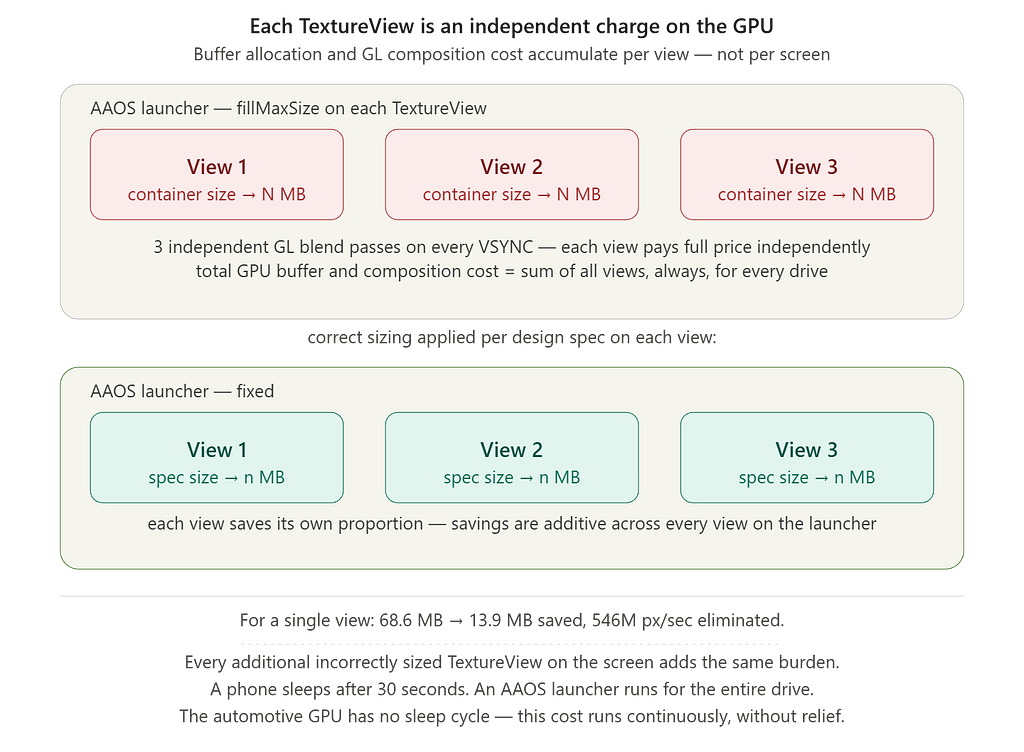
For a single view, the numbers are already significant: 54.7 MB of unnecessary GPU buffer allocation, 546M pixels per second eliminated from the composition pipeline. Every additional incorrectly sized TextureView on the screen adds the same burden at its own scale.
There is an additional constraint specific to automotive hardware worth understanding: Hardware Composer overlay planes.
Most automotive SoCs — including the Qualcomm SA8155P and SA8295 — have a limited number of hardware overlay planes, typically four to eight. SurfaceView and AndroidExternalSurface consume one overlay plane each. If the system runs out of overlay planes, the Hardware Composer falls back to GPU composition for everything — including views that were previously on hardware overlays. At that point, you have lost the benefit of the hardware path and added GPU composition pressure on top of your existing TextureView costs.
This makes surface sizing discipline even more important. You are not just managing GPU memory and composition cost — you are managing a finite hardware resource that the entire system shares, including the cluster display and any Driver Monitoring System running on the same SoC.
The automotive GPU is not a flagship phone GPU. It is a fixed-capability chip running for hours under sustained load, without the thermal relief of a screen lock or a sleep cycle. On a phone, this kind of inefficiency shows up as battery drain you might not notice. On automotive hardware, running continuously against a fixed GPU budget, it shows up as thermal throttling, frame drops, and competition with every other process that needs the GPU — including the ones responsible for safety-critical rendering.
The Platform Principle
TextureView sizing is not a micro-optimization. It is a correctness issue.
The design team specified exact dimensions for a reason. When the implementation ignores those dimensions and uses fillMaxSize instead, it is not just wasting GPU memory — it is handing the rendering SDK a surface larger than the design intended, allocating memory that was never needed, and paying a composition cost on every frame that was never necessary.
Before you move on: search your project for TextureView and fillMaxSize appearing within a few lines of each other. Check each one against its design specification. Measure the actual dimensions with onSurfaceTextureAvailable. The measurement takes five minutes.
The fix is one modifier chain. The savings compound across every view on the screen, every second of every drive.
Every surface should be exactly as large as the content it contains — no larger.
How to Verify on Your Device
// 1. Add to onSurfaceTextureAvailable
override fun onSurfaceTextureAvailable(st: SurfaceTexture, w: Int, h: Int) {
    if (BuildConfig.DEBUG) {
        Log.e("SurfaceSize", "surface w=$w h=$h")
    }
}
# 2. Force cold start and capture
adb shell am force-stop <your.package>
adb logcat | grep SurfaceSize

# 3. Find your rendering service process
adb shell ps -A | grep -i "render|engine|3d|avatar"
# 4. Inspect SurfaceFlinger layer allocation
adb shell dumpsys SurfaceFlinger | grep -A10 "<your layer name>"
Important: If the rendering SDK manages its own EGL surfaces directly, GPU buffer allocations may not appear in dumpsys meminfo under standard EGL/Gfx categories. Use onSurfaceTextureAvailable dimensions as the primary measurement — it directly reports what the SDK receives.
This article is a companion piece to the Android Automotive System Internals series.
- Part 1: The Speedometer Lied — Debugging Real-Time IPC in Android Automotive
- Part 2: The Camera That Launched Too Late
References
- AOSP Graphics Architecture — the BufferQueue pipeline in detail
- BufferQueue and Gralloc — buffer allocation mechanics; confirms allocation is sized at surface creation
- Chromium Graphics Dev — Use TextureView as compositing surface on Android? — Sami Kyostila (Google) independently confirms the triple-buffer formula (3 × view_width × view_height × 4 bytes) and documents why Chrome switched from TextureView to SurfaceView: GL-only composition vs hardware overlay, higher memory bandwidth, and additional buffering latency
- AndroidExternalSurface — Jetpack Compose API — modern Compose wrapper for hardware overlay surface path (API 34+)
- SurfaceTexture.setDefaultBufferSize — force internal buffer dimensions independent of view layout size
- Android Media3 Surface documentation — SurfaceView recommendation for video playback
- Perfetto tracing quickstart — for GPU composition measurement
The Surface That Was Too Big was originally published in ProAndroidDev on Medium, where people are continuing the conversation by highlighting and responding to this story.



This Post Has 0 Comments