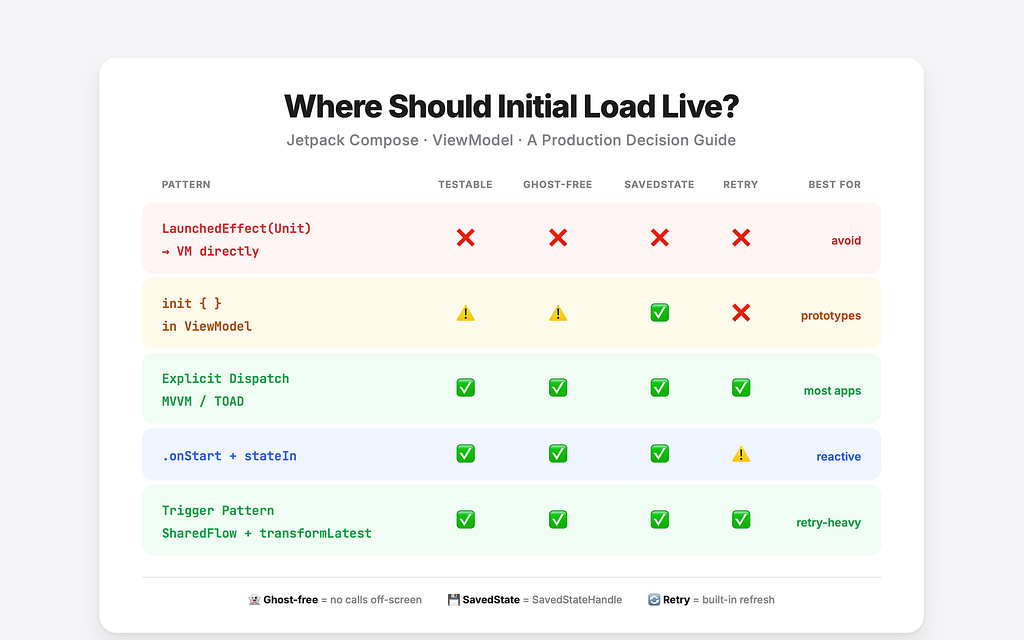

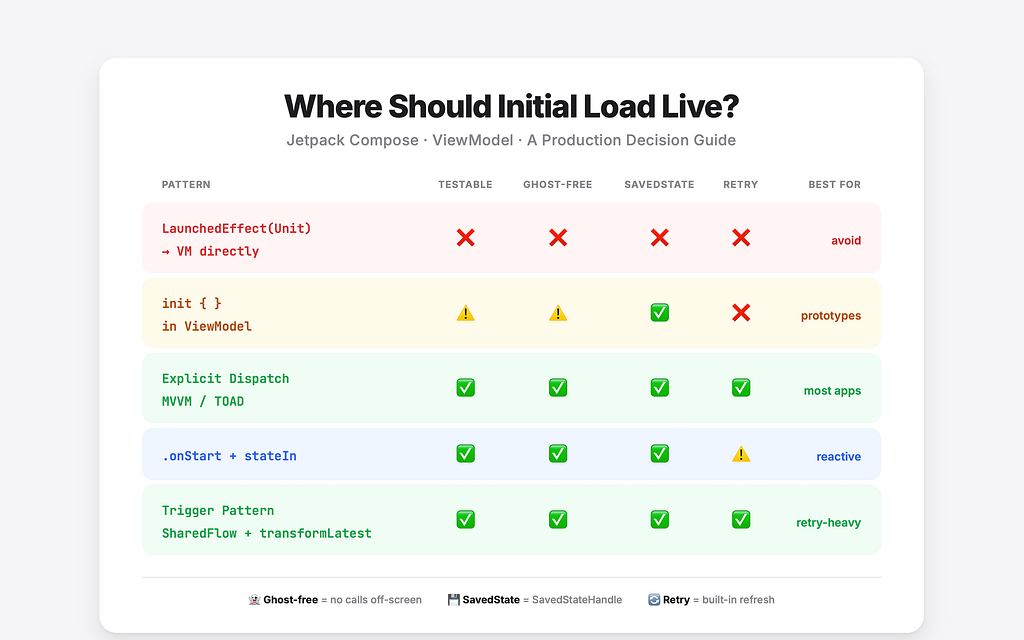
A production decision guide born from 3 LinkedIn posts, 50+ engineers disagreeing, and the humbling realization that everyone was right
The Debate That Wouldn’t End
I wrote a LinkedIn post calling LaunchedEffect(Unit) { viewModel.loadData() } a code smell. The community pushed back hard.
I wrote a follow-up defending init{} as a cleaner alternative. The community pushed back harder.
Then I wrote about .onStart + stateIn as the reactive approach. Same result.
Fifty-plus engineers weighed in across three posts. Some agreed, some disagreed violently, and some proposed entirely different patterns I hadn’t considered. I spent more time in the comments than I did writing the posts.
Here’s the uncomfortable conclusion I reached: they were all right.
Not because every pattern is equally good — some are genuinely better than others in specific contexts — but because the answer depends on constraints that most articles ignore entirely. Your team size. Your testing discipline. Whether you need retry. Whether your screen is reactive-heavy or a simple one-shot load.
Most existing content on this topic falls into one of three camps: “Use LaunchedEffect(Unit)” (old, naive), “Move to init{}” (overcorrection with no nuance), or “Use stateIn” (one-sided, skips the gotchas). Each presents a single pattern as the answer.
This article is different. It covers all the real patterns with honest trade-offs, provides an actual decision framework rather than “it depends,” and validates everything with production context and community feedback from engineers who do this daily.
Let’s start with why this question is harder than it looks.
Why This Is Harder Than It Looks
Android development has a unique set of constraints that make this question genuinely difficult. It’s not that developers are overthinking it — it’s that the platform forces you to think about things that don’t exist on other platforms.
Here’s the fundamental tension: the ViewModel and the Composable have different lifecycles.
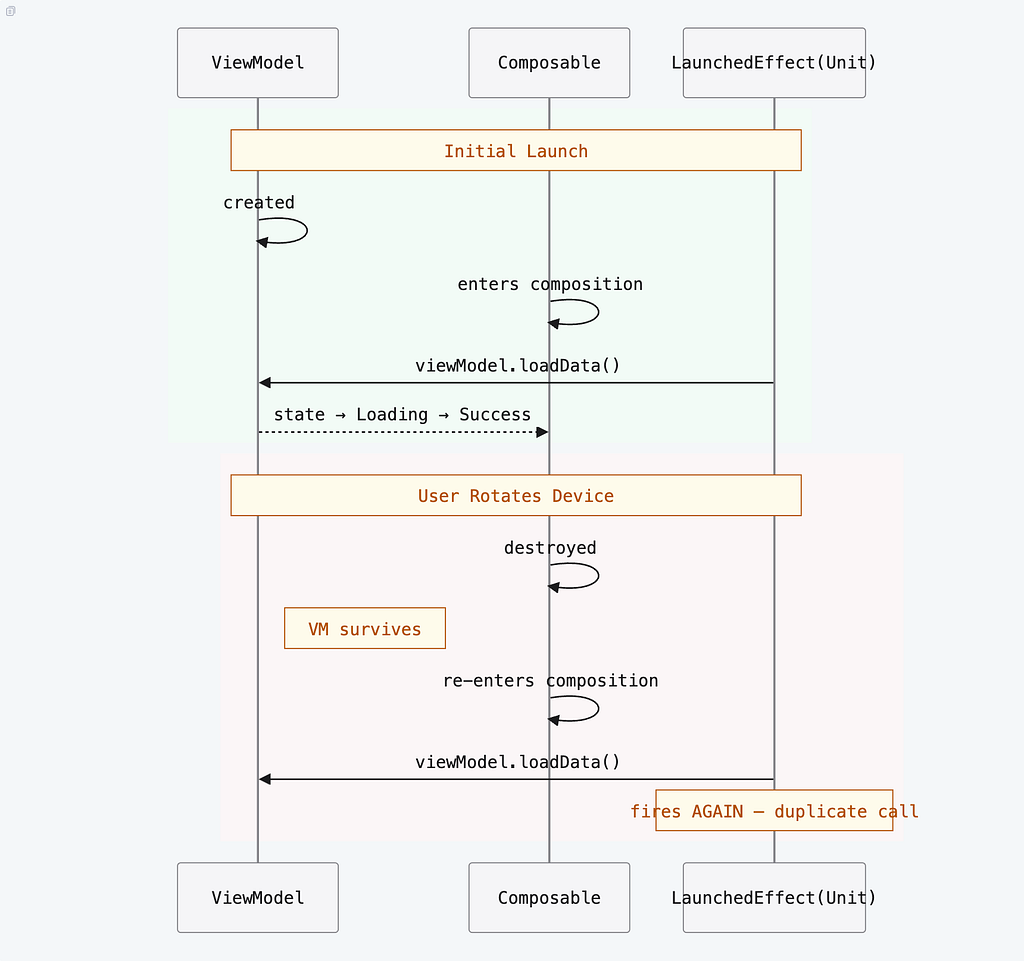


The ViewModel survives configuration changes. The Composable doesn’t. When the user rotates their phone, the Composable is destroyed and recreated from scratch, but the ViewModel stays alive. This is by design — it’s the whole point of ViewModel — but it creates a mismatch that every initial-load pattern has to deal with.
These are the main lifecycle challenges that force trade-offs in every approach:
- Configuration changes: The Composable is destroyed and recreated, but the ViewModel survives. Any LaunchedEffect will re-fire. Any init{}won’t.
- Process death + SavedStateHandle: The system can kill your app in the background. When the user returns, the ViewModel is recreated from scratch. SavedStateHandle is the mechanism for surviving this, but not every pattern works cleanly with it.
- Backstack: When the user navigates to another screen, your screen’s Composable may leave composition entirely, but the ViewModel stays alive (scoped to the navigation graph). When they come back, the Composable re-enters composition and effects fire again.
- Unit testing coroutines: Some patterns make testing straightforward; others require TestScope, advanceUntilIdle(), and careful coroutine management.
Every pattern is a trade-off against at least one of these constraints. There is no escape.
And yes — repeatOnLifecycle solves the collection-side lifecycle awareness (stop collecting when the screen is in the background), but it doesn’t address where the load trigger lives. That’s what this article is about.
The Patterns
Each pattern below follows the same structure: what it looks like, why people reach for it, the real gotchas (not just “be careful”), and when it’s actually the right choice.
Pattern 0 — The Smell
@Composable
fun MyScreen(viewModel: MyViewModel = viewModel()) {
    LaunchedEffect(Unit) {
        viewModel.loadData()  // Why here? What triggers this?
    }
    // ... UI
}
This is the pattern most tutorials teach. It’s also the one that causes the most trouble in production.
Why people use it: It’s simple. It runs once when the Composable enters composition. It “just works” in the happy path.
The real gotchas:
- It hides business intent behind UI plumbing. The Composable is now responsible for deciding when to load data. That’s a business decision masquerading as a lifecycle event.
- It re-fires on re-entering composition. Navigate away, come back — LaunchedEffect(Unit) fires again. Rotate the device — fires again. The ViewModel may have already loaded the data, but the Composable doesn’t know that. You end up with duplicate network calls, race conditions, and state flickering.
- It’s not testable without a Compose test harness. You can’t unit test this in isolation. The load trigger is embedded in the UI layer.
- No retry or refresh support. You’d need to add more state management to handle retry, which further tangles the UI and business layers.
The deeper problem: LaunchedEffect(Unit) is composition-driven, not UI-driven. Composition — the process of adding a Composable to the tree — is an implementation detail of the rendering system, not a semantic event.
A ViewModel should react to business semantics: “screen opened,” “user requested refresh,” “navigation argument changed.” It should not react to rendering mechanics: “this composable was added to the tree.”
That’s the fundamental mismatch. The fact that composition happens to coincide with the screen appearing doesn’t make it the right abstraction to build on. It’s a coincidence, not a contract — and building on coincidences is how you get bugs that only show up on backstack navigation, tab switches, and configuration changes.
Best for: Nothing. There is always a better option.
Pattern 1 — init {}
class MyViewModel : ViewModel() {
    init {
        viewModelScope.launch { load() }
    }

    private suspend fun load() {
        // fetch data, update state
    }
}
This is the first reflex when someone realizes Pattern 0 is a smell. Move the load into init{}, and now the ViewModel owns it. Clean, right?
Why people like it: The load happens on ViewModel creation. It survives configuration changes (the ViewModel isn’t recreated on rotation). No Compose-side effects at all. The UI just observes state.
The real gotchas:
- No screen-visibility awareness. The ViewModel is created when the navigation graph instantiates it, which might happen before the user ever sees the screen. If you’re prefetching ViewModels, init{} fires immediately — even if the user never navigates to that screen.
- Runs immediately in unit tests. The moment you instantiate the ViewModel in a test, init{} fires. You need TestScope and advanceUntilIdle() to control timing, which adds friction to every test.
- You lose conditional load control. With init{}, the load always happens. You can’t conditionally skip it based on navigation arguments, screen state, or user intent. Note: SavedStateHandle works fine here via constructor injection — that’s not the issue. The issue is that init{} is unconditional.
- No retry or refresh support. Just like Pattern 0, there’s no built-in mechanism for retry or pull-to-refresh. You’d need to add a separate method for that, at which point you’re halfway to Pattern 2 anyway.
Best for: Simple prototypes, one-shot screens with no retry needs, or fast-moving teams that accept the trade-offs.
Pattern 2 — Explicit Action Dispatch (Clean MVVM / TOAD)
// Composable: signals lifecycle, NOT business logic
@Composable
fun MyScreen(viewModel: MyViewModel = viewModel()) {
    LaunchedEffect(Unit) {
        viewModel.onAction(Action.ScreenStarted)
    }

    val uiState by viewModel.uiState.collectAsStateWithLifecycle()
    // ... render uiState
}

// ViewModel: stays idle until told to start
class MyViewModel : ViewModel() {
    private val _uiState = MutableStateFlow<UiState>(UiState.Idle)
    val uiState: StateFlow<UiState> = _uiState.asStateFlow()

    fun onAction(action: Action) {
        when (action) {
            Action.ScreenStarted -> viewModelScope.launch { load() }
            Action.Retry -> viewModelScope.launch { load() }
        }
    }

    private suspend fun load() {
        _uiState.value = UiState.Loading
        // fetch data, update _uiState
    }
}

sealed interface Action {
    data object ScreenStarted : Action
    data object Retry : Action
}
Wait — doesn’t this use LaunchedEffect(Unit), the thing I just called a smell?
Yes. But the distinction matters: Pattern 0 uses LaunchedEffect as a business trigger. Pattern 2 uses it as a lifecycle signal. The Composable isn’t deciding what to load or when — it’s signaling “the screen is now visible.” The ViewModel decides what to do with that signal.
Why people like it:
- Explicit and auditable. Every state change traces back to a named action. You can grep the codebase for Action.ScreenStarted and find exactly where and why loads happen.
- Trivially testable. In unit tests, you call viewModel.onAction(Action.ScreenStarted) directly. No Compose runtime, no LaunchedEffect, no test harness.
- Works cleanly with SavedStateHandle.toRoute<>(). You can access navigation arguments before deciding whether to load.
- First-class retry and refresh. Adding Action.Retry or Action.PullToRefresh is a one-line addition to the when block.
The real gotchas:
- More ceremony than init{}. You need the Action sealed interface, the onAction method, and the LaunchedEffect in the Composable. For a simple screen, this can feel like overkill.
- The ceremony is worth it. Once your app has more than a handful of screens, the consistency and testability pay for themselves many times over.
A stricter variant of this pattern is TOAD (Typed Object Action Dispatch), where the ViewModel dispatches typed events to external handler classes. It’s a pure state machine — higher ceremony, steeper learning curve, but zero ambiguity about state transitions. If your team follows MVI principles, TOAD is Pattern 2 taken to its logical extreme.
Best for: Most production apps. This is the default recommendation unless you have a specific reason to choose otherwise.
Pattern 3 — .onStart / .onSubscription + stateIn
class MyViewModel : ViewModel() {
    val uiState: StateFlow<UiState> = repository.getDataFlow()
        .onStart { emit(UiState.Loading) }
        .stateIn(
            scope = viewModelScope,
            started = SharingStarted.WhileSubscribed(5_000),
            initialValue = UiState.Loading
        )
}
This is the reactive purist’s answer: no LaunchedEffect in the Composable at all. The load starts when the UI subscribes to the StateFlow, and stops when the screen is gone for longer than 5 seconds. The ViewModel is a pure reactive pipeline.
Why people like it:
- Zero Compose side effects. The Composable just collects state. No LaunchedEffect, no lifecycle signals, no imperative code in the UI layer.
- Starts exactly when the UI observes. The load is triggered by subscription, not by explicit calls. This is semantically clean — if nobody is watching, nothing happens.
- Stops when the screen is gone. WhileSubscribed(5_000) means the upstream flow is cancelled 5 seconds after the last subscriber disappears. No ghost network calls running in the background.
- Fits naturally into reactive chains. If your screen already uses .combine, .flatMapLatest, or SavedStateHandle.getStateFlow, adding .onStart is one line — it doesn’t break the reactive flow.
The real gotchas:
- Hot→cold→hot semantics can surprise you. When the last subscriber disappears and the timeout expires, the flow goes cold. When a new subscriber appears, .onStart fires again, which means the load can re-trigger. For most screens this is fine (or even desirable), but it catches people off guard.
- Multiple subscribers can double-fire onStart. If two Composables observe the same StateFlow, onStart fires once for the flow, but the behavior with SharedFlow-based chains can differ. This is where .onSubscription becomes relevant.
- No built-in retry. You can’t emit to a cold flow from outside. If the user taps “retry,” you need a separate mechanism — which often means reaching for Pattern 4.
- Test timing subtleties. You need advanceUntilIdle() to let the flow pipeline settle in unit tests.
onStart vs. onSubscription: In practice, with stateIn(WhileSubscribed) and a single UI collector, they behave identically. .onSubscription is more semantically precise when multiple collectors might attach — it fires per subscriber rather than per flow start. Community engineers report using .onSubscription in production with no issues. Pick whichever matches your flow topology.
Best for: Reactive-heavy screens with multiple upstream flows, teams allergic to any Compose side effects, and ViewModels that are pure transformation pipelines.
Pattern 4 — The Trigger Pattern
class MyViewModel : ViewModel() {
    private val retryTrigger = MutableSharedFlow<Unit>(
        extraBufferCapacity = 1
    )

    val uiState: StateFlow<UiState> = retryTrigger
        .onStart { emit(Unit) }  // auto-trigger on first subscription
        .transformLatest {
            emit(UiState.Loading)
            val result = repository.loadData()
            emit(result.fold(
                onSuccess = { UiState.Success(it) },
                onFailure = { UiState.Error(it.message) }
            ))
        }
        .stateIn(
            scope = viewModelScope,
            started = SharingStarted.WhileSubscribed(5_000),
            initialValue = UiState.Loading
        )

    fun retry() {
        retryTrigger.tryEmit(Unit)
    }
}
This is Pattern 3’s big sibling. It combines the reactive benefits of .onStart + stateIn with first-class retry and refresh support — all in a single reactive pipeline.
Why people like it:
- Single pipeline for everything. Initial load, retry, and pull-to-refresh all flow through the same transformLatest block. No separate methods, no duplicated logic.
- transformLatest cancels in-flight calls. If the user taps retry while a previous load is still running, the previous coroutine is cancelled automatically. No race conditions.
- No LaunchedEffect in Compose. Same benefit as Pattern 3 — the UI just collects state.
- Declarative. The entire load lifecycle is expressed as a flow transformation, not as imperative method calls.
The real gotchas:
- More complex mental model. If your team isn’t comfortable with transformLatest, SharedFlow, and reactive flow operators, this pattern has a steeper learning curve than Pattern 2.
- Don’t add extra onStart on the outer chain. A common mistake is adding .onStart { emit(UiState.Loading) } on the outer chain after transformLatest, which creates duplicate emissions.
Best for: Screens that need retry, pull-to-refresh, or periodic reload, combined with reactive upstream flows.
The Decision Framework
Here’s the flowchart I wish existed when I started this series:
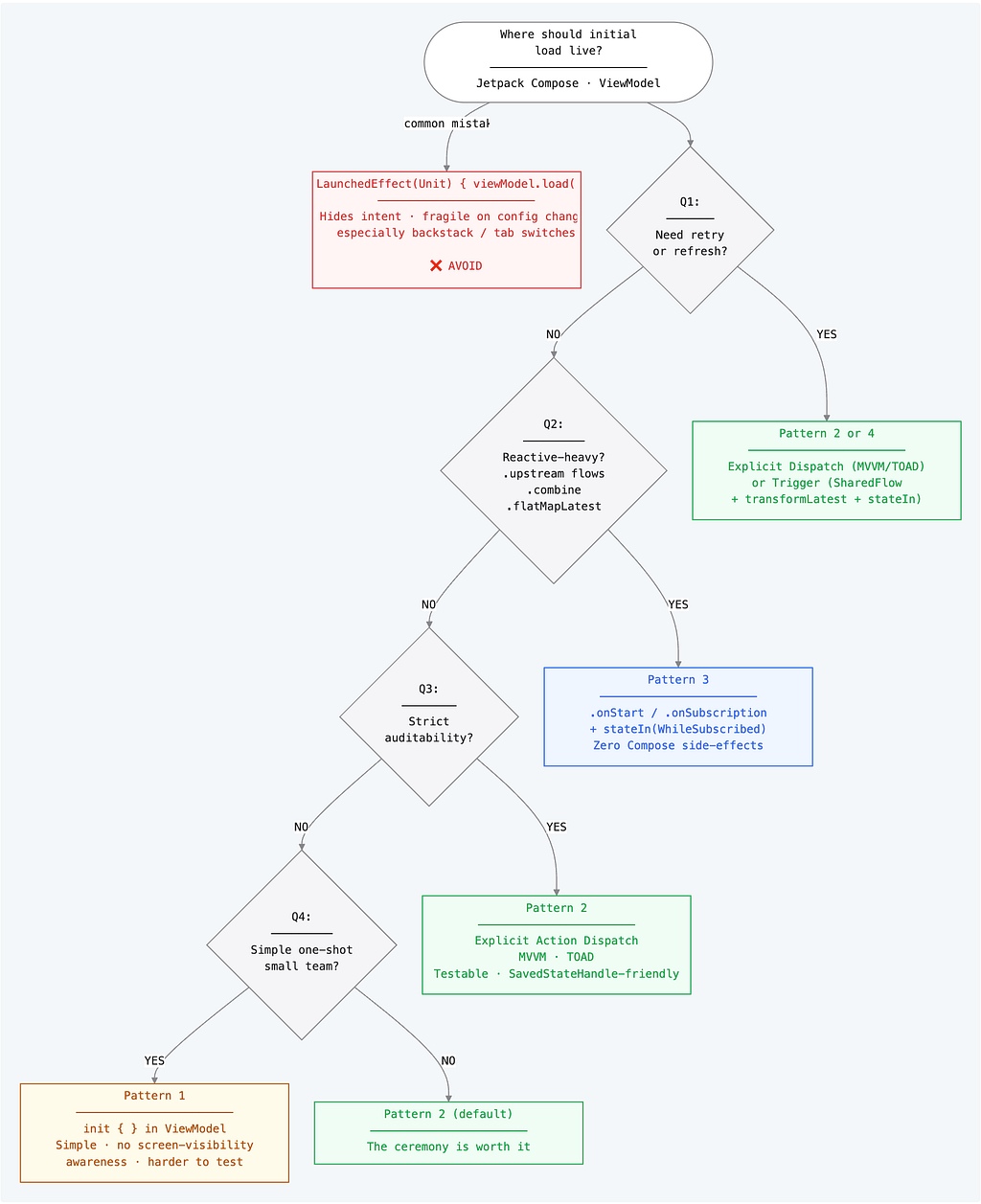
Does your screen need to load data when it appears? Yes → continue below.
Q1: Do you need retry / pull-to-refresh / multiple reload triggers?
- YES → Pattern 2 (explicit action dispatch) or Pattern 4 (trigger-based reactive).
- NO → continue to Q2.
Q2: Is your screen reactive-heavy? (multiple upstream flows, .combine, .flatMapLatest, SavedStateHandle.getStateFlow)
- YES → Pattern 3 (.onStart + stateIn). Fits naturally into the reactive chain.
- NO → continue to Q3.
Q3: Does your team care about strict auditability — every state change traces to a named intent?
- YES → Pattern 2 with MVVM or TOAD. LaunchedEffect(Unit) { onAction(ScreenStarted) } is safe and intentional here.
- NO → continue to Q4.
Q4: Is this a simple, one-shot load with no retry, on a small or fast-moving team?
- YES → Pattern 1 (init{}). Accept the trade-offs: harder unit tests, no screen-visibility control.
- NO → Default to Pattern 2. The ceremony is worth it.
The Comparison Table
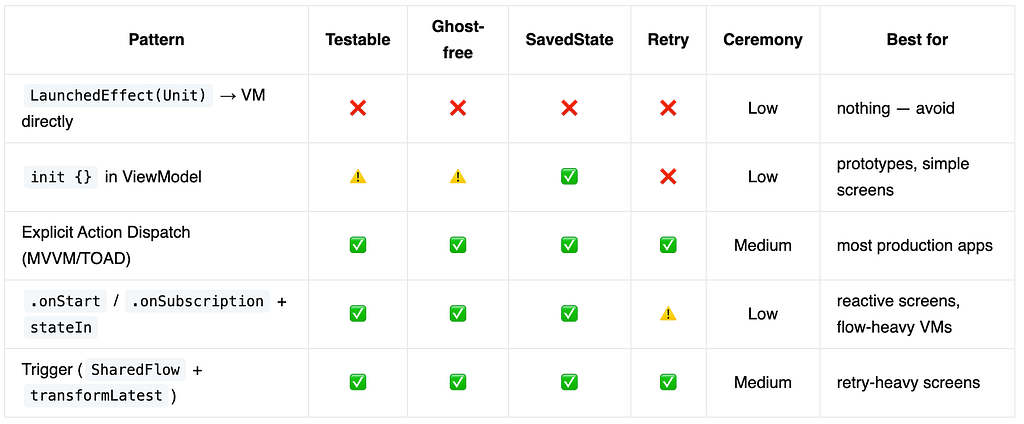
The Meta-Lesson
The real code smell was never LaunchedEffect itself.
It was using the UI layer as an imperative business trigger.
The fix isn’t a single pattern — it’s a clear contract:
- ViewModel owns state and logic.
- Composable observes state and signals lifecycle.
Once that line is clear, even LaunchedEffect(Unit) can be clean — as long as it’s sending a lifecycle signal (like Action.ScreenStarted), not triggering business logic directly.
This is what Pattern 2 gets right. The LaunchedEffect is still there, but it’s doing a fundamentally different job. It’s the Composable saying “I’m on screen now” — not “please go fetch the user profile.”
Pattern 3 and Pattern 4 take this further by eliminating the lifecycle signal entirely. The ViewModel reacts to subscription, not to explicit calls. Both approaches honor the same contract: the ViewModel owns the logic, the UI just shows up.
Do You Even Need a ViewModel?
This was the sharpest critique in the entire series:
“If you strip [ViewModels] away from their purpose… you might also not need view models at all and can just use something else to load data.”
It’s a fair challenge, and it deserves an honest answer.
The case for keeping the ViewModel:
- Config change survival. The ViewModel lives across rotation; the Composable doesn’t. Without it, you re-fetch on every configuration change.
- Process death + SavedStateHandle. Reactive flows alone don’t serialize state across process death. The ViewModel + SavedStateHandle pair is what makes that work.
- Testability boundary. The ViewModel is the seam where you swap real repositories for fakes in unit tests. Remove it, and your test boundary moves into the Composable — or disappears entirely.
- Shared state. When multiple Composables on the same screen need the same data, the ViewModel is the natural single owner.
The case for questioning it:
- For truly stateless, read-only screens with no side effects, a ViewModel is ceremony.
- A plain produceState or a Compose-aware library like Molecule or Circuit can be cleaner for simple cases.
- ViewModel is a pattern, not a mandate.
The honest take: Patterns 3 and 4 don’t strip the ViewModel of purpose — they keep load logic inside it, just triggered reactively rather than imperatively. That’s still a ViewModel doing its job. The question is only about how it decides to start work, not whether it owns state.
That distinction is important. The reactive patterns aren’t evidence that ViewModels are unnecessary — they’re evidence that ViewModels can be smarter about when they start working.
Conclusion
There is no silver bullet. Android’s constraints — configuration changes, process death, backstack, recomposition — guarantee that every pattern has trade-offs. Anyone who tells you otherwise is either working on a trivial app or hasn’t hit the edge cases yet.
But “it depends” is not good enough. That’s why the decision framework exists: it turns a vague architectural question into four concrete yes/no checks that point you to a specific pattern.
The right pattern is the one your team can read, test, and reason about six months from now. Not the one that’s fashionable on Twitter. Not the one that a tutorial taught you. The one that fits your constraints.
If you’re unsure, start with Pattern 2. The explicit action dispatch approach works for most production apps, scales cleanly, and gives you a clear path to Pattern 4 if you need reactive retry later. The ceremony is real, but it pays for itself the first time you debug a load-related bug and can trace exactly what triggered it.
Thanks to everyone who pushed back in the comments across this series. You made this guide better than anything I could have written alone.
This article grew out of a 4-part LinkedIn posts series. If you want the shorter versions:
- Post 1 — LaunchedEffect Code Smell
- Post 2 — The init{} Nuance + MVVM/TOAD
- Post 3 — .onStart + stateIn Debate
- Post 4 — The Decision Guide (wrap-up)
References
Android / Jetpack
- Jetpack Compose — Android’s modern declarative UI toolkit.
- ViewModel — Lifecycle-aware component that survives configuration changes.
- SavedStateHandle — Key-value map that survives process death via the saved-state mechanism.
- StateFlow / SharedFlow — Kotlin coroutines primitives for observable state and event streams.
- LaunchedEffect — Compose side-effect API that runs a suspend block when entering composition.
- collectAsStateWithLifecycle — Lifecycle-aware Flow collector for Compose.
- repeatOnLifecycle — Runs a block every time the lifecycle reaches a target state (e.g., STARTED).
- produceState — Compose API that converts non-Compose state into Compose State.
- Navigation Compose — Type-safe navigation for Compose, including toRoute<>() for argument parsing.
Alternative Architecture Libraries
- Molecule (Cash App) — Build StateFlow streams using Compose’s runtime without a UI tree. Useful for managing presentation logic / state purely in Compose.
- Circuit (Slack) — Compose-first architecture library for Kotlin/Android: presenters, screens, navigation, and more. Builds on ideas similar to Molecule but as a fuller app framework. Documentation
- TOAD — Typed Object Action Dispatch (Murtaza Khursheed) — A Kotlin-first architecture pattern that shifts complexity from bloated ViewModels into typed, dispatchable action objects. Pattern 2 taken to its logical extreme.
- Orbit MVI — Simple, type-safe MVI framework for Kotlin with excellent multiplatform support (including iOS via KMP). One of the most popular and actively recommended MVI libraries.
- MVIKotlin (Arkadii Ivanov) — Mature, battle-tested MVI framework with time-travel debugging and strong KMP focus. Widely used in Kotlin Multiplatform projects. Documentation
Table of Contents
1. The Debate That Wouldn’t End
2. Why This Is Harder Than It Looks
3. The Patterns
- Pattern 0 — The Smell
- Pattern 1 — init {}
- Pattern 2 — Explicit Action Dispatch
- Pattern 3 — .onStart + stateIn
- Pattern 4 — The Trigger Pattern
4. The Decision Framework
5. The Meta-Lesson
6. Do You Even Need a ViewModel?
7. Conclusion
8. References
Follow me here on Medium and on LinkedIn for updates, and feel free to reach out if you need help with native mobile development or rescuing an Android or iOS project from Vibe-coding.
Where Should Initial Load Logic Actually Live in Jetpack Compose? was originally published in ProAndroidDev on Medium, where people are continuing the conversation by highlighting and responding to this story.




This Post Has 0 Comments